Automation has become an essential part of modern work, helping individuals and businesses complete repetitive tasks faster, reduce manual effort, and create more consistent processes. From sending automated emails to managing customer data, scheduling reports, processing orders, and monitoring systems, automation can transform the way everyday work gets done.
Rather than replacing every human task, effective automation focuses on repetitive and predictable activities so people can spend more time on strategy, creativity, customer relationships, and problem-solving. Whether you are a small business owner, freelancer, marketer, manager, or technology professional, understanding how automation works can help you build more efficient workflows.
This guide explains what automation is, how it works, where it can be used, its benefits and challenges, and practical steps for creating an automation strategy.
What Is Automation?
Automation is the use of technology, software, systems, or predefined rules to perform tasks with limited human intervention. An automated workflow follows specific instructions when certain conditions are met, allowing repetitive processes to happen consistently.
For example, an online store can automatically send an order confirmation after a customer completes a purchase. A marketing team can automatically add a new subscriber to an email sequence. A company can also schedule recurring reports to be generated and delivered without someone manually preparing them every week.
Modern automation can range from simple task automation to sophisticated systems that use artificial intelligence, machine learning, APIs, and workflow automation platforms.
Why Automation Matters
Many organizations spend significant amounts of time performing repetitive administrative work. Tasks such as copying information between applications, sending routine notifications, updating spreadsheets, organizing files, and creating recurring reports may be necessary, but they do not always require constant human attention.
Automation can turn these repetitive processes into structured workflows. Once properly configured, the system can perform the defined steps consistently while employees focus on higher-value activities.
- Save time: Repetitive tasks can be completed automatically.
- Improve consistency: Standardized workflows can reduce variations in routine processes.
- Reduce manual errors: Automated data transfers can eliminate some common copying and entry mistakes.
- Increase productivity: Teams can spend more time on meaningful work.
- Scale operations: Automated workflows can handle increasing volumes without requiring the same increase in manual effort.
- Improve visibility: Automated processes can create logs, notifications, and measurable workflow data.
Common Types of Automation
Automation is not limited to one industry or technology. Different types of automation address different business and personal productivity needs.
Business Process Automation
Business process automation focuses on repetitive operational activities. Examples include invoice processing, employee onboarding, document routing, approval workflows, and recurring reporting.
Marketing Automation
Marketing automation helps organizations manage repetitive marketing activities. Businesses can automate email campaigns, lead nurturing, customer segmentation, notifications, and scheduled content distribution.
IT Automation
IT automation can help technical teams manage system monitoring, software deployment, backups, user provisioning, infrastructure tasks, and routine maintenance. Automated monitoring can also notify administrators when predefined conditions require attention.
Workflow Automation
Workflow automation connects multiple steps in a process. For example, when a customer submits a form, an automated workflow could save the information, notify a sales representative, create a task, and send a confirmation email.
AI-Powered Automation
Artificial intelligence can extend traditional automation by helping systems classify information, summarize content, recognize patterns, generate responses, and support decision-making. AI automation is particularly useful when processes involve large amounts of unstructured information.
How to Identify Tasks That Should Be Automated
Not every task should be automated. The best candidates are usually repetitive, predictable, rule-based, and performed frequently.
Start by examining your daily or weekly workflow and look for activities that repeatedly consume time without requiring significant creative judgment.
- Tasks performed several times per day or week.
- Processes that follow the same sequence of steps.
- Data entry between two or more applications.
- Routine notifications and reminders.
- Recurring reports and data collection.
- File organization and document processing.
- Standard customer communications.
- Approval and assignment workflows.
A useful question is: “If I had to explain this task as a clear sequence of rules, could software perform most of it?” If the answer is yes, the process may be a good automation candidate.
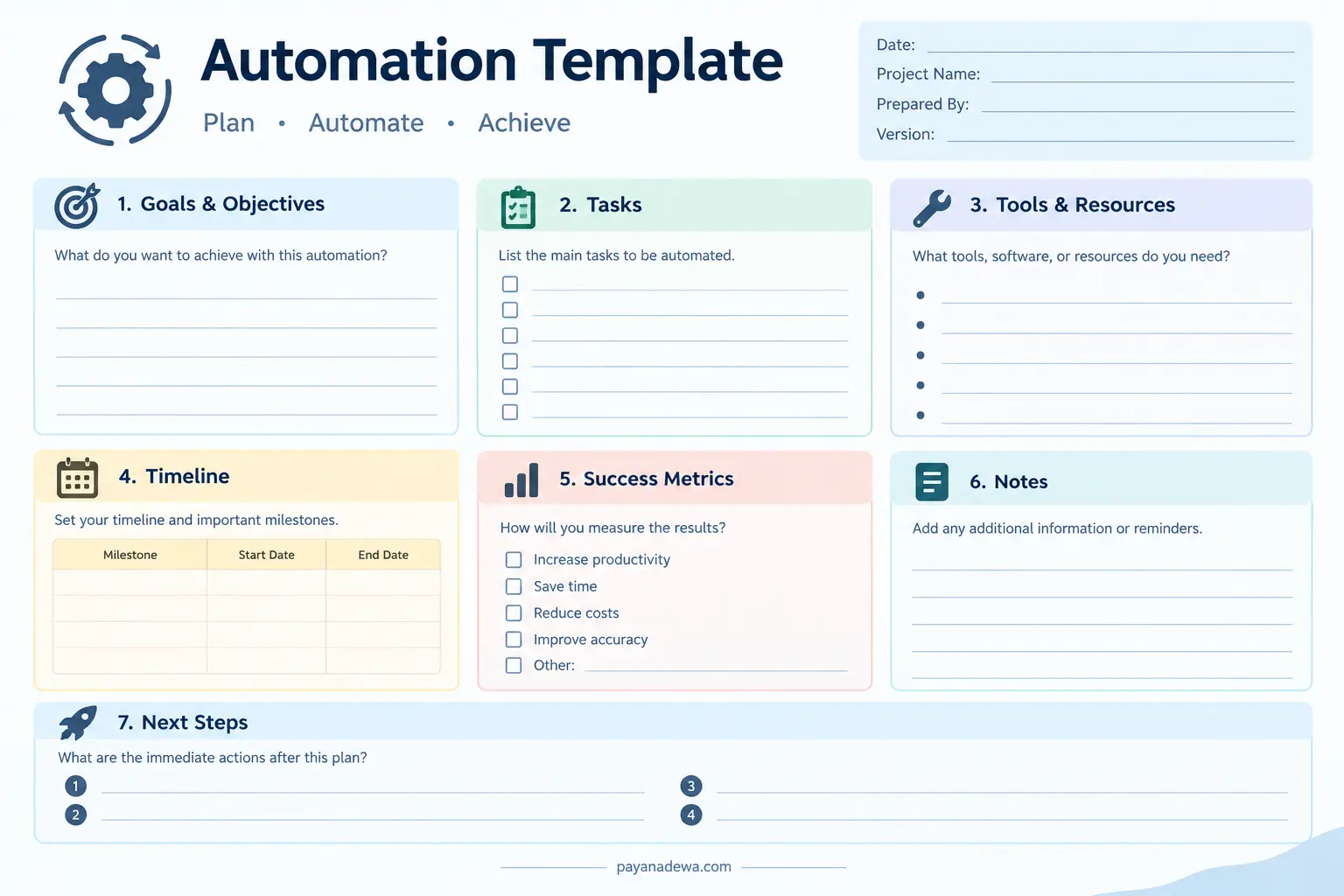
Use This Automation Planning Template
Before building an automated workflow, it helps to document the objective, tasks, tools, timeline, and expected results. A simple planning template can prevent unnecessary complexity and make implementation easier.
Use the template below to define what you want to automate and how you will measure success.
How to Build an Effective Automation Workflow
1. Define the Goal
Start with a specific objective. Instead of saying “automate marketing,” identify the exact result you want to achieve. For example, you might want to automatically follow up with new leads within a specific period.
A clear goal makes it easier to determine which tasks belong inside the workflow and which should remain manual.
2. Map the Existing Process
Document how the process currently works before changing it. List every important step, including inputs, decisions, actions, and outputs.
This process mapping exercise can reveal unnecessary steps and bottlenecks. Automating an inefficient process without improving it first can simply make an inefficient workflow happen faster.
3. Choose the Right Automation Tools
The appropriate tool depends on the complexity of your workflow. Simple tasks may only require built-in scheduling or spreadsheet features, while more advanced processes may require workflow automation platforms, APIs, databases, robotic process automation, or AI services.
Consider factors such as integrations, ease of use, security, scalability, reporting, pricing, and technical requirements before selecting a solution.
4. Start With a Small Workflow
One of the safest ways to introduce automation is to begin with a small, well-defined process. Test the workflow before expanding it to other departments or larger volumes of data.
A small pilot makes it easier to identify unexpected conditions, incorrect triggers, missing information, and other problems.
5. Test Every Important Scenario
Automation should be tested with normal and unusual situations. Consider what happens when information is missing, a system is unavailable, a customer submits duplicate information, or a workflow receives an unexpected input.
Testing edge cases helps prevent automated processes from producing errors at scale.
6. Monitor and Improve
Automation is not necessarily a “set it and forget it” project. Workflows should be reviewed periodically to ensure that they continue to support current business requirements.
Monitor completion rates, errors, processing time, costs, and user feedback. Use these measurements to improve the workflow over time.
Practical Automation Examples
Automation can be applied to many everyday activities. Here are several practical examples:
- Email: Send automatic confirmations, reminders, and follow-up messages.
- Customer service: Route support requests to the appropriate team.
- Sales: Create follow-up tasks when new leads enter a CRM system.
- Finance: Organize invoices and send payment reminders.
- Human resources: Automate onboarding checklists and notifications.
- Content management: Schedule publishing and distribute approved content.
- Data management: Synchronize information between connected applications.
- Reporting: Generate recurring reports from predefined data sources.
Common Automation Mistakes to Avoid
Automating Too Much Too Quickly
Trying to automate an entire organization at once can create unnecessary complexity. Start with processes that have clear requirements and measurable benefits.
Ignoring Human Oversight
Some processes require judgment, context, or approval. Automation should include appropriate human review when errors could have significant consequences.
Failing to Document Workflows
Every important automated workflow should have clear documentation explaining its purpose, triggers, actions, dependencies, and failure procedures. Documentation makes maintenance and troubleshooting easier.
Neglecting Security
Automation systems may have access to sensitive business or customer information. Use appropriate authentication, permissions, access controls, and data protection practices. Review which applications and users can access automated workflows.
Measuring the Wrong Results
An automation can successfully complete a task while failing to deliver meaningful business value. Measure outcomes such as time saved, error reduction, processing speed, customer experience, or operational cost rather than simply counting automated actions.
Tips for Successful Automation
- Keep workflows simple: Avoid unnecessary steps and complicated dependencies.
- Document everything: Record triggers, actions, integrations, and exceptions.
- Use clear naming: Give workflows descriptive names that make their purpose obvious.
- Build error handling: Decide what should happen when a workflow fails.
- Protect sensitive data: Apply appropriate security controls and access permissions.
- Track performance: Measure the results before and after implementation.
- Review regularly: Update workflows when business processes or software change.
The Future of Automation
Automation continues to evolve as cloud software, artificial intelligence, APIs, and intelligent workflow platforms become more accessible. Instead of simply following fixed instructions, newer systems can increasingly work with natural language, unstructured information, and changing conditions.
This does not eliminate the importance of human involvement. In many cases, the most effective approach combines automated execution with human oversight, strategic thinking, creativity, and decision-making.
Businesses that approach automation as a process improvement discipline rather than simply a technology project can build workflows that are more reliable, measurable, and adaptable.
Conclusion
Automation can help individuals and organizations reduce repetitive work, improve consistency, save time, and create scalable workflows. The key is not to automate everything, but to identify the right processes and design them carefully.
Start by defining a clear goal, mapping the existing process, selecting appropriate tools, testing a small workflow, and measuring the results. With thoughtful planning and continuous improvement, automation can become a practical foundation for more productive and efficient work.