With a daily weather tracking template, you can record sunny, cloudy, rainy, stormy, and snowy days throughout the month. You can also track temperatures, compare weather conditions, and discover patterns over time. Best of all, you do not need special equipment or advanced weather knowledge to get started.
In this guide, you will learn what a weather chart is, how to use one, and how to choose the right template for home, school, or personal weather tracking.
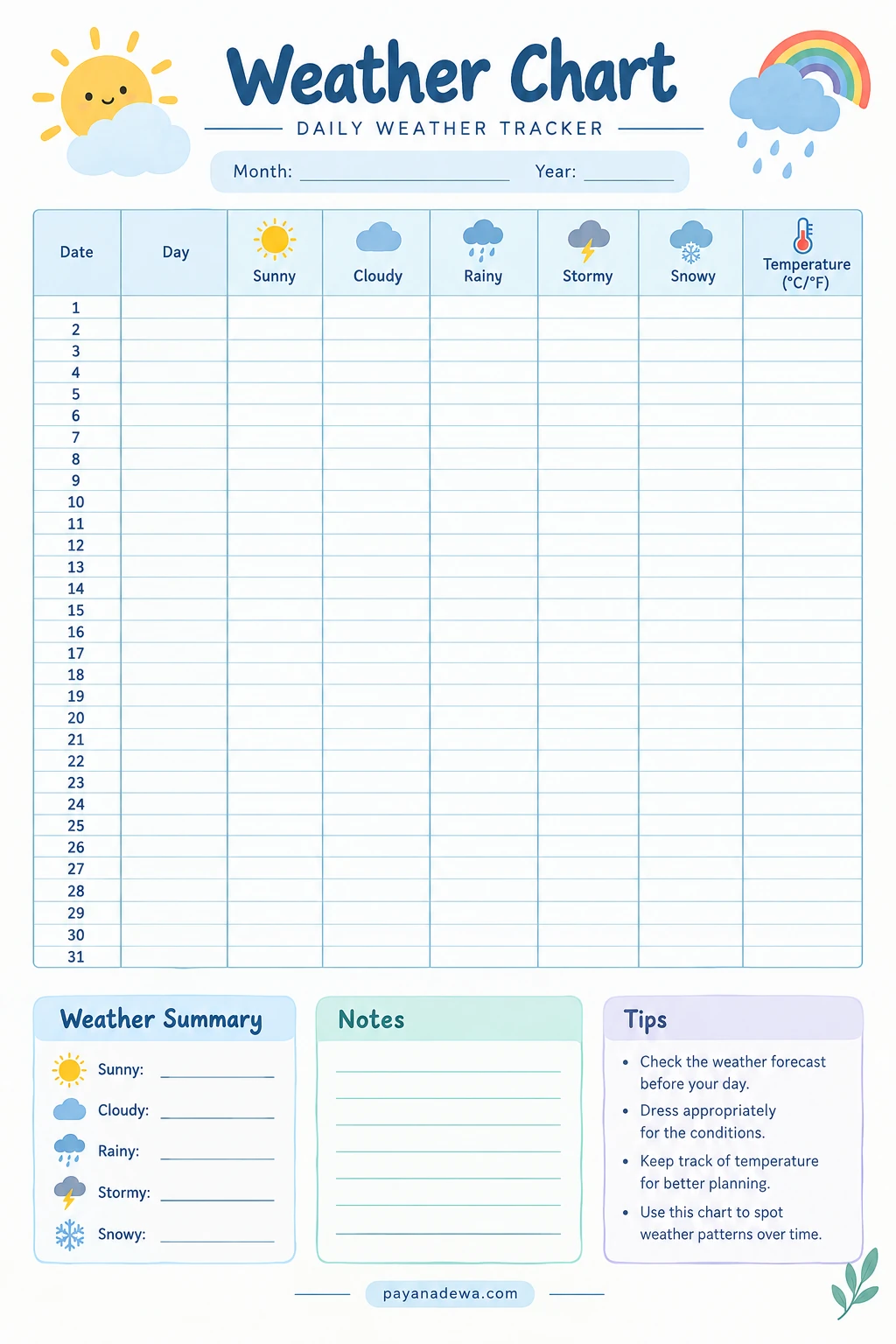
What Is a Weather Chart?
A weather chart is a visual record of weather conditions over a specific period. It typically includes the date, weather type, and temperature. Some charts cover a single day, while others track conditions for an entire week or month.
Unlike a weather forecast, which predicts future conditions, a weather chart records observations. Therefore, it helps users compare daily weather and identify changes over time.
A typical weather tracking chart includes the following categories:
- Date and day: Record when each observation takes place.
- Sunny: Mark days with clear skies or plenty of sunshine.
- Cloudy: Record days when clouds cover part or most of the sky.
- Rainy: Identify days with rainfall or passing showers.
- Stormy: Note thunderstorms or other storm conditions.
- Snowy: Record snowfall where applicable.
- Temperature: Enter the temperature in Celsius or Fahrenheit.
Depending on your needs, you can also include wind speed, humidity, rainfall amounts, or additional notes. This flexibility makes a weather chart useful for both simple classroom activities and detailed observations.
Benefits of Using a Printable Weather Chart
A printable weather chart template provides a straightforward way to organize observations without complicated software. Simply print the worksheet, place it somewhere accessible, and update it regularly.
Understand Daily Weather Changes
Weather can change significantly from one day to the next. By recording conditions consistently, you can see how often sunny, cloudy, or rainy weather occurs. Over several weeks, these observations may reveal patterns in your local environment.
Support Classroom Learning
Teachers can use a weather chart to introduce meteorology, seasons, temperature, and observation skills. Students can record the weather each morning and discuss their findings during class.
This activity also encourages children to compare information, recognize differences, and practice basic counting. For example, students can calculate the number of sunny days recorded during a month.
Build a Daily Observation Habit
Tracking weather encourages you to pay attention to your surroundings. Instead of checking a forecast and moving on, you begin noticing clouds, wind, sunlight, and temperature changes.
Make Weather Data Easier to Understand
Symbols and organized columns make weather information easier to read. A visual chart can help children and beginners understand observations more quickly than a long list of written data.
How to Use a Weather Chart
Using a daily weather chart is simple. Follow these steps to keep your records consistent and useful.
Step 1: Print Your Weather Chart Template
Choose a printable weather chart that suits your needs. A monthly template works well for long-term tracking, while a weekly chart is ideal for short classroom activities.
Print the worksheet on standard paper. For repeated use, consider placing it in a plastic sleeve and writing on it with a dry-erase marker. Alternatively, use a notebook to maintain a permanent record.
Step 2: Add the Date
Write the month and year at the top of the chart. Next, enter the day of the week for each date. Accurate dates make it easier to compare your observations with weather reports later.
Step 3: Observe the Weather
Look outside at approximately the same time each day. Observe the sky, check for rain, and notice whether conditions are changing. If you cannot observe the weather directly, consult a reliable local weather service.
Weather can vary throughout the day. If you record only morning conditions, label your observations accordingly. This approach keeps your data consistent.
Step 4: Mark the Weather Condition
Use a check mark, colored pencil, or simple symbol to indicate the observed condition. If your chart allows only one category, choose the condition that best represents the observation period.
For mixed conditions, such as sunshine followed by rain, add a note or create a separate category. This prevents important details from being lost.
Step 5: Record the Temperature
Check a thermometer or trusted local weather source and enter the temperature. Make sure you use the same unit throughout your chart, either degrees Celsius or degrees Fahrenheit.
For meaningful comparisons, record the temperature at a consistent time. If you want to track daily highs and lows, use separate columns to keep the results clear.
Step 6: Review Your Results
At the end of the week or month, count the different weather conditions. Compare temperatures and look for noticeable changes. You can also write a short summary describing the most common conditions during the observation period.
Weather Chart Template: What to Look For
A good printable weather chart should be easy to read, simple to update, and suitable for your intended purpose. Choosing the right layout helps you record information accurately without making the process complicated.
- Clear headings: Choose a layout with readable labels and organized columns.
- Weather symbols: Look for recognizable icons that make observations easier.
- Temperature tracking: Select a chart with enough space to record temperatures.
- Daily entries: A monthly chart should accommodate every date in the month.
- Notes section: Extra space allows you to describe unusual conditions.
- Printer-friendly design: Choose a clean layout that remains readable in color or grayscale.
- Flexible categories: Adapt the chart to different climates and learning activities.
For younger children, choose a simple worksheet with colorful weather icons. Older students and adults may prefer a detailed weather log that includes rainfall, humidity, wind speed, and temperature ranges.
Weather Chart Activities for Kids and Students
A weather chart can turn everyday observations into an engaging science activity. With a few simple tasks, children can practice observation, counting, writing, and basic data analysis.
Count Sunny and Rainy Days
Ask students to count the sunny and rainy days recorded during a week. They can compare the totals and identify which condition appeared most often.
Create a Weather Graph
Once the chart contains enough data, use the results to create a bar graph. For example, students can compare the number of sunny, cloudy, and rainy days during a month.
Compare Temperatures
Have students identify the warmest and coolest days recorded on their chart. They can calculate the difference between two temperatures and discuss how conditions changed throughout the week.
Make Simple Weather Predictions
After collecting observations for several weeks, ask students to describe possible patterns. They might notice that certain conditions occur more frequently during a particular period.
However, explain that past observations do not guarantee future weather. Accurate forecasting requires additional information, including atmospheric measurements and weather models.
Tips for Accurate Weather Tracking
Consistent observations make your weather chart more useful. Follow these practical tips to improve the quality of your records.
- Record observations daily. Missing entries can make comparisons less reliable.
- Use a consistent observation time. This reduces differences caused by changing conditions throughout the day.
- Check reliable sources. Use a local meteorological service or a properly maintained thermometer when necessary.
- Keep units consistent. Avoid mixing Celsius and Fahrenheit in the same column.
- Describe unusual conditions. Add notes about strong winds, fog, hail, or sudden temperature changes.
- Review the chart regularly. Weekly summaries help you identify errors and notice patterns.
- Keep the chart accessible. Place it in a classroom, study area, or another convenient location.
For outdoor measurements, follow thermometer instructions and keep the device away from direct sunlight or other heat sources unless it is designed for that exposure. Never go outside during dangerous weather simply to complete an observation.
Weather Chart vs. Weather Forecast vs. Climate Chart
Although these tools are related, they serve different purposes. Understanding the differences helps you use each one effectively.
- Weather chart: Records observed conditions and organizes short-term weather data.
- Weather forecast: Estimates future conditions using observations, atmospheric measurements, and forecasting models.
- Weather map: Displays weather information across a geographic area, often including fronts, pressure systems, or precipitation.
- Climate chart: Summarizes longer-term patterns, such as average monthly temperature and precipitation.
For example, a monthly weather chart might show that your area experienced twelve rainy days. A forecast helps you determine whether rain is expected tomorrow. Meanwhile, a climate chart can help you compare typical rainfall across different months or years.
Using these tools together provides a more complete understanding of local weather conditions.
Frequently Asked Questions About Weather Charts
What should a weather chart include?
A basic weather chart should include the date, day of the week, weather conditions, and temperature. Optional fields include rainfall, wind speed, humidity, and notes about unusual observations.
Can I use a weather chart for school?
Yes. Weather charts are useful for science lessons, morning classroom routines, homework, and simple data analysis projects. Teachers can adapt the categories to suit students’ ages and learning objectives.
How often should I update my weather chart?
Daily recording is ideal for most monthly tracking activities. However, you can record conditions more frequently if you want to study changes throughout the day. The key is to label each observation clearly and follow a consistent method.
Can I use the same weather chart every month?
Yes. A reusable template can work for any month. Simply update the month and year, then use only the dates that apply. A 31-day chart can accommodate every calendar month.
Is a weather chart the same as a climate chart?
No. A weather chart usually records daily or short-term conditions, while a climate chart summarizes typical conditions over longer periods. Both are useful, but they answer different questions.
Conclusion
A weather chart is a simple yet valuable tool for tracking daily conditions, recording temperatures, and understanding changes in the environment. It can support classroom science lessons, family activities, personal observation, and basic weather data analysis.
To get the most from your chart, record observations consistently, use clear weather symbols, and review your results at the end of each week or month. Over time, these small daily entries can reveal useful patterns and strengthen your understanding of local weather.
Start with a printable weather chart template that fits your needs, keep it somewhere accessible, and make weather observation part of your daily routine. With a little consistency, tracking the weather becomes an easy and rewarding habit.