A successful training program requires more than skilled trainers and well-prepared learning materials. It also needs a clear schedule, defined responsibilities, realistic deadlines, and a reliable way to monitor progress. A Training Gantt Chart brings these elements together in one visual plan, helping training managers organize activities and keep every stage on track.
Whether you are planning employee onboarding, leadership development, technical workshops, or a company-wide learning initiative, a training timeline can make the entire process easier to manage. Instead of relying on scattered notes or lengthy email conversations, you can see what needs to happen, when each activity should begin, and which tasks depend on others.
In this guide, you will learn what a training Gantt chart is, why it matters, which elements to include, and how to create a practical schedule using a printable template. You will also discover common planning mistakes and useful tips for improving training delivery.
What Is a Training Gantt Chart?
A Training Gantt Chart is a visual project management tool that displays training activities along a timeline. Tasks appear as horizontal bars, with their positions indicating start dates, end dates, and duration. The chart may also include assigned team members, milestones, deadlines, and progress indicators.
Training coordinators use this format to plan the complete learning process, from identifying training needs to evaluating results after the sessions finish. Because all activities appear in one place, managers can quickly identify scheduling conflicts, overdue tasks, and potential delays.
For example, a four-week leadership development program might include planning, participant assessments, training material development, classroom sessions, practical exercises, and a final evaluation. A Gantt chart shows how these activities fit together and which ones can happen simultaneously.
Why Use a Gantt Chart for Training Management?
Training programs often involve several people, resources, and deadlines. Without a structured schedule, important tasks can be overlooked, materials may arrive late, and participants may receive conflicting information. A training schedule chart helps prevent these problems by making the plan visible and easier to coordinate.
1. Improve Planning and Organization
A Gantt chart breaks a large training initiative into manageable activities. Instead of treating training as one major event, you can organize preparation, delivery, assessment, and follow-up into clearly defined stages. This approach helps teams understand what must be completed before the next phase begins.
2. Clarify Responsibilities
Adding an owner to every task makes accountability easier to establish. For example, the human resources team may coordinate participant registration, a subject matter expert may prepare learning materials, and a trainer may lead the sessions. When responsibilities are visible, team members know what is expected of them.
3. Monitor Deadlines and Progress
The timeline makes it easier to compare planned dates with actual progress. Managers can identify delayed tasks early and adjust the schedule before the delay affects the entire program. Regular reviews also help teams decide where additional support or resources are needed.
4. Coordinate Trainers and Participants
Training often requires rooms, equipment, digital platforms, and participant availability. A centralized schedule helps coordinators align these requirements and reduce conflicts. It is especially useful when multiple departments or training groups are involved.
5. Support Better Training Outcomes
When preparation and delivery are properly coordinated, trainers have more time to focus on learning quality. A structured timeline also creates space for assessments, feedback, and follow-up activities, helping organizations evaluate whether the training achieved its objectives.
Essential Elements of a Training Gantt Chart
A useful training project timeline should be detailed enough to guide the team without becoming difficult to read. Include the following elements to make your chart practical and easy to maintain.
- Training title: Identify the program, such as Employee Onboarding or Leadership Development.
- Start and end dates: Define the planned training period and overall deadline.
- Activity list: Break the program into specific tasks, such as needs analysis, content preparation, delivery, and evaluation.
- Task duration: Estimate how long each activity will take.
- Task owners: Assign responsibility to a trainer, coordinator, department, or team member.
- Timeline bars: Display the planned duration and timing of each activity.
- Milestones: Mark important achievements, such as materials approved, training completed, or evaluation submitted.
- Progress indicators: Record task status or completion percentage when useful.
- Notes and dependencies: Document important requirements and identify tasks that cannot begin until earlier work is complete.
For smaller programs, a spreadsheet or printable template may be sufficient. Larger initiatives may benefit from project management software that supports dependencies, automatic date adjustments, notifications, and shared access.
Training Gantt Chart Template: Example Schedule
A printable training Gantt chart template gives you a starting point for organizing tasks and assigning responsibilities. The example below illustrates a four-week leadership development program. You can adapt the activities, duration, and team assignments to suit your own training objectives.
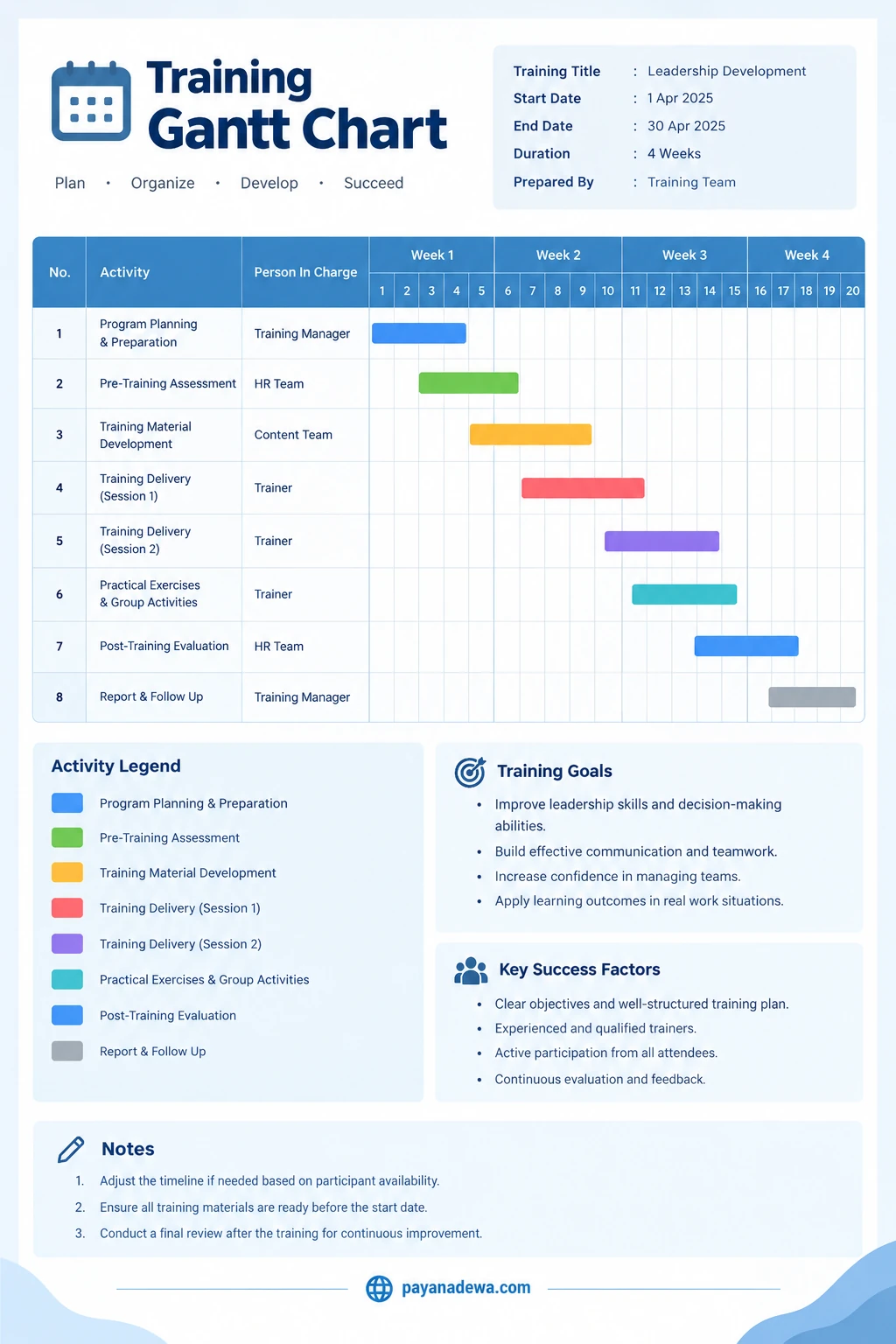
Use this Training Gantt Chart template to organize training activities, coordinate responsibilities, and monitor progress throughout a four-week program.
Example of a Four-Week Training Plan
- Week 1 — Planning and assessment: Define objectives, confirm participants, identify learning needs, and prepare the training outline.
- Week 2 — Material development: Create presentations, exercises, handouts, and assessment questions. Review the content before delivery.
- Week 3 — Training delivery: Conduct learning sessions, facilitate discussions, and provide practical exercises or group activities.
- Week 4 — Evaluation and follow-up: Collect feedback, assess learning outcomes, prepare a summary report, and identify opportunities for improvement.
This schedule is an illustrative example rather than a fixed rule. Some activities can run in parallel, while others must be completed in sequence. For instance, trainers can reserve a room while learning materials are being developed, but final participant assessments may need to wait until the training has been delivered.
How to Create a Training Gantt Chart Step by Step
Creating an effective chart starts with clear objectives and realistic estimates. Follow these steps to build a training schedule that your team can actually use.
Step 1: Define the Training Objectives
Begin by identifying what participants should know or be able to do after completing the program. Objectives might include learning a new software application, improving customer service, developing leadership skills, or meeting a compliance requirement.
Clear objectives help you select relevant activities and determine how success will be measured. They also prevent the schedule from becoming a list of tasks that do not contribute directly to learning outcomes.
Step 2: Break the Program Into Tasks
List all activities required to prepare, deliver, and evaluate the training. Include administrative work as well as learning activities. Typical tasks include needs assessment, curriculum design, trainer assignment, participant registration, material preparation, session delivery, knowledge testing, and post-training evaluation.
Keep tasks specific and measurable. For example, replace a vague task such as “prepare training” with separate activities for drafting the agenda, developing presentation slides, reviewing exercises, and approving the final materials.
Step 3: Estimate Task Durations
Determine how much time each activity will require. Consider team capacity, approval processes, participant availability, and the complexity of the subject matter. Consult the people responsible for completing the work instead of relying entirely on assumptions.
Include reasonable buffers for tasks that depend on external approvals or equipment availability. A realistic schedule is more useful than an ambitious timeline that immediately becomes outdated.
Step 4: Assign Owners and Dependencies
Give each activity a clear owner who is responsible for coordinating its completion. Then identify dependencies between tasks. For example, the final training materials may depend on approval of the course outline, while the evaluation report depends on receiving participant feedback.
Understanding dependencies helps you identify which delays could affect the overall completion date. It also shows where parallel work can save time without compromising quality.
Step 5: Build the Timeline
Place the activities along a calendar or weekly timeline and draw a horizontal bar for each task. The bar should begin at the planned start date and end at the expected completion date. Use consistent colors to distinguish major phases, such as planning, preparation, delivery, and evaluation.
Choose a level of detail that matches the program. A short workshop may need a daily schedule, whereas a six-month development initiative may be easier to manage using weekly or monthly intervals.
Step 6: Review and Share the Schedule
Check whether deadlines are realistic, responsibilities are clear, and required resources are available. Confirm important dates with trainers, managers, and participants before publishing the plan. Share one central version so everyone can access the latest information.
Step 7: Track Progress and Update the Chart
Review the schedule at regular intervals. Mark completed activities, revise dates when necessary, and document the reason for significant changes. If a task falls behind, determine whether you can reassign resources, change the sequence, or adjust a noncritical deadline.
A Gantt chart is most effective when it reflects the current situation rather than remaining a static document created at the beginning of the project.
Best Practices for Managing a Training Schedule
Once your chart is ready, use a few practical management techniques to keep it useful throughout the program.
- Keep the chart readable: Use concise task names and avoid including every minor action as a separate row.
- Set clear milestones: Mark important approval dates, session start dates, and completion targets.
- Build in contingency time: Allow flexibility for revisions, trainer absences, and scheduling changes.
- Communicate changes quickly: Notify affected team members when a date, owner, or requirement changes.
- Review workload: Avoid assigning too many overlapping tasks to the same trainer or coordinator.
- Measure learning outcomes: Include assessments and feedback activities, not just attendance and session completion.
- Choose the right format: Use a printable template for straightforward programs and collaborative software for complex projects.
It is also helpful to distinguish activity completion from training effectiveness. Delivering every session on time is a useful operational result, but it does not necessarily prove that participants gained the intended skills. Combine schedule tracking with appropriate learning assessments and follow-up measures.
Common Training Gantt Chart Mistakes to Avoid
Even a well-designed timeline can fail if it is not maintained properly. Watch for these common problems when planning your training activities.
Creating an Unrealistic Schedule
Overly ambitious deadlines can lead to rushed content, limited practice time, and poor coordination. Base estimates on actual workloads and include time for reviews and revisions.
Ignoring Dependencies
Some tasks cannot start until others are complete. If the chart ignores these relationships, the schedule may look efficient but fail in practice. Identify essential prerequisites before finalizing dates.
Leaving Responsibilities Unclear
When several people assume someone else is handling a task, important work may be missed. Assign a clear owner to each activity and define who approves major deliverables.
Failing to Update the Timeline
Outdated schedules create confusion and undermine trust. Establish a regular review routine and make sure the team knows where to find the current version.
Measuring Attendance Instead of Learning
A completed training schedule is only one measure of success. Include knowledge checks, practical demonstrations, participant feedback, or workplace performance indicators that match the program’s objectives.
Frequently Asked Questions About Training Gantt Charts
What is the main purpose of a Training Gantt Chart?
Its main purpose is to organize training activities on a visual timeline. It helps managers plan dates, assign responsibilities, coordinate resources, track progress, and identify scheduling problems before they affect delivery.
Can I create a training Gantt chart in Excel?
Yes. Excel or similar spreadsheet software can be used to create a simple training timeline with task names, start dates, durations, responsible people, and colored schedule bars. A printable template is also useful for teams that prefer a straightforward planning document.
What activities should a training schedule include?
Most schedules include needs assessment, objective setting, course design, material preparation, participant coordination, training delivery, practical exercises, evaluation, reporting, and follow-up. The exact activities depend on the type and scale of the program.
How long should a training Gantt chart cover?
The timeline should cover the entire training project, including preparation and post-training evaluation. A short workshop may require only a few days, while employee onboarding or leadership development may span several weeks or months.
How often should I update the chart?
Update it whenever an important date, task status, or responsibility changes. For active programs, a weekly review is often practical, although complex projects may require more frequent checks.
Conclusion
A Training Gantt Chart is a practical way to turn a training idea into an organized, measurable plan. By mapping activities, durations, deadlines, dependencies, and responsibilities on one timeline, you can coordinate your team more effectively and respond to potential delays before they become major problems.
Start by defining clear learning objectives, dividing the program into manageable tasks, and assigning realistic deadlines. Then review progress regularly and include evaluation activities that measure what participants actually learn.
Whether you manage employee onboarding, professional development, technical instruction, or leadership training, a well-maintained Gantt chart can make planning more transparent and training delivery more consistent. Use the template as a starting point, adapt it to your needs, and keep the schedule updated as your program develops.