A computer certificate can be a valuable way to demonstrate your digital skills, improve your resume, and prepare for new educational or career opportunities. Whether you are learning basic computer operations, improving your office software skills, or exploring information technology, a certificate can help document what you have learned.
However, not every computer certificate serves the same purpose. Some certificates confirm that you completed a training course, while others require a formal examination or practical assessment. Understanding these differences will help you choose the right program for your goals, budget, and experience level.
What Is a Computer Certificate?
A computer certificate is a document or digital credential that confirms the completion of computer-related training, an assessment, or a professional certification process. It may demonstrate knowledge of basic computer operations, office applications, programming, networking, or other technology skills.
The value of a certificate depends on the organization that issues it and the requirements for earning it. A certificate of completion usually confirms that someone finished a course. A professional certification often requires a standardized examination or practical assessment.
Before enrolling in a program, check what the certificate represents and whether it is relevant to your educational or professional goals.
Types of Computer Certificates
1. Basic Computer Skills Certificate
A basic computer skills certificate is suitable for beginners who want to become comfortable using computers. Training may cover starting and shutting down a computer, managing files and folders, typing, browsing the internet, and practicing safe online habits.
This type of certificate can benefit students, job seekers, office workers, and adults who want to improve their digital literacy.
2. Office Applications Certificate
An office applications certificate focuses on software used in schools and workplaces. Depending on the course, learners may study word processing, spreadsheets, presentations, email, and online collaboration tools.
Practical assignments might include preparing a professional document, creating a budget spreadsheet, designing a presentation, and organizing digital files. These skills can support administrative, customer service, and other office-based roles.
3. IT Support and Networking Certificate
IT support and networking certificates introduce learners to computer hardware, operating systems, troubleshooting, network configuration, and technical support. Advanced courses may cover network security, routing, and wireless connectivity.
These credentials can help learners prepare for entry-level IT positions. However, employers may also expect practical experience and strong problem-solving skills.
4. Programming and Web Development Certificate
Programming certificates may cover languages such as Python, JavaScript, or Java. Web development courses can include HTML, CSS, databases, and application development fundamentals.
Choose a program that includes practical projects. Building a simple website, creating an application, or developing a small data project can help demonstrate your abilities beyond the certificate itself.
5. Cybersecurity, Cloud Computing, and Data Certificates
Specialized computer certificates are available in cybersecurity, cloud computing, data analytics, and related technology fields. These programs may require prior knowledge of computers or programming.
Before choosing a specialized credential, review its prerequisites, assessment requirements, practical exercises, renewal policies, and recognition within your target industry.
Benefits of Getting a Computer Certificate
A computer certificate can provide a structured learning path and a clear way to document your progress. It may also help you communicate your skills to employers, clients, and educational institutions.
- Demonstrate digital skills: Document training in computer applications, technical support, or specialized software.
- Improve confidence: Develop practical skills through guided lessons and assignments.
- Strengthen your resume: Add relevant training to support job applications.
- Prepare for further study: Build foundational knowledge before moving to advanced courses.
- Track your progress: Use assignments and assessments to identify areas for improvement.
A computer certificate does not guarantee employment or a promotion. Its value is strongest when combined with demonstrable skills, practical experience, and relevant projects.
How to Choose the Right Computer Certificate
Identify Your Learning Goals
Start by deciding what you want to achieve. Beginners may benefit from basic computer literacy training, while office workers may prefer courses covering spreadsheets, word processing, and presentations.
If you want to enter the technology industry, compare IT support, networking, programming, and cybersecurity programs based on the roles that interest you.
Review the Course Curriculum
Look for clear learning objectives, practical exercises, and an assessment method that matches the skills being taught. A course that includes hands-on assignments can help you apply concepts to real situations.
Check whether the certificate includes the course title, issuing organization, completion date, and other relevant details.
Verify the Issuing Organization
Research the school, training provider, professional association, or technology company that issues the certificate. Review its reputation, course information, instructor qualifications, and assessment policies.
If a provider describes its credential as industry-recognized, verify that claim through the relevant professional organization or employer resources.
Compare Costs and Study Requirements
Consider the total cost, including registration, examination fees, learning materials, retakes, and renewal expenses. Compare online and in-person options, and choose a schedule that fits your responsibilities.
How to Earn a Computer Certificate
Although requirements vary by program, the following steps can help you get started.
- Assess your current skills: Identify what you already know and what you need to learn.
- Select an appropriate course: Match the curriculum to your goals and experience.
- Create a study schedule: Set realistic weekly learning targets.
- Practice regularly: Complete exercises on your own computer whenever possible.
- Prepare for assessments: Review course objectives and practice sample tasks when available.
- Save your certificate: Keep a digital copy and check that your personal and course details are correct.
- Apply your knowledge: Build practical projects that demonstrate the skills you learned.
Computer Certificate Template: What Should It Include?
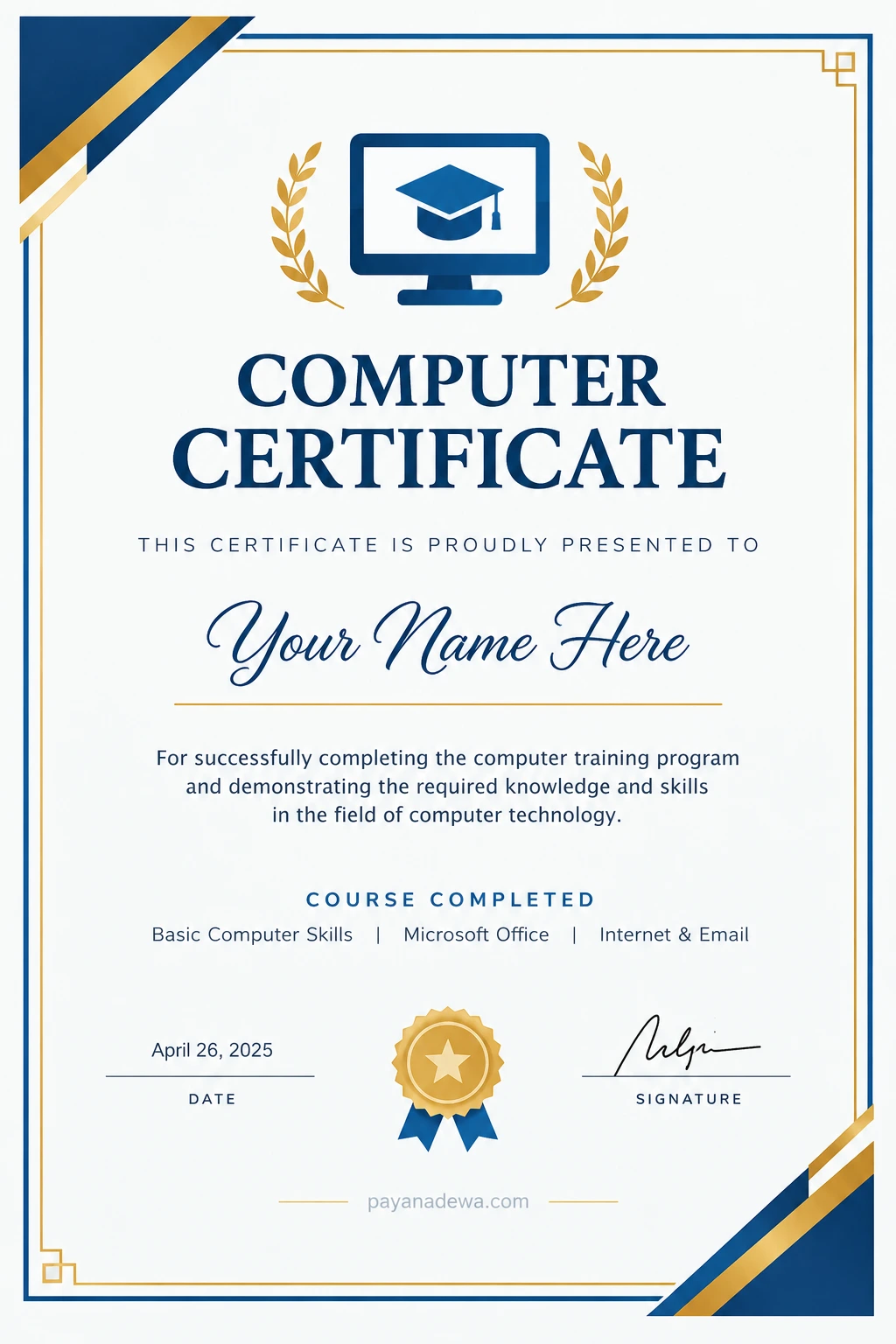
A well-designed computer certificate template can help schools, instructors, training centers, and organizations recognize course completion. The layout should be professional, readable, and suitable for printing.
A standard computer training certificate generally includes these details:
- The heading, such as “Computer Certificate” or “Certificate of Completion.”
- The recipient’s full name.
- The name of the completed course or training program.
- A statement describing the achievement.
- The issuing institution or instructor.
- The completion date and, if needed, a certificate identification number.
- An authorized signature or verification method.
Choose readable fonts, balanced spacing, and contrasting colors. Leave enough room for the recipient’s name and authorized signatures. Before printing, check the page size, margins, spelling, and alignment.
Use the following printable certificate design as a starting point. Replace the sample details with accurate information before distributing the certificate.
How to Add a Computer Certificate to Your Resume
Place relevant credentials in a section titled “Certifications,” “Training,” or “Professional Development.” Include the certificate name, issuing organization, and completion date.
If the credential has an official verification page or identification number, include it when appropriate. Describe your qualifications accurately, and do not present a basic course completion certificate as a professional certification unless that is its official status.
You can make your resume stronger by connecting the certificate to a practical example. For instance, explain that you can create spreadsheets, prepare presentations, manage digital files, or troubleshoot common computer problems, provided you can demonstrate those skills.
Common Mistakes to Avoid
- Choosing only by price: Compare course quality, content, and credibility before enrolling.
- Assuming all certificates are equivalent: Different credentials have different requirements and recognition.
- Skipping practical exercises: Hands-on practice helps turn theoretical knowledge into usable skills.
- Ignoring renewal rules: Some professional certifications expire or require continuing education.
- Misrepresenting qualifications: Only claim credentials and abilities you have genuinely earned or developed.
Frequently Asked Questions
Can I get a computer certificate online?
Yes. Many educational institutions and training providers offer online computer courses. Check the curriculum, assessment method, certificate requirements, and provider credibility before registering.
Is a computer certificate useful for beginners?
Yes. A beginner-level computer certificate can provide structured training in essential digital skills. Choose a course that matches your current abilities and offers enough practical exercises.
Does a computer certificate guarantee a job?
No. A certificate can support a job application, but employers also consider experience, practical ability, communication, and the requirements of the position.
What is the difference between a computer certificate and a professional certification?
A computer course certificate often confirms completion of a training program. A professional certification typically verifies that an individual meets a defined standard, often through an examination or assessment. Requirements vary by issuer.
Conclusion
A computer certificate can help you organize your learning, document your progress, and demonstrate useful digital skills. The best option depends on your goals, whether you want to improve basic computer literacy, learn office applications, or pursue a career in information technology.
Research the issuing organization, compare course requirements, and prioritize practical learning. If you are creating certificates for a training program, use a clear and printable computer certificate template and ensure that every detail accurately reflects the learner’s achievement.