Service catalogs are useful in many settings, from IT departments and managed service providers to consulting firms, agencies, and internal operations teams. The format can be a simple document, a web page, or a searchable portal. The best version is easy to maintain and answers the questions readers ask most often.
What Is a Service Catalog?
A service catalog is a structured list of services that an organization makes available to a defined audience. Each listing explains what the service does, who it is for, what it includes, and how to access it. Depending on the organization, it may also show service hours, delivery times, eligibility rules, support contacts, service-level targets, or starting prices.
In IT service management, an IT service catalog often helps employees find services such as account access, device setup, software installation, network support, and data recovery. A customer-facing business catalog may instead describe web design, consulting, maintenance, training, or subscription packages.
A catalog is not simply a list of everything an organization does. It should help a reader make a decision or take a clear next step. Keep each description specific, use familiar language, and avoid promising outcomes the team cannot consistently deliver.
Why a Service Catalog Matters
It Sets Clear Expectations
People can see what a service includes, what falls outside its scope, and what information they need before making a request. This reduces misunderstandings and helps teams avoid repeated clarification.
It Improves Service Discovery
A logical structure makes services easier to find. Grouping offerings by category, audience, or business need helps readers identify relevant options without knowing internal department names.
It Supports Consistent Delivery
When service descriptions, request steps, and ownership are documented in one place, teams have a shared reference. This can improve handoffs, onboarding, reporting, and service reviews.
It Helps People Make Informed Choices
Clear descriptions of features, requirements, service windows, and pricing allow readers to compare options and choose the right level of support.
What to Include in a Service Catalog
The right level of detail depends on your audience. Start with the information people need to understand and request each service, then add operational details when they are useful.
- Service name: Use a short, recognizable name that describes the outcome or task.
- Service description: Explain the purpose and value in plain English.
- Target audience: State who can use the service, such as employees, departments, small businesses, or enterprise customers.
- Scope and deliverables: List what is included and clarify important exclusions.
- Requirements: Identify approvals, documents, access, or information needed to begin.
- Request process: Provide the correct form, portal, email, phone number, or next step.
- Availability and timing: Share support hours, expected response times, and typical delivery windows when known.
- Cost or pricing model: Include a price, range, subscription level, or explanation of how a quote is prepared, if appropriate.
- Service owner: Name the responsible team or role so that questions have a clear destination.
- Last updated date: Show when the information was reviewed so readers can judge whether it is current.
Only publish commitments your organization can support. If delivery times vary, describe the factors that affect them instead of presenting an uncertain estimate as a guarantee.
How to Create a Service Catalog Step by Step
1. Define the Audience and Purpose
Decide whether the catalog is for customers, employees, partners, or service managers. A customer catalog should focus on outcomes, options, costs, and how to get started. An internal IT catalog may emphasize eligibility, approvals, request forms, fulfillment steps, and support targets.
2. Gather and Verify Your Services
Ask service owners to list active offerings and confirm which ones are available. Remove duplicates, retired services, and vague entries. Record a clear owner for every listing so future updates do not become an unassigned task.
3. Group Services into Intuitive Categories
Use categories that match how readers think. For example, a business catalog might include Consulting, Development, Support, Training, and Add-On Services. An internal catalog might use Workplace Technology, Accounts and Access, Business Applications, and Security. Avoid creating so many categories that navigation becomes difficult.
4. Write Concise, Consistent Descriptions
Use a repeatable format for every service. Begin with the need it addresses, explain the main deliverables, and finish with the next step. Prefer direct language such as “Request a new employee laptop” over internal labels that only specialists understand.
5. Make Requesting a Service Straightforward
Place the request link or contact method near the description. Tell readers what to prepare and what happens after submission. If approval is required, explain who approves the request and how the requester will receive updates.
6. Review, Publish, and Improve
Have service owners check the content before publication. Then review search terms, common questions, incomplete requests, and user feedback. Use these signals to improve descriptions and remove friction over time.
Service Catalog Template: A Simple Example
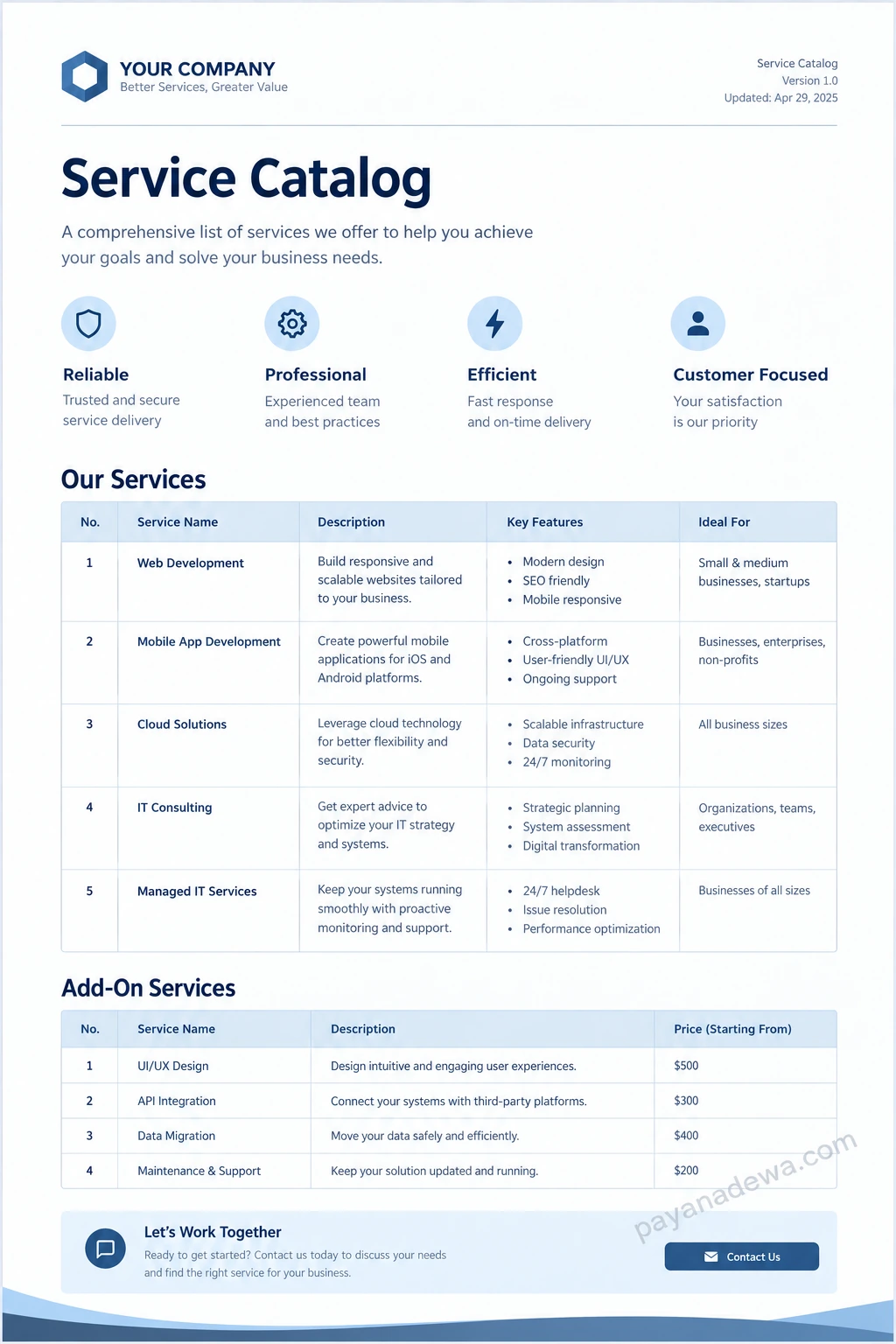
Use the following structure as a starting point. Adapt the fields to fit your business model, and keep the layout consistent across every service entry.
- Service name: Website Development
- Overview: Design and build a responsive website for your organization.
- Includes: Discovery, page design, development, mobile responsiveness, and launch support as agreed in the project scope.
- Ideal for: Small businesses, startups, and organizations refreshing an existing website.
- Requirements: Business goals, brand assets, content, and a named project contact.
- Delivery estimate: Confirmed after reviewing project scope and content readiness.
- Pricing: Custom quote based on scope and complexity.
- How to request: Contact the service team to arrange an initial discussion.
This example demonstrates the level of clarity to aim for. Do not copy fields blindly. A service with fixed pricing may need a price table, while a sensitive internal service may need access rules and approval details.
Service Catalog Template Preview
Best Practices for a Better Catalog
- Write for readers, not departments. Use common terms and explain necessary technical language.
- Keep entries scannable. Use meaningful headings, short paragraphs, tables where appropriate, and consistent labels.
- Make ownership visible. Assign a person or team to review each service entry.
- Set a review schedule. Check high-change services more often and review the full catalog at planned intervals.
- Make accessibility a priority. Use readable text, adequate contrast, descriptive link text, and a layout that works on mobile devices.
- Separate the catalog from internal procedures. Show users what they need to know. Keep detailed fulfillment instructions in internal documentation when they are not relevant to the audience.
- Track useful measures. Monitor catalog searches, successful requests, incomplete submissions, repeat questions, and user satisfaction.
Common Service Catalog Mistakes to Avoid
A catalog becomes less useful when it lists services without explaining them. Avoid names that are too broad, descriptions filled with jargon, and entries that do not explain how to request the service. Another common problem is outdated information. Incorrect prices, retired offerings, broken links, or old support contacts quickly undermine trust.
It is also a mistake to publish every operational detail in the main catalog. Too much information can make simple choices harder. Keep the main entry focused, then link to policies, technical specifications, or detailed procedures when readers need them.
How to Keep Your Service Catalog Up to Date
Treat the catalog as a maintained service, not a one-time document. Give every entry an owner, record a last-reviewed date, and establish a clear update process. When a service changes, the owner should update its scope, availability, price, request route, and related documentation together.
Collect feedback from users and support staff. If people repeatedly ask the same question, improve the relevant listing. If a service is rarely selected, check whether it is still needed or simply difficult to find. A short quarterly review can be a useful starting point, with more frequent checks for services that change rapidly.
Conclusion
A well-designed service catalog makes services easier to understand, compare, and request. Start by defining your audience, confirming available offerings, and writing clear descriptions with practical next steps. Add ownership and review dates to keep the information trustworthy.
Whether you publish a printable document or an online service catalog, focus on helping readers find the right service with as little friction as possible. A clear structure, accurate information, and regular maintenance will make your catalog a practical resource for both customers and employees.