The most effective catering flyers combine appetizing visuals, concise copy, useful menu information, and a simple call to action. They are easy to scan on a phone, attractive when printed, and focused on the needs of the audience. This guide explains what to include, how to organize the design, and how to use your flyer to promote catering services more effectively.
What Is a Catering Flyer?
A catering flyer is a promotional document used to advertise food catering services for events, businesses, and private customers. It may introduce a catering company, showcase menu options, promote a seasonal offer, or encourage people to request a quote. Flyers can be printed for distribution or saved as digital files for email, websites, and social media.
A catering business flyer works best when it answers a few important questions quickly: What type of food and service do you provide? Which occasions do you serve? What makes your business a good choice? How can customers contact you? If readers can find these answers at a glance, they are more likely to take the next step.
Essential Elements Every Catering Flyer Should Include
1. A Clear, Memorable Headline
Use a headline that tells people what you do. Phrases such as “Catering for Every Occasion,” “Fresh Food for Your Next Event,” or “Make Your Event Delicious” are direct and easy to understand. You can include your business name near the top, but make sure the main service remains prominent.
2. High-Quality Food Photography
Food photography can create an immediate emotional response. Choose bright, sharp images that reflect the dishes you actually serve. A buffet spread may suit corporate events, while plated meals can be more appropriate for weddings or private dining. Avoid filling every empty space with a photo; one strong hero image and one or two supporting images often look more polished.
3. A Short Description of Your Services
Explain the value you provide in a few sentences. Mention useful details such as fresh ingredients, flexible menus, delivery, setup, staffed service, or dietary accommodations—but only include services your business genuinely offers. Specific benefits are more persuasive than broad claims.
4. Menu Highlights or Catering Packages
Give readers a taste of your menu without trying to list every dish. You might feature signature entrees, appetizers, desserts, vegetarian choices, or popular buffet packages. If prices vary by guest count, location, or menu selection, invite readers to request a customized quote rather than displaying a price that could be misleading.
5. Contact Details and a Strong Call to Action
Make it easy to respond. Include your preferred contact method, such as a phone number, email address, website, or messaging account. A direct call to action—such as “Request a Catering Quote,” “Check Your Event Date,” or “Ask About Our Menu”—tells the reader what to do next. If you use a QR code, test it before printing.
How to Design a Catering Flyer Step by Step
Choose One Main Audience
Start by deciding who the flyer is meant to reach. A flyer for office managers may emphasize punctual delivery, convenient packages, and service for meetings. A wedding catering flyer may focus on menu customization, presentation, and guest experience. A family-event flyer might highlight flexible portions, party platters, and simple booking. Trying to speak to everyone at once can make the message less effective.
Build a Simple Visual Hierarchy
Arrange information in the order readers need it: headline, key food image, main benefit, menu or service highlights, then contact details. Use a small number of fonts and keep body text comfortably readable. Bold headings and short bullet points help people scan the flyer instead of facing a dense block of copy.
Use Colors That Match Your Brand
Warm colors such as cream, brown, terracotta, and gold can create a welcoming food-focused style. Green may suggest freshness, while black and white can feel modern and elegant. There is no single correct palette; choose colors that fit your brand and maintain enough contrast for easy reading. Use the same colors and logo across your website, menu, and promotional materials for consistency.
Design for Print and Digital Sharing
For printed flyers, use a high-resolution file, leave a safe margin around the edges, and check that small text remains readable at the final size. Ask your printer about its preferred file format, bleed, and color settings. For online sharing, export a crisp image or PDF that loads quickly and remains legible on mobile screens. Keep a master version so you can update seasonal menus or contact details without rebuilding the design.
Example Catering Flyer Template and Layout
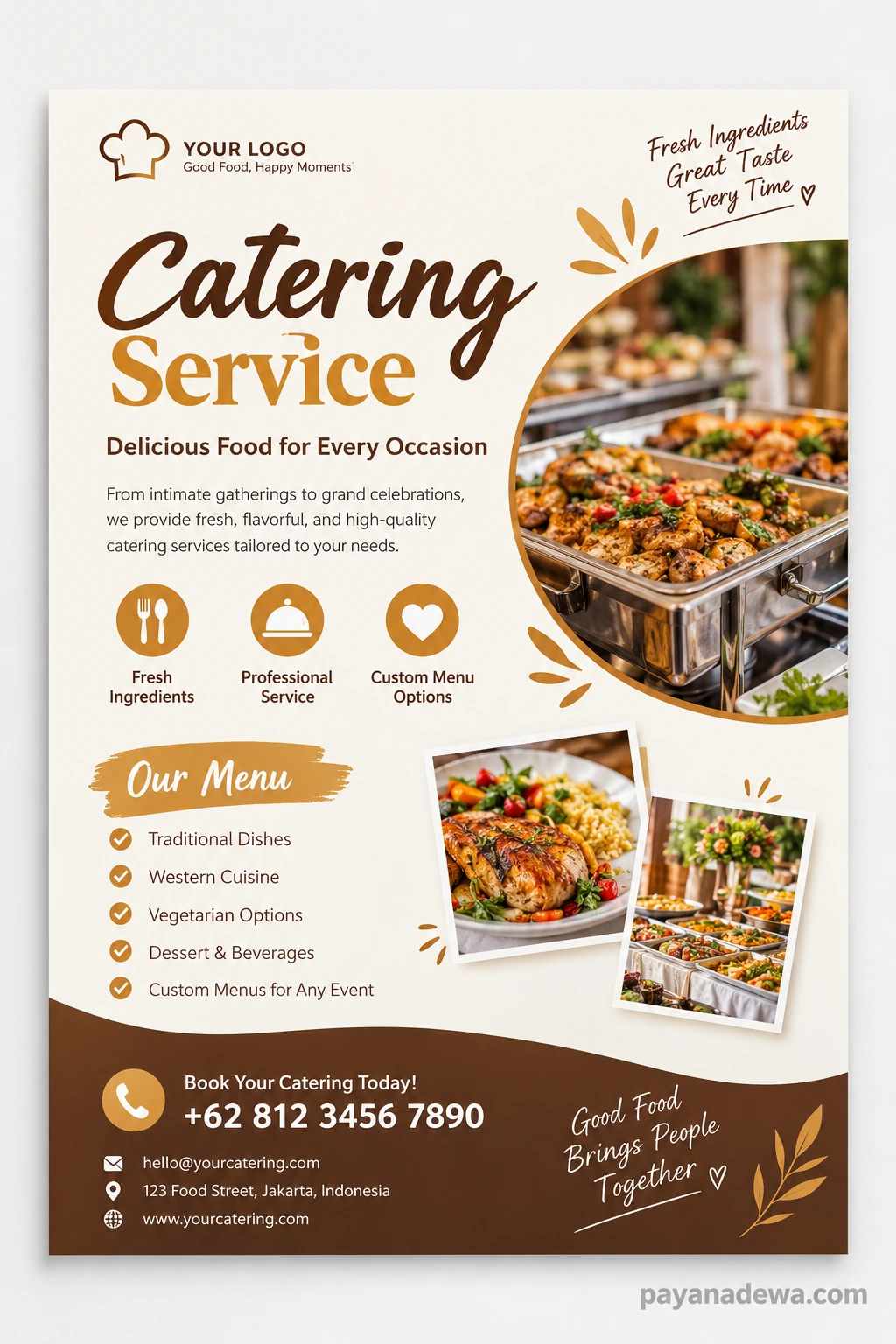
A practical catering flyer template can save time while giving your promotion a clear structure. Use the following layout as a starting point, then customize the wording, imagery, colors, and service details to match your business.
Suggested layout:
- Top section: business logo, catering headline, and short tagline.
- Main section: one appetizing food photo and a concise service description.
- Highlights: three or four benefits, such as custom menus, delivery, or event service.
- Menu section: a short list of signature dishes or package options.
- Bottom section: booking call to action, phone, email, website, and optional QR code.
Keep the layout flexible. A premium wedding caterer may use more white space and elegant typography, while a casual party-food business may benefit from bold colors and lively food photography. The design should support the message rather than distract from it.
Practical Tips to Make Your Flyer More Effective
- Lead with benefits: Explain how your service makes event planning easier, whether through flexible menus, reliable delivery, or professional setup.
- Be specific: Mention the event types you serve and the area you cover when that information helps customers decide.
- Keep copy concise: Use short sentences and avoid unnecessary jargon. A flyer is an invitation to learn more, not a complete business brochure.
- Use authentic details: Feature real menu items and accurate service information. Never promise dietary options, certifications, or facilities you cannot provide.
- Proofread carefully: Check spelling, phone numbers, email addresses, prices, and booking links before sharing or printing.
- Give the reader one next step: A clear primary action is easier to follow than several competing offers.
Where to Share Your Catering Flyer
A flyer can support both offline and online marketing. Print copies for suitable community noticeboards, partner venues, local offices, or event-planning meetings where distribution is permitted. You can also send a digital version to previous customers, include it in a catering proposal, or publish it on your website.
For social media, adapt the layout to the platform instead of simply uploading a tiny image of the print design. Use a readable crop, a short caption, and a link or instruction for requesting a quote. You can also create separate versions for corporate catering, weddings, private parties, and seasonal events so each audience sees the most relevant offer.
Common Catering Flyer Mistakes to Avoid
Overcrowding is one of the most common problems. Too many photos, fonts, menu items, and decorative elements make the flyer difficult to scan. Another mistake is hiding contact information in tiny text or using a vague call to action. Low-quality images, inconsistent branding, unclear pricing, and outdated details can also weaken trust.
Before publishing, view the flyer at its actual printed size and on a mobile screen. Ask someone unfamiliar with your business to look at it for a few seconds, then tell you what service they think you offer and how they would contact you. If they cannot answer easily, simplify the design.
Conclusion
An effective catering flyer combines an appealing food image, a clear message, useful menu highlights, and easy-to-find booking details. Start with the needs of your target audience, organize the content so it can be scanned quickly, and use consistent branding to build recognition. Before distributing the flyer, verify every detail and make sure the design works in both print and digital formats.
With a thoughtful layout and a focused call to action, a catering flyer can become a practical, reusable marketing tool for attracting inquiries and helping customers imagine how your food and service could make their next event special.