An engineer business card is a simple yet powerful tool for building professional relationships. Whether you are a civil engineer, mechanical engineer, electrical engineer, or engineering consultant, a well-designed business card helps you introduce yourself, share your expertise, and make it easier for potential clients and colleagues to contact you.
In today’s competitive business environment, first impressions matter. A professional engineering business card communicates your identity and reflects your attention to detail. With the right layout, readable typography, and carefully selected colors, you can create a card that represents your skills and professional values.
This guide explains how to design an effective engineer business card, what information to include, which styles to consider, and how to prepare your design for printing. You will also learn how to use an engineer business card template to create a polished result without unnecessary design complexity.
What Is an Engineer Business Card?
An engineer business card is a printed or digital card that presents an engineer’s professional identity and contact information. It typically includes a name, job title, company name, email address, and telephone number. Some cards also feature a company logo, professional website, QR code, or list of engineering services.
Unlike a generic contact card, an engineering business card can reflect the specific field in which you work. For example, a civil engineer may use architectural line drawings, while a mechanical engineer might prefer geometric shapes or subtle gear-inspired graphics.
The most effective designs balance visual appeal with practical information. A recipient should be able to understand who you are and how to contact you within a few seconds.
Essential Information for an Engineer Business Card
Before selecting a design, determine which details your business card needs. A clear information hierarchy makes your card easier to read and more useful during professional networking.
1. Name and Professional Title
Your name should be one of the most noticeable elements on the card. Place your professional title nearby so people can immediately identify your role.
- Full name: Use the name you normally use in professional settings.
- Job title: Consider titles such as Civil Engineer, Mechanical Engineer, Electrical Engineer, Project Engineer, or Engineering Consultant.
- Professional credentials: Include relevant licenses or qualifications when appropriate and permitted.
Choose an accurate title that reflects your current responsibilities. Engineering students, interns, and recent graduates should use descriptions that clearly represent their experience level.
2. Contact Information
Your card should make communication easy. Select contact details that are relevant to your work rather than trying to include every possible communication channel.
- A professional email address.
- A business telephone number.
- Your company website or online portfolio.
- A professional networking profile, when relevant.
- Your office address, if clients need to visit your workplace.
A QR code can also link to your digital portfolio, online résumé, or contact page. However, test the code before printing and make sure the destination works well on mobile devices.
3. Company Logo and Branding
If you work for an engineering company, use its approved logo and brand colors. Consistent branding helps clients recognize your organization and creates a professional connection between your card, website, proposals, and other business materials.
Independent engineers can use a personal logo or a simple text-based identity. Keep the design consistent with your professional website and portfolio so that people can recognize your brand across different platforms.
Popular Engineer Business Card Design Ideas
The right design depends on your engineering specialty, target audience, and personal preferences. Fortunately, a professional card does not need complicated graphics or expensive finishing techniques to make a strong impression.
Minimalist Engineering Business Card
A minimalist engineer business card uses clean typography, generous white space, and a limited color palette. This style works particularly well for engineers who want to communicate precision, organization, and professionalism.
Choose a clear heading for your name, a smaller line for your job title, and neatly aligned contact details. A simple geometric accent or company logo can provide visual interest without overwhelming the layout.
Civil Engineer Business Card
A civil engineer business card can feature subtle building outlines, bridge illustrations, structural diagrams, or blueprint-inspired patterns. Navy blue, white, gray, and light blue are useful choices for creating a technical and modern appearance.
These visual elements are especially suitable for professionals working in construction, infrastructure, structural design, and project management. Keep the illustrations restrained so the contact information remains the main focus.
Mechanical and Electrical Engineer Business Cards
Mechanical engineers may prefer gear symbols, technical linework, or geometric patterns. Electrical engineers can incorporate circuit-inspired graphics, simple electrical symbols, or understated blue accents.
Regardless of your specialization, avoid adding too many technical illustrations. One relevant graphic is usually enough to communicate your field while preserving a clean, professional appearance.
Modern Digital-Friendly Business Cards
A digital-friendly engineering business card combines traditional contact information with a QR code or link to an online profile. This approach is useful for consultants and engineers who want to share project examples, professional credentials, or detailed service information.
Keep the printed card simple and let your website provide additional details. This approach improves readability while giving interested clients a convenient way to explore your experience.
Engineer Business Card Template: A Practical Starting Point
An engineer business card template can simplify the design process and help you maintain a consistent professional appearance. Templates are useful for engineering students, independent consultants, freelancers, and established firms that need a practical starting point.
Choose a template that allows you to edit the name, job title, contact details, logo, colors, and graphic elements. A two-sided design can provide space for essential contact information on the front and engineering services or a brand message on the back.
For a versatile result, select a template with a clear layout, high-contrast text, and enough space around important elements. Make sure the design can be adjusted to your printer’s required dimensions before ordering printed copies.
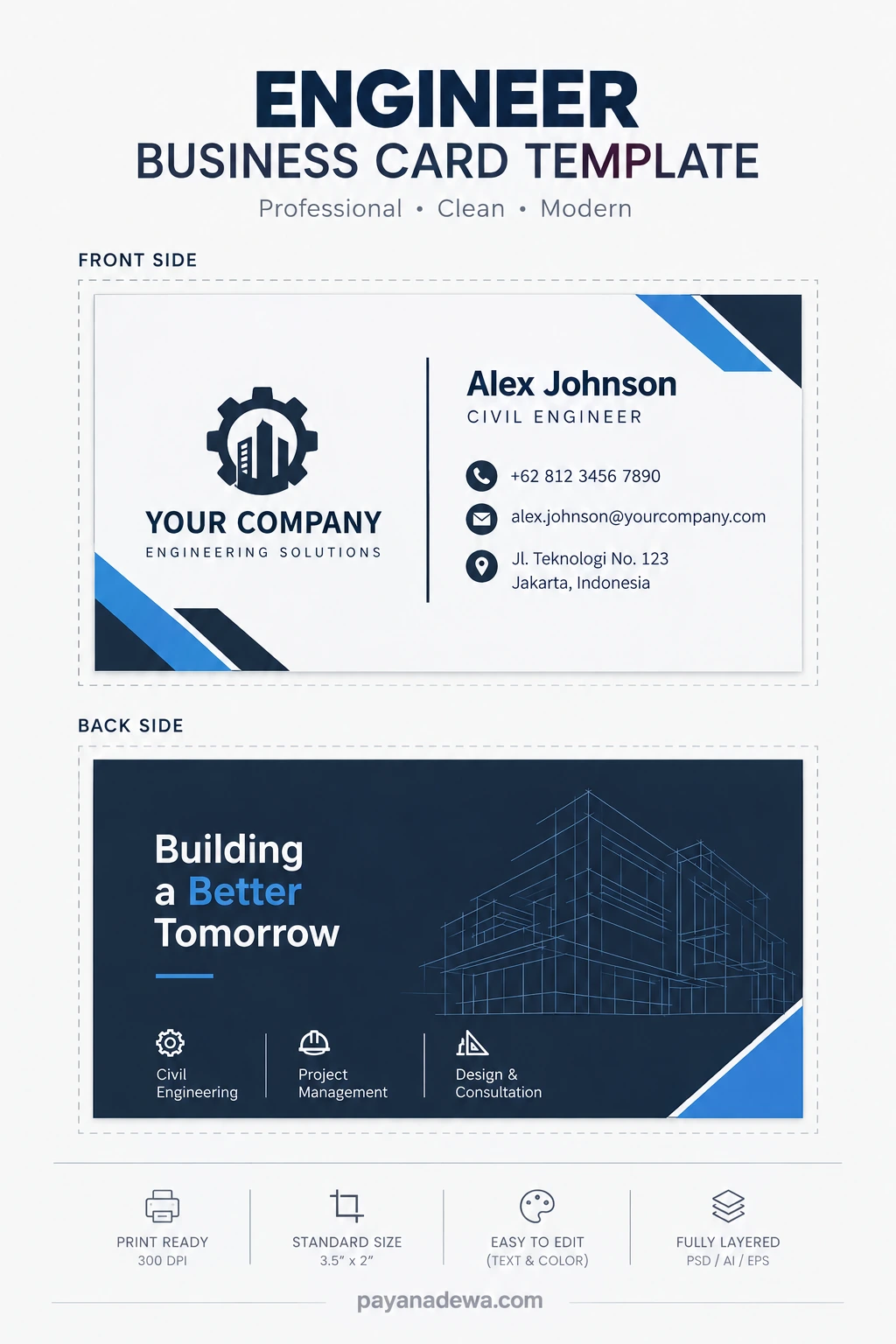
Before using the template, replace all sample names, telephone numbers, email addresses, company names, and website details with accurate information. Review the final design carefully and ensure that all logos and graphic assets are suitable for your intended use.
How to Choose Colors, Fonts, and Layouts
Select a Professional Color Palette
Color influences the way people perceive your professional identity. Navy blue and gray can create a technical appearance, while black and white offer a timeless, understated style. Green may suit environmental engineering, while brighter accents can work well for technology-focused businesses.
Choose a palette that matches your brand and provides sufficient contrast. Dark text on a light background is often easy to read, although a carefully designed dark card can also look professional.
Use Readable Typography
Simple sans-serif fonts are popular for engineering business cards because they look modern and remain readable at small sizes. Use one font family or two complementary families to maintain consistency.
Make your name prominent, place your job title underneath, and keep contact information large enough to read comfortably. Avoid decorative fonts for email addresses and telephone numbers.
Create a Balanced Layout
Arrange information into clear groups. Keep your name and title together, position the company logo in a dedicated area, and align contact details consistently.
White space is just as important as the content itself. It prevents the card from feeling crowded and helps recipients find the most important details quickly.
Business Card Size and Printing Preparation
Choosing the correct dimensions and preparing the artwork properly can help prevent printing errors. Business card sizes vary by country and print provider, so confirm the required format before finalizing your design.
A common United States business card size is 3.5 × 2 inches. In Indonesia, print providers may offer formats around 90 × 55 mm. Check the exact finished dimensions with your printer before creating the final file.
Follow these practical printing tips:
- Confirm the dimensions: Set your document to the printer’s required finished size.
- Add bleed when required: Extend background colors and graphics beyond the trim edge according to the printer’s specifications.
- Keep safe margins: Place important text and logos away from cutting edges.
- Use suitable resolution: Prepare raster artwork at the resolution recommended by your printer, commonly 300 DPI.
- Choose quality cardstock: Select paper that feels sturdy and suits your professional image.
- Proofread every detail: Verify names, titles, phone numbers, email addresses, and URLs.
- Review a proof: Check a digital or physical sample before approving a large print order.
Remember that a good design still needs accurate production settings. Review the artwork at its actual printed size to make sure small text remains legible and no important information falls too close to the cutting line.
Common Engineer Business Card Mistakes to Avoid
Even an attractive business card can be ineffective if the design is difficult to read or contains unnecessary information. Avoid these common mistakes when preparing your card.
- Overcrowding the layout: Include only information that supports your professional goals.
- Using tiny text: Make contact details comfortable to read without magnification.
- Choosing poor contrast: Ensure that text stands out clearly from the background.
- Adding unrelated graphics: Use imagery that supports your engineering specialty or brand.
- Displaying outdated details: Update your card when your role, company, or contact information changes.
- Listing unverified credentials: Use only qualifications and professional designations you are entitled to claim.
- Ignoring print specifications: Confirm dimensions, bleed, margins, and file format before printing.
Avoiding these problems helps create a card that looks professional, communicates your expertise, and supports your networking activities.
How to Make Your Engineering Business Card More Effective
A business card works best when it supports a broader professional networking strategy. Connect your printed card with your online presence and make sure both represent the same professional identity.
First, keep your LinkedIn profile or portfolio up to date. Include relevant projects, qualifications, and examples of your work when appropriate. Next, use consistent branding across your card, website, email signature, and professional documents.
When meeting a potential client or colleague, introduce yourself and briefly explain your area of expertise. Exchange cards naturally during the conversation, then follow up with a relevant message if there is an opportunity to collaborate.
Finally, review your card periodically. Updating outdated information helps ensure that new contacts can reach you and understand your current professional role.
Conclusion
A well-designed engineer business card introduces your professional identity, communicates your expertise, and makes networking easier. By combining accurate contact information, readable typography, appropriate engineering graphics, and careful printing preparation, you can create a card that reflects your professional standards.
Whether you choose a minimalist design, a civil engineering theme, or a modern digital-friendly layout, prioritize clarity and consistency. Start with a suitable engineer business card template, customize it to match your specialty, and verify every detail before printing.
Ultimately, the best engineering business card is one that represents you accurately, supports your networking goals, and makes it easy for potential clients and colleagues to contact you.