A designer business card is more than a simple way to share contact information. It represents your brand, highlights your creative style, and helps potential clients remember you. Whether you are a graphic designer, freelance creative, photographer, or design studio owner, a well-designed business card can make a lasting impression.
Today, you can create a professional business card using customizable templates, modern typography, and carefully selected colors. You do not need advanced design skills to get started. With the right layout and a clear message, you can create a card that looks polished and reflects your professional identity.
In this guide, you will discover popular designer business card styles, essential design elements, practical customization tips, and printing recommendations. You will also learn how to choose a template that suits your business and makes your brand stand out.
What Is a Designer Business Card?
A designer business card is a professionally styled card that communicates your identity and contact details through thoughtful visual design. It usually includes your name, job title, company name, logo, and essential contact information.
Unlike a basic contact card, a creative business card focuses on visual presentation. It uses typography, color, spacing, and graphic elements to communicate a brand’s personality.
For example, a minimalist card may suit a freelance graphic designer, while a luxurious black-and-gold design may work better for a premium creative agency. Meanwhile, a natural color palette can complement a brand specializing in sustainable products or wellness.
A successful business card balances creativity with readability. Every element should support your professional image without making the design feel crowded.
Why a Professional Business Card Matters
Although digital networking continues to grow, printed business cards remain useful at meetings, conferences, exhibitions, and client consultations. They provide a simple way to share information without requiring someone to search for your profile online.
A carefully designed card offers several benefits.
- Builds brand recognition: Consistent colors, fonts, and logos help people recognize your business.
- Creates a professional impression: A polished layout shows attention to detail and care for your presentation.
- Encourages networking: Physical cards make it easy to exchange contact details during professional events.
- Showcases creativity: Designers can demonstrate their visual style through the card itself.
- Supports digital connections: A QR code can direct recipients to your portfolio, website, or professional profile.
However, a beautiful design alone is not enough. Your card must also communicate the right information clearly and remain easy to read.
Popular Designer Business Card Styles
Choosing a suitable design style is the first step toward creating a memorable business card. Consider your audience, industry, and brand personality before selecting a template.
1. Minimalist Business Cards
Minimalist business cards use clean layouts, simple typography, and plenty of white space. They often feature a limited color palette and only the most important information.
This style works especially well for freelance designers, consultants, architects, and modern creative businesses. It keeps the focus on your name, logo, and contact details.
2. Modern and Geometric Designs
Modern business cards often combine bold typography with geometric shapes, contrasting colors, and structured layouts. Navy blue, white, and bright blue accents can create a contemporary professional appearance.
These designs are suitable for graphic designers, digital agencies, technology professionals, and branding studios. Use decorative shapes carefully so they do not compete with the essential information.
3. Luxury Business Cards
Luxury business cards commonly feature dark backgrounds, elegant typography, metallic accents, and refined spacing. Black and gold are popular choices because they create a sophisticated visual contrast.
This style can suit premium design studios, interior designers, fashion professionals, and high-end service providers. For printed versions, consider foil stamping or specialty paper when your budget allows.
4. Natural and Organic Designs
Natural business cards use earthy colors, botanical illustrations, soft shapes, and understated typography. Green, beige, cream, and muted brown can create a calm, approachable appearance.
These templates are ideal for eco-conscious brands, wellness businesses, handmade products, and creative professionals who prefer an organic aesthetic.
5. Creative Portfolio Business Cards
A portfolio business card combines contact information with a distinctive visual element that represents your work. You might include a small illustration, a custom pattern, or a QR code linking to your online portfolio.
Nevertheless, keep the layout organized. Your name, professional role, and primary contact method should remain easy to identify at a glance.
Essential Elements of an Effective Business Card
Before customizing a designer business card template, decide which information your audience needs most. A strong design communicates the essentials without unnecessary clutter.
Name and Professional Title
Make your name prominent and easy to read. Add a concise title, such as Graphic Designer, Brand Designer, Creative Director, or Freelance Illustrator. This helps recipients understand what you do immediately.
Logo and Brand Identity
Your logo helps connect the card to your wider brand. Use a high-quality logo file and maintain consistent colors and typography across your website, social media profiles, and printed materials.
Contact Information
Include only the details that support your networking goals. Common choices include:
- Professional email address
- Business phone number
- Website or online portfolio
- Business address, when relevant
- Professional social media profile
For a cleaner layout, prioritize two or three useful contact methods instead of including every available detail.
QR Code and Digital Links
A QR code can connect a printed business card to a digital portfolio, booking page, or website. Test the code on several devices before printing. Also, ensure the destination works correctly on mobile screens.
How to Customize a Designer Business Card Template
A template saves time because it provides an existing layout, typography structure, and visual direction. Follow these steps to adapt it to your business.
Step 1: Choose the Right Layout
Select a layout that suits your industry and the amount of information you need to display. A simple design works well for individual professionals. A two-sided card can provide additional space for a logo, portfolio link, or brand message.
Step 2: Apply Your Brand Colors
Start with your existing brand palette whenever possible. If you are developing a new identity, choose one dominant color, one supporting color, and a neutral background.
Make sure the text contrasts clearly with the background. For instance, dark navy text on a white background is generally easier to read than pale gray text on cream.
Step 3: Select Readable Fonts
Use one or two complementary typefaces. A distinctive display font can highlight your name, while a simple sans-serif font can keep contact information readable.
Avoid overly decorative fonts for small text. Before printing, check the design at its actual physical size rather than relying only on a zoomed-in screen preview.
Step 4: Organize the Information
Create a clear visual hierarchy by making your name and professional title easy to notice. Group related contact details together and leave enough space between elements.
Next, remove decorative elements that do not contribute to the message. A focused design often looks more professional than a crowded one.
Step 5: Add Finishing Details
Consider a subtle pattern, a small illustration, a distinctive logo treatment, or a QR code. These details can make your card more memorable without overwhelming the layout.
Finally, proofread every line. Incorrect email addresses, outdated phone numbers, and broken website links can undermine an otherwise excellent design.
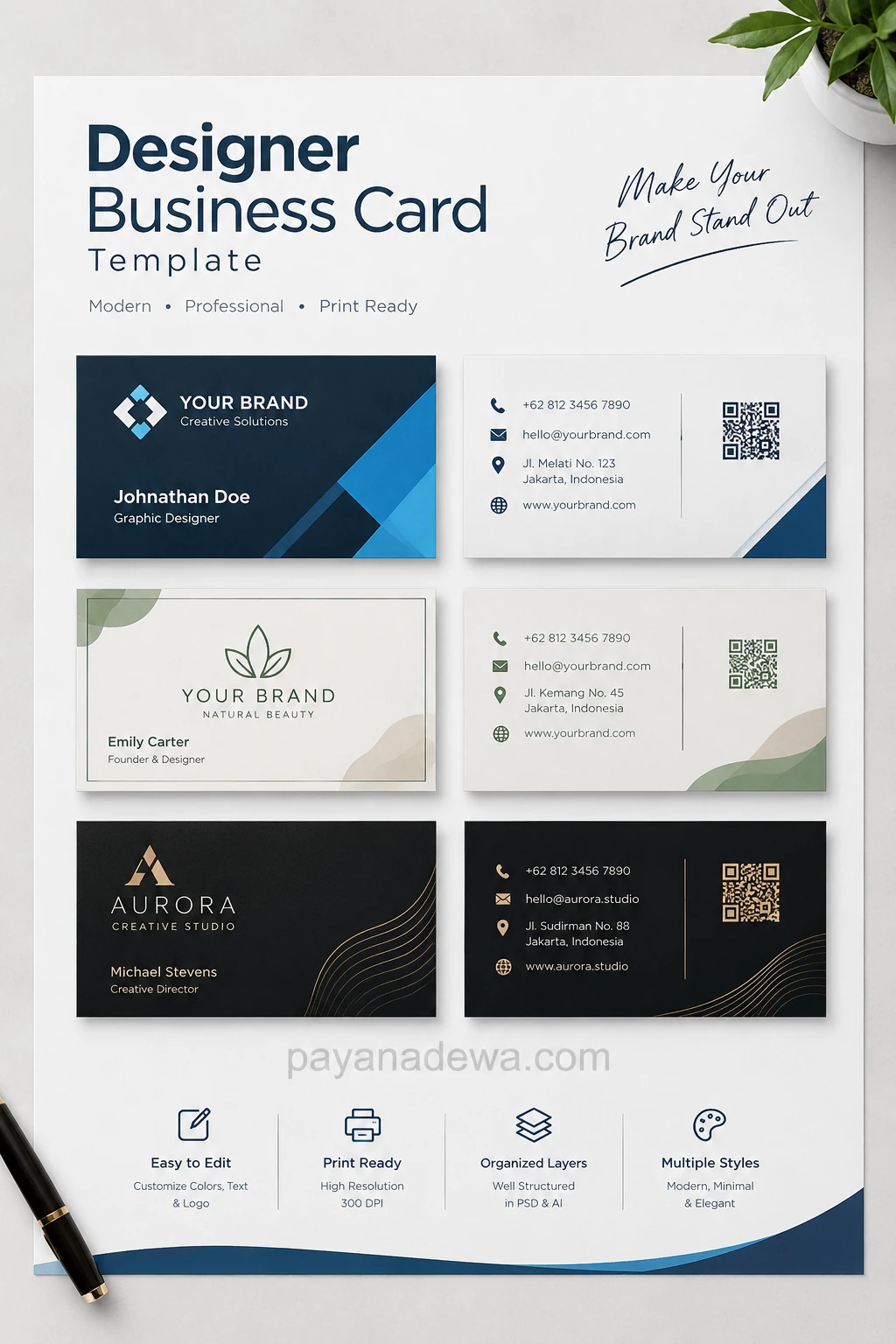
Designer Business Card Template: A Visual Example
The following designer business card template showcases several approaches, including modern blue layouts, natural botanical styling, and elegant black-and-gold designs. Use these examples as inspiration when creating a card that reflects your own professional identity.
Customize the sample names, contact details, logo, colors, and decorative elements before using a design for your business. Any sample QR code should also be replaced with a verified code that links to your intended destination.
Business Card Printing Tips for Professional Results
Once your design is ready, prepare the file carefully for printing. Good print preparation helps preserve the quality of your typography, colors, and graphic details.
Choose the Correct Size
Business card dimensions vary by country and printer. A common US size is 3.5 × 2 inches, while a frequently used standard in many other markets is 85 × 55 millimeters.
Check your printer’s specifications before setting up the document. Also, confirm the required bleed and safe area so important content does not get trimmed.
Use High-Resolution Artwork
Prepare print artwork at the resolution recommended by your printer, commonly 300 DPI for raster images at the final print size. Vector formats are particularly useful for logos, text, and sharp graphic elements.
Export your finished design in the format requested by the print provider. A print-ready PDF is often appropriate, but requirements can differ between providers.
Select Suitable Paper and Finishes
Paper quality influences how your business card feels and looks. Thick cardstock can create a sturdy, premium impression, while uncoated stock offers a natural texture.
You can also consider matte, gloss, textured, or specialty finishes. Choose a finish that supports your brand rather than adding unnecessary expense.
Review a Proof Before Ordering
Always inspect a digital proof or printed sample before placing a large order. Check alignment, spelling, color consistency, and the readability of small text.
When possible, test the design in natural lighting. A screen preview may not accurately represent the final printed colors or surface finish.
Common Business Card Design Mistakes to Avoid
Even a creative concept can lose its impact when basic design principles are overlooked. Avoid these common mistakes:
- Adding too much information: Keep the content focused on what recipients need.
- Using poor contrast: Choose text and background colors that remain easy to distinguish.
- Mixing too many fonts: Limit typefaces to maintain visual consistency.
- Ignoring print margins: Keep important text away from the trimming edges.
- Using low-quality logos: Start with crisp, high-resolution or vector artwork.
- Forgetting to test QR codes: Verify the destination before sending the file to print.
- Following trends without a purpose: Select design elements that support your brand and audience.
By avoiding these mistakes, you can create a business card that looks professional and communicates your value more effectively.
How to Choose the Best Designer Business Card Template
The best template is one that combines visual appeal, practical functionality, and brand consistency. Before making your final choice, consider the following questions.
- Does the style match your profession and target audience?
- Can you customize the logo, colors, typography, and contact details?
- Is the layout readable at the final printed size?
- Does the file support the editing and export options you need?
- Can the design be adapted for digital sharing as well as print?
- Does the template provide enough space for your essential information?
Also, check the template’s licensing terms before using it commercially. If you plan to distribute or resell a modified template, confirm that the license explicitly allows that use.
For the best results, treat the template as a starting point rather than a finished identity. Small, thoughtful changes can make a familiar layout feel distinctive and more closely aligned with your brand.
Conclusion
A designer business card can help you communicate your professional identity, strengthen brand recognition, and build valuable connections. The most effective designs combine a clear layout, readable typography, consistent colors, and relevant contact information.
Start by choosing a template that fits your style. Then customize the visual elements, review the details, and prepare the artwork according to your printer’s specifications. Whether you prefer a minimalist, modern, natural, or luxury design, focus on clarity and consistency.
With careful planning, a well-designed business card can become a practical extension of your brand. Choose a design that represents your work, makes your information easy to find, and leaves a memorable impression on every recipient.