If you are looking for a scholarship certificate template, this guide will help you understand what to include, how to choose the right design, and how to create a certificate that is ready to print or share digitally. You will also discover practical design tips and examples that make the process easier for educators, administrators, and scholarship organizations.
With a clean layout, readable typography, and the right information, you can create a scholarship award certificate that honors students while maintaining a professional appearance.
What Is a Scholarship Certificate?
A scholarship certificate is an official or commemorative document presented to a student who has received a scholarship or earned recognition through an educational award program. It usually identifies the recipient, the awarding organization, the reason for the award, and the date of presentation.
Some certificates recognize financial support for tuition, books, or other educational expenses. Others celebrate academic excellence, leadership, creativity, or community service. The exact format depends on the scholarship program and the purpose of the document.
A scholarship certificate can serve several purposes:
- Recognizing achievement: Celebrates academic performance, talent, effort, or leadership.
- Commemorating an award: Provides a lasting record of scholarship recognition.
- Supporting student motivation: Encourages recipients to continue pursuing their educational goals.
- Representing an organization: Presents the scholarship provider in a professional and consistent way.
- Creating a keepsake: Gives students a document they can display or preserve with other academic records.
It is important to distinguish a scholarship certificate from an official financial award letter. A certificate generally recognizes an award, while an award letter explains the scholarship amount, eligibility conditions, payment arrangements, or other formal terms. A certificate should not replace required financial or enrollment documentation.
What Should a Scholarship Certificate Include?
A professional scholarship certificate should communicate its purpose clearly. The design can be simple or decorative, but the essential information should be easy to find and read.
1. Certificate Title
Use a clear heading such as “Scholarship Certificate,” “Scholarship Award Certificate,” or “Certificate of Academic Excellence.” The title should immediately explain why the document is being presented.
2. Recipient’s Full Name
Display the student’s full name prominently. Check spelling carefully before printing or distributing the certificate. The recipient’s name is often the most visually important element after the main title.
3. Scholarship or Award Description
Include a short statement explaining why the student received the award. For example, the certificate might recognize outstanding academic performance, leadership, community involvement, or selection for a particular scholarship program.
4. Awarding Organization
Include the name of the school, university, foundation, company, or organization issuing the certificate. An official logo may be added when the organization has authorized its use.
5. Date and Authorized Signature
Add the date of presentation and a signature line for the appropriate representative. Depending on the program, this could be a school principal, university administrator, scholarship committee chair, or authorized officer.
6. Optional Scholarship Details
Some certificates benefit from additional details, such as the scholarship program name, academic year, award category, or certificate reference number. Include these only when they serve a clear purpose and do not overcrowd the design.
Free Scholarship Certificate Template Design
A ready-made scholarship certificate template can save time while helping you maintain a polished and consistent appearance. Templates are especially useful for schools, educational institutions, nonprofit organizations, and scholarship committees that need to prepare multiple certificates.
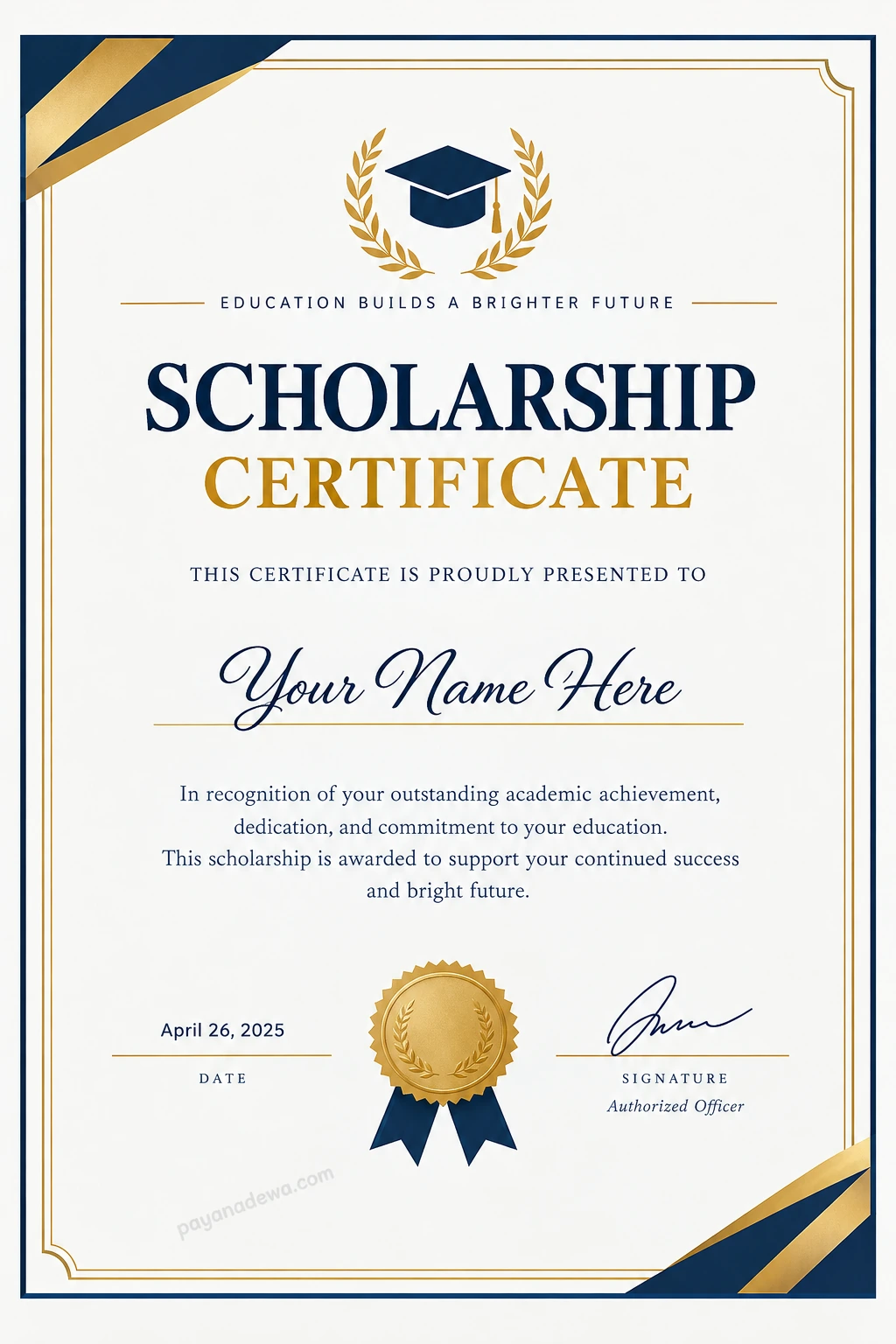
The example above uses a white background with navy blue and gold accents. A graduation cap and laurel wreath communicate academic achievement, while the decorative border gives the certificate a formal appearance. The recipient’s name, award statement, date, and signature area provide a practical structure that can be adapted to different scholarship programs.
Use this design as a starting point and customize it to suit your organization’s identity. Replace the sample name and date with accurate information, add the scholarship details, and include an authorized signature before presenting the final certificate.
How to Create a Scholarship Certificate
Creating a scholarship certificate does not require advanced graphic design skills. Following a few straightforward steps can help you produce a document that looks professional and remains easy to read.
Step 1: Choose a Suitable Template
Select a scholarship certificate template that matches the purpose of the award. A formal design is suitable for universities and foundations, while a simple, modern layout may work well for school recognition programs. Make sure the template has enough space for the recipient’s name and award description.
Step 2: Add the Recipient’s Information
Enter the student’s full name and verify the spelling. Include the scholarship title, award category, or academic year when relevant. If the certificate will be personalized for several recipients, review each version individually before exporting the files.
Step 3: Write a Clear Award Statement
Use concise language that explains the reason for the recognition. Avoid long paragraphs or vague descriptions. A direct statement makes the certificate easier to understand and more meaningful to the recipient.
For example: “In recognition of outstanding academic achievement, dedication, and commitment to continued education.”
Step 4: Customize the Visual Design
Choose a limited color palette, readable fonts, and a balanced layout. Navy, gold, black, and white are popular choices for formal academic certificates. Keep decorative elements secondary to the information that matters most.
Step 5: Add Official Details
Include the awarding organization’s name, presentation date, and signature field. Add a logo or official seal only when you have permission to use it. Ensure that the certificate accurately reflects the organization’s authorization and the student’s actual award status.
Step 6: Review and Export
Proofread every field, check the page dimensions, and confirm that the text remains readable at the intended print size. Save an editable copy for future changes. For printing, PDF is often a convenient choice because it helps preserve the document’s layout. A high-quality image format can also be useful for previews or digital sharing.
Tips for Designing a Professional Scholarship Award Certificate
A good certificate combines visual appeal with clear communication. These practical tips can help you create a design that looks polished without becoming overly complicated.
- Keep the layout balanced: Give the title, recipient’s name, and award statement enough space to stand out.
- Use readable typography: Choose a decorative font for limited emphasis, but use clear fonts for names, dates, and supporting text.
- Limit the color palette: Two or three coordinated colors are usually enough to create a consistent design.
- Choose appropriate borders: A thin double-line border or subtle corner ornament can add formality without distracting from the content.
- Use high-quality graphics: Ensure that logos, emblems, and decorative elements remain sharp when printed.
- Check print dimensions: Choose a standard paper size that suits your region and printing equipment.
- Maintain consistency: Use the same visual style across certificates issued by the same program.
- Protect personal information: Share only the recipient details needed for the certificate and obtain appropriate permission before publishing it online.
Remember that a professional certificate does not need excessive decoration. A clear hierarchy, consistent spacing, and accurate information often make a stronger impression than a crowded design.
Scholarship Certificate Examples and Wording
The wording should reflect the type of scholarship or recognition being awarded. Below are several examples you can adapt to your program.
Academic Excellence Scholarship
“This certificate is presented to [Recipient Name] in recognition of outstanding academic achievement, dedication to learning, and commitment to educational excellence.”
Merit-Based Scholarship
“Awarded to [Recipient Name] in recognition of exceptional merit, demonstrated ability, and continued dedication to academic success.”
Community Service Scholarship
“Presented to [Recipient Name] in appreciation of outstanding community involvement, leadership, and a meaningful commitment to serving others.”
Educational Support Scholarship
“This certificate recognizes [Recipient Name] as a recipient of the [Scholarship Program Name], supporting continued educational development and future achievement.”
These examples are starting points rather than official award statements. Adapt the wording to your organization’s criteria and verify that the certificate accurately describes the award being presented.
Printable vs Digital Scholarship Certificates
Scholarship certificates can be prepared for physical presentation or digital distribution. Each option offers different advantages, so consider how the recipient will use the document.
Printable Certificates
A printable scholarship certificate is suitable for award ceremonies, school events, graduation celebrations, and formal presentations. Use a high-resolution design, appropriate margins, and paper that supports the desired finish. Test-print one copy before producing a large batch.
Digital Certificates
A digital scholarship certificate is convenient for remote students, online programs, and electronic records. Export the final design in a format that preserves its appearance, such as PDF. Check that the file displays correctly on common devices and that all text remains legible.
If a certificate needs to function as a formally verifiable credential, consider additional safeguards such as an authorized digital signature, a verification code, or a secure record maintained by the issuing organization. A decorative seal or image alone does not establish authenticity.
Common Scholarship Certificate Mistakes to Avoid
Even an attractive design can lose credibility if important information is incorrect or difficult to read. Review these common mistakes before finalizing your certificate.
- Incorrect recipient names: Confirm the spelling and preferred presentation of every student’s name.
- Missing award information: Identify the scholarship or reason for recognition clearly.
- Unclear authorization: Use accurate organization details and approved signatures.
- Overcrowded layouts: Remove unnecessary graphics and keep the main information prominent.
- Low-resolution images: Use suitable image quality for the intended print dimensions.
- Unverified claims: Do not describe a scholarship as officially accredited, guaranteed, or financially awarded unless the statement is accurate and supported.
- Forgotten placeholders: Replace sample text, including “[Recipient Name]” and “[Date],” before issuing the certificate.
A final review checklist can prevent many of these problems. Verify the recipient’s name, award title, issuing organization, date, signature, spelling, and final file format before distributing the document.
Frequently Asked Questions About Scholarship Certificates
Is a scholarship certificate the same as a scholarship award letter?
No. A scholarship certificate typically recognizes the recipient or commemorates an award. A scholarship award letter usually provides formal details about funding, eligibility, conditions, and payment arrangements. Follow the issuing institution’s requirements when both documents are needed.
Can I customize a scholarship certificate template?
Yes. You can usually customize the recipient’s name, award title, organization details, colors, date, and signature area. Follow any licensing terms and obtain permission before using an organization’s logo or official emblem.
What paper size should I use?
Choose a standard paper size supported by your printer and suitable for the presentation. A4 is common in many countries, while US Letter is widely used in the United States. Check the template dimensions and printer settings before printing.
Can a scholarship certificate be issued digitally?
Yes. Digital certificates are useful for online programs and remote recipients. Export the design in a suitable format, proofread the final file, and add verification features if the issuing organization requires them.
Does a scholarship certificate prove that tuition has been paid?
Not necessarily. A certificate may recognize a scholarship award, but it does not automatically prove payment, enrollment, or the fulfillment of financial conditions. Refer to the official award letter or records from the scholarship provider for those details.
Conclusion
A scholarship certificate is a valuable way to recognize academic achievement, celebrate student potential, and commemorate educational awards. With a suitable template, accurate information, readable typography, and a balanced design, you can create a certificate that looks professional and is easy to personalize.
Start with a clean scholarship certificate template, customize the recipient and award details, and review the final document before printing or sharing it. Whether you are preparing a printable certificate for a school ceremony or a digital award for an online scholarship program, thoughtful design and accurate wording will help make the recognition meaningful.