A retirement certificate is a meaningful way to recognize an employee’s dedication, celebrate years of service, and honor the contributions they have made throughout their career. Whether you are preparing a retirement celebration for a colleague, a long-serving team member, a teacher, or a company executive, a thoughtfully designed certificate can make the occasion more memorable.
Creating a professional retirement certificate does not have to be complicated. With the right wording, an elegant layout, and a personalized message, you can produce a certificate that expresses genuine appreciation. You can also use a printable retirement certificate template to save time while maintaining a polished and professional appearance.
In this guide, you will learn what a retirement certificate is, what information to include, how to write meaningful retirement messages, and how to choose a design that suits the recipient. You will also discover practical tips for creating a retirement award certificate that is ready to print, present, and preserve as a keepsake.
What Is a Retirement Certificate?
A retirement certificate is a formal or commemorative document presented to someone who is retiring from their professional career. It recognizes their years of service, professional achievements, dedication, and positive impact on an organization or community.
Employers, schools, government offices, nonprofit organizations, and other institutions commonly present retirement certificates during farewell parties, retirement dinners, staff meetings, or official ceremonies.
Unlike employment records or official retirement documents used for administrative purposes, a retirement recognition certificate is generally intended to express gratitude and celebrate an individual’s career. It can be personalized with the recipient’s name, job title, years of service, retirement date, and a message of appreciation.
A retirement certificate can serve several purposes:
- Recognizing service: Acknowledges the employee’s commitment and contributions over the years.
- Celebrating achievements: Highlights professional accomplishments and milestones.
- Expressing appreciation: Shows that colleagues and employers value the recipient’s efforts.
- Creating a keepsake: Provides a lasting reminder of a meaningful professional journey.
- Supporting retirement celebrations: Adds a personal and formal touch to a farewell event.
What Should a Retirement Certificate Include?
A well-designed retirement certificate combines clear information with a thoughtful message. Although the exact format depends on the organization and occasion, several essential elements help make the document complete and professional.
1. Certificate Title
Start with a prominent heading such as “Retirement Certificate,” “Certificate of Retirement,” or “Certificate of Appreciation.” The title should immediately communicate the purpose of the document.
2. Recipient’s Full Name
The recipient’s name is one of the most important parts of the certificate. Display it prominently using a larger font or an elegant script style. Double-check the spelling before printing the final version.
3. Years of Service or Professional Role
Include the recipient’s job title, department, organization, or length of service when relevant. For example, you might recognize someone for 25 years of dedicated service as a teacher or 30 years of leadership in a company.
4. Retirement Recognition Message
Add a short paragraph that expresses appreciation for the recipient’s dedication and achievements. The message should feel sincere and specific rather than generic. Mentioning a notable accomplishment or positive contribution can make the certificate more meaningful.
5. Organization Name and Logo
Include the company, school, department, or institution presenting the certificate. Adding an official logo can reinforce the document’s professional appearance, provided you have permission to use it.
6. Date and Authorized Signature
Include the presentation date or official retirement date, depending on the occasion. A signature line for a manager, director, principal, or other authorized representative adds a personal finishing touch.
Free Printable Retirement Certificate Template
A printable retirement certificate template is a convenient starting point for creating a personalized retirement award. Instead of designing every element from scratch, you can begin with an established layout and customize the details to suit the recipient.
A clean printable design typically features a clear title, a designated space for the recipient’s name, a retirement appreciation message, and fields for the date and signature. Decorative borders, subtle ornaments, and a balanced color palette can make the certificate look elegant without distracting from its message.
For a formal presentation, consider a navy blue and gold design with a white or cream background. For a more relaxed workplace celebration, a minimalist layout with simple typography may be a better choice.
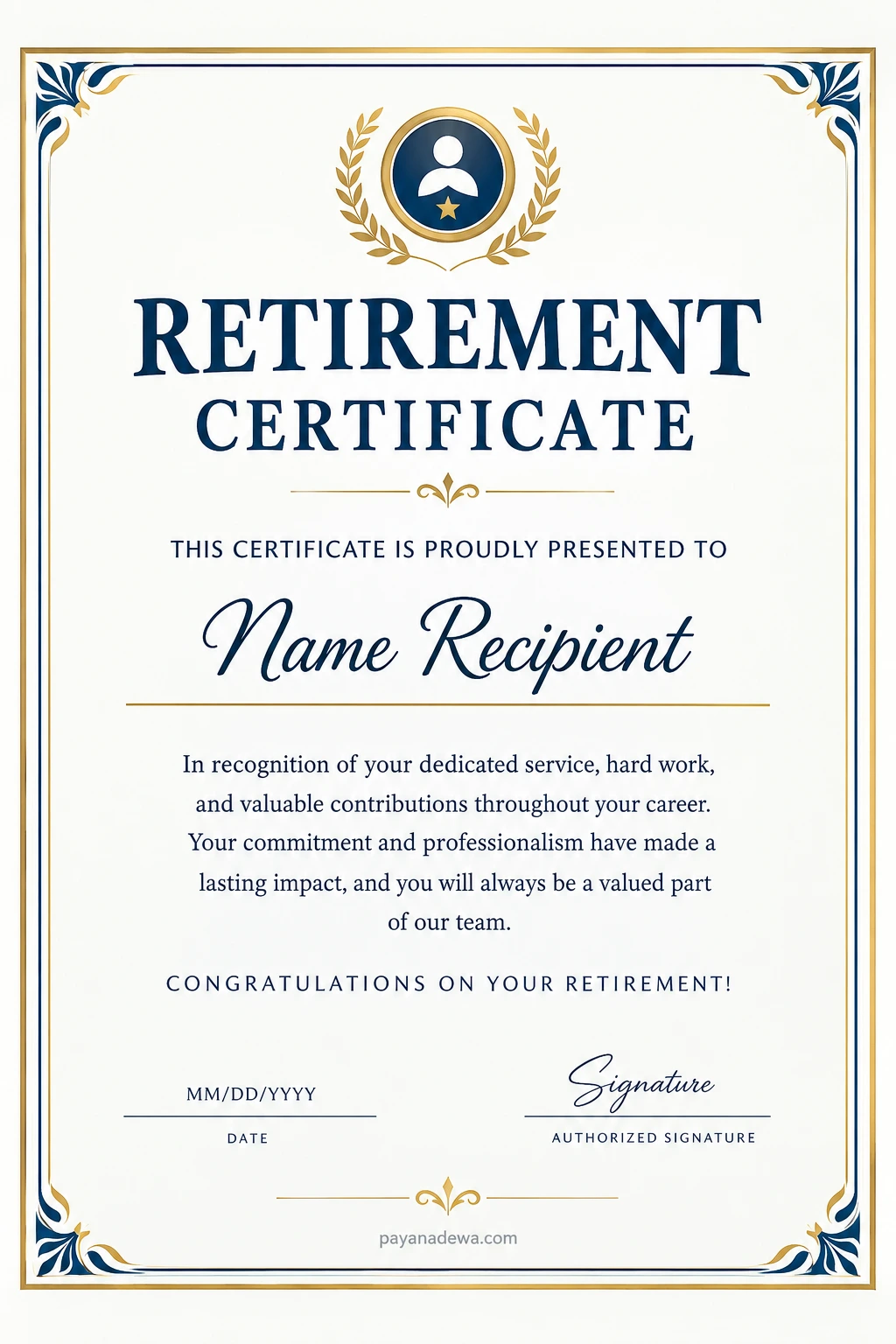
Before using a template, make sure it includes enough space for the recipient’s name and recognition message. If you plan to print several copies, choose a design that remains readable on standard paper and does not rely on excessive decorative elements.
How to Create a Retirement Certificate
Creating a retirement certificate is straightforward when you follow a few practical steps. Whether you use a printable template or design your own document, the goal is to produce a certificate that looks professional and feels personal.
Step 1: Choose the Right Template
Select a retirement certificate design that reflects the recipient’s profession, personality, and workplace culture. Traditional borders and formal typography work well for corporate or institutional settings, while modern layouts can suit creative organizations.
Step 2: Add the Recipient’s Information
Enter the recipient’s full name, job title, organization, and years of service if appropriate. Make sure every detail is accurate before moving to the next step.
Step 3: Write a Meaningful Message
Use a short message that recognizes the person’s dedication and contributions. Avoid overly complicated language. A few sincere sentences often communicate appreciation more effectively than a long paragraph.
Step 4: Personalize the Design
Adjust the colors, fonts, borders, and decorative elements to match the occasion. Add the organization’s name or authorized logo when appropriate. Keep the layout balanced so that the recipient’s name and the main message remain easy to read.
Step 5: Review and Proofread
Check the spelling of names, dates, job titles, and organization details. Review the message for grammar, consistency, and tone. It is helpful to ask another person to check the certificate before it is finalized.
Step 6: Print and Present the Certificate
Use good-quality paper or cardstock for a more substantial finish. Print a test copy to check the margins, colors, and readability. For a formal retirement event, consider placing the finished certificate in a presentation folder or suitable frame.
Retirement Certificate Wording Examples
The wording you choose should reflect the recipient’s career, relationship with the organization, and the tone of the retirement celebration. The following examples can be adapted for different professional settings.
Formal Retirement Certificate Message
“This certificate is proudly presented to [Recipient’s Name] in recognition of outstanding dedication, professional excellence, and years of valuable service to [Organization Name]. Your commitment and contributions have made a lasting impact. We extend our sincere appreciation and wish you happiness and success in your retirement.”
Employee Retirement Certificate Message
“In appreciation of [Recipient’s Name]’s dedicated service and valuable contributions to our team, we proudly present this retirement certificate. Thank you for your hard work, professionalism, and commitment. Your efforts have helped shape our workplace, and your legacy will continue to inspire us. Congratulations on your retirement.”
Teacher Retirement Certificate Message
“Presented to [Teacher’s Name] in grateful recognition of years of devoted teaching, guidance, and service to the educational community. Your passion for learning and commitment to your students have made a lasting difference. May your retirement bring happiness, relaxation, and new opportunities.”
Short and Simple Retirement Certificate Message
“Presented to [Recipient’s Name] in recognition of dedicated service and valuable contributions. With sincere appreciation for your years of commitment, we congratulate you on your retirement and wish you all the best in the years ahead.”
Retirement Certificate for Long Service
“In honor of [Recipient’s Name]’s [Number] years of outstanding service to [Organization Name], this certificate recognizes a remarkable career built on dedication, integrity, and achievement. Thank you for your lasting contributions and commitment. Congratulations on reaching this important milestone.”
Retirement Certificate Design Ideas
The appearance of a retirement certificate can influence how memorable and appropriate it feels. Choosing the right design helps communicate respect and appreciation while ensuring that the document looks polished.
Classic Navy Blue and Gold
Navy blue and gold create a traditional, distinguished appearance. This combination works especially well for corporate retirement awards, leadership recognition, and formal ceremonies. Gold borders and restrained decorative accents can add elegance without overwhelming the text.
Minimalist and Modern
A minimalist retirement certificate uses clean lines, generous white space, and simple typography. This style is ideal for organizations that prefer contemporary designs. It also makes the recipient’s name and appreciation message stand out.
Elegant Floral Design
Floral accents can create a warm and celebratory appearance. This option may suit retirement certificates for teachers, healthcare professionals, community workers, or colleagues who appreciate softer decorative details.
Personalized Career-Themed Design
A personalized certificate can include subtle elements related to the recipient’s profession, such as books for an educator, architectural lines for an engineer, or a company emblem for a long-serving employee. Keep these details tasteful so the certificate remains suitable for display.
Tips for Printing a Professional Retirement Certificate
Even a beautiful design can lose its impact if the final print is poorly prepared. A few simple precautions can help you achieve a professional result.
- Choose suitable paper: Use quality paper or cardstock that feels substantial and supports the design.
- Check the page size: Confirm whether the template is designed for US Letter, A4, or another paper format.
- Use readable fonts: Decorative script works well for names, but the main message should remain easy to read.
- Check print margins: Make sure borders and text are not cut off at the edges.
- Preview the colors: Print a test copy if the design contains gold, dark blue, or other prominent colors.
- Keep the wording concise: A focused message is easier to read and looks better on the page.
- Verify the final details: Confirm names, dates, signatures, and service information before presenting the certificate.
If the certificate will be presented at a retirement party, consider preparing it a few days in advance. This allows enough time to correct errors, improve the print quality, or arrange professional printing if necessary.
Retirement Certificate vs. Official Retirement Documents
It is important to distinguish a retirement recognition certificate from official retirement paperwork. Although both may be associated with retirement, they serve different purposes.
A retirement recognition certificate is generally a commemorative award that celebrates an individual’s professional journey. It may be issued by an employer, school, organization, or group of colleagues.
Official retirement documents, on the other hand, may include pension statements, benefit approvals, employment records, or other paperwork required by an employer or government agency. These documents can have administrative or legal significance and must follow the relevant requirements.
A decorative retirement certificate does not automatically establish pension eligibility, confirm employment status, or replace official retirement records. If you need documentation for benefits or legal purposes, contact the appropriate employer, pension administrator, or government office.
Frequently Asked Questions About Retirement Certificates
Can I create a retirement certificate for free?
Yes. You can create a retirement certificate using a free template or a document editor. Add the recipient’s details, write a personalized appreciation message, and prepare the document for printing. Check the template’s usage terms if you plan to use it commercially.
What is the difference between a retirement certificate and a certificate of appreciation?
A retirement certificate specifically recognizes an individual’s retirement and career contributions. A certificate of appreciation can be presented for many reasons, including teamwork, volunteering, project completion, or general workplace achievements.
What size should a retirement certificate be?
Common options include US Letter and A4 paper. The best size depends on the template, printer, and intended presentation. Choose a format that provides enough room for the title, recipient’s name, message, date, and signature.
Who can issue a retirement certificate?
An employer, business owner, school administrator, department head, nonprofit organization, or authorized representative can present a retirement recognition certificate. Families and colleagues may also create informal certificates for personal celebrations.
Should a retirement certificate include years of service?
Including years of service is a useful way to recognize a specific career milestone. However, it is optional. If you include this information, verify that the number of years is accurate.
Can I personalize a retirement certificate template?
Yes. Most customizable templates allow you to change the recipient’s name, message, date, colors, and other design elements. You may also add an organization name, an authorized logo, or a signature field.
Conclusion
A retirement certificate is a thoughtful way to celebrate a career, recognize years of service, and express appreciation for someone’s lasting contributions. With an appropriate design and carefully chosen wording, it can become a meaningful keepsake that the recipient will value long after the retirement celebration ends.
Whether you choose a classic navy blue and gold layout, a minimalist design, or a personalized career-themed template, focus on accuracy, readability, and sincere recognition. Include the recipient’s name, relevant service details, a heartfelt message, and the necessary date and signature fields.
Start with a printable retirement certificate template, customize it for the recipient, and review every detail before printing. A little preparation can turn a simple document into a memorable tribute to a professional journey and an exciting new chapter in life.