Whether you are a project manager, teacher, business owner, or event organizer, creating a project completion certificate does not have to be complicated. With the right wording, essential details, and a clean design, you can produce a document that looks professional and communicates achievement clearly. This guide explains what a project certificate is, what to include, how to create one, and how to choose a suitable template.
What Is a Project Certificate?
A project certificate is a formal document issued to recognize a person’s participation, contribution, or successful completion of a specific project. It typically includes the recipient’s name, project title, completion date, issuing organization, and an authorized signature. Depending on its purpose, it may also include a project identification number, the project duration, or a description of the recipient’s responsibilities.
Unlike a general appreciation note, a project certificate follows a structured format and serves as a documented record of an achievement. It can recognize the completion of a school assignment, a workplace initiative, a research project, a community program, or a collaborative development effort.
However, a project certificate is not automatically an academic qualification, professional license, or accredited credential. Its value depends on the issuing organization, the achievement being recognized, and the context in which it is used.
Why Is a Project Certificate Important?
A thoughtfully prepared project certificate offers benefits to both recipients and organizations. It records accomplishments while helping people feel that their time, skills, and effort have been recognized.
- Recognizes achievement: It acknowledges the successful delivery of a project or the completion of assigned responsibilities.
- Motivates participants: Formal recognition can encourage people to continue developing their skills and contributing to future projects.
- Documents participation: It creates a written record of involvement in a project, training activity, or organized program.
- Supports professional portfolios: Recipients may include relevant certificates in a portfolio or share them with prospective employers when appropriate.
- Strengthens organizational recognition: A consistent certificate format helps schools, companies, and project teams celebrate milestones professionally.
To maintain credibility, the certificate should accurately describe the achievement and identify the organization or person responsible for issuing it.
What Should a Project Certificate Include?
The best project certificate design balances attractive presentation with clear, useful information. Although the exact format depends on the purpose, several elements are commonly included.
1. Certificate Title
Choose a direct heading such as “Project Completion Certificate,” “Certificate of Project Participation,” or “Project Achievement Certificate.” The title should immediately explain why the document is being issued.
2. Recipient’s Full Name
Display the recipient’s name prominently and check its spelling before printing or distributing the certificate. A larger font or elegant typography can help distinguish the recipient’s name from the supporting text.
3. Project Name and Description
Include the official project title and a short statement describing the achievement. For example, the certificate may confirm that a participant successfully completed a website redesign project or contributed to a community improvement initiative.
4. Completion Date and Project Details
Add the date of completion and, where useful, the project ID, duration, department, or program name. These details make the certificate easier to verify and distinguish from other documents.
5. Issuing Organization and Signatures
Identify the company, school, institution, or project team issuing the certificate. Include the name and title of an authorized signatory, along with a signature or approved digital signature when appropriate. An official seal or logo may also be included if the organization is authorized to use it.
Free Project Certificate Template: Design Inspiration
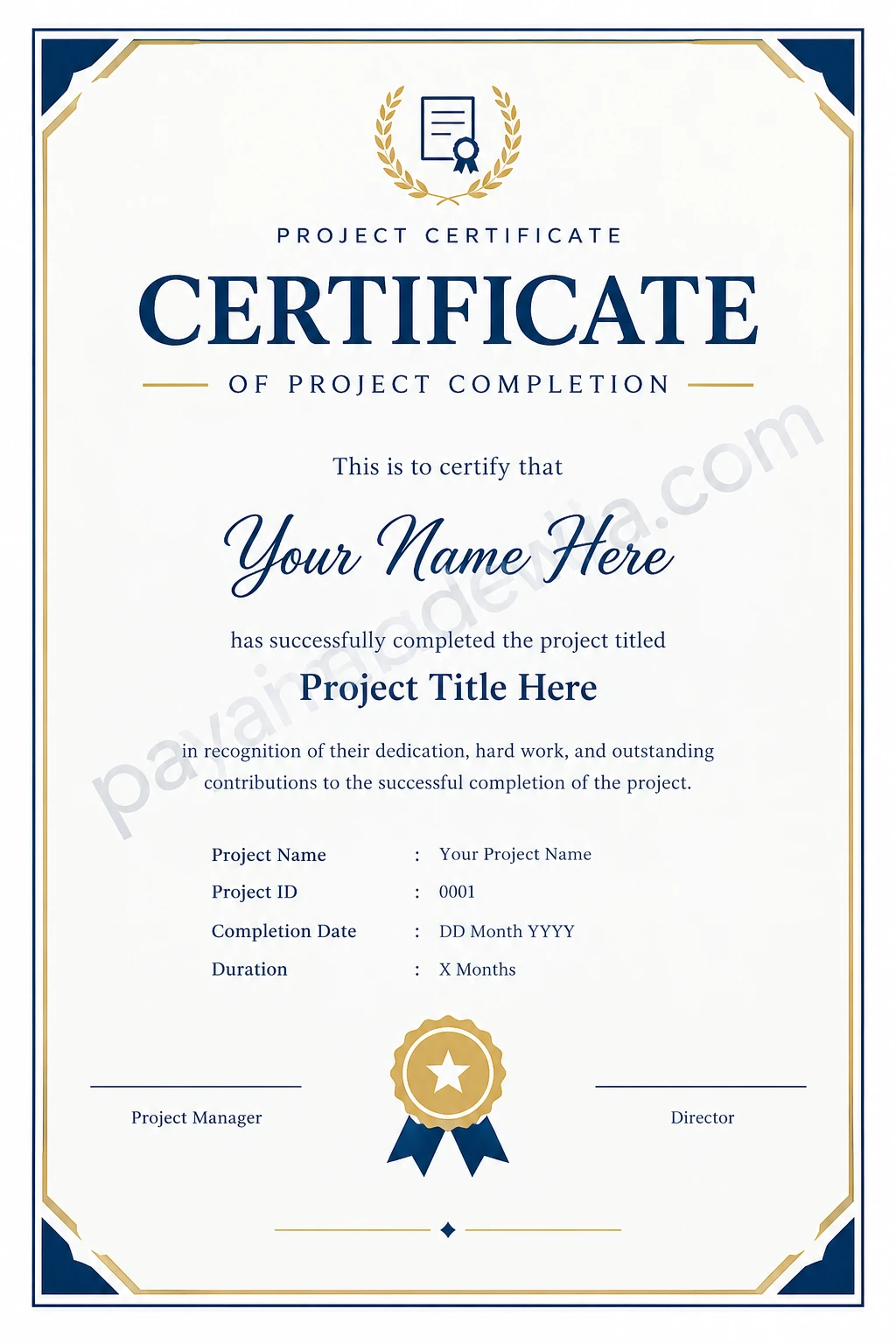
A printable project certificate template makes it easier to create a polished document without designing every element from scratch. The template below uses a clean white background, navy typography, gold decorative borders, and a central award emblem. These elements create a formal appearance suitable for many professional and educational projects.
Use the design as a starting point, then customize the recipient’s name, project title, completion date, and authorized signatures. For organizational use, you can also incorporate a company logo or adjust the colors to match your brand guidelines.
How to Create a Professional Project Certificate
You can create a project certificate using a word processor, presentation application, graphic design tool, or online certificate editor. Follow these steps to make the process straightforward.
Step 1: Define the Purpose
Decide whether the certificate recognizes project completion, participation, outstanding performance, leadership, or a specific contribution. The purpose determines the title and wording. A completion certificate should confirm that the required work was finished, while a participation certificate should focus on involvement.
Step 2: Select a Suitable Template
Choose a layout that fits the recipient and setting. A formal business project may benefit from a restrained design with neutral colors, while a school or creative project may suit a more colorful style. Make sure the template provides enough space for names, project details, and signatures.
Step 3: Add Accurate Information
Enter the recipient’s full name, project title, completion date, and issuing organization. Add any relevant reference number or project duration. Avoid including personal information that is unnecessary for the certificate’s purpose.
Step 4: Write Clear Certificate Wording
Use concise, professional language that describes the achievement accurately. Avoid exaggerated claims, especially when the certificate does not represent an accredited qualification. A short, specific statement is generally more effective than a long paragraph.
Step 5: Review the Design
Check font consistency, spacing, alignment, contrast, and readability. The recipient’s name and certificate title should be easy to identify at a glance. Decorative elements should support the content rather than compete with it.
Step 6: Proofread and Export
Verify all names, dates, project titles, and signatures before issuing the document. Save an editable master copy for future use and export a print-ready PDF when appropriate. If distributing a digital image, use a sufficiently high resolution to keep the text sharp.
Project Certificate Wording Examples
The wording should match the achievement being recognized. The following examples can be adapted to different situations.
Project Completion Certificate
“This certificate is presented to [Recipient Name] in recognition of successfully completing the [Project Name] project on [Completion Date]. This achievement reflects dedication, collaboration, and commitment to the project’s objectives.”
Project Participation Certificate
“This certificate recognizes [Recipient Name] for participating in the [Project Name] project and contributing time, effort, and ideas toward its successful completion.”
Outstanding Project Contribution Certificate
“This certificate is awarded to [Recipient Name] in recognition of outstanding contributions to the [Project Name] project. The recipient’s initiative, teamwork, and commitment helped support the project’s goals.”
Student Project Certificate
“This certificate is presented to [Student Name] for successfully completing [Project Title] as part of [Course or Program Name]. It recognizes the student’s effort, creativity, and application of the skills developed during the project.”
Replace every placeholder with verified information. If the project involved a team, clarify whether the certificate recognizes individual participation, collective completion, or a specific responsibility.
Tips for Choosing the Best Project Certificate Design
A good certificate should look professional and remain easy to read when printed or viewed on a screen. Keep these practical considerations in mind:
- Keep the layout simple: Use a clear visual hierarchy, balanced spacing, and limited decorative elements.
- Choose readable fonts: Use distinctive typography for the title and recipient’s name, but keep the supporting text easy to read.
- Use consistent colors: Match the palette to the organization or occasion. Navy, black, white, and gold are common choices for formal certificates.
- Check print dimensions: A4 and US Letter are common paper sizes. Confirm the intended size and orientation before printing.
- Maintain good contrast: Ensure that text remains legible against the background, including when printed in grayscale.
- Protect authenticity: Use logos, seals, and signatures only when authorized. Do not imply that a certificate has official accreditation unless that claim is accurate.
- Save a reusable version: Keep an editable template so future certificates can be prepared consistently.
Digital vs. Printable Project Certificates
Both digital and printed certificates can serve the same recognition purpose, but each format has practical advantages.
A printable project certificate is useful for award ceremonies, classroom presentations, workplace celebrations, and physical portfolios. It can be signed by hand and displayed in a frame. Before printing, review the margins, paper size, image quality, and final colors.
A digital certificate is convenient for remote teams, online courses, virtual project presentations, and electronic records. It can be distributed by email or stored in a digital portfolio. PDF is often suitable for sharing a consistent document, while an image format can work well for previews and web content.
For important professional records, consider adding a certificate reference number, a verification contact, or another appropriate verification method. A digital image alone does not guarantee authenticity.
Common Mistakes to Avoid
Even an attractive certificate can lose credibility if it contains inaccurate information or unclear wording. Avoid these common mistakes:
- Using the wrong recipient name or project completion date.
- Failing to identify the issuing organization.
- Using overly decorative fonts that make essential information difficult to read.
- Claiming professional accreditation or qualification without proper authorization.
- Stretching a low-resolution image until the text appears blurry.
- Leaving template placeholders, editing notes, or sample signatures in the final document.
- Using logos or signatures without permission.
A final review by the project manager or authorized issuer can help prevent these issues and ensure that the certificate accurately reflects the achievement.
Conclusion
A project certificate is a practical way to recognize completed work, document participation, and celebrate contributions in professional, educational, and community settings. By including accurate project details, clear certificate wording, and appropriate authorization, you can create a document that is both meaningful and professional.
Start with a suitable project certificate template, customize the design to match its purpose, and review every detail before issuing it. Whether you need a printable project completion certificate or a digital certificate for an online project, a thoughtful layout and accurate information will help make the recognition more valuable to its recipient.