A professional certificate is a valuable way to recognize skills, celebrate achievements, and document successful completion of a course or training program. Whether you are an educator, business owner, trainer, or course creator, a well-designed certificate can make your recognition feel more meaningful and professional.
However, creating a certificate from scratch can take time. You need to choose the right layout, select readable fonts, organize important information, and ensure the final design looks polished. Fortunately, a professional certificate template makes the process easier and faster.
In this guide, you will learn what a professional certificate is, what information it should include, how to choose an appropriate design, and how to customize a printable certificate for different purposes. You will also discover practical tips for creating a certificate that looks attractive and communicates achievement clearly.
What Is a Professional Certificate?
A professional certificate is a document that recognizes an individual’s successful completion of a course, training program, workshop, or other learning activity. Depending on the issuing organization, it may demonstrate knowledge, practical skills, professional development, or participation in a structured educational experience.
Organizations often use professional certificates to acknowledge employees, students, customers, and training participants. Individuals may also include relevant certificates in their resumes, portfolios, or professional profiles.
It is important to understand that a certificate does not automatically represent a professional license or an accredited qualification. Its meaning depends on the issuing organization, the requirements completed, and any applicable industry standards.
Common Uses for Professional Certificates
Professional certificates can serve many purposes across different industries. Common examples include:
- Employee training: Recognize employees who complete workplace training or professional development.
- Online courses: Reward learners who finish digital courses, tutorials, or educational programs.
- Workshops and seminars: Acknowledge participants who attend or complete organized learning activities.
- Business development: Recognize completed training in sales, customer service, leadership, or communication.
- Technical skills: Document learning in areas such as software, design, data analysis, or information technology.
- Personal development: Celebrate achievements in creative skills, language learning, and other educational pursuits.
Essential Elements of a Professional Certificate
A successful certificate combines an attractive design with clear, accurate information. Before printing or distributing your document, make sure it contains the details needed to identify the recipient and explain the achievement.
1. Certificate Title
The title should immediately communicate the document’s purpose. Examples include Professional Certificate, Certificate of Completion, Certificate of Achievement, and Certificate of Training. Choose wording that accurately reflects what the recipient has accomplished.
2. Recipient’s Full Name
The recipient’s name is one of the most important elements. Give it a prominent position and use a readable font. Before issuing the certificate, verify the spelling to prevent errors and unnecessary reprints.
3. Course or Program Name
Identify the course, workshop, training program, or skill area associated with the certificate. Specific wording helps readers understand what the recipient completed rather than leaving the achievement unclear.
4. Issuing Organization
Include the name of the company, school, training provider, or organization issuing the document. You may also add an authorized logo, provided you have permission to use it.
5. Date and Authorization
Add the completion date or issue date, depending on the certificate’s purpose. A signature from an authorized representative can provide additional context. For formal credentials, include a certificate identification number or verification link when appropriate.
Professional Certificate Template: Design Inspiration
A professional certificate template provides a ready-made structure that you can personalize for your organization or educational program. The right template saves time while helping maintain a consistent visual identity.
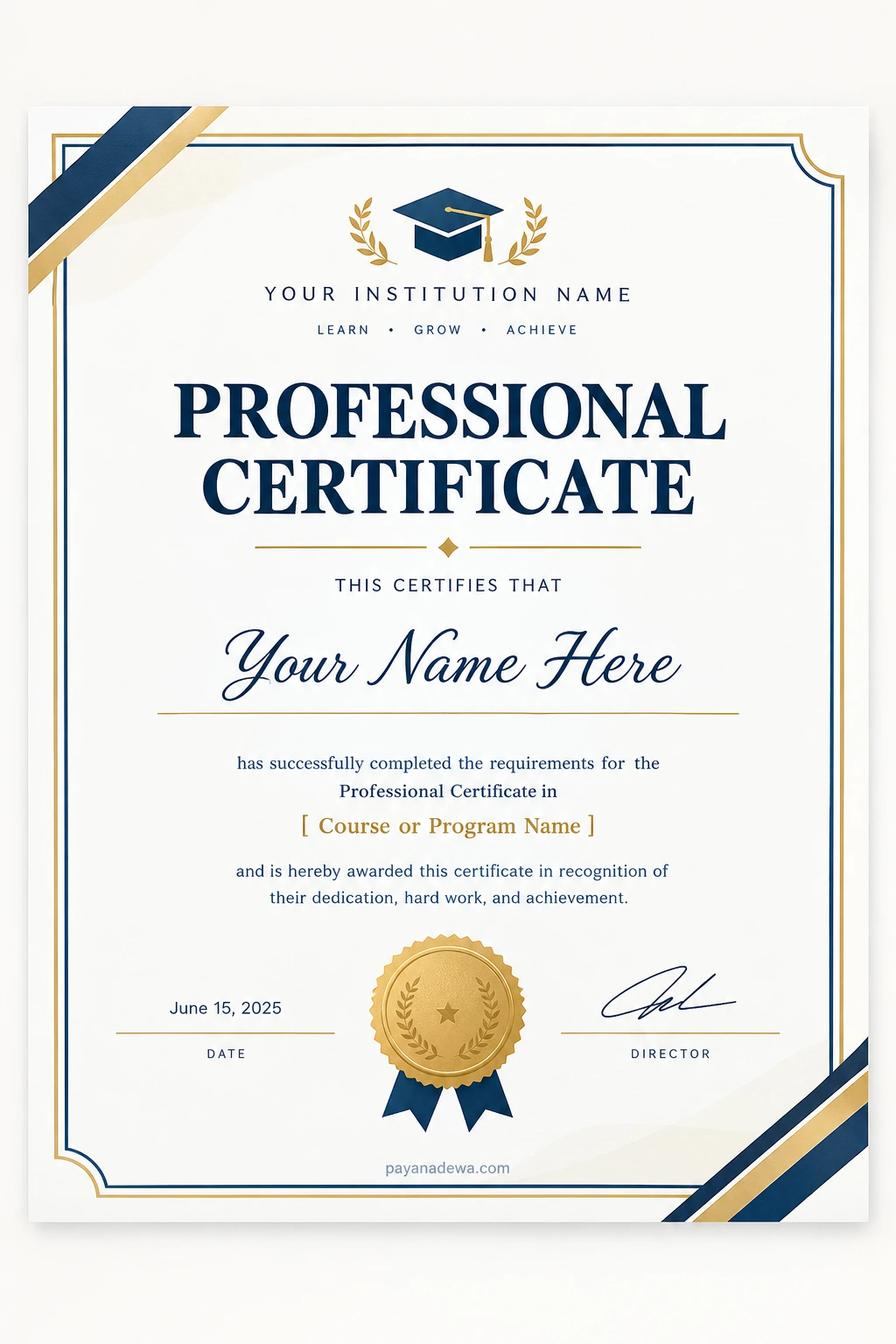
The following certificate design uses a clean white background, elegant navy borders, gold accents, and a prominent heading. These elements create a formal appearance without overwhelming the information that matters most.
Why This Certificate Design Works
Several design choices make this template suitable for a variety of professional settings.
- Clean layout: The generous spacing helps readers focus on the recipient’s name and achievement.
- Classic colors: Navy blue communicates formality, while gold adds a sense of distinction.
- Decorative seal: A medal-style emblem adds visual interest without replacing the actual details of the qualification.
- Clear hierarchy: The large title and centered recipient name make the certificate easy to scan.
- Customizable fields: The institution name, course title, date, and signature can be adjusted to suit different needs.
Remember that a decorative design does not establish accreditation or official recognition. Always describe the certificate’s status accurately.
How to Create a Professional Certificate
You do not need advanced graphic design skills to create an attractive certificate. By following a few straightforward steps, you can prepare a document that looks polished and is easy to read.
Step 1: Define the Purpose
First, decide why you are issuing the certificate. A certificate for an internal employee workshop may require different information from one issued for a paid online course or an academic training program.
Clarifying the purpose helps you select the appropriate title, wording, and level of formality.
Step 2: Choose a Suitable Template
Select a layout that matches your organization’s identity and the type of achievement being recognized. Minimalist designs work well for modern businesses, while traditional borders and metallic accents can suit formal recognition.
Next, check that the template leaves enough space for long names, course titles, dates, and signatures.
Step 3: Add Accurate Information
Replace every placeholder with the correct details. Include the recipient’s name, program title, issuing organization, and relevant dates. If you use a signature or logo, make sure it is authorized.
For certificates distributed in large numbers, consider using a spreadsheet and a document editor with mail-merge functionality. This approach can reduce repetitive work and make personalization more efficient.
Step 4: Customize the Visual Style
Use a consistent color palette and limit the number of fonts. A decorative font can work well for the recipient’s name, but the remaining text should be easy to read.
Keep decorative elements balanced. Borders, icons, and seals should support the information rather than compete with it.
Step 5: Review and Export
Before sharing the final document, proofread every field and check the alignment, spacing, and contrast. Then export the certificate in a suitable format.
- PDF: A practical choice for printing and distributing a consistent document layout.
- PNG or WEBP: Useful for digital previews and online presentation, depending on the platform.
- Editable document: Helpful when you need to revise details or produce certificates regularly.
Finally, print a test copy if the certificate will be distributed physically. Check that the borders are not cut off and that all text remains legible.
Tips for Making Your Certificate Look More Professional
Good design depends on more than decorative borders. Small improvements can make a certificate easier to understand and more suitable for professional use.
Prioritize Readability
Choose fonts that remain clear at the final print size. Use strong contrast between text and background, and avoid placing important information over complicated patterns.
Maintain Consistent Branding
Use your organization’s approved colors, logo, and typography when appropriate. Consistent branding helps recipients recognize the issuing organization and creates a unified appearance across multiple certificates.
Choose the Correct Paper Size
Landscape layouts are popular for traditional certificates because they provide ample horizontal space. However, portrait layouts may be more suitable for certain digital designs or specialized uses.
Before printing, confirm the intended paper size, page orientation, margins, and printer settings. These checks help prevent cropped borders and awkward spacing.
Use Honest and Specific Wording
State exactly what the recipient completed or achieved. For example, distinguish between attending a workshop and successfully completing an assessed training course. This makes the certificate more transparent and credible.
Protect Personal Information
If you publish certificate examples online, use sample names and fictional details unless you have permission to display real recipients’ information. For digital certificates, consider a verification method that does not expose unnecessary personal data.
Professional Certificate vs. Professional Certification
Although these terms sound similar, they can have different meanings. Understanding the distinction helps you choose the correct wording for your document.
Professional Certificate
A professional certificate commonly documents the completion of a course, training program, or educational activity. The requirements depend on the provider, and some programs may include examinations or practical assessments.
Professional Certification
A professional certification generally refers to a credential awarded by a certifying body after a person meets defined requirements. These may include examinations, experience, continuing education, or periodic renewal.
The terminology varies by industry and jurisdiction. Therefore, check the relevant provider’s rules before describing a credential as accredited, licensed, or officially recognized.
Where to Use a Professional Certificate Template
A customizable certificate can support a range of educational and business activities. For example, small businesses can recognize employee training, instructors can celebrate course completion, and workshop organizers can acknowledge participants.
Online educators may also provide downloadable certificates to learners who satisfy their course requirements. In corporate settings, certificates can document participation in professional development initiatives and internal training programs.
Regardless of the setting, the document should accurately represent the achievement and clearly identify the issuing organization. If the certificate is intended to meet a regulatory or industry requirement, confirm the applicable standards before using a generic template.
Frequently Asked Questions
Can I use a professional certificate template for free?
That depends on the template’s license and terms of use. Check whether personal use, commercial use, modification, and redistribution are permitted before using or sharing a design.
What size should a professional certificate be?
The appropriate size depends on your location, printer, and intended use. Common options include US Letter and A4 paper. Choose the page size before finalizing the layout to avoid unexpected cropping.
Can I create a professional certificate online?
Yes. Many graphic design tools and document editors let you customize a certificate by changing the text, colors, fonts, and branding. Review the export options to ensure the finished file meets your printing or digital distribution needs.
Does a professional certificate guarantee employment?
No. A certificate may demonstrate training or knowledge, but it does not guarantee a job, promotion, or professional license. Employers evaluate credentials alongside experience, demonstrated skills, and other relevant qualifications.
Conclusion
A professional certificate is an effective way to recognize learning, document training, and celebrate achievements. With a suitable template, you can create a polished document without spending unnecessary time building the design from the beginning.
Start by defining the purpose, selecting a readable layout, and adding accurate information. Then customize the colors and branding, review every detail, and export the certificate in the right format.
Whether you are creating certificates for employees, students, online learners, or workshop participants, a thoughtful design and honest wording will make the document more useful and meaningful. Choose a professional certificate template that fits your needs, personalize it carefully, and prepare a final version that is ready to share or print.