A half fold card is one of the easiest ways to create a personal greeting card at home. It has a simple design: one sheet of paper or cardstock is folded in half to create a front cover, a back cover, and two inside panels. Despite its simplicity, this format works for birthdays, holidays, thank-you notes, invitations, anniversaries, and many other occasions.
Using a half fold card template makes the process even easier. A template gives you a clear guide for the outside panels, inside message area, and center fold. You can print it, add your own artwork, and personalize the finished card without needing advanced design skills. Whether you prefer a clean printable layout or a colorful handmade design, this guide will help you choose the right paper, print accurately, and create a polished result.
What Is a Half Fold Card?
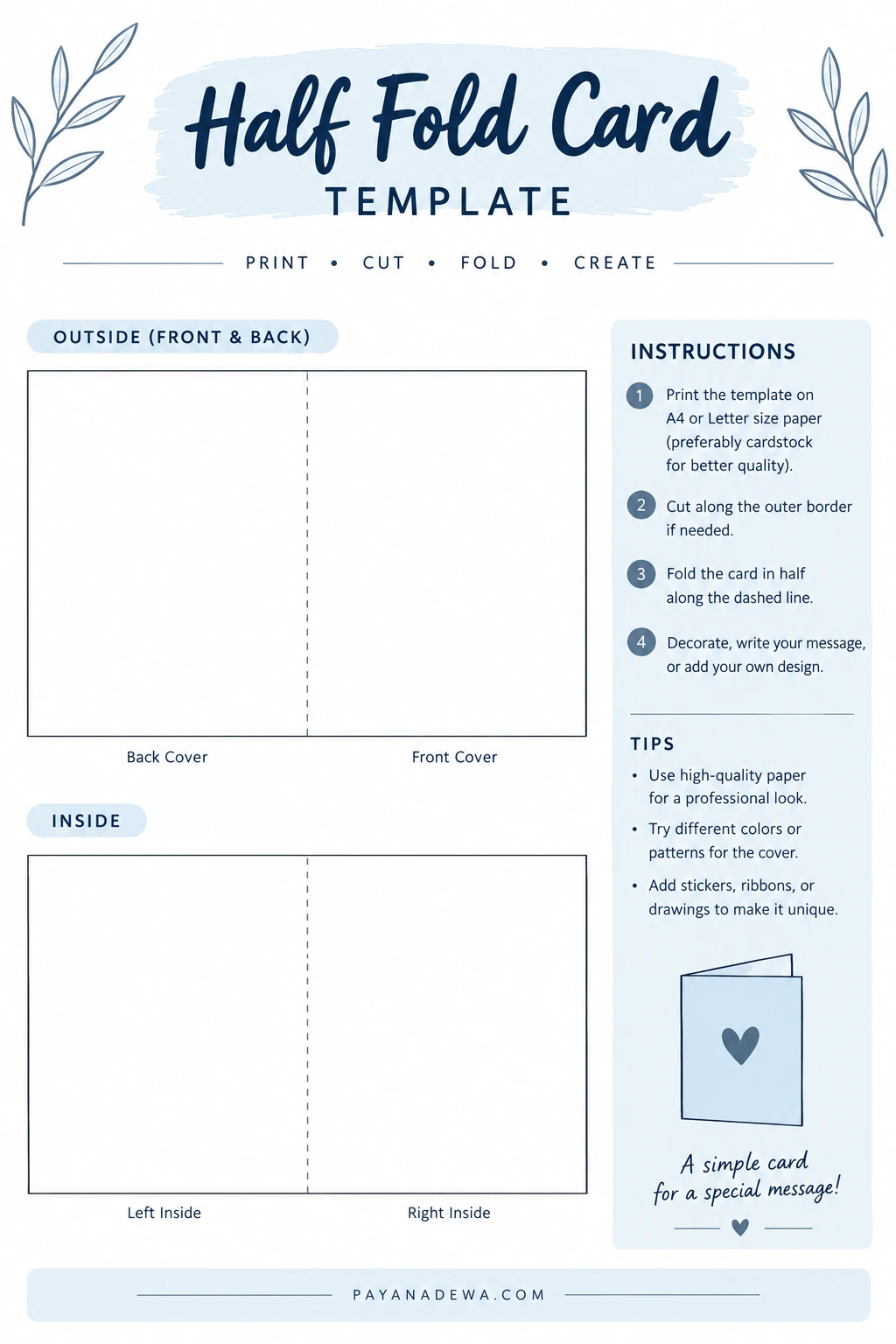
A half fold card is made by folding a flat sheet in half. The fold divides the sheet into two equal sections, creating four surfaces: the front cover, back cover, left inside panel, and right inside panel. The front usually carries a title, illustration, or greeting, while the inside provides room for a personal message.
This style is popular because it is practical and flexible. You can make a small note card or a larger greeting card, depending on the paper size and direction of the fold. It is also easy to decorate with photographs, drawings, stamps, stickers, or simple typography.
Common uses for half fold cards
- Birthday cards and celebration greetings
- Thank-you cards for friends, family, customers, or teachers
- Holiday and seasonal greeting cards
- Wedding, anniversary, and engagement messages
- Handmade invitations and event announcements
- Small business notes included with orders or gifts
Why Use a Half Fold Card Template?
A printable card template helps you plan the layout before you cut, fold, or decorate your paper. It can reduce guesswork and make repeated projects more consistent. For example, the template can show where the center fold belongs and which panel should become the front cover.
Templates are especially useful when you want a neat result but do not have professional design software. They also make a helpful starting point for children’s craft activities, classroom projects, and do-it-yourself stationery.
Benefits of a printable template
- Clear panel placement: See how the front, back, and inside sections relate to one another.
- Simple preparation: Print a guide instead of building the layout from scratch.
- Easy customization: Add your own colors, text, illustrations, or photographs.
- Consistent results: Reuse the same dimensions for a set of matching cards.
- Beginner-friendly crafting: Follow the fold line without needing specialist tools.
A template is a guide rather than a finished design. Check the dimensions and printer settings before making several copies, especially if your card needs to fit a particular envelope.
How to Choose the Right Paper and Cardstock
Paper choice affects how your card looks, feels, folds, and prints. Standard printer paper is fine for testing a layout. For a sturdier greeting card, however, cardstock usually gives the finished piece a more substantial feel.
Paper weight and finish
Choose a paper weight that your printer can handle. Medium-weight cardstock is often a useful starting point, but the supported thickness varies by printer. Check the printer manual before loading heavy paper. Matte cardstock is easy to write on and works well for most designs. Glossy stock can make photos and bright colors stand out, although some pens may smear on its surface.
If the card will be mailed, consider the combined weight of the cardstock, decorations, and envelope. Raised embellishments can also affect how easily the card fits through postal sorting equipment.
Choose a size before designing
Common paper sizes include US Letter and A4. The final card dimensions depend on the sheet size, orientation, and fold direction. Before printing, decide whether you want a portrait or landscape card. Then confirm that the folded card fits the envelope you plan to use.
How to Print and Fold a Half Fold Card
Follow these steps for a clean, even fold. If your design includes text or artwork, print a test copy on ordinary paper first.
- 1. Open the template. Check that the layout matches your intended paper size.
- 2. Set the print options. Select the correct paper size and orientation. Use actual size or 100% scale when the template requires exact dimensions; avoid “fit to page” if it changes the measurements.
- 3. Print a test sheet. Confirm that the panels and fold guide appear in the expected positions.
- 4. Print on your chosen cardstock. Follow your printer’s loading instructions and select an appropriate media setting if available.
- 5. Trim the outer edge if needed. Use a ruler and craft knife only on a safe cutting surface, or use scissors carefully.
- 6. Mark the center fold. Align a ruler with the fold guide. Lightly score the line with a suitable scoring tool if the cardstock is thick.
- 7. Fold and press. Bring the two halves together, align the edges, and press the crease gently with a bone folder or the back of a clean ruler.
- 8. Add your message and decorations. Let ink, paint, or glue dry before closing the card.
For the neatest fold, avoid forcing thick cardstock into a sharp crease without scoring it first. Scoring compresses the paper fibers and can help reduce cracking along the fold.
How to Customize Your Half Fold Card
The best card designs balance decoration with readable space. Start with one main visual element, then add smaller details that support it. A simple layout often feels more thoughtful than a page crowded with competing colors and graphics.
Design the front cover
Use the front cover to set the tone. A short greeting, a small illustration, a favorite photograph, or a minimal pattern can all work well. Keep important text away from the edges so it does not appear cramped after trimming or folding.
Make the inside message personal
Leave enough blank space for handwriting. If you are printing the message, choose a legible font and a comfortable text size. A personal detail, shared memory, or sincere sentence can make the card feel more meaningful than a long generic greeting.
Add decorations thoughtfully
- Use two or three complementary colors for a coordinated look.
- Combine a clear heading with plenty of white space.
- Add a photo or illustration that matches the occasion.
- Test markers and pens on a spare piece of the same cardstock.
- Keep bulky embellishments away from the fold and envelope edges.
Common Printing and Folding Problems
The design prints too small or too large
Check the paper-size setting and scaling option. Printer dialogs may automatically shrink a design to fit printable margins. If exact dimensions matter, compare a printed measurement with the template and adjust the settings before printing again.
The fold looks crooked
First, align the two outer edges on a flat surface. Then make a light crease at the center before pressing firmly. A ruler or scoring board can help you keep the fold straight. For multiple cards, use the same method each time.
The cardstock cracks at the crease
Thick or coated stock may crack when folded sharply. Score the fold first and test the technique on a scrap piece. Folding with the printed side positioned appropriately for the paper’s grain may also improve the finish, depending on the stock.
The ink smudges
Allow the print to dry fully before handling or folding the card. Check that the paper type selected in the printer settings matches the material you are using. If smudging continues, try a compatible paper or a different print-quality setting.
Tips for a Professional-Looking Result
A few small checks can make a homemade card look carefully finished. Keep the edges clean, make the fold precise, and review the design before printing the final copy.
- Print one draft before using expensive cardstock.
- Check spelling, dates, names, and punctuation carefully.
- Keep key text and artwork inside a comfortable margin.
- Use high-resolution images to avoid blurry printing.
- Choose an envelope before finalizing the card dimensions.
- Store finished cards flat and away from moisture or direct sunlight.
If you are making a batch, prepare one complete sample first. This lets you confirm the print settings, fold direction, and envelope fit before producing the rest.
Frequently Asked Questions
Can I make a half fold card with regular printer paper?
Yes. Regular paper works for drafts, lightweight notes, and simple activities. For a sturdier greeting card, use cardstock that is compatible with your printer.
Should I print the template on both sides?
That depends on the template. Some guides show the outside and inside as separate layouts, while others are designed for duplex printing. Check the instructions and test the page order on plain paper before printing on cardstock.
How do I make the fold look crisp?
Align the edges, score the center line when appropriate, and press the crease with a bone folder or a similar smooth tool. Avoid dragging a sharp blade across the cardstock unless you are using a proper scoring tool and safe technique.
Can I use the same template for different occasions?
Absolutely. Keep the basic fold and panel layout, then change the colors, greeting, illustrations, or inside message for birthdays, holidays, thank-you notes, and other events.
Conclusion
A half fold card is a simple, versatile way to make personalized stationery at home. With a clear printable template, suitable cardstock, and careful folding, you can create a card that looks neat without complicated equipment. Start with a test print, confirm the paper and envelope sizes, and customize the front and inside to suit your occasion. A few thoughtful details can turn a basic folded sheet into a keepsake that feels personal and special.