Creating a clear and professional bill does not have to be complicated. Whether you run a small business, work as a freelancer, sell products, or provide services, an organized bill helps you communicate exactly what a customer needs to pay. A well-designed bill can include customer information, products or services, quantities, prices, taxes, discounts, payment terms, and the final amount due.
A practical bill template makes this process easier by providing a ready-to-use structure. Instead of creating a new document from scratch every time you need to request payment, you can simply enter the relevant information, review the totals, and send or print the completed document. This saves time while helping your business maintain consistent and professional records.
Whether you need a printable bill template for everyday transactions or a digital document for electronic payments, choosing the right format can make billing more efficient. The following guide explains what a bill should contain, how to use a template effectively, and how to create a document that is easy for both businesses and customers to understand.
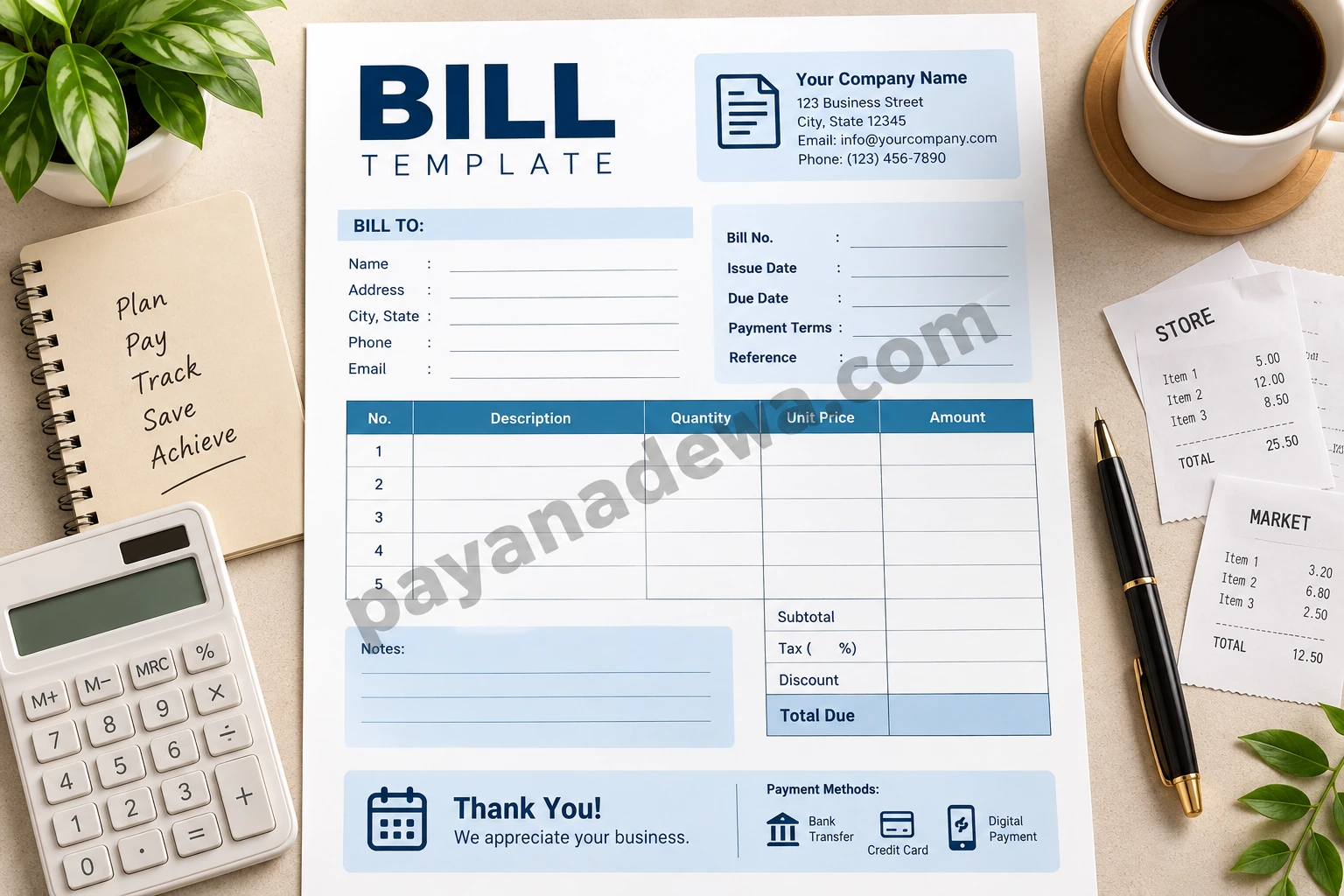
What Is a Bill Template?
A bill template is a pre-designed document used to record charges for products or services provided to a customer. It gives you a consistent layout where important billing information can be entered quickly. Depending on the type of transaction, a bill may function similarly to an invoice, receipt, statement, or payment request.
The main advantage of using a template is consistency. Every bill can follow the same structure, making your documents easier to prepare, review, store, and understand. This is especially useful for businesses that send bills regularly to multiple customers.
Bill Template vs. Invoice
The terms bill and invoice are often used interchangeably, although their use can vary by country, industry, and business practice. In general, an invoice is commonly issued by a seller to request payment for goods or services, while a bill is often the document a customer receives showing what they owe.
For everyday business use, the most important consideration is not the name of the document but whether it clearly communicates the transaction, amount due, payment deadline, and payment instructions.
What Should a Professional Bill Include?
A useful bill should contain enough information to eliminate confusion. A simple design can still be professional when all essential details are presented clearly.
- Business information: Include the business name, address, phone number, email address, and other relevant contact details.
- Customer information: Add the customer’s name, billing address, email, or other identifying information when appropriate.
- Bill number: Use a unique reference number to make tracking and recordkeeping easier.
- Issue date: Clearly state when the bill was created.
- Due date: Specify when payment should be completed.
- Itemized charges: List each product or service, quantity, unit price, and amount.
- Subtotal: Show the amount before taxes, discounts, or additional charges.
- Taxes and fees: Include applicable taxes, service charges, or other costs.
- Discounts: Clearly identify any discount applied to the transaction.
- Total amount due: Make the final payment amount easy to find.
- Payment instructions: Explain how the customer can pay.
- Notes: Add useful terms, delivery information, thank-you messages, or other relevant details.
Benefits of Using a Bill Template
Using a ready-made billing format can improve the way you manage routine financial documents. Instead of repeatedly designing a new document, you can start with an established structure and customize only the information that changes.
Save Time on Repetitive Billing Tasks
A template reduces the amount of formatting required for each transaction. Once your standard business details are entered, you can focus on the customer information, products, services, and amounts.
Create Consistent Business Documents
Consistency can make a small business appear more organized. Using the same layout, terminology, and information structure across multiple bills creates a recognizable documentation process.
Reduce Missing Information
A structured template serves as a checklist. When the document includes dedicated areas for dates, customer details, item descriptions, totals, and payment instructions, you are less likely to forget an important field.
Make Recordkeeping Easier
Organized bills can help businesses maintain transaction records. A unique bill number, date, customer name, and total amount make individual documents easier to locate when reviewing financial activity later.
How to Use a Bill Template
Using a bill template is straightforward, but accuracy is important. A small mistake in a price, quantity, tax, or total can create unnecessary payment issues.
1. Add Your Business Details
Begin by entering your business name and contact information. If you regularly use the same template, save a master copy containing your standard business details. Keep a separate blank version so the original template remains unchanged.
2. Enter Customer Information
Add the customer’s name and relevant contact details. For business customers, include the company name and billing information when required.
3. Add Products or Services
List every charge separately. Use concise descriptions so the customer can easily understand what was purchased or which service was provided. Include quantities and unit prices whenever applicable.
4. Calculate the Total
Review the subtotal before adding taxes, fees, or discounts. Then calculate the final amount due. If you use a spreadsheet or billing application, formulas can reduce manual calculation errors.
5. Add Payment Terms
Clearly state the payment deadline and accepted payment methods. For example, you might specify bank transfer, card payment, digital payment, or another method supported by your business.
6. Review Before Sending
Check names, dates, item descriptions, quantities, prices, tax calculations, and payment details. A final review takes only a few moments but can prevent avoidable billing disputes.
Tips for Creating a Better Bill
A professional document does not need excessive decoration. In most cases, clarity and usability are more important than complex visual elements.
- Keep the layout clean: Use sufficient spacing and clear headings.
- Highlight the total: Make the amount due easy to identify.
- Use readable typography: Avoid overly decorative fonts that make financial information difficult to read.
- Be specific: Describe products and services clearly.
- Use consistent numbering: Maintain a logical bill numbering system.
- State payment terms clearly: Avoid vague deadlines or payment instructions.
- Check calculations: Verify every amount before delivering the document.
- Keep copies: Store completed bills securely for future reference.
Printable Bill Template or Digital Bill?
The best format depends on how your business operates. A printable bill template can be useful for in-person transactions, physical records, service businesses, and situations where customers prefer paper documentation.
A digital bill, meanwhile, can be sent by email or another electronic channel. Digital documents are convenient for remote transactions and can be stored in folders or cloud-based systems for easier access.
Some businesses benefit from using both formats. A printable template can serve as a physical backup, while a digital version can make sending and storing documents more convenient.
Common Mistakes to Avoid When Preparing a Bill
Even a simple bill can become confusing when important information is missing or presented inconsistently. Avoiding common mistakes can improve the payment experience for customers.
- Leaving out the issue date or payment deadline
- Using unclear product or service descriptions
- Failing to show individual charges
- Adding incorrect quantities or unit prices
- Forgetting applicable taxes or fees
- Showing a total that does not match the itemized charges
- Providing incomplete payment instructions
- Using inconsistent bill numbers
- Sending a document without reviewing customer information
Who Can Use a Bill Template?
A flexible bill template can work for many types of users. Small business owners can use it for customer transactions, while freelancers can use it to document professional services. Retailers, contractors, consultants, tutors, repair providers, and other service professionals can also adapt the format to their needs.
The template can be customized according to the transaction. A service provider might emphasize labor hours and service descriptions, while a retailer may focus on product names, quantities, unit prices, and applicable taxes.
Make Your Billing Process More Efficient
Once you have a reliable template, consider creating a simple workflow around it. Keep a master template, assign sequential bill numbers, save completed documents with consistent filenames, and maintain organized records.
For example, a filename could include the year, bill number, and customer name. This makes it easier to search for previous transactions without opening every document individually.
You can also create separate versions for different situations, such as a service bill, product bill, recurring payment bill, or simple printable bill. Keeping the structure consistent while adapting the details can save additional time.
Conclusion
A well-designed Bill Template provides a practical way to organize charges, communicate payment information, and maintain consistent business records. By including essential details such as customer information, itemized charges, dates, payment terms, taxes, discounts, and the total amount due, you can create documents that are clear and easy to understand.
The key is to prioritize accuracy and simplicity. Use a consistent format, review every calculation, provide clear payment instructions, and keep copies of completed documents. Whether you need a printable document or a digital billing format, a carefully organized template can make routine billing faster and more professional.