Printed brochures can still play an important role in local marketing, trade shows, events, retail promotions, and direct customer outreach. The challenge is not always creating the brochure itself. The bigger challenge is knowing where brochures were distributed, how many were handed out, which locations performed best, and whether those efforts actually generated leads or conversions. A Marketing Campaign Brochure Tracker Template provides a simple way to organize this information and turn offline promotional activity into measurable marketing data.
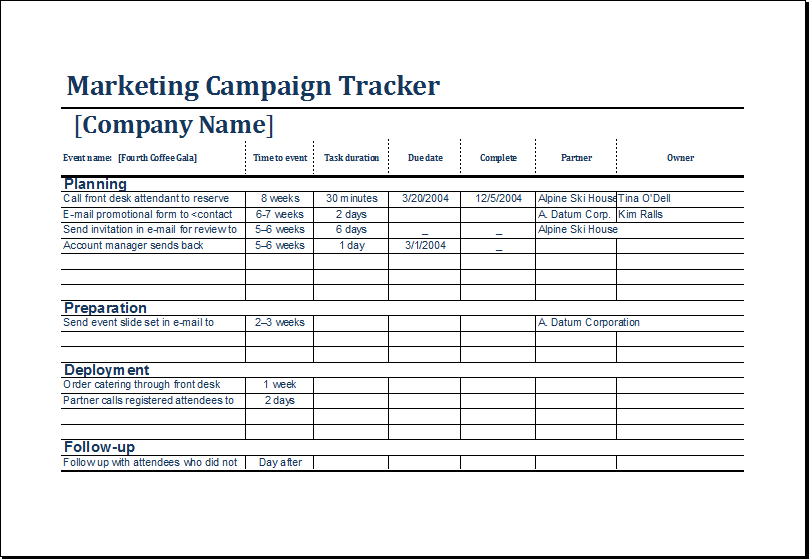
Without a tracking system, brochure distribution can quickly become difficult to manage. Teams may remember approximate quantities, but important details such as dates, locations, response rates, and campaign notes can easily be forgotten. A structured tracker creates one central record that helps marketers monitor distribution, evaluate results, and make better decisions for future campaigns.
What Is a Marketing Campaign Brochure Tracker Template?
A Marketing Campaign Brochure Tracker Template is a pre-designed document or spreadsheet used to record the distribution and performance of brochures during a marketing campaign. The source file describes it as a systematic way to track information such as distribution location, date, quantity distributed, response rate, and notes.
The basic idea is straightforward: instead of treating every brochure distribution as an isolated activity, marketers record each activity in a consistent format. Over time, those records create a useful picture of which distribution channels and locations are producing the strongest results.
Why Use a Brochure Distribution Tracker?
Brochure marketing can be effective, but physical promotional materials are more difficult to measure than many digital campaigns. A tracker bridges that measurement gap by giving marketers a practical method for recording campaign activity and comparing outcomes.
The source identifies four major benefits: organization, efficiency, analysis, and improvement. Keeping information in one place makes campaign management easier, while performance data can reveal opportunities to improve future brochure distribution.
- Stay organized: Keep distribution information in one central record.
- Save time: Use a ready-made structure instead of building a tracking system from scratch.
- Measure performance: Compare response rates and leads across different locations.
- Improve future campaigns: Use previous results to refine distribution strategies.
- Support decision-making: Focus resources on channels that demonstrate stronger results.

Key Information to Include in Your Tracker
A useful marketing campaign tracking spreadsheet should capture enough information to explain both what happened and what happened afterward. The original sample tracker uses several core fields that provide a strong foundation for a campaign dashboard.
Distribution Location
Record exactly where brochures were distributed. This could include a shopping mall, retail store, trade show, community event, business district, partner location, or another promotional venue.
Date
Recording the distribution date allows you to compare results over time and identify whether specific periods or events generate stronger engagement.
Number of Brochures Distributed
Quantity is essential for calculating performance. Recording how many brochures were delivered at each location makes it possible to compare distribution volume against responses or conversions.
Response Rate
Response rate helps show whether brochure distribution generated meaningful interest. Depending on the campaign, a response could be a phone inquiry, website visit, QR code scan, form submission, store visit, appointment, or lead.
Notes and Comments
Do not overlook qualitative information. Notes can explain why one location performed differently from another. Traffic levels, audience quality, weather, event type, staff availability, or promotional timing may all affect results.

How to Use a Marketing Campaign Brochure Tracker Template
Getting started does not require complicated software. The source recommends downloading or creating a tracker using a spreadsheet application such as Microsoft Excel or Google Sheets, customizing the structure, recording distribution information, tracking responses, and then analyzing the results.
Step 1: Define the Campaign
Start by identifying the campaign name, objective, target audience, campaign period, and primary offer. Knowing the goal makes it easier to determine which metrics should be tracked.
Step 2: Customize the Template
Add or remove columns according to your campaign. A local business may need location and foot-traffic information, while a trade show campaign may require event name, booth number, attendee estimates, and lead counts.
Step 3: Record Distribution Data
Enter information as soon as brochures are distributed. Waiting until the end of a campaign increases the risk of missing or inaccurate data.
Step 4: Track Responses
Record leads and conversions associated with each distribution source. Unique QR codes, landing page URLs, promotional codes, or dedicated phone numbers can make attribution easier.
Step 5: Analyze the Results
Compare locations and distribution methods to determine which approaches generated the strongest response. The original template recommends using collected data to identify successful locations and strategies and inform future campaigns.
Turn Brochure Distribution Into Measurable Marketing
One of the most important improvements you can make is connecting physical brochures to measurable actions. A brochure itself does not automatically tell you whether someone became interested. You need a mechanism that connects the printed material to a response.
- QR codes: Send readers to a campaign-specific landing page.
- Unique promotional codes: Use different codes for different locations.
- Dedicated URLs: Create separate landing pages for major distribution channels.
- Phone tracking: Use campaign-specific contact numbers when appropriate.
- Lead forms: Ask prospects how they discovered the business.
- Redemption offers: Track coupons or special promotions connected to the brochure.
These methods make it easier to move from simply counting brochures to measuring actual marketing outcomes.
Example of a Brochure Tracking System
Imagine a company distributes brochures through three channels: a shopping mall, a trade show, and a local community event. The tracker can record the number distributed and the resulting response rate for each location.
The sample data in the source illustrates this approach: a shopping mall distribution records 500 brochures and a 10% response rate, a trade show records 1,000 brochures and a 20% response rate, while a local community event records 250 brochures and a 5% response rate.
Even a simple comparison like this can reveal useful patterns. A marketer might investigate why the trade show produced stronger engagement and whether similar audiences or events should receive greater attention in future campaigns.

How to Improve Brochure Campaign Tracking
A tracker becomes more valuable when the information is accurate and consistent. Establish a simple process for everyone involved in brochure distribution so that different team members record information in the same way.
- Update regularly: Record data daily or weekly depending on campaign activity.
- Use consistent naming: Avoid recording the same location under multiple names.
- Track costs: Add printing, transportation, staffing, and distribution costs when useful.
- Measure conversions: Go beyond responses and identify how many leads become customers.
- Add campaign notes: Record circumstances that may explain unusual results.
The source recommends regular updates so the information remains accurate and current.
Can the Template Track Digital Brochures?
Although the tracker is primarily designed around physical brochure distribution, its structure can be adapted for digital campaigns. Additional columns can be added for email open rates, website clicks, downloads, landing-page visits, or other digital engagement metrics.
This flexibility makes the template useful as a broader campaign tracking framework. For example, a business could maintain separate tabs for printed brochures, downloadable PDFs, email promotions, and event-based campaigns while keeping the measurement principles consistent.
Common Mistakes to Avoid
Tracking is only useful when the information is reliable. Avoid creating a spreadsheet that contains incomplete data or metrics that cannot be connected to business outcomes.
- Tracking quantity without results: Distribution numbers alone do not show campaign effectiveness.
- Updating too late: Delayed data entry can lead to forgotten or inaccurate information.
- Using inconsistent categories: Standardize location names and campaign labels.
- Ignoring lead quality: A large number of responses is not necessarily better if the leads are poor quality.
- Never reviewing the data: A tracker should lead to decisions and improvements, not simply store information.
Best Practices for Better Campaign Decisions
At the end of each campaign period, review the tracker and identify the strongest and weakest distribution sources. Look for patterns rather than focusing on a single number.
Ask questions such as: Which locations reached the right audience? Which events generated qualified leads? Where was brochure volume high but response low? Which offers produced the most conversions? What distribution costs produced the best return?
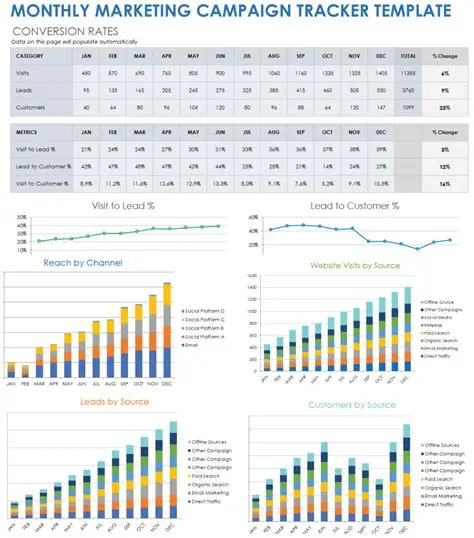
These questions turn a basic brochure log into a useful marketing performance tool. Over multiple campaigns, the accumulated data can help your team make more informed decisions about where to distribute materials and how to allocate marketing resources.
Conclusion
A Marketing Campaign Brochure Tracker Template provides a simple but effective way to organize brochure distribution and measure campaign performance. By recording locations, dates, quantities, response rates, and notes, marketers can replace guesswork with structured information.
The real value of a tracker comes from what happens after the data is collected. Analyze the results, identify high-performing locations, investigate weak response rates, connect brochures to measurable actions, and use those insights to improve future campaigns. Whether you manage a local promotion, trade show campaign, retail initiative, or broader marketing program, a consistent tracking system can help turn printed promotional materials into a more measurable and strategically useful marketing channel.