A well-written CV can make a significant difference when applying for a job. It introduces your professional background, highlights your qualifications, and helps employers understand why you are a suitable candidate. Whether you are a recent graduate, an experienced professional, or someone changing careers, creating a strong CV is an important step toward finding the right opportunity.
However, writing an effective CV involves more than listing your previous jobs and educational qualifications. You need to organize your information clearly, highlight relevant achievements, and present your experience in a professional format. A good CV should be easy to read, relevant to the position, and tailored to the employer’s expectations.
In this guide, you will learn what a CV is, how to structure one, what information to include, and how to create a professional CV that helps you stand out in today’s competitive job market.
What Is a CV?
CV stands for Curriculum Vitae, a document that summarizes your professional background, education, skills, work experience, and achievements. Employers use it to evaluate whether your qualifications match the requirements of a particular position.
A CV provides a clear overview of your career history and professional abilities. It helps recruiters understand your experience before deciding whether to invite you for an interview.
The term CV can have slightly different meanings depending on the country. In the United Kingdom and many other countries, a CV is commonly used for general job applications. In the United States, a resume is usually shorter and focuses on experience relevant to a specific job, while a CV is often more detailed and used in academic or research careers.
What Should a Professional CV Include?
A professional CV should contain the most important information employers need to assess your suitability. Although the exact format may vary depending on your industry and experience, several sections are commonly included.
1. Contact Information
Start your CV with accurate contact details so recruiters can reach you easily. Place this information near the top of the document.
- Full name.
- Professional email address.
- Phone number with the correct country code.
- City and country of residence.
- LinkedIn profile or professional portfolio, if relevant.
Use a professional email address and double-check your contact information. Avoid including unnecessary personal details such as marital status, religion, or identification numbers unless they are specifically required and appropriate in your location.
2. Professional Summary
A professional summary is a short introduction that explains who you are, what you do, and what you can offer an employer. It should highlight your most relevant experience, strengths, and career goals.
For example:
“Motivated marketing professional with three years of experience in digital marketing, social media management, and content development. Skilled in creating engaging campaigns, analyzing performance data, and supporting business growth through effective online strategies.”
Keep your summary concise and specific. Whenever possible, connect your strengths to the requirements of the job you want.
3. Work Experience
Your work experience section shows employers what you have done in previous positions. List your most recent job first, followed by earlier roles.
For each position, include:
- Job title.
- Company or organization name.
- Employment dates.
- Location, when relevant.
- Main responsibilities and measurable achievements.
Rather than describing every daily task, focus on responsibilities and results that demonstrate your value.
For example, instead of writing “Responsible for social media accounts,” you could write “Managed three social media platforms and increased audience engagement by 35% over six months.”
Use action verbs such as managed, developed, coordinated, improved, designed, and achieved to make your experience more compelling.
4. Education and Qualifications
Include your academic background, relevant qualifications, and professional certifications. Start with your highest or most recent qualification.
- Degree or qualification title.
- Name of school, college, or university.
- Graduation year or attendance dates.
- Relevant academic achievements, when useful.
- Professional certifications or training courses.
If you are a recent graduate, you can place your education section before your work experience, especially when your academic background is more relevant than your employment history.
5. Skills
The skills section gives recruiters a quick overview of your abilities. Include a combination of technical skills and transferable skills that match the job description.
Examples of technical skills include:
- Microsoft Office and Google Workspace.
- Graphic design and video editing.
- Programming and data analysis.
- Digital marketing and SEO.
- Project management software.
Examples of transferable skills include communication, teamwork, problem-solving, time management, leadership, and adaptability.
Choose skills you can genuinely demonstrate through your experience or achievements. A focused list is more effective than including every ability you have ever used.
6. Additional Information
Depending on your background and the position, you may include additional sections to strengthen your application.
- Languages and proficiency levels.
- Volunteer experience.
- Professional memberships.
- Publications and research.
- Awards and achievements.
- Relevant personal projects.
Only include information that adds value to your application. Keep your CV focused on the position you are targeting.
How to Write a CV Step by Step
Creating a professional CV becomes easier when you follow a clear process. Use these practical steps to organize your information and build a document that communicates your strengths effectively.
Step 1: Understand the Job Description
Before writing your CV, carefully read the job advertisement. Identify the required qualifications, responsibilities, experience, and skills.
Make a list of the most important requirements. Then compare them with your own background. This helps you decide which achievements and abilities deserve the most attention.
Step 2: Choose the Right CV Format
Your CV format should reflect your experience and career goals. Three common formats are worth considering.
- Reverse chronological CV: Presents your most recent work experience first. It is suitable for candidates with a consistent employment history.
- Functional CV: Focuses on skills and abilities rather than employment dates. It can be useful for career changers or candidates with employment gaps.
- Combination CV: Highlights both professional skills and work experience. It works well for applicants with diverse qualifications.
For most traditional job applications, a reverse chronological format is a practical starting point because recruiters can quickly understand your career progression.
Step 3: Write Clear and Relevant Content
Use simple language and concise sentences. Each section should provide useful information without unnecessary explanations.
Whenever possible, include measurable results. Numbers, percentages, project outcomes, and other specific achievements help demonstrate your contribution.
Step 4: Make the Layout Easy to Read
A clean CV design improves readability and creates a professional first impression. Use consistent headings, balanced spacing, and an easy-to-read font.
Consider these formatting recommendations:
- Use professional fonts such as Arial, Calibri, or Aptos.
- Choose a readable font size, usually around 10–12 points for body text.
- Keep heading styles consistent throughout the document.
- Use bullet points to organize responsibilities and achievements.
- Leave sufficient white space between sections.
- Use colors sparingly and maintain good contrast.
For many standard job applications, a CV of one or two pages is a useful target. However, academic and senior professional CVs may require additional pages.
Step 5: Review and Proofread
Before sending your CV, check spelling, grammar, dates, job titles, and contact information. Make sure your formatting remains consistent when the document is opened on another device.
Save a final copy as a PDF when the employer accepts that format. Also keep an editable Word document so you can update your CV for future applications.
Choosing the Best CV Template
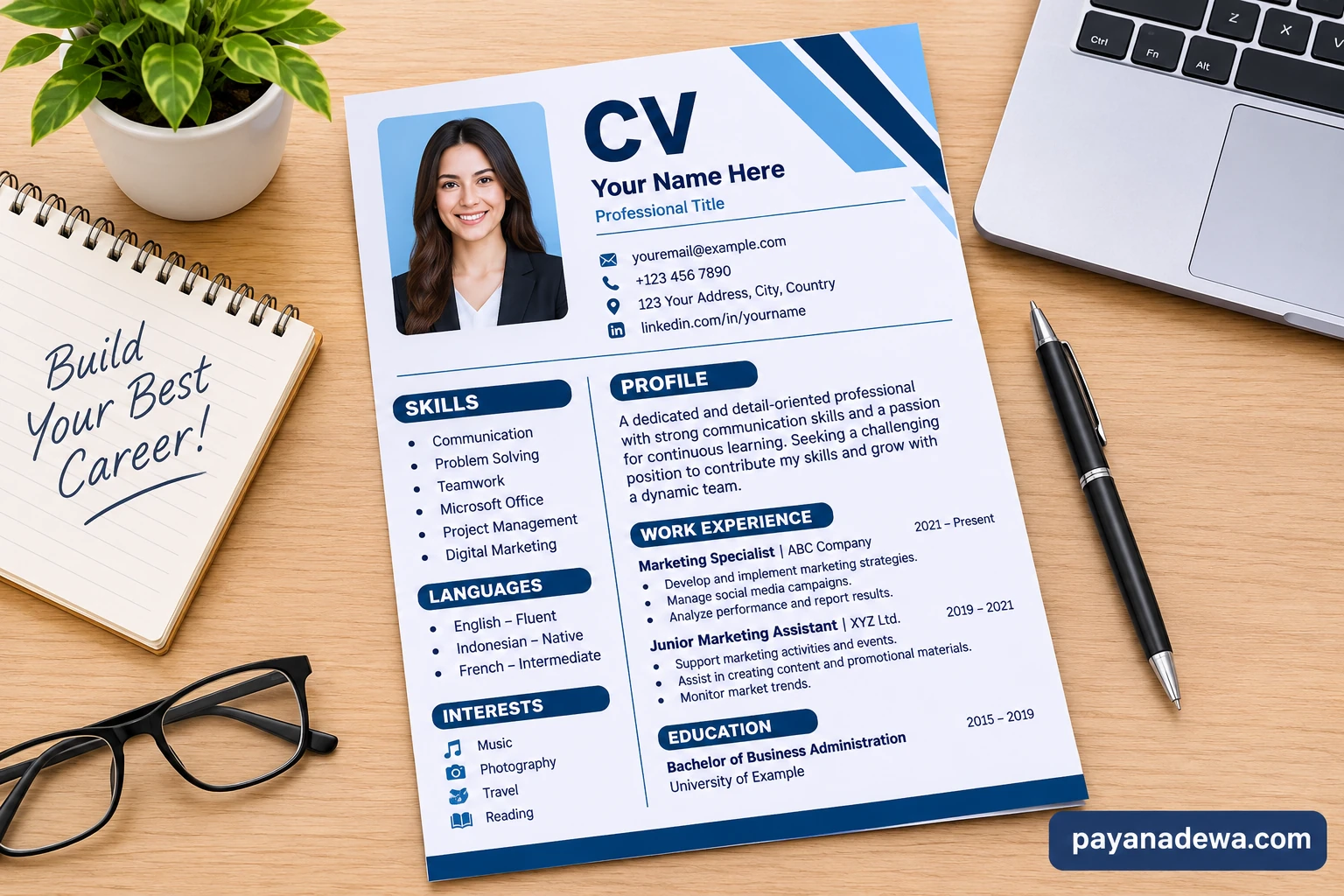
A good CV template saves time and provides a structured layout for presenting your professional information. However, choosing a design should not be based on appearance alone.
The best CV template combines a professional appearance with clear organization and practical functionality.
When selecting a template, look for these features:
- Simple structure: Each section should be easy to identify.
- Readable typography: Text should remain clear on screens and printed pages.
- Professional appearance: Avoid excessive graphics, decorative elements, and distracting colors.
- Editable sections: You should be able to customize the content easily.
- ATS-friendly formatting: Prefer straightforward layouts that applicant tracking systems can read.
A two-column CV can look attractive, but some applicant tracking systems may have difficulty interpreting complex layouts. If you are applying through an online recruitment platform, a simple single-column format is often a safer choice.
Use a template as a starting point rather than copying its example content. Replace every placeholder with accurate information about your own qualifications and experience.
Common CV Mistakes You Should Avoid
Even qualified candidates can weaken their applications by making avoidable CV mistakes. Pay attention to the following issues before submitting your document.
- Including irrelevant information: Focus on experience and skills related to the position.
- Using the same CV for every job: Adjust your summary and relevant achievements to match each opportunity.
- Writing long paragraphs: Use short descriptions and bullet points to improve readability.
- Adding inaccurate information: Never exaggerate qualifications, responsibilities, or achievements.
- Ignoring spelling errors: Proofread carefully because mistakes can reduce your credibility.
- Using complicated designs: Avoid layouts that make important information difficult to find or read.
- Forgetting to update contact details: Ensure employers can reach you using your current information.
Remember that a CV is a professional document. Accuracy, clarity, and relevance should always come before decoration.
Tips to Make Your CV Stand Out
Competition for attractive job opportunities can be strong. Therefore, your CV should communicate your value quickly and clearly.
Here are several practical ways to improve your application:
- Customize your CV: Match your experience and skills to the specific position.
- Use relevant keywords: Include appropriate terms from the job description naturally.
- Highlight achievements: Show what you accomplished instead of only listing responsibilities.
- Keep information current: Update your qualifications, experience, and professional skills regularly.
- Maintain consistency: Use the same formatting style, spacing, and heading structure throughout.
- Be honest: Present your actual qualifications confidently without making unsupported claims.
You can also ask a trusted colleague or career adviser to review your CV. A second opinion may help identify unclear descriptions or missing information that you overlooked.
CV Checklist Before Applying for a Job
Use this simple checklist to make sure your CV is ready to send.
- Your name and contact information are correct.
- Your professional summary is clear and relevant.
- Your work experience is listed in the correct order.
- Your achievements include specific results where possible.
- Your education and qualifications are accurate.
- Your skills match the requirements of the position.
- Your document has consistent formatting.
- Your spelling and grammar have been checked.
- Your CV is saved in the requested file format.
- Your filename looks professional, such as YourName_CV.pdf.
Completing this checklist can help you avoid common problems and submit a more polished application.
Conclusion
Writing a professional CV is an important part of building a successful career. A strong document presents your experience, education, skills, and achievements in a clear and organized way. It also helps employers understand what you can contribute to their organization.
Start with a suitable CV template, choose a format that matches your career history, and tailor your content to each job opportunity. Keep the design simple, highlight measurable achievements, and review every detail before submitting your application.
Whether you are applying for your first job or pursuing a new career opportunity, a well-prepared CV can help you make a positive first impression and move one step closer to your professional goals.