Without a shared process, small but important tasks can be missed. A technician might finish a repair but forget to test the equipment, explain the work, or record a recommended follow-up. A service checklist reduces these gaps by turning expectations into visible, repeatable actions. It can also improve communication between technicians, managers, and customers.
This guide explains what to include in a service checklist, how to adapt one to different industries, and how to use it without slowing down your team. You can also use the printable template below as a starting point and customize the tasks to match your workflow.
What Is a Service Checklist?
A service checklist is a structured list of tasks that a service provider reviews before, during, and after completing a job. It may cover preparation, inspection, diagnosis, repair, testing, cleanup, customer communication, and recordkeeping. Each item can be marked as completed, not applicable, or requiring follow-up.
The checklist may be printed for a technician to complete by hand or built into a digital service form. In either format, its purpose is the same: to make sure important steps are performed and documented in a consistent way.
Why a Service Checklist Matters
It creates consistent service standards
When every team member follows the same core process, customers receive a more predictable experience. A checklist communicates the minimum steps expected on every job while still allowing technicians to use their professional judgment.
It reduces missed tasks and repeat visits
Busy schedules, interruptions, and unfamiliar jobs can make it easy to overlook a detail. A written task list acts as a practical reminder. Recording inspection results and tests can also help identify incomplete work before the technician leaves the site.
It improves communication and accountability
A completed form gives the team a shared record of what was checked, what was repaired, and what remains outstanding. Notes, dates, service numbers, and signatures make it easier to follow up and clarify responsibilities.
It supports quality control and customer confidence
Managers can review completed forms to spot recurring issues, training needs, or inconsistent procedures. Customers can also see that the provider followed a clear process and documented the outcome.
What to Include in a Service Checklist
The right fields depend on the type of service, but most useful service forms contain several common sections.
- Job information: Date, service or work order number, technician name, and customer name.
- Service overview: Service type, location, equipment or asset details, and a short description of the reported issue.
- Preparation: Confirm the appointment, review the service history, gather tools, and check required parts or safety equipment.
- Inspection and diagnosis: Record visible damage, symptoms, test results, and any relevant observations.
- Work performed: List cleaning, adjustments, repairs, replacements, configuration, or maintenance tasks completed.
- Verification: Test functionality, confirm safe operation, and check that the original problem has been addressed.
- Customer communication: Explain the work, share usage or maintenance advice, and confirm any remaining concerns.
- Closeout: Clean the work area, record recommendations, schedule follow-up if needed, and obtain the appropriate sign-off.
Keep each checklist item specific and easy to verify. “Check equipment” is vague; “inspect the power cable for visible damage” tells the technician exactly what to look for. Add a notes field for unusual findings rather than trying to fit every possible situation into the standard task list.
Printable Service Checklist Template
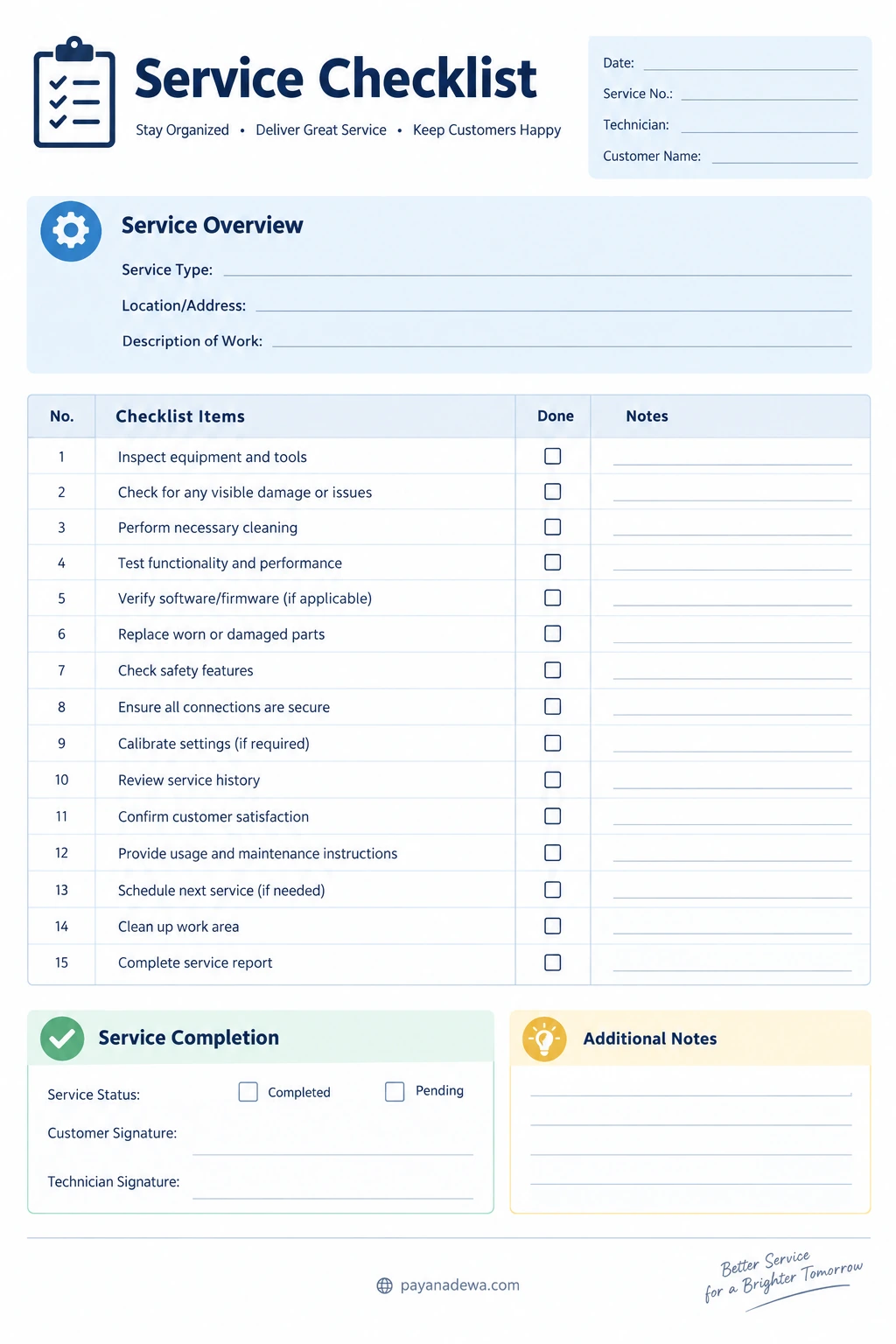
Use the template below to organize a routine service visit. It includes job details, a service overview, task completion boxes, notes, and sign-off fields. Adapt the wording to your equipment, service agreement, safety rules, and company procedures.
How to Use the Checklist During a Service Visit
1. Prepare before starting
Fill in the date, work order number, customer details, service location, and a concise description of the requested work. Review previous service records when available. Confirm that the technician has the correct tools, parts, instructions, and personal protective equipment.
2. Inspect and record the condition
Start with the checks appropriate to the job. Note visible damage, unusual sounds, leaks, error messages, or other relevant symptoms. If a measurement or test is important, record the actual result and the applicable acceptance range rather than simply marking the task complete.
3. Complete the work and verify the result
Mark tasks as they are completed, not from memory at the end of the visit. Record parts replaced, settings changed, and work that could not be completed. After repairs or maintenance, perform the required functional and safety checks. Never mark a test as passed if it was not performed.
4. Explain the outcome to the customer
Summarize what was done in plain language. Explain any limitations, maintenance recommendations, or work that may be needed later. Give the customer a chance to ask questions and confirm that the service outcome is understood.
5. Close the job properly
Clean the work area, return equipment to the agreed condition, complete the service report, and record follow-up actions. Obtain signatures where your process requires them. Store the completed checklist according to your company’s recordkeeping and privacy policies.
Tips for Creating a Checklist Your Team Will Actually Use
- Match it to the job: Create a core checklist and add task-specific versions for different services or equipment types.
- Use plain language: Write short action statements that technicians can understand at a glance.
- Group related tasks: Separate preparation, inspection, work performed, verification, and closeout.
- Make status clear: Provide options such as Done, Not Applicable, and Follow-up Required when a simple checkbox is not enough.
- Leave room for evidence: Include space for measurements, observations, part numbers, and customer comments.
- Prioritize safety: Highlight required safety steps and follow the relevant manufacturer instructions, regulations, and workplace procedures.
- Review it regularly: Update the form when equipment, service standards, regulations, or recurring problems change.
- Ask technicians for feedback: The people using the form can identify confusing wording, duplicate steps, and missing checks.
Paper vs Digital Service Checklists
A printable service checklist is useful when technicians work in locations with limited connectivity, need a quick handwritten record, or prefer a simple paper workflow. It is inexpensive to introduce and easy to customize. However, paper forms may need to be scanned or entered into another system, and handwriting can sometimes be difficult to read.
A digital service checklist can support required fields, timestamps, photo attachments, searchable records, and automatic notifications. It may be a better fit for teams managing many jobs or coordinating work across several locations. Digital tools can also make reporting easier, but they require suitable devices, training, and a reliable process for access and data protection.
Many businesses use a hybrid approach: technicians complete a printable form in the field, then upload or enter the results into a central record. Choose the format that makes accurate completion easiest for your team.
Common Service Checklist Mistakes to Avoid
- Making the form too long: Include essential checks and move specialist procedures into separate job-specific forms.
- Using vague tasks: Replace broad instructions with observable actions and clear pass criteria where possible.
- Skipping notes: A tick alone may not explain an unusual condition, failed test, or recommended repair.
- Confusing completion with approval: A task being performed does not always mean the result passed inspection. Record the outcome separately when needed.
- Failing to assign follow-up: Record who is responsible and when outstanding work should be reviewed.
- Never reviewing the form: An outdated checklist can preserve obsolete steps and miss new risks.
Conclusion
A practical service checklist helps teams deliver consistent work, reduce oversights, document results, and communicate clearly with customers. Start with the essential job details and task groups, make every item specific and verifiable, and leave room to record findings and follow-up actions. Then review the form with the people who use it and refine it as your service process evolves.
Use the printable Service Checklist Template as a flexible starting point. With the right checks and a consistent closeout routine, it can become a simple but valuable part of your service quality system.