Creating a successful website involves more than choosing an attractive design and publishing a few pages. A website must be fast, secure, easy to navigate, mobile-friendly, and optimized for search engines. Without proper preparation, even a beautifully designed website can struggle to attract visitors or provide a positive user experience.
This is where a site checklist becomes valuable. It provides a practical way to review every important part of your website, identify potential problems, and make sure essential tasks are completed before and after launch.
Whether you are building a new website, managing a business website, or improving an existing blog, having a structured website checklist can save time and prevent costly mistakes. It also helps you maintain consistent quality as your website grows.
In this guide, you will discover the essential website checks, from technical setup and search engine optimization to security, content quality, and ongoing maintenance.
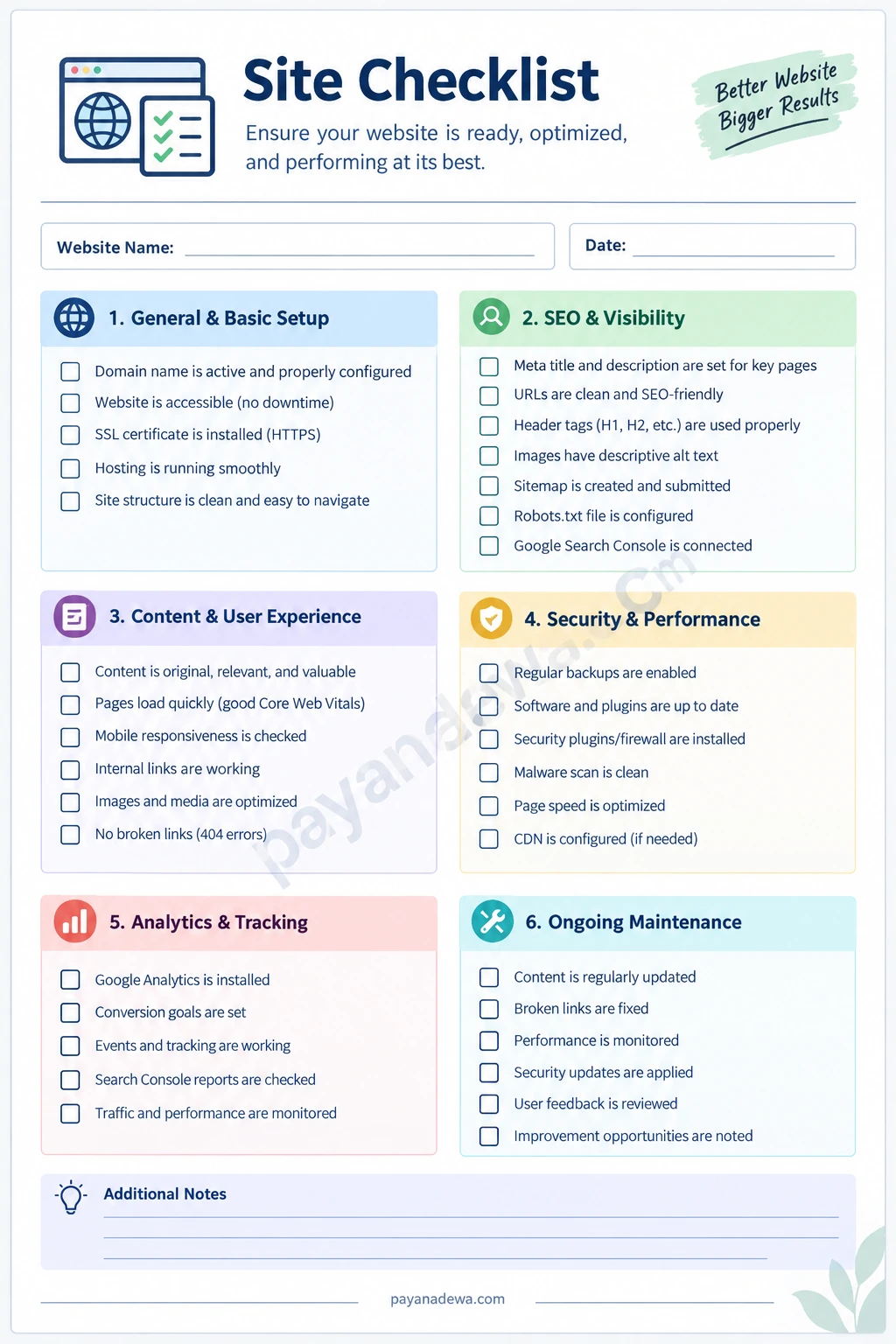
What Is a Site Checklist?
A site checklist is a structured list of tasks used to evaluate, launch, manage, and maintain a website. It helps website owners confirm that important features are working correctly and that visitors can access useful information without unnecessary difficulties.
Depending on your goals, a website checklist may include technical requirements, design improvements, content reviews, SEO settings, security measures, and performance monitoring.
Why Is a Website Checklist Important?
Managing a website involves many small details. Missing just one important task can affect your website’s performance, visibility, or credibility.
For example, a missing SSL certificate can make visitors question your website’s security. Broken internal links can create navigation problems, while poorly optimized images can increase loading times.
A reliable checklist helps you:
- Identify technical problems before they affect visitors.
- Improve website speed and mobile responsiveness.
- Strengthen search engine optimization.
- Maintain consistent content quality.
- Protect website data and visitor information.
- Track maintenance tasks and future improvements.
Most importantly, it creates a repeatable process. Instead of relying on memory, you can follow the same organized steps whenever you update or review your website.
Essential Site Checklist for Website Setup
Before publishing a website, start by checking its basic configuration. These foundational elements influence accessibility, reliability, and the overall experience visitors receive.
1. Check Your Domain and Hosting
Your domain name is your website’s online address, while hosting provides the server space needed to store its files and content.
Make sure your domain is registered, correctly connected to your hosting provider, and configured to renew automatically when appropriate. Also, review your hosting resources to ensure they can support your expected traffic.
- Confirm that the domain name is active.
- Check DNS records and domain configuration.
- Verify that hosting services are working properly.
- Enable automatic renewal where available.
- Test your website’s availability from different devices.
2. Install an SSL Certificate
Website security should never be an afterthought. An SSL/TLS certificate enables HTTPS connections and helps protect information exchanged between visitors and your website.
Check that your website loads through HTTPS and that visitors are automatically redirected from HTTP to the secure version. Also, look for mixed-content warnings that may appear when some resources still load through insecure connections.
3. Review Website Navigation
Visitors should be able to find important information quickly. A clear navigation menu makes your website easier to explore and helps users understand how its pages are organized.
Review your main menu, footer links, category pages, and important landing pages. Make sure every essential section is accessible and that navigation labels are easy to understand.
SEO Site Checklist to Improve Search Visibility
Search engine optimization helps search engines understand your website and its content. Although SEO does not guarantee rankings, following established optimization practices can improve how your pages are discovered and presented in search results.
1. Optimize Titles and Meta Descriptions
Every important page should have a unique, descriptive title and a useful meta description. Include the primary keyword naturally when it accurately reflects the page’s topic.
Avoid repeating identical titles across multiple pages. Instead, write clear descriptions that explain what visitors can expect when they click your search result.
2. Use Proper Heading Structure
Organize your content with one descriptive H1 heading and relevant H2 and H3 subheadings. This structure makes articles easier to scan and helps communicate the relationship between different topics.
3. Create SEO-Friendly URLs
Short, descriptive URLs are easier for visitors to understand and share. Use relevant words, separate terms with hyphens, and avoid unnecessary numbers or complicated parameters whenever possible.
4. Optimize Images and Internal Links
Images should be compressed appropriately without sacrificing unnecessary visual quality. Give meaningful images descriptive file names and useful alternative text.
Internal links are equally important. Connect related articles and relevant website pages so visitors can discover additional information. Regularly review these links to identify broken destinations.
5. Check Your Sitemap and Robots.txt
An XML sitemap can help search engines discover important website URLs. Submit an accurate sitemap through Google Search Console and review indexing reports for potential problems.
Your robots.txt file should also be configured carefully. Avoid accidentally blocking important pages, stylesheets, or resources that search engines need to understand your website.
Content and User Experience Checklist
Useful content is one of the most important reasons visitors return to a website. However, publishing information is not enough. Your content must be accurate, readable, relevant, and easy to access.
1. Review Content Quality
Check every important page for spelling mistakes, outdated information, unclear explanations, and unnecessary repetition. Each page should provide genuine value and address the needs of its intended audience.
Before publishing, ask yourself whether the content answers the reader’s questions and offers practical information they can use.
2. Test Mobile Responsiveness
Many visitors access websites through smartphones and tablets. Therefore, your website should adapt to different screen sizes without creating horizontal scrolling or difficult navigation.
- Check text readability on smaller screens.
- Make buttons large enough to tap comfortably.
- Test menus and navigation elements.
- Check image sizing and page layouts.
- Make sure forms work correctly on mobile devices.
3. Improve Website Loading Speed
Slow pages can frustrate visitors and make important information harder to access. Optimize image sizes, reduce unnecessary scripts, enable appropriate caching, and review your hosting performance.
Use tools such as Google PageSpeed Insights to identify performance opportunities. Pay particular attention to Core Web Vitals because they provide useful measurements of loading performance, interactivity, and visual stability.
Website Security and Performance Checklist
A professional website needs ongoing protection. Security problems can damage visitor trust, interrupt business operations, and potentially expose sensitive information.
1. Schedule Regular Backups
Create regular backups of your website files and database. Store backup copies in a separate location so they remain available if your hosting account experiences problems.
Just as importantly, test the restoration process. A backup is only useful when you can successfully recover your website from it.
2. Update Website Software
Keep your content management system, themes, plugins, and server software updated. Remove extensions that you no longer use and check that installed tools come from trustworthy developers.
3. Monitor Website Security
Use appropriate security tools, strong passwords, and multi-factor authentication where available. Limit administrative access to people who genuinely need it.
Also, monitor unusual activity, suspicious login attempts, malware warnings, and unexpected changes to website files.
Analytics and Website Monitoring Checklist
Once your website is running, you need reliable information to understand how visitors interact with it. Analytics can reveal which pages perform well and where improvements may be necessary.
1. Configure Website Analytics
Set up an analytics platform such as Google Analytics 4 when appropriate. Make sure tracking works correctly and that your configuration respects applicable privacy and consent requirements.
Review useful measurements, including:
- Website traffic and visitor sources.
- Popular landing pages and content.
- Engagement and user interactions.
- Conversions and important website events.
- Performance trends over time.
2. Connect Google Search Console
Google Search Console provides information about how your website appears in Google Search. It can help identify indexing issues, search queries, impressions, clicks, and technical problems.
Review its reports regularly rather than assuming every published page will automatically appear in search results.
Ongoing Website Maintenance Checklist
Website maintenance is a continuous process. Even a well-designed website can develop problems as software changes, content becomes outdated, and visitor expectations evolve.
Weekly Maintenance Tasks
- Check website availability and important pages.
- Review security notifications and unusual activity.
- Look for broken links or missing images.
- Check website forms and essential functions.
- Review important performance indicators.
Monthly Maintenance Tasks
- Update website software and extensions safely.
- Review website backups and restoration options.
- Refresh outdated articles and important information.
- Check SEO performance and indexing reports.
- Review traffic trends and conversion measurements.
Quarterly Maintenance Tasks
- Perform a broader technical SEO audit.
- Review website design and mobile usability.
- Evaluate hosting resources and website performance.
- Remove unnecessary plugins and outdated content.
- Identify opportunities for new content and improvements.
These schedules are practical starting points. Adjust them according to your website’s size, traffic, security requirements, and publishing frequency.
How to Use a Printable Site Checklist Effectively
A printable site checklist makes website management easier by turning a large project into smaller, trackable tasks. You can use it when launching a new website, reviewing an existing project, or preparing for a scheduled maintenance session.
Follow a Simple Review Process
First, write your website name and the date of your review. Next, work through each checklist category, including general setup, SEO, content, security, analytics, and maintenance.
Mark completed tasks and record any problems in the notes section. If you discover an issue, assign it a priority and decide when it should be resolved.
For better results, repeat the review regularly. This approach helps you identify recurring problems, measure improvements, and maintain a more reliable website.
Conclusion: Make Your Website Better with a Complete Site Checklist
A well-maintained website requires attention to many different areas. From domain configuration and technical SEO to content quality, security, analytics, and ongoing maintenance, every element contributes to the overall experience.
Using a complete site checklist makes these responsibilities easier to organize and manage. It helps you catch problems earlier, maintain consistent standards, and identify opportunities to improve your website over time.
Start with the essential checks, prioritize the issues that matter most, and build a regular maintenance routine. You do not need to complete everything in one day. Consistent improvements can make a meaningful difference.
Download and use the printable Site Checklist Template to keep your website tasks organized. What is the most important website improvement on your list? Share your thoughts and experiences in the comments!