Building a successful website takes more than creative ideas and technical skills. Every project needs a clear plan, realistic deadlines, and effective communication. Without these essentials, tasks can overlap, important details can be overlooked, and launch dates can slip. A website Gantt chart helps you organize the entire process in one easy-to-follow timeline.
Whether you are creating a personal blog, an online store, or a business website, a Gantt chart can make project management simpler. It shows what needs to be done, when each task should start, and how different activities depend on one another.
In this guide, you will learn what a website Gantt chart is, how it works, which tasks to include, and how to create a practical project schedule. You will also discover tips for tracking progress and avoiding common planning mistakes.
What Is a Website Gantt Chart?
A website Gantt chart is a visual project management tool that displays website development tasks along a timeline. Each task appears as a horizontal bar, showing its planned start date, end date, and duration. This layout makes it easier to understand the project schedule at a glance.
For example, a website project might include research, design, content creation, development, testing, and launch. A Gantt chart places these activities in chronological order. It also shows which tasks can happen simultaneously and which must wait for earlier work to finish.
Key Elements of a Website Gantt Chart
A useful chart contains several essential elements. Each one helps the team understand responsibilities, deadlines, and project progress.
- Tasks: Specific activities required to complete the website.
- Timeline: Dates or weeks used to schedule the work.
- Duration: The estimated time needed for each activity.
- Dependencies: Relationships between tasks that affect their order.
- Milestones: Important achievements, such as design approval or launch day.
- Progress: An indication of how much work has been completed.
These elements provide a shared view of the project. As a result, team members can identify priorities, communicate delays, and make informed decisions before small problems become major obstacles.
Why Use a Gantt Chart for Website Development?
Website development involves several connected activities. Designers need requirements, developers need approved designs, and content creators need to understand the site’s structure. A clear timeline helps everyone coordinate their work more effectively.
Improve Project Organization
A Gantt chart turns a large project into manageable tasks. Instead of treating website development as one overwhelming assignment, you can divide it into smaller activities with clear deadlines. This approach makes responsibilities easier to understand and progress easier to measure.
Manage Deadlines and Resources
Project managers can estimate workloads and distribute responsibilities across the team. They can also identify busy periods before assigning additional work. When a task takes longer than expected, the chart helps reveal which upcoming activities may be affected.
Strengthen Team Communication
A shared timeline gives designers, developers, writers, and stakeholders a common reference point. Everyone can see current priorities and upcoming milestones. This reduces confusion and makes progress meetings more focused.
Identify Risks Earlier
Some website tasks depend on decisions or deliverables from other people. For example, development may stall when page designs are not approved. A Gantt chart makes these relationships visible, allowing the team to address potential delays sooner.
Essential Tasks to Include in a Website Gantt Chart
The best project schedule reflects the actual needs of your website. However, most projects benefit from a few common development phases. Organizing tasks by phase helps you build a realistic timeline without overlooking important work.
1. Research and Planning
Begin by defining the website’s purpose, target audience, features, and success criteria. Research competitors, establish the project scope, and confirm the available budget. Create a sitemap and identify the content each page will need.
Typical planning tasks include gathering requirements, selecting a platform, defining responsibilities, and approving the project brief. Completing these activities early reduces unnecessary changes during development.
2. Website Design
The design phase transforms project requirements into a visual experience. Create wireframes, choose typography and colors, and develop page layouts. Review mobile responsiveness and accessibility as part of the design process.
Include time for feedback and revisions. Design approval is an important milestone because developers often rely on approved layouts before building the final pages.
3. Content Creation and Development
Content and development can sometimes progress at the same time. Writers can prepare landing pages, product descriptions, and blog content while developers build the site’s structure. However, complex page layouts may require content drafts before development can be completed.
Schedule frontend development, backend functionality, database configuration, integrations, and content uploads. Include time for technical reviews rather than assuming every feature will work correctly on the first attempt.
4. Testing and Quality Assurance
Testing helps ensure the website works as intended before visitors arrive. Check navigation, forms, links, loading speed, mobile layouts, and browser compatibility. Review accessibility, security, and any essential ecommerce or payment functions.
Allow enough time to fix problems and repeat important tests. A website should not move directly from initial development to launch without an appropriate quality assurance phase.
5. Deployment and Launch
The final phase includes preparing the hosting environment, connecting the domain, configuring analytics, and checking essential search engine optimization settings. Back up important files and verify that redirects work when replacing an existing website.
After launch, monitor performance and resolve any unexpected issues. You can also schedule follow-up activities, such as submitting the sitemap to search engines and reviewing visitor behavior.
Website Gantt Chart Template and Example
A website Gantt chart template gives you a practical starting point for organizing tasks. You can customize the dates, durations, responsibilities, and milestones to match your project’s size and complexity.
The example below illustrates a website development project lasting approximately three months. The schedule is illustrative, so adjust the dates and task durations to suit your actual requirements.
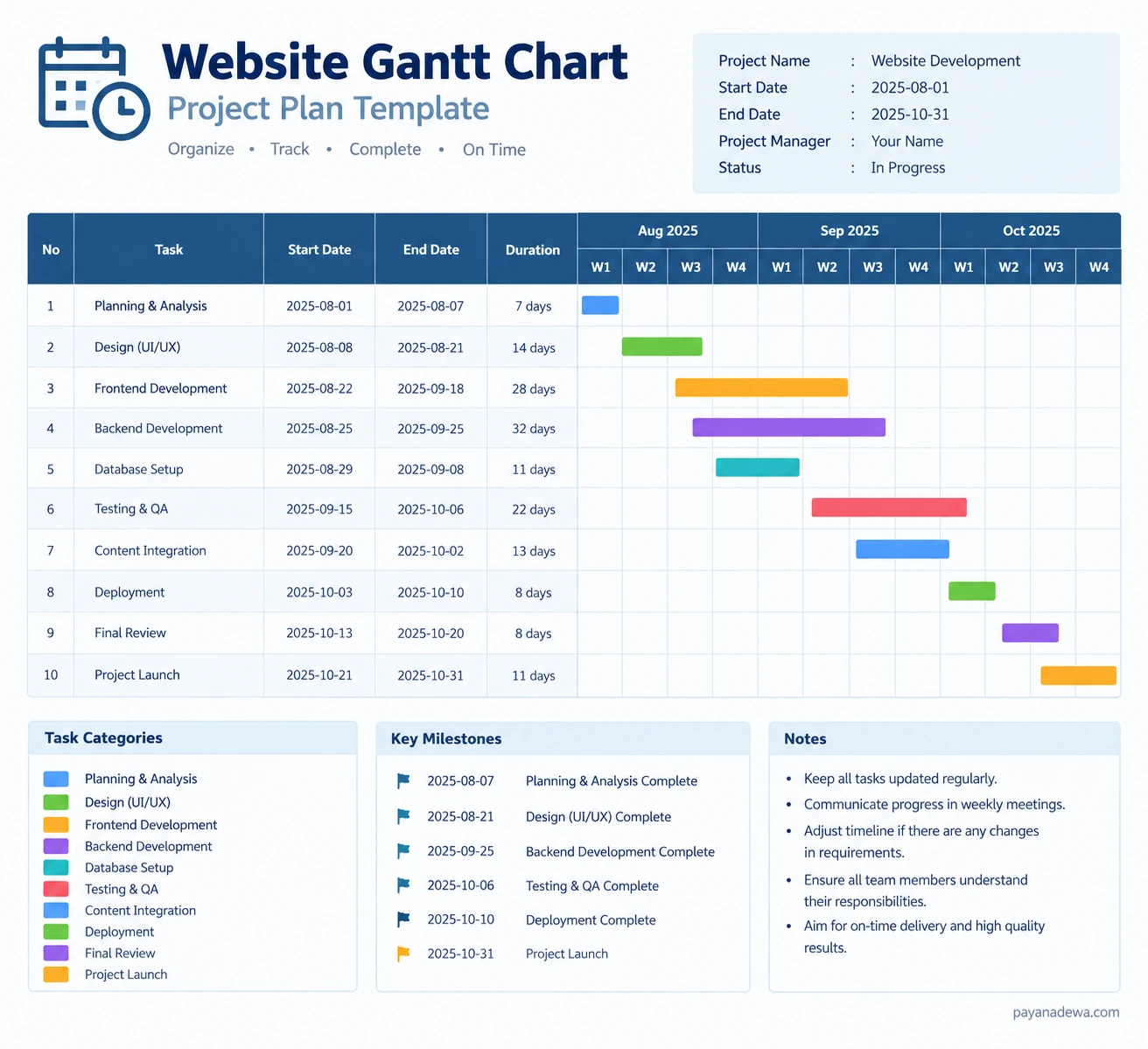
Example Website Development Timeline
- Week 1: Research, requirements, and project planning.
- Weeks 2–3: Wireframes, visual design, and design approval.
- Weeks 3–6: Frontend and backend development.
- Weeks 4–6: Content preparation and database configuration.
- Weeks 7–8: Content integration and functional testing.
- Week 9: Bug fixes, performance checks, and final review.
- Week 10: Deployment, launch, and initial monitoring.
Some activities overlap to make efficient use of time. However, overlapping tasks should only be scheduled when the necessary resources and prerequisites are available. More complex websites may require additional development and testing periods.
How to Create a Website Gantt Chart Step by Step
You do not need an expensive project management platform to create a useful Gantt chart. A spreadsheet or printable template can work well for a small website. Larger projects may benefit from dedicated software with automatic scheduling and collaboration features.
Step 1: Define the Project Scope
List the pages, features, integrations, and deliverables required for the website. Agree on what the project includes and what falls outside its scope. Clear boundaries help prevent unexpected work from disrupting the schedule.
Step 2: Break the Work into Tasks
Divide each project phase into specific activities. Instead of writing a broad task such as website development, create smaller items such as building the homepage, configuring navigation, integrating forms, and testing responsive layouts.
Step 3: Estimate Durations and Set Dates
Estimate how long each task will take based on its complexity and the available team. Assign realistic start and end dates, including time for reviews and revisions. Use previous project experience when available, and avoid scheduling every activity at maximum capacity.
Step 4: Add Dependencies and Milestones
Identify which tasks must finish before others can begin. For example, final page development may depend on approved designs. Add milestones for major decisions, testing completion, stakeholder approval, and the planned launch.
Step 5: Assign Owners and Track Progress
Give every task a clear owner so that responsibility does not become ambiguous. Update the chart regularly with actual progress, revised dates, and new risks. Review the schedule with the team and adjust it when circumstances change.
Best Practices for Managing Your Website Project Timeline
A well-designed chart is most effective when the team uses it consistently. Follow these practical tips to keep your website project organized and on schedule.
- Keep tasks specific: Use clear actions with measurable outcomes rather than vague descriptions.
- Build in buffer time: Allow room for unexpected technical issues, feedback, and revisions.
- Limit unnecessary overlap: Schedule simultaneous work only when dependencies and resources permit it.
- Review the timeline weekly: Compare planned progress with actual results and address delays early.
- Control scope changes: Evaluate the effect of new requests before adding them to the schedule.
- Communicate changes: Inform everyone affected when deadlines, responsibilities, or priorities change.
- Measure meaningful results: Track completed deliverables and resolved issues, not just hours spent working.
These habits make your project timeline more reliable. They also help the team focus on delivering a functional, accessible, and user-friendly website rather than simply meeting a date.
Common Website Gantt Chart Mistakes to Avoid
Even a detailed schedule can fail when its assumptions are unrealistic. Recognizing common mistakes helps you create a plan that supports the project instead of adding unnecessary administration.
Creating Tasks That Are Too Broad
A task such as build the entire website is difficult to estimate or monitor. Break it into smaller deliverables so that progress becomes visible. Smaller tasks also make it easier to identify the source of a delay.
Ignoring Feedback and Approval Time
Reviews often take longer than expected because stakeholders may request revisions or need time to make decisions. Add explicit review periods and assign someone to approve each major deliverable.
Failing to Update the Schedule
An outdated Gantt chart can mislead the team. Update task status and deadlines whenever important changes occur. If a delay affects dependent tasks, revise the relevant dates rather than leaving the original schedule unchanged.
Planning Without Considering Resources
One person cannot always complete several demanding tasks at once. Check team availability, technical requirements, and external dependencies before committing to deadlines. A realistic plan is more valuable than an ambitious schedule that cannot be maintained.
Choosing the Right Website Gantt Chart Tool
The right tool depends on your project size, budget, and collaboration needs. A simple spreadsheet may be enough for a freelancer or small business. A larger team may need a platform that supports dependencies, notifications, workload planning, and shared progress reports.
When comparing tools, consider these factors:
- Ease of use: Can team members understand and update the chart quickly?
- Scheduling features: Does the tool support dependencies, milestones, and date adjustments?
- Collaboration: Can stakeholders view progress and share feedback?
- Reporting: Can you compare planned dates with actual performance?
- Cost and scalability: Does the solution fit your budget and support future projects?
- Export options: Can you print the chart or share it in a convenient format?
Start with the simplest tool that meets your needs. You can move to a more advanced project management solution as your team, website features, or reporting requirements grow.
Conclusion: Plan a Better Website Launch with a Gantt Chart
A website Gantt chart makes project planning clearer by connecting tasks, deadlines, dependencies, and milestones in one visual timeline. It helps teams coordinate design, content, development, testing, and deployment while identifying risks before they become serious delays.
To get the most from your chart, define the project scope, break work into manageable tasks, assign responsibilities, and review progress regularly. Choose a template or tool that suits your workflow, then adapt the schedule as the project develops.
With a realistic plan and consistent communication, you can manage website development more confidently and prepare for a smoother launch. Start building your website Gantt chart today, and share your planning tips or project challenges in the comments.