A well-organized training catalog helps employees, managers, and organizations discover learning opportunities that support professional growth. Whether you manage corporate training, offer online courses, or provide professional development services, a clear catalog makes it easier for people to find the right programs and understand their benefits.
A training catalog is more than a simple list of courses. It serves as a central resource for exploring available training programs, comparing learning options, reviewing course descriptions, and planning development goals. When designed effectively, it can improve employee engagement, simplify training administration, and help organizations build a stronger learning culture.
In this guide, you will learn what a training catalog is, which elements to include, how to organize training programs, and how to create a professional template that meets the needs of your audience.
What Is a Training Catalog?
A training catalog is a structured collection of learning programs, courses, workshops, and professional development opportunities offered by an organization or training provider. It provides essential information about each program so prospective participants can make informed decisions.
Companies often use a corporate training catalog to organize employee development initiatives, communicate available learning resources, and support workforce planning. Educational institutions and independent training providers also use course catalogs to present their offerings to students, clients, and business partners.
A typical training catalog includes course titles, descriptions, learning objectives, durations, delivery formats, prerequisites, and registration information. Depending on the organization, it may also include instructor details, certification opportunities, and course fees.
Why Is a Training Catalog Important?
A well-designed catalog provides several practical benefits:
- Improved accessibility: Participants can quickly identify relevant courses and learning opportunities.
- Better planning: Managers can match training programs with employee development goals and business priorities.
- Clear communication: Consistent course descriptions help participants understand what each program offers.
- Greater engagement: An attractive catalog encourages employees to explore new skills and development opportunities.
- More efficient administration: Training coordinators can organize programs, communicate schedules, and manage enrollment more effectively.
Ultimately, a training catalog connects learning opportunities with the people who need them. It makes professional development easier to understand, access, and manage.
Essential Elements of an Effective Training Catalog
Before creating your catalog, determine which information your audience needs to compare courses and choose appropriate learning opportunities. A consistent structure also makes the document easier to update as new programs become available.
1. Clear Course Titles and Descriptions
Every training program should have a descriptive title and a concise explanation of its purpose. Avoid vague names that do not communicate the subject or expected benefits.
For example, instead of using a title such as “Business Skills,” consider “Effective Business Communication for Teams.” The more specific title helps readers understand the topic immediately.
Each description should explain the course content, its intended audience, and the practical value participants can expect to gain.
2. Learning Objectives
Learning objectives explain what participants should know or be able to do after completing a program. These objectives help learners determine whether a course aligns with their professional goals.
Use action-oriented language such as develop, analyze, demonstrate, improve, and apply. For example, a project management course might aim to help participants create project schedules, identify risks, and monitor project performance.
3. Course Duration and Delivery Format
Participants need to know how much time a program requires and how it will be delivered. Include the expected duration and specify whether the course is available in person, online, or through a hybrid format.
Providing this information helps employees balance training commitments with their regular responsibilities. It also allows managers to plan schedules and allocate learning time more effectively.
4. Target Audience and Skill Level
Identify who should attend each course. Some programs are designed for beginners, while others require prior knowledge or professional experience.
Common audience categories include new employees, team leaders, department managers, technical professionals, and senior executives. Clearly identifying the intended participants reduces confusion and helps learners select suitable programs.
5. Registration and Contact Information
Make the next step easy to understand. Include registration instructions, enrollment deadlines when applicable, contact details, and links to relevant course pages.
If your organization uses a learning management system, direct participants to the appropriate registration page. For a printable catalog, include a website address or QR code that connects readers to current course information.
Popular Training Programs to Include
The best training catalog reflects the needs of your workforce or target audience. While the exact offerings depend on your industry, several training categories are useful for many organizations.
Leadership and Management Training
Leadership programs help supervisors, managers, and emerging leaders strengthen their ability to guide teams and achieve business objectives.
Potential courses include:
- Leadership fundamentals and management skills.
- Team building and employee motivation.
- Strategic thinking and decision-making.
- Conflict resolution and performance management.
- Coaching, mentoring, and delegation.
These programs can help organizations develop stronger managers and prepare employees for greater responsibility.
Communication and Interpersonal Skills
Effective communication supports collaboration, customer relationships, and productive teamwork. These courses help participants express ideas clearly, listen actively, and handle challenging conversations professionally.
Consider including business writing, presentation skills, negotiation techniques, emotional intelligence, and workplace communication. These topics are relevant to employees across many departments and experience levels.
Digital Skills and Technology Training
Digital training helps employees adapt to changing workplace technologies and use modern tools effectively. Depending on your organization’s needs, courses may cover spreadsheet applications, data analysis, cybersecurity awareness, digital collaboration, and artificial intelligence tools.
When selecting technology courses, consider current skill gaps and the practical tasks employees perform. This approach helps ensure that training supports everyday work rather than introducing tools without a clear purpose.
Project Management Training
Project management programs teach participants how to plan work, allocate resources, manage deadlines, and monitor results. They may cover project planning, risk management, stakeholder communication, agile methods, and budget control.
These skills are valuable for project managers and employees who contribute to cross-functional initiatives. Choose course levels that reflect participants’ existing experience and responsibilities.
Customer Service and Professional Development
Customer service training helps employees improve customer interactions, manage complaints, and provide consistent support. Other professional development programs may focus on time management, problem-solving, adaptability, and productivity.
Choose topics based on customer feedback, employee performance data, and the challenges your teams encounter most frequently.
How to Create a Professional Training Catalog Template
A reusable training catalog template saves time and creates a consistent presentation across programs. You can develop one using a word processor, spreadsheet, presentation tool, or design application, depending on the complexity of your training offerings.
Step 1: Define Your Audience and Goals
Start by identifying who will use the catalog and what they need to accomplish. An internal employee training catalog may emphasize skill development and enrollment procedures. A commercial training catalog may focus more on course benefits, delivery options, pricing, and registration.
Define the primary purpose before choosing a layout or writing course descriptions.
Step 2: Organize Courses into Categories
Group related programs into logical categories, such as leadership, technical skills, compliance, communication, and professional development. If you offer many courses, consider adding subcategories or a table of contents.
Organized categories help readers find relevant programs without scanning every entry individually.
Step 3: Standardize Course Information
Create a consistent information structure for every program. At a minimum, consider including the following fields:
- Course title and category.
- Short description and learning objectives.
- Target audience and recommended skill level.
- Duration and delivery format.
- Prerequisites and required materials.
- Instructor or training provider.
- Registration instructions and contact information.
Not every course requires every field. Select the information that helps your audience make a decision, and apply the same structure throughout the catalog.
Step 4: Choose a Clean, Readable Design
Use a professional layout with clear headings, consistent spacing, and readable typography. A limited color palette can help distinguish categories without overwhelming the content.
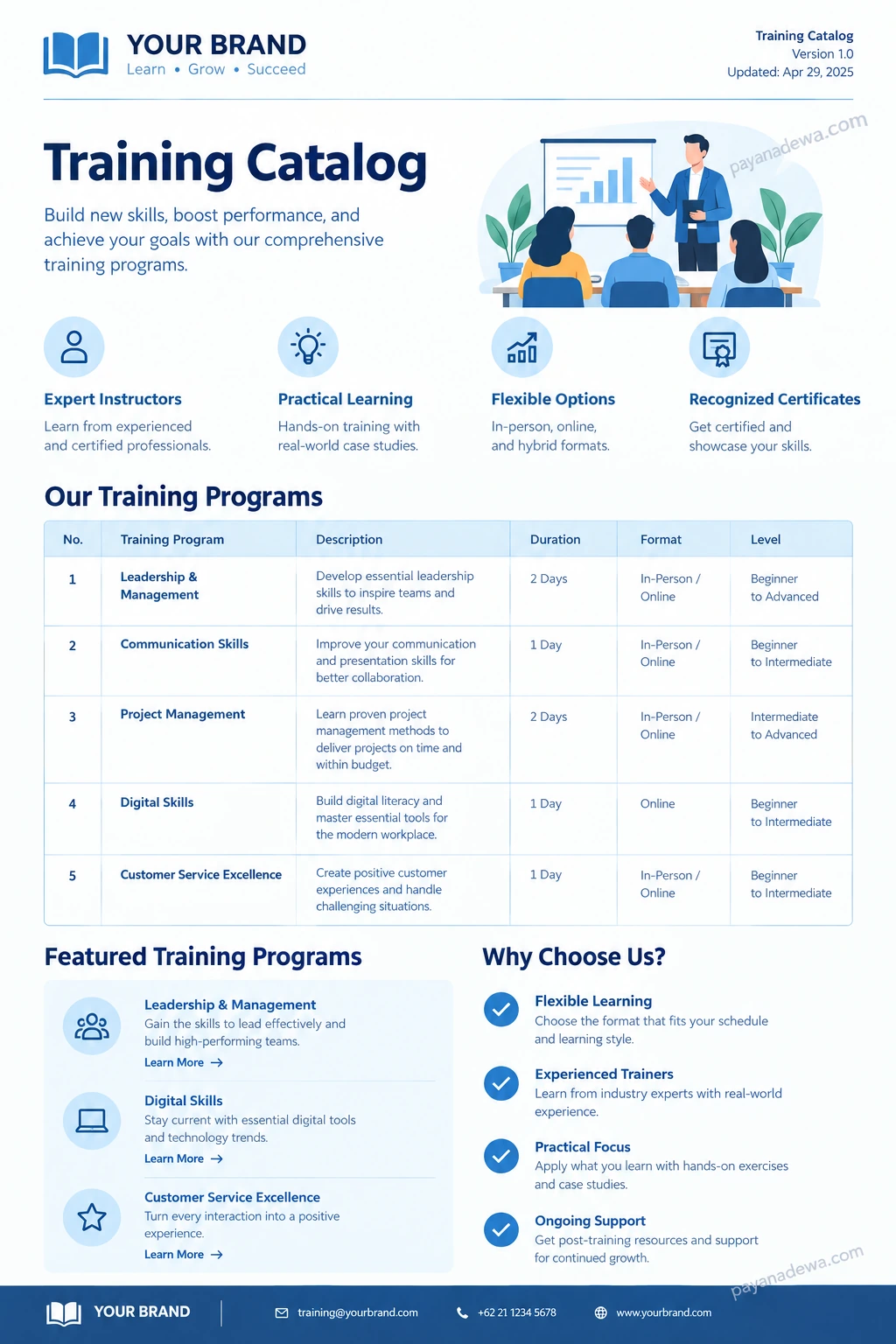
Tables work well for comparing course durations, delivery formats, and skill levels. Icons can highlight important features, but they should support the information rather than replace clear descriptions.
For printable documents, check margins, page breaks, contrast, and font sizes. For digital catalogs, ensure that links work and that the layout remains readable on smaller screens.
Step 5: Add Relevant Visual Elements
Visual elements can make a training catalog easier to scan and more engaging. Consider adding category icons, instructor photographs, certification symbols, or a simple illustration that reflects the learning environment.
Use visuals selectively so the catalog remains focused on the courses. Optimize image file sizes for faster page loading, provide descriptive alternative text, and ensure that decorative elements do not interfere with readability.
Step 6: Review and Publish
Before publishing, verify every course title, description, schedule, registration link, and contact detail. Ask training coordinators or subject matter experts to review the information for accuracy.
Also, establish a process for updating the catalog. Assign responsibility for reviewing course availability, replacing outdated information, and adding new programs. A regular review schedule helps keep the resource useful and reliable.
Training Catalog Template: Design and Layout Tips
A good template should make essential information visible at a glance. The following design principles can help you create a catalog that looks professional and remains practical.
- Use a clear hierarchy: Make the main title, category headings, and course names easy to distinguish.
- Keep descriptions concise: Focus on course outcomes and relevant benefits rather than lengthy promotional language.
- Use consistent formatting: Apply the same heading styles, spacing, and information order throughout the document.
- Make comparisons easy: Use tables or structured cards to present duration, level, and delivery format.
- Include your branding: Add your organization name, logo, brand colors, and appropriate contact details.
- Design for accessibility: Use sufficient color contrast, readable fonts, meaningful link text, and descriptive image alt attributes.
- Plan for updates: Avoid layouts that become difficult to edit when courses are added or removed.
A printable training catalog may work best as a carefully structured PDF. An online catalog, however, can provide searchable course listings, category filters, registration buttons, and links to more detailed course pages.
Choose the format that fits your audience, distribution method, and maintenance requirements.
Best Practices for Managing a Training Catalog
Creating the catalog is only the first step. Maintaining accurate information and measuring its usefulness will help you get more value from your training programs.
Align Training with Business Needs
Review business objectives, employee feedback, performance gaps, and upcoming organizational changes before adding courses. Prioritizing relevant learning opportunities helps prevent the catalog from becoming a collection of disconnected programs.
Make Course Selection Easier
Provide filters or categories that help users search by subject, skill level, duration, or delivery format. For smaller catalogs, a clear table of contents and consistent headings may be sufficient.
Measure Engagement and Results
Track useful indicators such as course enrollment, completion rates, participant satisfaction, and demonstrated skill improvement. When possible, connect training outcomes with relevant workplace performance measures.
Use these insights to identify popular courses, improve underperforming programs, and plan future learning opportunities. Avoid relying on enrollment numbers alone, because participation does not necessarily indicate that a course improved performance.
Keep Information Current
Remove discontinued programs, update schedules, verify registration links, and review course descriptions regularly. Clear ownership and a defined update process help maintain accuracy as your training portfolio evolves.
Common Training Catalog Mistakes to Avoid
Even a visually attractive catalog can be ineffective if readers struggle to understand the information. Watch for these common mistakes:
- Overloading pages with information: Too much text makes courses difficult to compare. Use concise descriptions and consistent sections.
- Using unclear course names: Specific titles help readers identify relevant training quickly.
- Leaving out essential details: Include the duration, target audience, delivery format, and registration instructions where applicable.
- Ignoring mobile users: Check that online course listings and links work on phones and tablets.
- Publishing outdated information: Review course availability and registration details before distributing the catalog.
- Failing to measure effectiveness: Use participant feedback and relevant learning outcomes to guide improvements.
Addressing these issues improves usability and helps the catalog serve as a reliable guide to professional learning.
Conclusion
A well-designed training catalog helps organizations present learning opportunities clearly, support employee development, and connect training activities with business goals. By including useful course descriptions, learning objectives, durations, delivery formats, and registration information, you can make it easier for participants to find programs that match their needs.
Start with a reusable training catalog template, organize courses into relevant categories, and apply a consistent visual design. Then review the content regularly, collect feedback, and measure training outcomes to identify opportunities for improvement.
Whether you manage a small collection of workshops or a comprehensive corporate learning program, a clear and well-maintained catalog can make professional development more accessible, organized, and effective.