A professional catering invoice helps catering businesses manage payments, track event expenses, and maintain clear communication with clients. Whether you provide wedding catering, corporate lunches, private dinners, or large event buffets, an organized invoice makes your business look more professional and helps you get paid on time.
If you are looking for a catering invoice template, you need a document that clearly explains the services provided, the cost of each item, applicable taxes, and the payment deadline. Fortunately, creating one does not have to be complicated. With the right format, you can prepare accurate invoices in just a few minutes.
In this guide, you will learn what a catering invoice should include, how to calculate catering charges, which payment terms to use, and how to create an invoice that works for different types of catering events.
What Is a Catering Invoice?
A catering invoice is a billing document that a catering company or independent caterer sends to a customer after providing food, beverages, staffing, or event-related services. It lists the agreed-upon charges and explains how and when the client should pay.
Depending on your business, you may issue an invoice before an event, after the service is complete, or in stages throughout the booking process. For example, a wedding caterer might request a deposit when the client confirms the booking and send a final invoice after the menu and guest count are finalized.
A well-prepared catering service invoice helps both parties understand the financial details of an event. It also provides a useful record for bookkeeping, expense tracking, tax preparation, and future reference.
What Should a Catering Invoice Include?
Every catering invoice should contain enough information for the client to identify the booking, understand the charges, and complete the payment. Although the exact format depends on your business, the following details are useful for most catering services.
1. Catering Business Information
Start with your business name, logo, address, phone number, email address, and website. These details make your invoice recognizable and give clients a convenient way to contact you about questions or corrections.
2. Invoice Number and Dates
Assign a unique invoice number to every document. Include the invoice issue date and payment due date as well. A consistent numbering system makes it easier to organize records and locate invoices when needed.
3. Client and Event Details
Include the client’s name, company, billing address, and contact information. For event catering, add the event name, service date, venue, and estimated guest count. These details help prevent confusion when you manage several bookings at the same time.
4. Itemized Catering Services
List each product or service separately rather than combining everything into a single unexplained charge. Common line items include:
- Food packages, buffet meals, or plated dinners.
- Beverages, coffee, tea, and refreshments.
- Desserts, cakes, and specialty menu items.
- Servers, chefs, bartenders, and other event staff.
- Equipment rental, tableware, and serving supplies.
- Delivery, setup, cleanup, and transportation fees.
For every item, show the quantity, unit price, and line total. This makes the catering invoice easier to understand and helps clients verify the final amount.
5. Subtotal, Taxes, and Total Due
Calculate the subtotal by adding all itemized charges. Then include applicable taxes, discounts, deposits already paid, and any additional fees. Clearly display the remaining balance so the client knows exactly how much is outstanding.
6. Payment Instructions and Terms
Explain which payment methods you accept, such as bank transfer, credit card, or an approved online payment service. State the due date and any agreed deposit or late-payment terms. Make sure these conditions are consistent with your contract and applicable local laws.
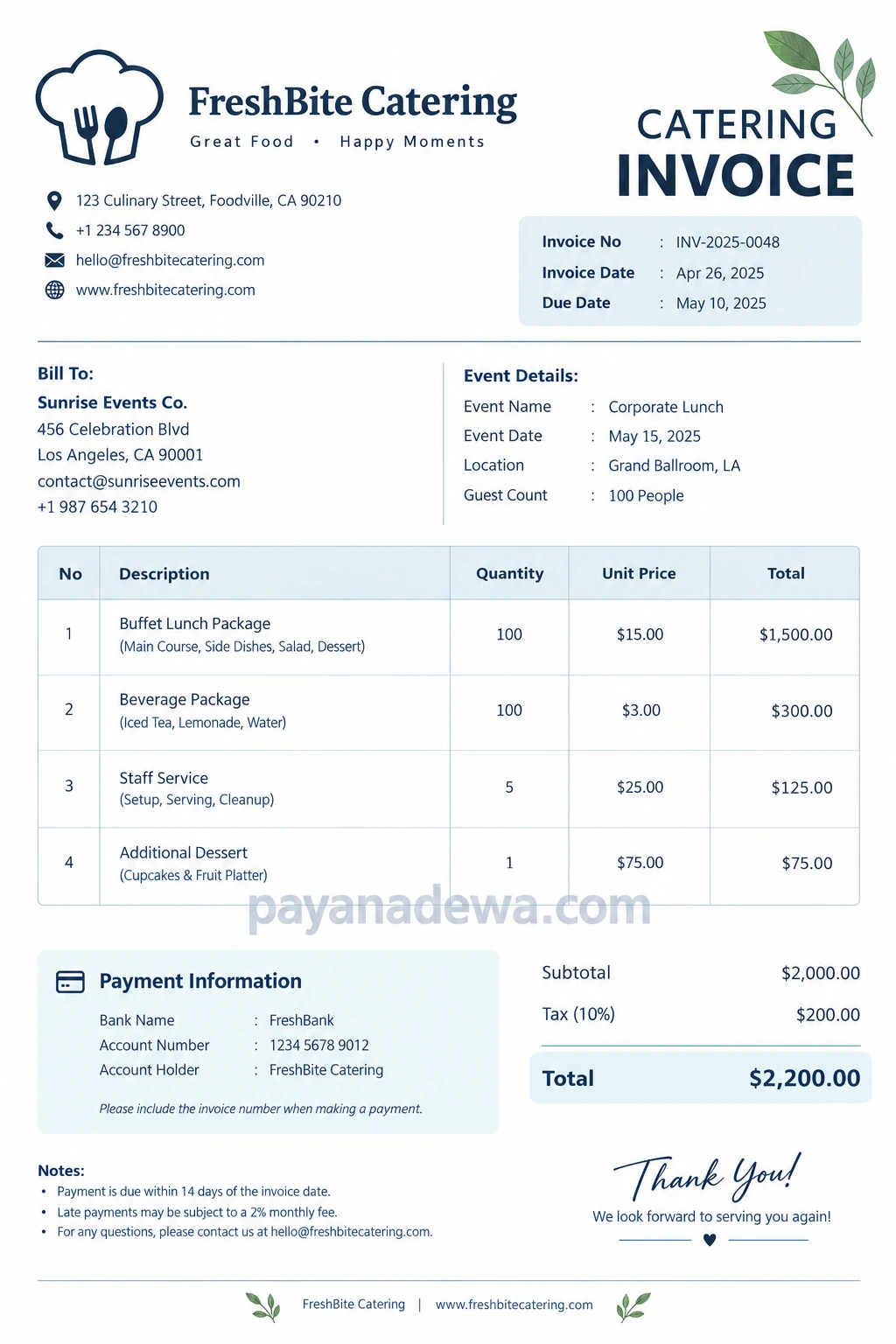
For a convenient starting point, use the catering invoice template below as a visual reference for organizing these details.
How to Create a Catering Invoice Step by Step
Creating an invoice becomes much easier when you follow a consistent process. Use these steps to prepare a clear and accurate document for each catering job.
Step 1: Confirm the Booking Details
Before preparing the invoice, review the client’s agreement, selected menu, event location, service date, and expected number of guests. Confirm any changes to the booking, especially adjustments to the guest count or menu selection.
Step 2: List Every Billable Service
Record the food, drinks, labor, equipment, and other services included in the booking. If you charge separately for delivery or setup, list those fees as individual items. Clear descriptions reduce misunderstandings and make the invoice easier to review.
Step 3: Calculate the Charges
Multiply each quantity by its unit price to calculate the line total. Add all line totals to determine the subtotal. Next, apply the appropriate tax rate and subtract any discounts or payments already received.
For example, a corporate lunch for 100 guests might include the following charges:
- Buffet lunch package: 100 guests at $15.00 each = $1,500.00.
- Beverage package: 100 guests at $3.00 each = $300.00.
- Staff service: 5 staff members at $25.00 each = $125.00.
- Additional dessert package: 1 package at $75.00 = $75.00.
The subtotal is $2,000.00. If an illustrative 10% tax applies, the tax is $200.00, bringing the total to $2,200.00. Actual tax rates and taxable items vary by location, so confirm the rules that apply to your business.
Step 4: Add Payment Terms
Choose a payment deadline that matches your agreement with the client. For example, you might require payment within 14 days of the invoice date. For larger events, you may use a deposit followed by a final payment before the event.
Always state the amount already paid and the outstanding balance. This prevents clients from accidentally paying the full amount twice.
Step 5: Review and Send the Invoice
Check the client’s details, invoice number, arithmetic, dates, and payment instructions before sending the document. Save a copy for your records and use a consistent method to track whether the invoice is pending, partially paid, or complete.
Different Types of Catering Invoices
Not every catering business needs the same invoice format. Choose a layout that reflects the services you provide and the way you charge customers.
Wedding Catering Invoice
A wedding catering invoice may include meal packages, cocktail-hour refreshments, cake service, staff costs, rentals, and venue setup. Because wedding bookings often involve deposits and changing guest counts, show the deposit paid and remaining balance clearly.
Corporate Catering Invoice
Corporate catering invoices are commonly used for office lunches, conferences, business meetings, and company celebrations. Include the company name, purchase order number if required, event date, and any department or billing reference supplied by the client.
Private Party Catering Invoice
For birthdays, anniversaries, and family gatherings, keep the invoice straightforward. Separate food, beverages, staffing, delivery, and optional extras so the customer can see how the final price was calculated.
Event Catering Invoice
Large events may require more detailed billing for multiple service periods, different menu stations, equipment rentals, and additional labor. Consider using separate sections or detailed line items to make complex bookings easier to review.
Best Practices for Faster Catering Payments
A good invoice does more than request money. It also helps establish professional expectations and reduces avoidable payment delays.
- Send invoices promptly. Prepare the document as soon as the relevant billing milestone is reached.
- Use clear descriptions. Avoid vague entries such as miscellaneous charges when you can explain the actual service.
- Agree on payment terms in advance. Discuss deposits, final payments, and cancellation charges before confirming the booking.
- Offer convenient payment methods. Use secure options that are practical for your business and clients.
- Follow up politely. Send a friendly reminder before or shortly after the due date, depending on your payment policy.
- Keep accurate records. Store invoices, receipts, contracts, and payment confirmations together.
- Use a consistent template. A standard layout saves time and helps maintain a professional brand identity.
Common Catering Invoice Mistakes to Avoid
Even a simple billing error can create confusion or delay payment. Fortunately, most problems are preventable with a quick review.
- Incorrect guest counts: Confirm the final number of guests before calculating per-person charges.
- Missing service fees: Include agreed delivery, staffing, rental, and setup charges.
- Unclear tax calculations: Apply the correct tax treatment and display the amount separately when appropriate.
- Duplicate billing: Deduct deposits and previous payments from the outstanding balance.
- Missing due dates: State when payment is expected instead of leaving the client to guess.
- Inconsistent records: Use unique invoice numbers and update payment status after receiving funds.
Additionally, check whether your jurisdiction requires specific invoice fields, tax registration details, or electronic invoicing procedures. A general template is a helpful starting point, but it may need adjustments to meet local requirements.
Frequently Asked Questions About Catering Invoices
When should a catering invoice be sent?
The timing depends on your contract and billing policy. Some caterers issue invoices when a booking is confirmed, while others bill after the event. For larger bookings, deposits and milestone payments can help cover upfront expenses.
What is the difference between a catering invoice and a catering receipt?
An invoice requests payment for goods or services. A receipt confirms that payment has been received. If a client pays an invoice in full, you can provide a receipt or a paid invoice as confirmation, depending on your recordkeeping process.
Can I use a free catering invoice template?
Yes. A free catering invoice template can help you create professional invoices without designing every document from scratch. Choose a format that you can edit easily and customize with your business details, service descriptions, payment terms, and branding.
Should a catering invoice include a deposit?
If the client has already paid a deposit, show it as a separate credit or payment. Then subtract it from the total charges to calculate the remaining balance. Make sure the deposit amount matches your booking agreement and payment records.
Can I create a catering invoice in Word or Excel?
Yes. Word is useful for printable invoices with a polished layout, while Excel is convenient for calculating quantities, prices, taxes, and totals. You can also use invoicing software if you need automated reminders, payment tracking, or recurring billing.
Conclusion
A well-organized catering invoice helps you communicate charges clearly, manage event finances, and maintain a professional relationship with every client. By including accurate business details, event information, itemized services, taxes, payment terms, and the outstanding balance, you can reduce billing errors and make the payment process easier.
Start with a catering invoice template that suits your business, then customize it for weddings, corporate lunches, private parties, and other events. With a consistent invoicing process and careful recordkeeping, you can spend less time on administrative tasks and more time delivering excellent food and memorable experiences.