Medical business cards come in many styles, from clean minimalist layouts to modern designs with healthcare icons, professional colors, and custom branding. The best design balances appearance with readability, making essential information easy to find at a glance.
In this guide, you will learn what makes an effective medical business card, which details to include, how to choose a template, and how to prepare your design for printing. You will also find practical ideas for creating a healthcare business card that reflects your expertise and supports your professional identity.
What Is a Medical Business Card?
A medical business card is a printed or digital card that introduces a healthcare professional, medical practice, or healthcare-related business. It typically includes a person’s name, professional title, contact details, workplace, and other relevant information.
Doctors may use these cards when meeting patients, attending conferences, or connecting with colleagues. Dentists, pharmacists, physiotherapists, and private practitioners can also use them to share their services professionally. Unlike a general business card, a healthcare card should communicate clarity, credibility, and care.
Common users include:
- General practitioners and specialist doctors.
- Dentists and orthodontists.
- Nurses and healthcare consultants.
- Physiotherapists and rehabilitation specialists.
- Psychologists and mental health professionals.
- Medical clinics, hospitals, and diagnostic centers.
- Healthcare administrators and medical representatives.
Why a Professional Medical Business Card Matters
Build trust and credibility
A clean, organized design suggests attention to detail. Consistent typography, suitable colors, and accurate contact information help create a professional impression. Your card should support your qualifications, not make unsupported claims about medical outcomes.
Make contact information easy to find
Patients and professional contacts may need your phone number, email address, clinic location, or website later. A business card keeps these details together in a convenient format.
Strengthen your healthcare brand
A consistent visual identity helps people recognize your practice. Using the same logo, colors, and typography across your card, website, appointment materials, and other communications creates a unified brand.
Support professional networking
Medical conferences, seminars, training sessions, and community health events offer valuable networking opportunities. A medical professional business card provides a convenient way to exchange details with colleagues, suppliers, and potential collaborators.
Essential Information to Include
The most effective medical business cards include enough information to be useful without making the layout crowded. Start with the details people need most, then add optional elements when space allows.
Full name and professional title
Display your full name prominently. Add your professional title or specialty, such as General Practitioner, Cardiologist, Dentist, or Physiotherapist. Include credentials only when they are accurate and appropriate for your professional status.
Clinic or practice name
Include the name of your clinic, hospital, private practice, or healthcare organization. If you operate an independent practice, consider a simple logo or wordmark to strengthen brand recognition.
Contact information
Choose the contact details that are most useful to your patients or professional contacts. These may include:
- Business phone number or clinic reception number.
- Professional email address.
- Clinic website.
- Practice address or relevant location details.
- Appointment booking link or QR code.
Double-check every phone number, email address, website URL, and location before printing. Even a small mistake can make it difficult for someone to reach your practice.
Specialty or services
A short specialty description helps people understand your area of practice. A dentist might list preventive dentistry, while a physiotherapist could mention rehabilitation and mobility services. Keep the wording concise; a business card is not the place for a complete list of treatments or a detailed biography.
How to Choose the Best Medical Business Card Template
A medical business card template provides a starting point for a consistent and attractive design. It can save time while allowing you to customize the layout to suit your specialty or healthcare brand. Before selecting a template, consider these design elements.
Choose appropriate colors
Blue and white are popular choices because they create a clean, familiar healthcare aesthetic. Green and teal can also work well for wellness practices, rehabilitation centers, and healthcare organizations. Choose a small, coordinated palette rather than using too many competing colors.
Use readable typography
Choose simple fonts that remain legible at small sizes. Use a larger font for your name and a smaller but readable font for supporting details. Avoid decorative typefaces for phone numbers, email addresses, and clinic addresses. Maintain sufficient contrast between text and background.
Add relevant medical icons
A stethoscope, medical cross, heart symbol, or simple healthcare illustration can communicate your profession quickly. Use icons sparingly so they do not distract from the information. Avoid official institutional logos or professional emblems unless you have permission to use them.
Keep the layout simple
A good template creates a clear visual hierarchy. Your name should be easy to spot, your professional title should be immediately understandable, and your contact information should be grouped logically. Leave enough empty space around text and design elements.
Popular template styles include:
- Minimalist medical card: A white background, simple typography, and one accent color.
- Modern healthcare card: Blue or teal shapes, clean icons, and a contemporary layout.
- Private practice card: Refined typography and restrained colors for a premium professional identity.
- Dental business card: A friendly, clean layout with subtle dental imagery.
- Wellness and therapy card: Softer colors and a calm design for rehabilitation or wellness services.
Medical Business Card Template Inspiration
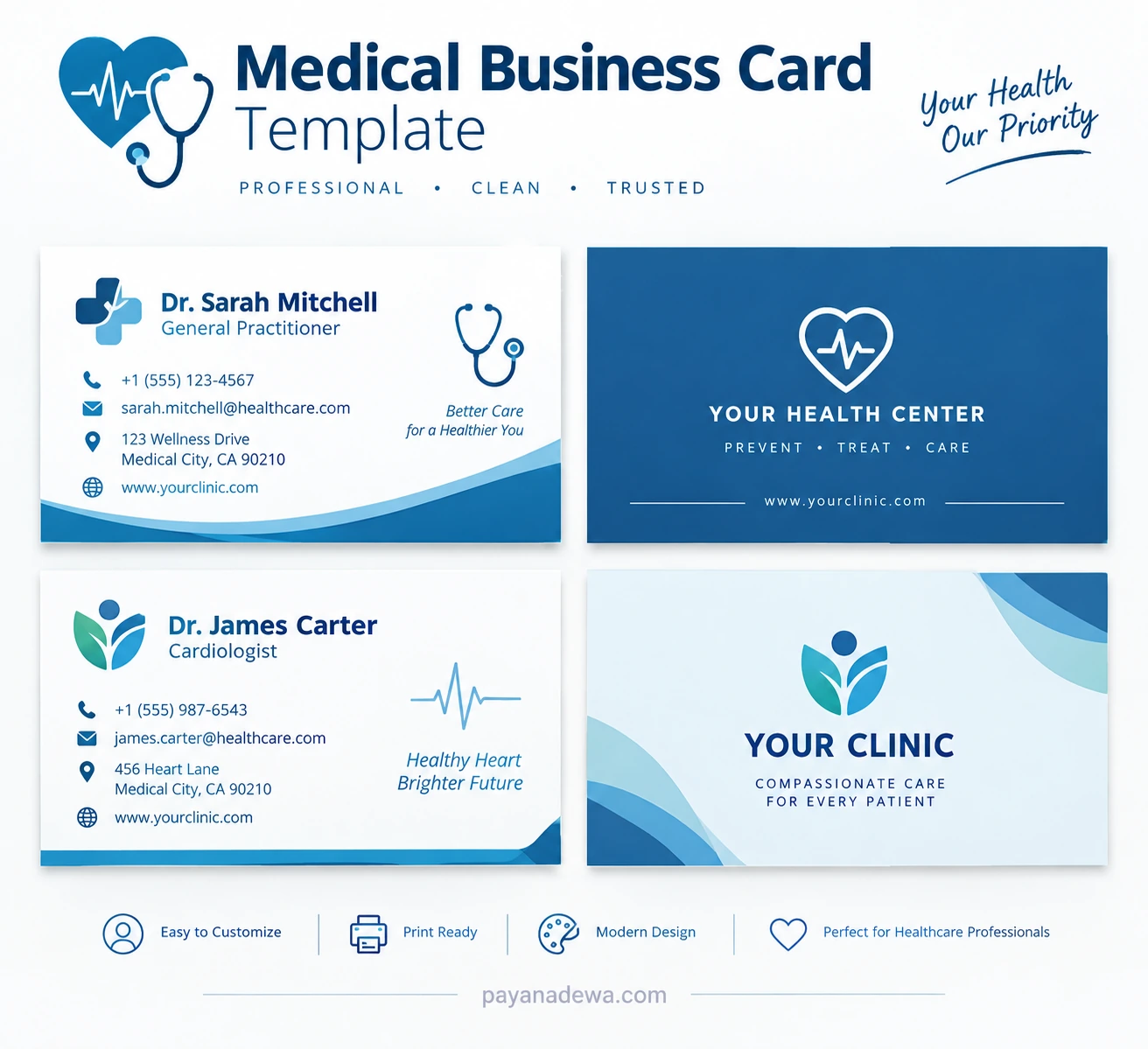
This medical business card template concept shows how professional colors, healthcare symbols, and organized contact details can work together. Use it as a visual starting point for a card that matches your specialty, clinic identity, and communication needs.
Customize the sample names, contact information, logo, and clinic details before using a design for your own practice. The details shown in the example are illustrative and should not be treated as verified information about a real healthcare professional.
How to Customize a Medical Business Card
Step 1: Select the right layout
Decide whether you need a single-sided or double-sided card. A single-sided layout works well when your information is limited. A double-sided design provides additional room for a logo, appointment QR code, or brief service description.
Step 2: Add your branding
Insert your clinic logo, preferred colors, and professional name. Keep branding consistent with your website and other patient-facing materials.
Step 3: Replace all sample details
Update placeholder names, phone numbers, email addresses, website URLs, and practice locations. Remove any information that does not apply to your business.
Step 4: Review the design
Check alignment, spacing, spelling, contrast, and font sizes. Ask someone else to review the card before sending it to a printer. A second review can help identify errors you might overlook.
Step 5: Export and test the final file
Use a print-ready PDF or another format accepted by your printer. Follow the printer’s requirements for dimensions, bleed, color settings, and image resolution. If you include a QR code, test it on several devices before printing in bulk.
Medical Business Card Printing Tips
Good printing helps your finished card look professional and remain useful over time. Before placing an order, consider these recommendations:
- Dimensions: Choose a size suitable for your market and confirm the final dimensions with your printer.
- Paper quality: Select durable cardstock that feels professional and is comfortable to carry.
- Finish: Matte finishes often provide a clean, understated appearance, while gloss can make colors look more vibrant.
- Bleed and margins: Keep essential text inside the safe area and follow the printer’s bleed specifications.
- Proofreading: Review a digital proof and, when practical, request a physical sample before ordering a large quantity.
- Accessibility: Maintain readable text sizes and strong contrast, especially for essential contact details.
Screen colors may look different from printed colors. A test print can help you confirm that your final card meets your expectations.
Digital Medical Business Cards and QR Codes
Digital business cards provide another way for healthcare professionals to share contact information. They can be delivered through email, messaging apps, websites, or a QR code printed on a traditional card.
A QR code can link to an appointment booking page, clinic website, professional profile, or digital contact card. Use a secure, relevant destination and check that it works correctly. Never link to pages that expose confidential patient information or request unnecessary personal data.
Printed and digital cards can work together. A printed card offers a familiar, tangible introduction, while a digital version allows you to update contact details more easily when your practice information changes.
Common Medical Business Card Mistakes to Avoid
Even a well-intentioned design can become less effective when it includes too much information or overlooks practical details. Avoid these common mistakes:
- Overcrowding: Too many services, credentials, and decorative elements make the card difficult to scan.
- Unreadable text: Extremely small fonts make contact information hard to use.
- Inconsistent branding: Unrelated colors and fonts can weaken your professional identity.
- Unverified credentials: Titles and qualifications should accurately represent your professional status.
- Outdated information: Old phone numbers, addresses, and website links create frustration.
- Unclear calls to action: If appointments are the main goal, make the booking method easy to identify.
- Privacy oversights: Never place patient information or other confidential data on a business card.
Before sending the card to print, confirm the accuracy of all details, test links and QR codes, review the design at actual size, and make sure the finished card represents your practice appropriately.
Conclusion
A professional medical business card helps healthcare professionals introduce themselves, share essential contact information, and maintain a consistent brand identity. The most effective designs combine clear typography, suitable colors, relevant medical icons, and a well-organized layout.
Whether you are a doctor, dentist, therapist, or clinic owner, starting with a medical business card template can make the design process easier. Customize the template with accurate details, review the layout carefully, and choose suitable printing materials for a polished result.
By prioritizing readability, accuracy, and professional presentation, you can create a healthcare business card that is practical, memorable, and aligned with your professional goals.