A DJ business card is more than a small piece of printed paper. It is a professional introduction to your music brand, a convenient way to share your contact information, and an effective tool for building relationships with event organizers, nightclub managers, wedding planners, and potential clients. Whether you perform at private parties, festivals, clubs, or corporate events, a well-designed card can help people remember your name long after the music stops.
Creating an effective DJ business card does not require complicated graphic design skills. The key is to combine a distinctive visual style with clear contact details and a consistent brand identity. From modern electronic music aesthetics to elegant wedding DJ designs, the right layout can communicate your personality and the type of experience you offer.
In this guide, you will discover creative DJ business card ideas, the essential information to include, practical design tips, and printing recommendations. You will also learn how to use QR codes and digital contact options to make your card more useful in today’s music industry.
Why a DJ Business Card Is Important
Networking plays an important role in building a successful DJ career. You might meet a venue owner after a performance, connect with a wedding planner at an event, or receive a referral from another musician. A business card gives these contacts an easy way to find you later.
Social media profiles are valuable, but not everyone wants to search for an account or type a complicated username. A physical card provides your essential information in one convenient place. It also shows that you take your music business seriously.
Here are several benefits of having a professional DJ business card:
- Build a memorable brand: Consistent colors, typography, and logos make your DJ identity easier to recognize.
- Make networking easier: Share your details quickly at clubs, music festivals, private events, and industry gatherings.
- Encourage bookings: Clear contact information helps potential clients inquire about availability and pricing.
- Show professionalism: A polished design creates a stronger first impression than incomplete or confusing contact details.
- Promote your music: A QR code can direct people to your mixes, portfolio, booking page, or social media profiles.
Although a business card cannot guarantee new bookings, it can support your marketing efforts and make it easier for interested people to contact you.
Creative DJ Business Card Design Ideas
The best DJ business card reflects your musical style and target audience. A techno DJ performing in underground clubs may prefer a bold, minimal design, while a wedding DJ might benefit from an elegant and approachable appearance.
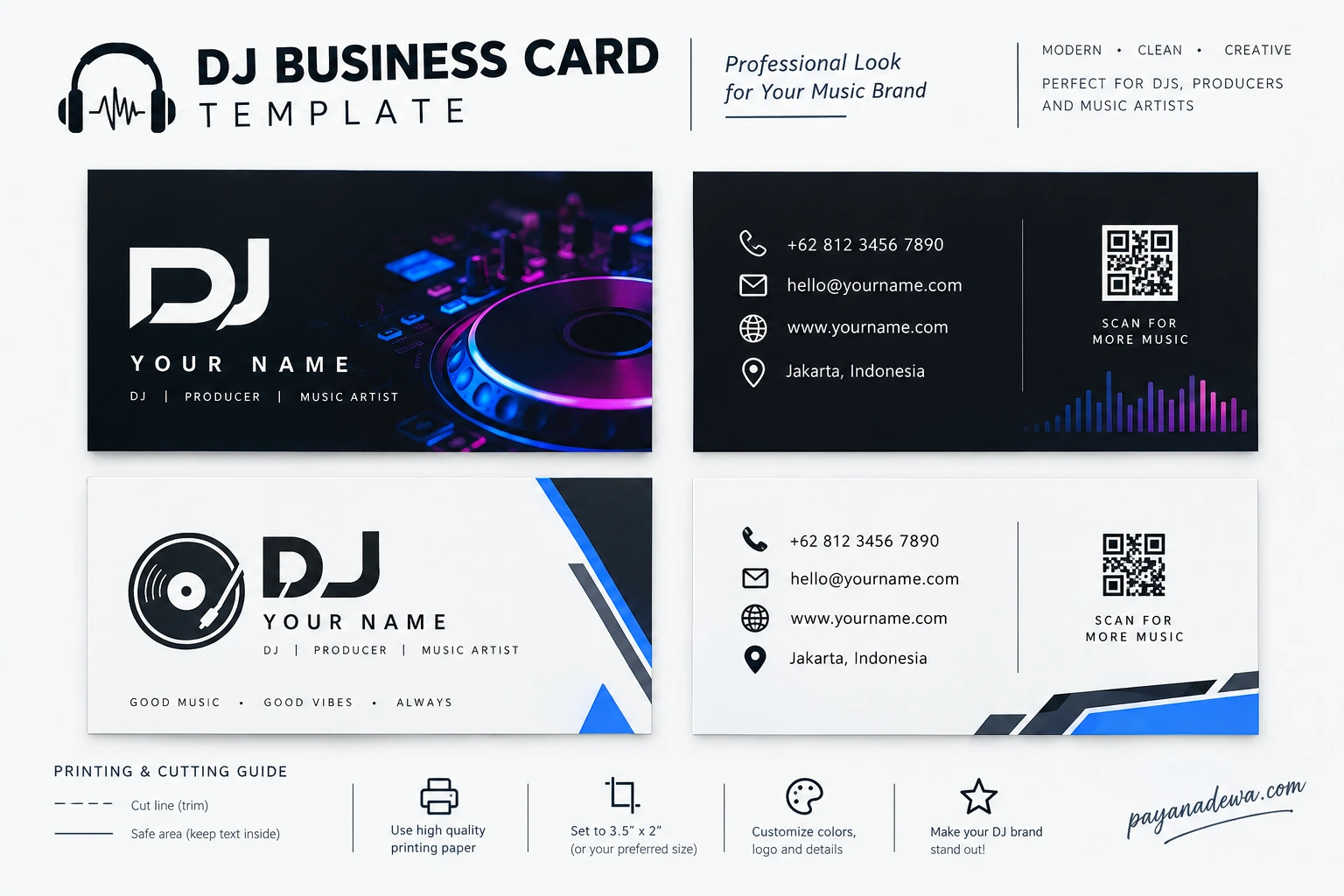
1. Modern Neon DJ Business Card
Neon blue, purple, and magenta are popular visual choices for electronic music branding. These colors can suggest energy, nightlife, and modern sound production when paired with a dark background.
Use a strong DJ logo, clean typography, and one striking visual element, such as a turntable, sound wave, or abstract light effect. Keep the contact information easy to read. Too many glowing effects can make small text difficult to understand.
2. Minimalist Black and White Design
A black-and-white DJ business card offers a timeless appearance that works across many music genres. It is suitable for club DJs, music producers, mobile DJs, and professionals who want a clean visual identity.
Focus on spacing, alignment, and readable fonts. A simple logo and carefully arranged contact details can look more professional than a crowded design filled with unnecessary graphics.
3. Elegant Wedding DJ Business Card
Wedding DJs often work with couples, venues, photographers, and event planners. Their business cards should communicate reliability, quality, and attention to detail.
Consider white, cream, charcoal, or navy backgrounds with subtle gold or silver accents. Include a professional logo and a booking website. If you specialize in weddings, mention that service clearly so prospective clients immediately understand your offering.
4. Creative Music Producer Card
Music producers and recording artists can use a more experimental layout to communicate their creative identity. Geometric shapes, abstract sound waves, and distinctive typography can make the card stand out.
However, originality should never come at the expense of usability. Keep your name prominent and ensure your website, email address, and other important details remain readable.
5. Double-Sided DJ Business Card
A double-sided card provides additional space without making the design feel crowded. The front can introduce your DJ brand, while the back contains your contact information, booking details, and QR code.
This arrangement separates branding from practical information. It also allows you to create a visually striking front while keeping the reverse side simple and functional.
What Information Should a DJ Business Card Include?
A successful DJ business card gives people the information they need without overwhelming them. Before designing your layout, decide which details are most important for your business and audience.
Essential Information
- DJ name: Use your stage name or professional business name prominently.
- Logo or brand identity: Include a recognizable visual mark if you have one.
- Phone number: Provide a number you regularly monitor for booking inquiries.
- Email address: Choose a professional address that is easy to read and remember.
- Website: Direct visitors to your portfolio, booking page, or official brand website.
- Social media: Include one or two platforms where people can hear your mixes or follow your work.
- Services: Briefly identify your specialties, such as club events, weddings, private parties, or corporate functions.
You do not need to include every possible contact channel. Prioritize the details that help your target customers take the next step. If your website already contains all your social links, for example, a single website address may be enough.
How to Use a QR Code on Your DJ Business Card
A QR code connects a printed card to your online presence. Someone can scan it with a compatible smartphone camera and open a webpage without manually entering a long URL.
For DJs, this feature can turn a simple card into a convenient promotional tool. Instead of printing several links, you can direct people to a single destination that contains your most important content.
Choose the Right QR Code Destination
Your QR code should lead to a useful, mobile-friendly page. Consider linking to:
- Your official DJ website or booking page.
- A music portfolio featuring your best mixes.
- A professional profile with upcoming events and performance clips.
- A digital contact card that makes saving your details easier.
- A landing page containing your music, services, and social media links.
Test the QR code on multiple devices before printing. Make sure the destination loads correctly, the code has sufficient contrast, and the printed size is large enough to scan comfortably. Avoid placing it over busy images or decorative patterns.
Whenever possible, use a destination URL that you control. This gives you more flexibility if you later update your portfolio or booking information.
Choosing the Right Size, Colors, and Fonts
Good design depends on more than attractive graphics. A DJ business card should remain readable at its final printed size and maintain a consistent appearance across digital and physical formats.
Standard Business Card Size
In the United States, a common business card size is 3.5 × 2 inches. In many other markets, including parts of Europe and Asia, 85 × 55 mm is also widely used. Check the specifications of your chosen printer before preparing the final file.
Include the appropriate bleed area and keep important text within the recommended safe area. These settings help prevent unwanted white edges or accidentally trimmed contact details.
Use a Consistent Color Palette
Choose two or three main colors that fit your brand. Blue and purple can suggest electronic music, black and silver can create a sleek club aesthetic, and neutral tones can suit wedding and corporate entertainment.
Maintain sufficient contrast between the background and the text. A beautiful design is ineffective if people cannot quickly read your phone number or website.
Select Readable Fonts
Use a distinctive typeface for your DJ name and a simpler font for contact information. Avoid using too many font families or overly decorative lettering for small text.
Review the design at actual size rather than relying only on a large computer preview. This simple step can reveal spacing and readability problems before printing.
Printing Tips for a Professional Finish
The material and finishing options you choose can influence how your DJ business card looks and feels. The right choice depends on your budget, visual style, and how frequently you distribute cards.
- Matte finish: Creates a clean, understated appearance and can reduce glare.
- Gloss finish: Adds shine and can make colorful graphics look more vivid.
- Thicker cardstock: Can feel more substantial and durable than lightweight paper.
- Rounded corners: Offer a softer visual style, although they may not suit every brand.
- Spot UV or foil accents: Add selected glossy or metallic details when a premium presentation is appropriate.
Before ordering a large batch, request a proof or sample when possible. Check the spelling, phone number, website, QR code, colors, and alignment. Also confirm that fonts are embedded or outlined as required by your printer.
Prepare the artwork in the file format requested by the print provider, commonly a print-ready PDF. Use the recommended color profile and image resolution, and confirm bleed and trim specifications before submitting the file.
How to Create a DJ Business Card Template
A reusable DJ business card template makes it easier to update your contact details and maintain consistent branding. You can create one with graphic design software or customize a professionally structured layout.
Step 1: Define Your Brand
Choose your DJ name, logo, musical niche, and preferred color palette. Think about whether your audience consists mainly of club promoters, wedding clients, private event organizers, or music fans.
Step 2: Organize the Layout
Place your DJ name and logo where they attract attention first. Arrange your contact details in a clear hierarchy, and reserve space for a QR code if you plan to use one.
Step 3: Customize the Template
Replace placeholder text with your real information. Adjust the colors, typography, and graphics to match your brand, but avoid adding elements that distract from the main message.
Step 4: Check the Design
Proofread every detail and inspect the card at its intended print size. Test all URLs and scan the QR code. Ask someone unfamiliar with your brand to review the design and identify anything confusing.
Step 5: Export and Print
Export the finished design according to your printer’s requirements. Order a small quantity first if you are unsure about the paper or finish. Once you are satisfied with the result, print additional cards as needed.
A reusable template is especially helpful when your phone number, booking website, or performance services change. You can update the relevant details without rebuilding your entire visual identity.
Common DJ Business Card Mistakes to Avoid
Even an attractive card can lose its effectiveness if important information is difficult to find. Avoid these common mistakes when preparing your design.
- Adding too much information: Focus on your name, booking contact, website, and most relevant services.
- Using unreadable text: Avoid excessively small fonts and low-contrast color combinations.
- Choosing generic branding: Develop a visual identity that reflects your musical style rather than relying entirely on stock graphics.
- Forgetting to test links: Check that your website and QR code lead to the correct destination.
- Ignoring print specifications: Confirm the final dimensions, bleed, safe margins, and file requirements.
- Leaving outdated details: Replace old contact information whenever your booking arrangements change.
Another common mistake is treating the business card as a complete marketing strategy. Your card works best when it connects to an active portfolio, professional online presence, and reliable booking process.
How to Make Your DJ Business Card Generate More Bookings
Distribution matters just as much as design. Carry a few cards when attending music events, meeting venue managers, or working with other event professionals. Offer one when the conversation naturally turns to your services instead of handing them out without context.
Personalize the interaction by explaining what you do and who you work with. For example, a wedding DJ can mention experience with receptions and private celebrations, while a club DJ can direct promoters to recent mixes and performance footage.
Keep your digital portfolio updated so potential clients can quickly evaluate your work. Respond to inquiries professionally, provide clear booking information, and make it easy for interested people to take the next step.
You can also track which promotional channels generate inquiries by using a dedicated landing page or campaign URL. This helps you understand whether your networking and printed materials contribute to your business goals.
Conclusion
A professional DJ business card combines memorable branding, readable contact information, and a practical design that makes networking easier. Whether you choose a bold neon layout, minimalist monochrome style, or elegant wedding DJ design, the most important elements are clarity, consistency, and relevance to your audience.
Start with a reusable DJ business card template, customize it to reflect your musical identity, and include only the details that help potential clients contact you. Consider adding a tested QR code to connect your printed card with your online portfolio or booking page.
With thoughtful design, careful printing, and strategic distribution, your DJ business card can become a useful part of your professional marketing toolkit and help you build stronger connections throughout the music industry.