A congratulations certificate is a thoughtful way to recognize achievements, celebrate milestones, and show appreciation for someone’s hard work. Whether you want to reward a student, recognize an employee, celebrate a graduation, or congratulate a friend, a well-designed certificate makes the moment more memorable.
With a printable congratulations certificate template, you can create a professional-looking award without hiring a designer. Simply choose a design, personalize the recipient’s name, add a congratulatory message, and print your finished certificate. You can also share a digital version online or send it by email.
In this guide, you will discover what makes a great congratulations certificate, how to choose the right template, what information to include, and how to create a certificate that looks attractive and meaningful.
What Is a Congratulations Certificate?
A congratulations certificate is a document presented to someone to celebrate an accomplishment, important event, or personal milestone. It communicates appreciation and recognizes the effort behind a successful result.
Unlike an ordinary greeting card, a certificate has a formal appearance. It often includes a decorative border, a prominent title, the recipient’s name, a personalized message, and a signature.
Congratulations certificates can be used in many situations, including:
- Academic achievements: Celebrate excellent grades, graduation, academic improvement, or completing a course.
- Professional accomplishments: Recognize promotions, outstanding performance, successful projects, or career milestones.
- Personal milestones: Congratulate someone on a new home, a personal goal, or another meaningful achievement.
- Competitions and events: Celebrate winners, participants, and individuals who demonstrate exceptional skills.
- Training and development: Recognize people who complete workshops, seminars, or professional development programs.
Most importantly, the certificate should reflect the achievement being celebrated. A thoughtful message and suitable design make the recognition feel personal rather than generic.
Why Use a Printable Congratulations Certificate Template?
A printable certificate template makes it easier to create an attractive award in less time. Instead of starting with a blank page, you can work with an existing layout and customize the details to suit your needs.
Save Time and Effort
A ready-made template provides the basic structure for your certificate. You do not need to arrange every border, heading, and decorative element yourself. This is especially helpful when preparing certificates for an entire class, team, or organization.
Create a Professional Appearance
A balanced layout, readable typography, and coordinated colors can make a certificate look polished. Gold and navy, for example, create an elegant appearance, while blue and white often feel clean and professional.
Personalize Every Certificate
You can change the recipient’s name, achievement description, date, and signature. You can also add a company logo, school emblem, or event name when appropriate. These details help make each certificate more meaningful.
Print or Share Digitally
Printable certificate templates offer flexibility. You can print them on quality paper for a formal presentation or save them as digital files for convenient sharing. Both options work well for personal celebrations and professional recognition.
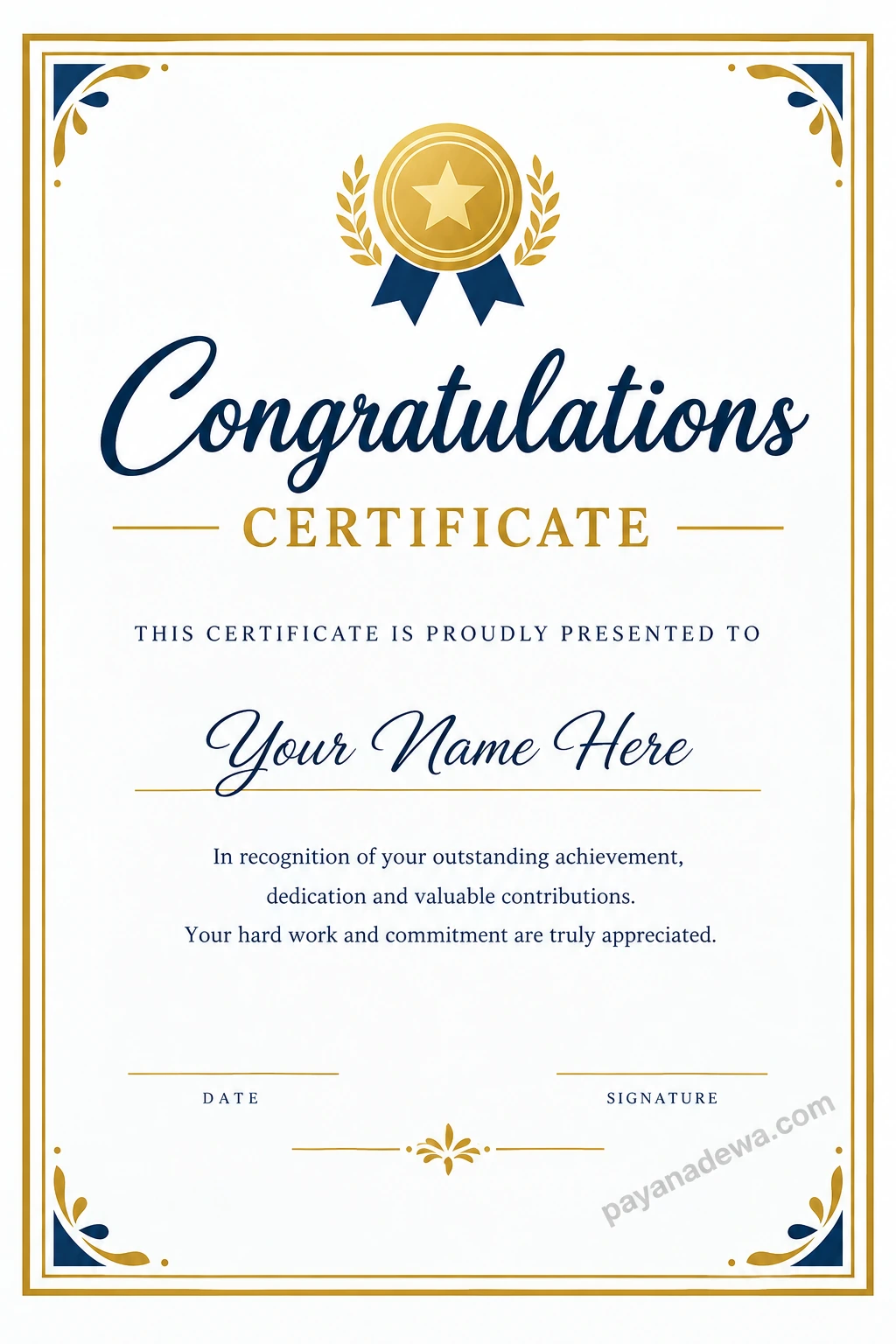
For an easy starting point, use the Congratulations Certificate Template below as inspiration for your own personalized design.
What to Include on a Congratulations Certificate
A successful certificate combines attractive design with clear information. Before printing, make sure the essential details are included and easy to read.
1. A Clear Certificate Title
The title should immediately communicate the purpose of the document. Common options include “Congratulations Certificate,” “Certificate of Achievement,” and “Certificate of Recognition.”
Choose a title that matches the occasion. For example, a school award may benefit from an achievement-focused heading, while a workplace certificate may use a professional recognition title.
2. The Recipient’s Full Name
The recipient’s name is one of the most important elements on the page. Make it prominent and use the correct spelling. A larger font or elegant script can help draw attention to the name without making the layout difficult to read.
3. A Personalized Congratulatory Message
Explain why the certificate is being awarded. Keep the wording positive, specific, and appropriate for the recipient.
For example:
“In recognition of your outstanding dedication, remarkable achievement, and commitment to excellence. Your hard work and perseverance are truly appreciated.”
A specific message is often more meaningful than a general statement. Whenever possible, mention the accomplishment or quality being recognized.
4. The Date and Signature
Include the date of the achievement or presentation. If the certificate is issued by a school, business, or organization, add the name and signature of an authorized representative.
You may also include an organization name, logo, or certificate identification number when the occasion requires additional formality.
Popular Congratulations Certificate Design Ideas
The best certificate design depends on the recipient, occasion, and intended use. Fortunately, you can choose from several styles to achieve the right look.
Elegant Gold and Navy Certificate
A gold and navy certificate is suitable for formal recognition, professional accomplishments, graduation celebrations, and special awards. Gold accents create a sense of distinction, while navy lettering provides strong contrast against a white background.
Minimalist Certificate Template
A minimalist certificate uses clean lines, generous white space, and simple typography. This style is ideal for modern businesses, online courses, and professional training programs.
Colorful Certificate for Students
Bright colors, friendly illustrations, and playful headings can make certificates more appealing to younger recipients. Use these elements thoughtfully so the recipient’s name and achievement remain the main focus.
Formal Corporate Recognition Certificate
Corporate certificates usually feature restrained colors, clear typography, and consistent branding. Add the company logo and an achievement-specific message to create a certificate that fits the organization’s identity.
How to Create Your Own Congratulations Certificate
Creating a certificate is straightforward when you follow a few practical steps. Start with a suitable template, then adjust the content and layout to match the occasion.
Step 1: Choose the Right Template
Decide whether you need a formal, modern, playful, or minimalist design. Consider who will receive the certificate and where it will be presented.
Step 2: Add the Recipient’s Information
Enter the recipient’s full name and the specific accomplishment being celebrated. Check the spelling carefully before moving to the next step.
Step 3: Customize the Design
Choose a readable font and a coordinated color palette. Keep decorative elements consistent, and avoid adding too many graphics. A simple design often looks more professional than a crowded one.
Step 4: Review the Certificate
Proofread every line, verify the date, and confirm that the signature details are correct. Also, check the spacing around the recipient’s name and congratulatory message.
Step 5: Download and Print
Save your finished certificate in a suitable format. PDF is a convenient choice for preserving the layout during printing. If you are printing a physical copy, use a high-quality printer and sturdy paper for a more polished result.
Tips for Printing a High-Quality Certificate
Even a beautiful design can look disappointing if it is printed incorrectly. Follow these tips to achieve a clean, professional finish.
- Select the correct paper size: Use a standard size such as US Letter or A4, depending on your location and template.
- Choose quality paper: Smooth, heavyweight paper can make the certificate feel more substantial.
- Check print settings: Select the correct paper size and a high-quality print setting.
- Maintain sufficient margins: Keep important text and decorative borders away from the edges to prevent accidental cropping.
- Preview before printing: Review the entire page and print a test copy when possible.
- Keep a digital copy: Save the final file so you can reprint the certificate or create matching awards later.
For digital distribution, use a clear, high-resolution file and ensure that all text remains readable on a computer or mobile screen.
Common Mistakes to Avoid
A certificate should feel special, so small details matter. Avoid these common mistakes when creating your design.
- Using too many fonts: Limit your design to two or three complementary typefaces.
- Adding excessive decoration: Too many icons, colors, or borders can distract from the achievement.
- Writing a vague message: Clearly explain why the recipient deserves recognition.
- Forgetting important details: Check the recipient’s name, award title, date, and signature before printing.
- Ignoring readability: Avoid text that is too small, too light, or difficult to read against the background.
- Using the wrong page layout: Make sure the design fits the selected paper size and orientation.
By avoiding these problems, you can create a certificate that looks attractive and communicates appreciation clearly.
Frequently Asked Questions About Congratulations Certificates
What is the difference between a congratulations certificate and a certificate of achievement?
A congratulations certificate is a broad way to recognize a positive event or milestone. A certificate of achievement specifically emphasizes an accomplishment, such as reaching a goal, completing a project, or demonstrating a particular skill. The terms can overlap, depending on the occasion.
Can I use a congratulations certificate for school or work?
Yes. A congratulations certificate can recognize academic progress, graduation, professional milestones, outstanding performance, and successful training completion. Customize the title and message to suit the recipient and setting.
What should I write on a congratulations certificate?
Include a clear title, the recipient’s name, a short message describing the achievement, the date, and the signature of the person presenting the award. Keep the message sincere, specific, and easy to understand.
What paper is best for printing certificates?
Heavyweight, smooth paper or light cardstock is generally a good choice. The best option depends on your printer, paper size, and desired finish. Always check your printer’s supported paper specifications before printing.
Can I share a congratulations certificate digitally?
Yes. You can share a certificate as a PDF or another suitable image format. Make sure the recipient’s name and all other details are readable, and keep a high-quality version for future use.
Conclusion
A congratulations certificate is a simple yet meaningful way to celebrate achievements, recognize dedication, and encourage future success. With the right template, thoughtful wording, and a balanced design, you can create a certificate that feels personal and professional.
Start by choosing a style that suits the occasion. Then add the recipient’s name, write a specific congratulatory message, and check every detail before printing or sharing your certificate.
Whether you are celebrating a student, colleague, friend, or family member, a well-designed congratulations certificate can turn an important moment into a lasting memory. Use the template featured in this guide as inspiration and create a certificate that makes the recipient feel genuinely appreciated.