Shopping online should be simple, clear, and convenient. However, customers can sometimes feel confused about what happens after they choose a product. A well-designed Ordering Process Guide Brochure can solve this problem by showing every stage of an order, from browsing products to receiving the final delivery.
An effective ordering guide gives customers clear instructions without overwhelming them. It explains what they need to do, what information they should provide, how payment works, and what to expect after placing an order. Whether you run an online store, service business, restaurant, or retail company, a simple order process guide can improve the customer experience and reduce unnecessary questions.
This guide explains the essential steps of an ordering process and provides practical tips for creating a brochure that customers can easily understand and follow.
What Is an Ordering Process Guide Brochure?
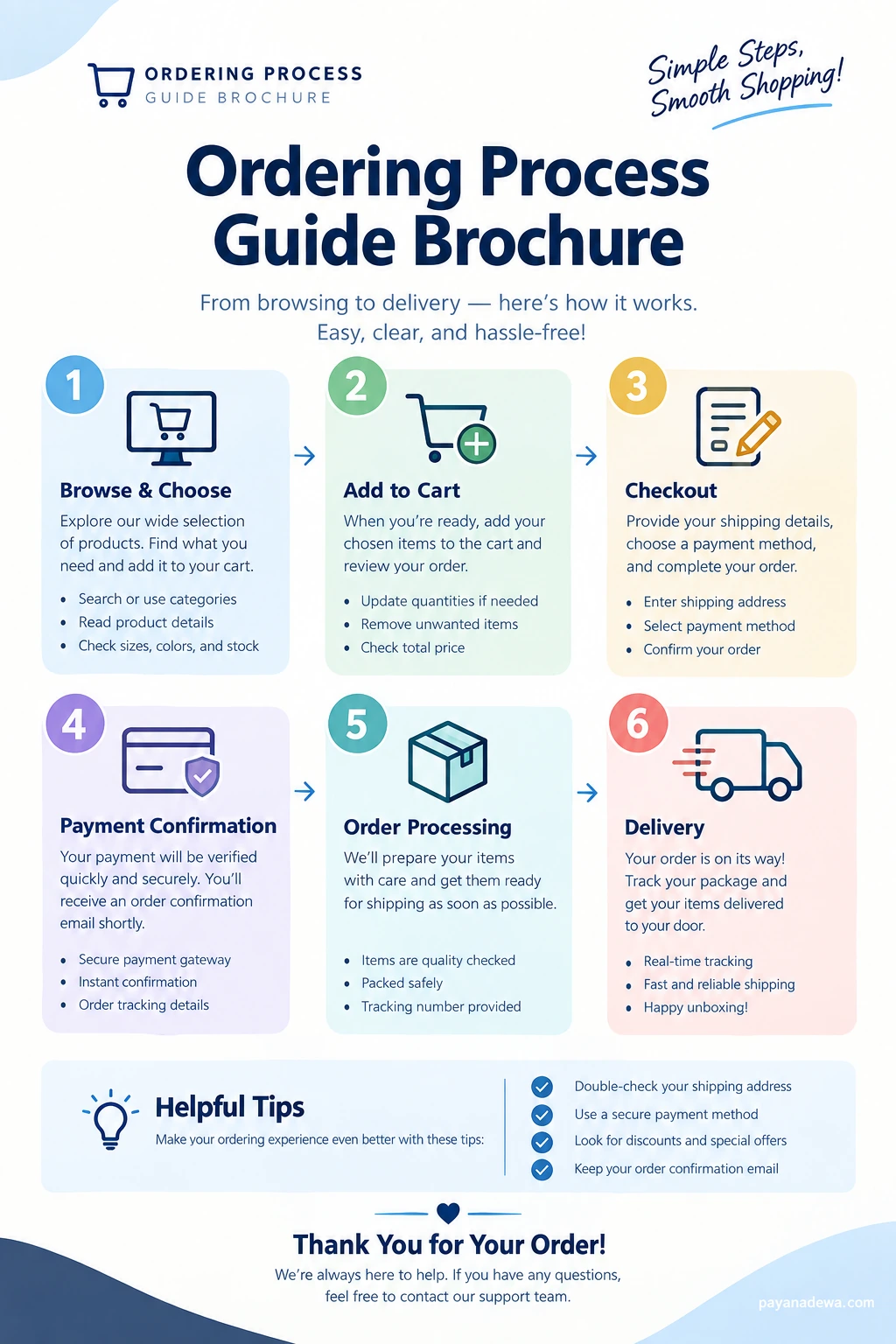
An Ordering Process Guide Brochure is a visual document that explains how customers can place and complete an order. It presents the process in a logical sequence, usually with numbered steps, short descriptions, icons, and helpful instructions.
The goal is simple: customers should be able to look at the brochure and immediately understand what they need to do next.
A typical ordering process brochure may include:
- Product browsing and selection instructions
- Add-to-cart or order placement information
- Checkout instructions
- Shipping and billing details
- Payment confirmation information
- Order processing updates
- Shipping and delivery information
- Customer support instructions
Because the information is organized visually, customers can scan the document quickly instead of reading a long block of instructions.
Why an Ordering Process Guide Is Important
A clear ordering process can make a significant difference in the way customers interact with a business. When shoppers understand each step, they are less likely to abandon their order because of confusion.
1. It Makes Ordering Easier
Customers appreciate simple instructions. A visual guide can show them exactly where to begin and what to do next. This is especially useful for first-time customers who may not be familiar with your ordering system.
2. It Reduces Customer Questions
Many customer service questions are caused by uncertainty. Customers may ask whether their payment was received, when an order will be processed, or how they can track a package.
A detailed ordering guide can answer these common questions before customers need to contact your support team.
3. It Builds Customer Confidence
A professional ordering process brochure makes a business look organized and prepared. Customers can see what happens after they click the order button. This transparency can create a more comfortable shopping experience.
4. It Creates a Consistent Customer Experience
When every customer receives the same clear instructions, the ordering experience becomes more consistent. The brochure can also help employees explain the process in the same way.
The 6 Essential Steps in an Ordering Process
A strong ordering process guide should follow a natural customer journey. The following six steps work well for many types of online and offline businesses.
Step 1: Browse and Choose
The process begins when customers explore available products or services. They should be able to find useful information quickly and compare their options.
Encourage customers to check important details before making a selection. These may include product descriptions, sizes, colors, availability, specifications, and prices.
- Browse product categories
- Search for specific products
- Read product descriptions
- Check sizes, colors, or specifications
- Confirm product availability
Step 2: Add Items to the Cart
After choosing a product, the customer can add it to the shopping cart. At this stage, customers should have the opportunity to review their selections.
A useful brochure can remind customers to check quantities, product variations, and prices before continuing.
- Choose the correct quantity
- Select the preferred product variation
- Remove unwanted products
- Review the estimated total
Step 3: Complete Checkout
Checkout is one of the most important stages of the ordering process. Customers normally provide shipping information and select their preferred payment method.
Keep checkout instructions straightforward. Avoid asking for unnecessary information because complicated checkout forms can make the process feel longer.
- Enter your name and contact details
- Provide the correct shipping address
- Review shipping options
- Select a payment method
- Review the complete order
Step 4: Confirm Payment
After the customer submits the order, the payment must be processed or verified. The exact process depends on the payment method and the business system.
Customers should receive a clear confirmation message when the transaction is successful. An order confirmation email can also provide useful information such as the order number, purchased items, total cost, and expected delivery details.
Step 5: Order Processing
Once the payment is confirmed, the business begins preparing the order. This may include checking inventory, picking products, packaging items, and preparing the shipment.
Customers should know that processing time can vary. If your business has a specific processing period, include it in the ordering guide.
For example, you can explain that orders are normally prepared within a certain number of business days. Clear expectations help customers understand the difference between processing time and shipping time.
Step 6: Shipping and Delivery
The final stage is delivery. Once the order has been shipped, customers may receive a tracking number or shipping notification.
A useful ordering brochure should explain how customers can track their packages and what they should do if a delivery is delayed.
- Receive the shipping confirmation
- Use the tracking number when available
- Monitor the delivery status
- Receive the package
- Contact customer support if assistance is needed
How to Design an Effective Ordering Process Brochure
Good design is just as important as good information. The brochure should be easy to scan, especially when customers are viewing it on a phone or printing it for later reference.
Use a Clear Visual Hierarchy
Make the main title easy to see. Then organize the ordering steps with numbered sections. Each step should have a short heading and a concise explanation.
Icons can also help customers recognize each stage quickly. For example, a shopping cart can represent product selection, while a delivery truck can represent shipping.
Keep the Text Concise
A brochure is not the same as a long instruction manual. Use short paragraphs and bullet points whenever possible.
Focus on information that customers actually need. Remove unnecessary technical language and complicated explanations.
Use Consistent Branding
Your ordering guide should match your business identity. Use consistent typography, spacing, colors, icons, and brand elements.
A professional appearance can make the document easier to recognize and can reinforce your brand throughout the customer journey.
Make It Printable and Digital-Friendly
A versatile Ordering Process Guide Brochure should work in both digital and printed formats. Use a clean layout with enough white space so that the document remains readable when printed.
For digital use, make sure the text remains legible on smaller screens. If you include website addresses, QR codes, or support information, make them easy to locate.
Practical Tips for a Better Ordering Experience
Small improvements can make the ordering process more convenient. Consider these practical recommendations when creating your guide.
- Double-check shipping information: Encourage customers to verify their address before submitting an order.
- Explain payment options: Clearly list the payment methods customers can use.
- Show order confirmation details: Tell customers where they can find their order number and confirmation.
- Explain processing times: Separate order preparation time from shipping time.
- Provide tracking information: Explain when tracking details become available.
- Include support information: Tell customers how to contact your team if they have a problem.
- Update the brochure regularly: Review the guide whenever your ordering system or policies change.
Common Mistakes to Avoid
Even a professional brochure can become difficult to use if it contains too much information or lacks a clear structure.
Too Much Text
Large paragraphs can make a brochure feel complicated. Break information into short sections and use bullet points for instructions.
Unclear Instructions
Avoid vague phrases such as “continue as normal” or “follow the next steps.” Instead, tell customers exactly what they should click, enter, check, or confirm.
Missing Order Information
Customers need to know what happens after an order is submitted. Include information about payment confirmation, processing, shipping, tracking, and customer support.
Outdated Information
An ordering guide becomes less useful when it contains old payment methods, incorrect delivery estimates, or outdated contact information. Review the document regularly.
Where to Use an Ordering Process Guide Brochure
An ordering guide can be useful in many business environments. Online stores can display it on product pages, checkout pages, FAQ sections, or customer support pages.
Retail businesses can also print the brochure and place it near checkout counters. Service providers can use a similar guide to explain booking and payment procedures.
Other possible uses include:
- E-commerce websites
- Retail stores
- Food and beverage businesses
- Custom product ordering
- Subscription services
- Event registration
- Appointment booking
- Wholesale ordering systems
Final Thoughts
A well-designed Ordering Process Guide Brochure gives customers a simple roadmap from the first product search to final delivery. By explaining each stage clearly, businesses can reduce confusion, improve communication, and create a smoother customer experience.
The most effective guide is easy to scan, visually organized, and focused on practical information. Use numbered steps, concise descriptions, helpful icons, and clear instructions. Most importantly, keep the information accurate and update it whenever your ordering system changes.
Whether you are creating a printable brochure, a digital instruction sheet, or an online ordering guide, the same principle applies: make every step clear so customers always know what to do next.