Action Plans Templates help turn goals into clear tasks, deadlines, responsibilities, and measurable results. Instead of keeping ideas in scattered notes, an action plan puts important details in one organized place. This makes it easier to know what needs to happen next.
A useful action plan does more than list tasks. It connects each task to a goal. It also identifies who is responsible, when the work should be completed, what resources are needed, and how progress will be checked.
This guide explains how to choose, create, and use action plan formats for personal projects, teams, and businesses. You will also learn how to compare spreadsheet, document, and fixed-layout formats, avoid common planning mistakes, and create a plan that people can actually follow.
What Are Action Plans Templates?
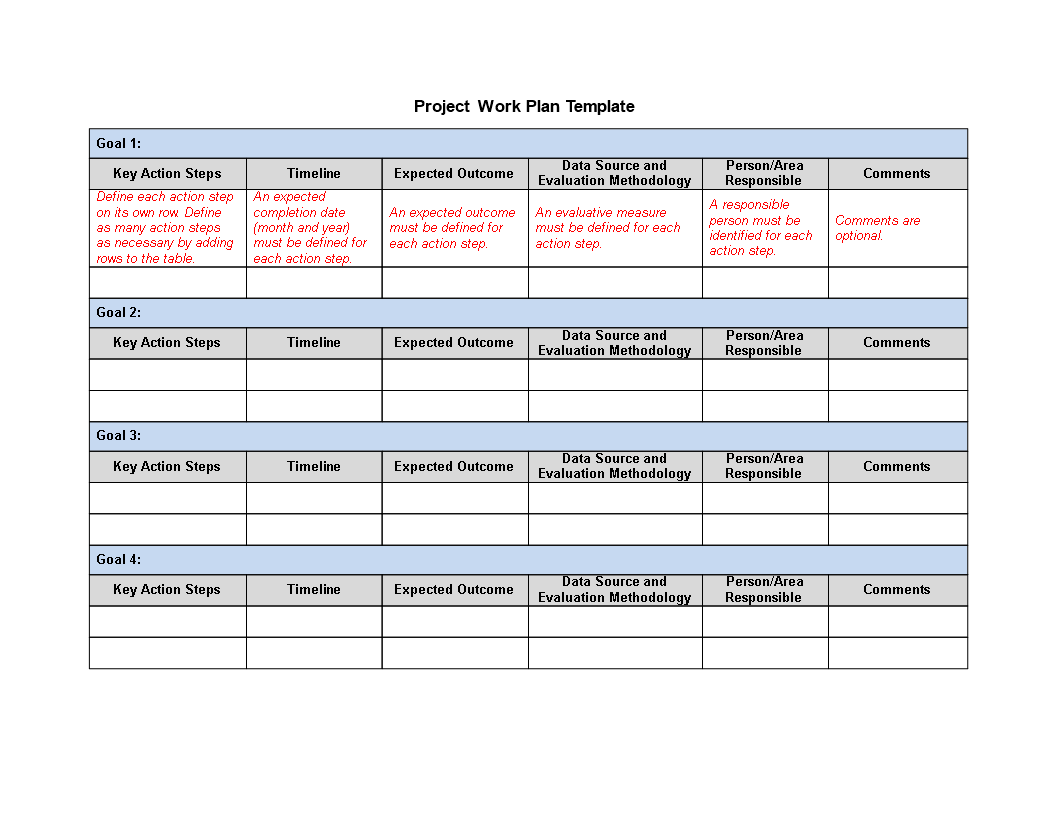
Action Plans Templates are ready-made structures for organizing the work required to reach a specific goal. They usually contain fields for objectives, tasks, owners, deadlines, priorities, resources, status, and results.
The main purpose is to make planning practical. A goal explains where you want to go. An action plan explains how you will get there.
For example, “improve customer service” is a broad goal. It becomes more useful when it is divided into specific actions. A team might review customer complaints, identify recurring problems, update response procedures, train staff, and review results.
This structure reduces confusion. Team members can see their responsibilities. Managers can see progress. Individuals can also use the same approach for personal projects and development goals.

Why Use an Action Plan?
Goals often fail because they remain too general. People know what they want, but they do not know what to do next. An action plan closes that gap.
A clear plan provides direction. It also creates accountability. When every task has an owner and a deadline, it becomes easier to follow up.
Action plans can also expose problems early. A task may require another task to be completed first. A deadline may be unrealistic. A team may lack the necessary resources. These issues become easier to identify when the work is written down.
- Clarity: everyone can see what needs to happen.
- Accountability: responsibilities are assigned to specific people or roles.
- Focus: important actions receive attention before lower-priority work.
- Measurement: progress can be compared with defined objectives.
- Communication: teams have a shared reference point.
- Flexibility: tasks and deadlines can be adjusted when circumstances change.

Essential Parts of Effective Action Plans Templates
A strong template should contain enough information to support action. It should not contain so many fields that updating the document becomes a burden.
Goals and Objectives
The first section should explain the desired result. This is where action plans templates goals objectives become especially useful.
A goal provides the overall direction. An objective makes the expected result more specific. Good objectives are easier to measure because they describe an outcome rather than a general intention.
Action Steps
Each objective should be divided into practical actions. Use clear verbs. For example, write “review customer survey results” instead of “customer survey.” The first version tells the reader exactly what to do.
Responsible Person
Each major action should have an owner. This does not mean that only one person can work on the task. It means one person is accountable for making sure the task moves forward.
Deadline
A deadline gives the action a clear target. When several tasks depend on one another, deadlines also help the team understand the sequence of work.
Status
A simple status system can make progress easier to understand. Useful options include Not Started, In Progress, Blocked, Completed, and Needs Review.

Action Plans Templates Excel
Action Plans Templates Excel work well for projects with many tasks, deadlines, owners, and status updates. A spreadsheet makes it easy to sort and filter information.
For example, a project manager can sort tasks by owner. The same plan can then be filtered by priority or deadline. This makes a spreadsheet useful for regular progress reviews.
Excel also supports formulas. A team can calculate completion rates, count open tasks, or identify overdue work. These features become valuable when a project has many action items.
However, a spreadsheet should remain simple. Too many formulas, tabs, and complicated fields can make the plan difficult to maintain.
Action Plans Templates PDF
Action Plans Templates PDF are useful when the layout needs to remain consistent. A fixed document can work well for meetings, formal reviews, printed planning sessions, and project records.
PDF is especially useful after the planning stage is complete. For example, a manager may prepare an action plan, review it with stakeholders, and then provide a fixed copy for reference.
For ongoing task management, however, an editable spreadsheet or document may be more convenient.

Action Plans Templates Word Format
Action Plans Templates Word Format can be useful when a plan requires explanations, background information, and detailed notes. Word is often easier than a spreadsheet when the plan contains substantial written content.
A Word-based plan may include an introduction, project background, objectives, action steps, responsibilities, deadlines, risks, and review notes.
It is a practical choice for plans that need to be read carefully rather than updated several times each day.
Action Plans Templates for Business
Action Plans Templates for Business can support marketing projects, sales initiatives, employee development, customer service improvements, product launches, process changes, and strategic objectives.
Business plans should connect activities to meaningful outcomes. A list of completed tasks does not automatically show whether a project succeeded.
For example, a sales team may create an action plan to improve lead follow-up. Tasks could include reviewing response times, defining follow-up stages, updating sales scripts, training representatives, and reviewing performance.
The plan becomes stronger when every activity has a clear reason. The team can then ask whether each action contributes to the desired business result.

Action Plans Templates and Examples
Action Plans Templates and Examples are helpful because they show how abstract goals can become practical tasks.
Consider a business that wants to improve its customer onboarding process. The goal is to create a smoother experience for new customers.
The first action could be to collect customer feedback. The next action could be to identify confusing steps. The team could then revise the onboarding instructions, test the revised process, train support staff, and review customer responses.
Each action has a logical connection to the overall objective. This is the basic principle behind effective action planning.

How to Create an Action Plan
1. Define the Main Goal
Start with the result you want. Keep the statement clear and focused. Avoid combining several unrelated goals in one plan.
2. Define Measurable Objectives
Next, decide how the goal will be evaluated. A measurable objective gives the team a clear standard for success.
3. Break Objectives Into Actions
Divide each objective into manageable tasks. If a task still feels too large, divide it again.
4. Assign Responsibility
Give each important task an owner. Make sure the person has enough authority, time, and resources to complete the assignment.
5. Set Realistic Dates
Use deadlines that reflect the actual workload. A deadline should motivate action without creating unnecessary pressure.
6. Add Resources
Some tasks need people, software, information, equipment, or budget. Record these requirements before work begins.
7. Define the Review Process
Decide when the plan will be reviewed. A weekly review may work for a short project. A monthly review may suit a longer strategic initiative.

Action Plans Templates 2022 and Older Resources
Searches for action plans templates 2022 can still lead to useful planning structures. The age of a template does not necessarily determine its usefulness.
Core planning principles remain stable. Goals, tasks, owners, deadlines, resources, and measurements are still central to effective action planning.
Older resources should still be reviewed before use. Check the terminology, workflow, business requirements, and measurement methods. Update anything that no longer matches the current project.
Action Plans Templates Full Size
Action Plans Templates Full Size can be useful when a project contains many actions, detailed notes, several objectives, or multiple milestones.
A larger layout provides more room for information. This can be helpful during team workshops and detailed project reviews.
For a small personal goal, a compact plan may be easier. The best layout is the one that contains enough information without making the plan difficult to read.

How to Choose the Best Format
When comparing action plans templates and best practices, focus on usability. A visually impressive template is not helpful if people avoid updating it.
- Use a spreadsheet for detailed task tracking.
- Use a document for plans with substantial written explanations.
- Use a fixed-layout format for formal records and presentations.
- Use a larger layout for complex projects.
- Use a compact layout for simple objectives.
Think about who will use the plan. A personal plan can remain simple. A department plan may need ownership, priorities, milestones, and performance measures.
Action Plans Templates Free Download and Similar Searches
People searching for action plans templates free download, action plans templates free, or free action plan templates editable are often looking for a starting point that can be adapted quickly. When evaluating these resources, focus on the structure rather than the label attached to the template.
Check whether the template includes the fields your project needs. A useful starting structure usually includes the goal, objective, action, owner, priority, deadline, resources, status, and result.
For spreadsheet users, a free action plan template excel can be convenient when tasks need regular sorting and tracking. For document users, an editable Word structure may be more suitable.
Common Action Planning Mistakes
One common mistake is writing tasks that are too vague. “Improve sales” is an objective, not a practical action. A stronger task might be “review the previous quarter’s sales pipeline and identify the largest conversion gaps.”
Another mistake is assigning one task to several people without identifying accountability. Collaboration is useful, but someone should still coordinate the action.
Unrealistic deadlines can also damage a plan. When dates are impossible, people may stop trusting the schedule.
Another problem is failing to review the plan. A document that never changes can quickly become outdated.

How to Make Action Plans Easier to Read
Readability matters because action plans are working documents. Users should be able to scan them quickly and understand what requires attention.
Use short sentences in explanatory sections. Use clear task names in the action list. Avoid long paragraphs when a short list would communicate the same idea more effectively.
Group related tasks together. Keep terminology consistent. If one status is called “In Progress,” do not use “Currently Working” for another task unless there is a meaningful difference.

Practical Business Action Plan Example
Imagine a company wants to improve its customer support process.
- Goal: create a more consistent customer support workflow.
- Objective: identify the main causes of delayed responses.
- Action: review recent support cases.
- Owner: support manager.
- Priority: high.
- Resource: support case records.
- Next step: identify recurring workflow problems.
- Review: discuss findings with the support team.
The following actions could include updating procedures, training employees, testing the revised process, and reviewing performance.

Advanced Tips for Better Action Plans
Experienced planners can improve their plans by examining dependencies. Ask which tasks must happen first. Then place those tasks in the correct order.
It is also useful to separate activity measures from outcome measures. Completing a training session is an activity. Improved employee performance is an outcome. Both can matter, but they measure different things.
Risk planning is another useful improvement. For important tasks, identify what could cause a delay. Then define a response before the problem occurs.
Finally, keep a record of major changes. This helps teams understand why deadlines or priorities changed during the project.
Examples of Action Plans Templates for Different Needs
Examples of action plans templates can vary greatly depending on the purpose of the project.
A personal development plan may focus on skills, learning activities, milestones, and review dates. A marketing plan may focus on campaigns, content, audience segments, deadlines, and performance indicators.
A sales action plan may track prospects, follow-up activities, owners, stages, and expected outcomes. A project implementation plan may focus on deliverables, dependencies, resources, risks, and milestones.
The template should change with the work. Do not force every project into exactly the same structure.

Frequently Asked Questions
What should an action plan contain?
A practical action plan should normally contain a goal, objectives, action steps, responsible people, deadlines, priorities, resources, status, and success measures.
Can an action plan be used for a small project?
Yes. Small projects often benefit from a simple one-page structure. The number of fields should match the complexity of the work.
Which format is best for detailed task tracking?
A spreadsheet is usually a strong choice when a project contains many tasks, owners, deadlines, priorities, and status updates.
Can action plans support business goals?
Yes. Business action plans can connect strategic goals with specific activities, responsible teams, deadlines, resources, and measurable outcomes.
How often should an action plan be reviewed?
The review schedule should match the pace of the project. Fast projects may need weekly reviews, while longer initiatives may work well with monthly reviews.
Final Thoughts on Action Plans Templates
Action Plans Templates are most useful when they make the next step obvious. Start with a clear goal. Define measurable objectives. Break them into practical actions. Assign responsibility. Set realistic deadlines. Then review progress regularly.
The format matters, but the planning logic matters more. Action plans templates excel can support detailed tracking, while action plans templates pdf can suit fixed records and presentations. Action plans templates word format can work well when detailed explanations are needed.
Choose the structure that matches the project, keep the language clear, and remove fields that do not contribute to execution. When a plan is easy to understand and easy to maintain, it becomes a practical tool for turning objectives into consistent action.