Whether you need employee identification, student cards, visitor badges, or event passes, an editable ID card makes the design process faster and more convenient. You can personalize the layout, adjust colors, replace images, and organize information to match your organization’s branding.
In this guide, you will discover what editable ID cards are, which features to look for, how to customize a template, and how to prepare your finished design for printing. You will also find practical tips for creating identification cards that look professional and remain easy to read.
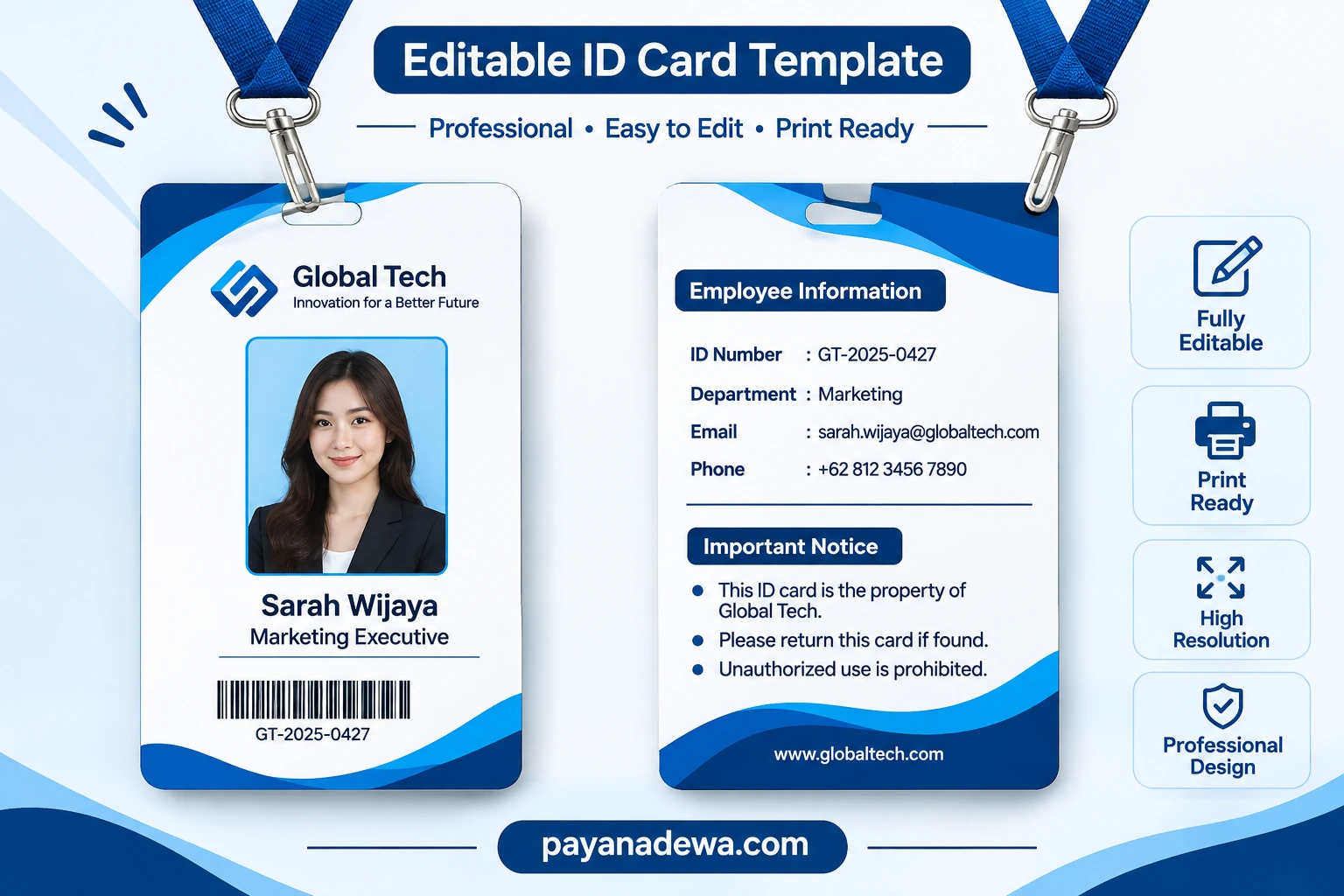
What Is an Editable ID Card?
An editable ID card is a digital identification card design that allows users to modify its contents before printing or sharing. Unlike a fixed image, an editable template gives you the flexibility to change text, photographs, colors, logos, and other design elements.
For example, a company can use one employee ID card template to create identification cards for an entire department. Instead of designing every card individually, the administrator simply replaces the employee information while keeping the overall design consistent.
Editable ID cards are commonly used for:
- Employee identification: Display employee names, photographs, departments, and job titles.
- Student identification: Create school or university cards with student details and enrollment numbers.
- Event passes: Identify attendees, staff members, volunteers, and authorized guests.
- Visitor badges: Help reception teams identify temporary visitors and contractors.
- Membership cards: Provide personalized identification for clubs, associations, and private organizations.
The main advantage is flexibility. You can reuse the same design while updating individual details whenever necessary.
Benefits of Using an Editable ID Card Template
Choosing an editable ID card template offers several advantages. It simplifies the design process and helps organizations maintain a consistent appearance across their identification materials.
1. Save Time and Effort
Creating an identification card from a blank page can take considerable time. You need to arrange the layout, select suitable fonts, position photographs, and organize personal information.
An editable template already provides a basic structure. Therefore, you can focus on entering the correct details instead of building the entire design. This is especially helpful when preparing cards for multiple employees or students.
2. Customize Every Important Detail
A good editable ID card allows you to personalize different design elements. Depending on the editing software, you may be able to change:
- Full names and identification numbers.
- Employee or student photographs.
- Company, school, or organization logos.
- Department names and job positions.
- Background colors and decorative elements.
- Contact details and additional information.
This flexibility makes it easier to create a design that matches your organization’s visual identity.
3. Maintain a Consistent Design
Consistency is important when producing identification cards for a large group. Using the same template ensures that every card follows a similar layout, color scheme, and typography style.
As a result, employee cards, student cards, and membership cards can look organized and professionally coordinated.
4. Reduce Design Costs
Reusable templates can reduce the time and resources needed to prepare new cards. Instead of hiring a designer for every small update, an authorized administrator can make routine changes independently.
However, organizations should still use appropriate printing materials and verify important information before producing the final cards.
Important Features of a Good Editable ID Card
Not every ID card template offers the same level of flexibility. Before choosing a design, consider the features that will make customization and printing easier.
Customizable Text Fields
Look for a template with clearly organized text areas. These should accommodate names, identification numbers, departments, positions, and other relevant information.
Choose readable fonts and avoid placing too much text on a small card. Important details should be visible without requiring readers to examine the card closely.
Photo Placement
A professional identification card often includes a photograph. Therefore, select a template with a clearly defined photo area and suitable proportions.
Use a high-quality, authorized photograph with good lighting. Keep the image properly aligned and avoid stretching it because this can make the finished card look unprofessional.
Logo and Branding Options
Company and organization logos help make identification cards recognizable. An editable template should provide enough space for a logo without making the layout crowded.
Use approved brand colors and maintain a balanced relationship between the logo, photograph, and text.
Front and Back Card Layouts
Some identification cards need information on both sides. The front can display the photograph, name, position, and identification number. Meanwhile, the back can contain contact information, return instructions, or other relevant organizational notices.
Before printing, make sure that both sides are correctly aligned and contain only information appropriate for the card’s intended purpose.
Print-Ready Quality
A useful editable ID card should support high-resolution output. Clear text, sharp photographs, and properly positioned design elements are essential for a professional result.
Whenever possible, use a print-ready PDF or another suitable high-quality format. Also, check the printer’s requirements for dimensions, margins, and color settings.
How to Customize an Editable ID Card
Customizing an ID card template is straightforward when you follow an organized process. The steps below can help you create a clean and professional design.
Step 1: Choose the Right Template
Start by selecting a template that matches your purpose. An employee card may need a photograph, job title, and department. In comparison, an event badge might require an attendee name, event title, and access category.
Choose a layout that provides enough space for all necessary information.
Step 2: Open the Template in an Editing Application
Use software that supports the template’s file format. Depending on the available file, suitable editing options may include Microsoft PowerPoint, Adobe Illustrator, Photoshop, Canva, or another compatible design application.
Check that the text and design elements are editable before making changes. A flattened image may allow limited customization compared with a layered design file.
Step 3: Replace the Sample Information
Remove placeholder details and enter the correct information. Double-check spelling, identification numbers, job titles, and other important fields.
For organizations preparing many cards, use a consistent information format. This makes the final collection easier to review and manage.
Step 4: Add the Correct Photograph and Logo
Insert an authorized photograph into the designated image area. Then, add the appropriate company or organization logo.
Keep both elements proportional and ensure that they do not overlap with important text. High-quality images generally produce better printing results.
Step 5: Adjust Colors and Typography
Customize the colors to match your organization’s branding. Use a limited color palette and select fonts that remain readable at the final card size.
Avoid excessive decoration. A simple layout often looks more professional than a design containing too many shapes, colors, and visual effects.
Step 6: Review and Export the Design
Before exporting, inspect the entire card carefully. Check the photograph, text alignment, spelling, margins, and image quality.
Save an editable master copy for future updates. Then, export a separate print-ready version in the format required by your printing service.
Tips for Designing Professional ID Cards
A well-designed identification card should be attractive, readable, and practical. The following tips can help improve your finished design.
- Keep the layout simple: Prioritize essential information and avoid unnecessary decorative elements.
- Choose readable typography: Use clear fonts and appropriate text sizes for the physical card dimensions.
- Use consistent colors: Follow your organization’s approved brand palette.
- Use high-quality photographs: Select clear images with suitable lighting and backgrounds.
- Check alignment: Keep text, photographs, and logos properly positioned.
- Protect sensitive information: Only include personal details that are genuinely necessary.
- Review before printing: Check every card for errors before producing multiple copies.
It is also important to consider accessibility. Sufficient contrast between text and background colors makes information easier to read. In addition, avoid relying on color alone to communicate important access categories or instructions.
Common ID Card Printing Mistakes to Avoid
Even a well-designed template can produce disappointing results if the printing process is not properly prepared. Fortunately, most common problems are easy to prevent.
Using Low-Resolution Images
Low-resolution photographs and logos can appear blurry when printed. Use suitable source images and check their appearance at the actual card size before exporting.
Ignoring Card Dimensions
Different printers and organizations may require different card dimensions. Always confirm the required size before finalizing your design. Also, leave sufficient space around the edges to prevent important content from being cut off.
Choosing Difficult-to-Read Fonts
Decorative fonts can look attractive on a computer screen but may become difficult to read on a small printed card. Use simple typography for names, identification numbers, and other essential information.
Forgetting to Check the Final Proof
Printing incorrect information can waste materials and create unnecessary administrative work. Review each personalized card before approving the final print.
Where Can You Use Editable ID Card Designs?
Editable ID card designs are useful in many professional and educational environments. Their versatility makes them suitable for organizations that need reusable identification materials.
- Offices and businesses: Create employee badges for staff identification and workplace administration.
- Schools and universities: Prepare student identification cards and authorized campus badges.
- Conferences and exhibitions: Design attendee passes, exhibitor badges, and event staff identification.
- Clubs and associations: Create membership cards with consistent organizational branding.
- Community organizations: Prepare volunteer badges and temporary identification materials.
Regardless of the environment, an ID card should only be used for its intended and authorized purpose. Editable templates are design tools, not a substitute for official identity verification or government-issued identification documents.
Frequently Asked Questions About Editable ID Cards
Can I edit an ID card template myself?
Yes. Many editable ID card templates can be customized using compatible design software. You can change text, photographs, logos, colors, and other supported elements depending on the file format.
Which software is suitable for editing ID card templates?
Microsoft PowerPoint, Canva, Adobe Illustrator, and Adobe Photoshop are common options. The best choice depends on the template format and the level of customization you need.
What information should an employee ID card contain?
An employee ID card commonly includes the employee’s name, photograph, job title, department, and an organization-approved identification number. Only include additional personal information when there is a legitimate need.
Can I print an editable ID card at home?
Yes, provided you have a compatible printer, suitable card material, and a template prepared for your printer’s requirements. For more durable results, you may prefer a professional printing service.
Should I save my editable ID card template?
Absolutely. Keeping an editable master file makes future updates easier. You can reuse the design when employee details change or when new authorized cards need to be prepared.
Conclusion
An editable ID card is a convenient way to create personalized and professional identification materials for businesses, schools, events, and organizations. With a reusable template, you can save time, maintain consistent branding, and customize essential details without designing every card from scratch.
For the best results, choose a suitable layout, use clear photographs, select readable fonts, and verify all information before printing. Additionally, keep an editable master copy so future changes can be completed quickly.
Whether you are preparing employee badges, student cards, or event passes, a well-organized editable ID card template can make the entire design process simpler and more efficient. Always use your designs responsibly and ensure that identification materials are issued only by authorized organizations.