An ID card is an essential tool for identifying individuals in workplaces, schools, organizations, and many other environments. Whether you are an employee, student, business owner, or event organizer, having a well-designed identification card makes daily activities more organized and professional.
Today, ID cards do much more than display a person’s name and photograph. They can also provide access to secure buildings, support attendance tracking, improve workplace security, and simplify identification processes. With different materials, layouts, and printing options available, creating a suitable ID card has become easier than ever.
In this guide, you will discover the different types of identification cards, their important features, design ideas, and practical tips for creating a professional ID card that meets your needs.
What Is an ID Card?
An ID card, also known as an identification card, is a document used to verify or communicate a person’s identity. It usually contains essential information such as a full name, photograph, identification number, organization name, and job title or membership status.
Organizations issue ID cards to employees, students, visitors, members, and other authorized individuals. These cards help people recognize one another and confirm their relationship with a particular institution.
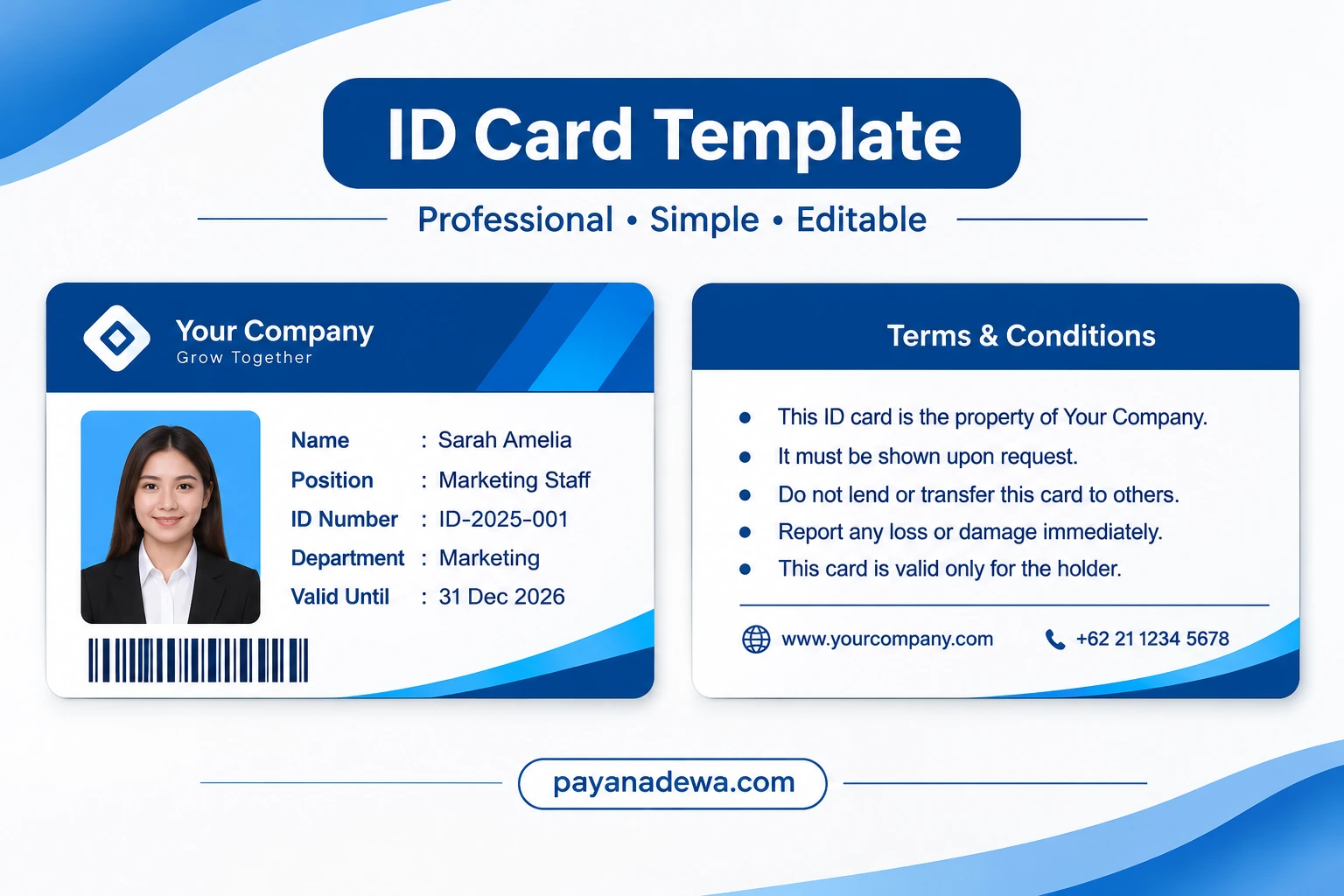
Most ID cards are made from durable plastic, although paper and laminated versions are also common. Depending on their purpose, they may include barcodes, QR codes, magnetic stripes, or electronic chips.
Common Types of ID Cards
Different organizations need different identification solutions. Therefore, choosing the right type of ID card depends on its intended use, security requirements, and budget.
1. Employee ID Cards
Employee ID cards are commonly used in offices, factories, hospitals, retail stores, and other workplaces. They help identify staff members and distinguish employees from visitors or external contractors.
A typical employee identification card includes:
- Employee’s full name
- Recent profile photograph
- Job title or department
- Unique employee identification number
- Company name and logo
- Card expiration date, when applicable
Some companies also use employee cards for building access, attendance management, and time tracking.
2. Student ID Cards
Schools, colleges, universities, and training institutions issue student ID cards to their students. These cards make it easier to identify enrolled students and access educational facilities.
Student cards may also provide benefits such as library access, campus discounts, examination identification, and cafeteria payments.
3. Visitor ID Cards
Visitor ID cards help organizations monitor people who enter their premises temporarily. They are particularly useful in corporate offices, hospitals, industrial facilities, and educational institutions.
These cards often display a visitor’s name, visit date, destination, and expiration time. Some organizations use different colors to distinguish visitors from permanent employees.
4. Membership ID Cards
Membership cards are designed for clubs, gyms, professional associations, communities, and subscription-based organizations.
They typically contain the member’s name, membership number, organization logo, and validity period. In addition, some membership cards provide access to exclusive services or special discounts.
5. Government and Official Identification Cards
Government-issued identification cards are used to establish identity for official purposes. Depending on the country, these documents may support access to public services, identity verification, and administrative procedures.
Official identification documents have specific legal and security requirements. Therefore, they should only be produced or issued by authorized government agencies.
Important Elements of a Professional ID Card
A good ID card design should be attractive, readable, and functional. Although creative layouts can make a card stand out, the most important information must remain easy to find.
Consider including the following elements when designing an identification card:
Personal Information
The cardholder’s name and identification number should be clearly visible. For employee cards, including a department or job title can make identification even easier.
Profile Photograph
A clear, recent photograph helps other people recognize the cardholder. Choose a professional image with good lighting and a simple background.
Organization Logo
Adding a company, school, or organization logo helps establish authenticity and strengthens brand recognition. Use a high-quality logo that remains clear when printed.
Identification Number
Every cardholder should have a unique identification number when the organization uses individual records. This makes searching, verification, and administrative management more convenient.
Security Features
Depending on the application, an ID card may include additional security elements, such as:
- QR codes for digital verification
- Barcodes for scanning
- Magnetic stripes for compatible readers
- RFID or NFC technology for contactless access
- Holographic elements or other anti-counterfeit features
Not every card requires advanced security. Choose features according to the organization’s actual needs.
How to Create a Professional ID Card
Creating an attractive identification card does not have to be complicated. With a suitable template and basic design tools, you can prepare a professional layout in a few simple steps.
Step 1: Determine the Purpose
First, decide who will use the card and what it needs to accomplish. An employee ID card may require a job title and department, while a student card may need a school name and student number.
Step 2: Choose the Right Card Size
Select a standard card dimension that works with your printer and accessories. A commonly used plastic card size is CR80, measuring approximately 85.60 mm × 53.98 mm.
Using standard dimensions helps ensure that the finished card fits common cardholders, wallets, and lanyard accessories.
Step 3: Select a Suitable Design
Choose a layout that reflects your organization. Blue and white are popular corporate colors because they create a clean and professional appearance. However, you can use other colors to match your brand identity.
Keep the design simple and avoid unnecessary decorative elements. Make sure that the text, photograph, and logo have enough space.
Step 4: Add the Required Information
Enter the cardholder’s details carefully. Double-check names, identification numbers, department information, and expiration dates before printing.
Incorrect information can create confusion and may require the card to be printed again.
Step 5: Review and Print
Before producing multiple cards, print a sample and inspect the result. Check the image quality, text alignment, colors, and overall readability.
For long-term use, consider durable PVC cards and professional card-printing equipment. Lamination can also protect suitable paper-based identification cards from moisture and everyday wear.
Choosing the Best ID Card Design
The right ID card design balances appearance and functionality. A beautiful card is useful only when people can easily read and understand its information.
Here are some practical design recommendations:
- Use readable fonts: Choose simple fonts and avoid decorative styles for important information.
- Maintain color consistency: Use colors that match your company or institution’s branding.
- Prioritize important details: Make the cardholder’s name and photograph easy to recognize.
- Use high-resolution images: Avoid blurry photographs and pixelated logos.
- Keep the layout organized: Arrange information into clear sections.
- Consider both sides: Use the back of the card for contact details, instructions, or security information when necessary.
A consistent design also makes it easier to produce identification cards for large teams or multiple departments.
Benefits of Using ID Cards
ID cards provide several practical advantages for individuals and organizations. Their benefits extend beyond simple identification.
Improved Security
Identification cards help security personnel recognize authorized individuals. When combined with access control systems, they can also restrict entry to specific areas.
Better Organization
In workplaces and educational institutions, ID cards make it easier to identify employees, students, and visitors. As a result, daily administrative activities become more organized.
Professional Appearance
Matching identification cards create a consistent and professional image. They also help employees represent their organization when interacting with customers and business partners.
Convenient Identification
Instead of repeatedly asking for personal details, staff members can quickly check the information displayed on an ID card. This saves time during routine verification.
Integration With Digital Systems
Modern identification cards can work with attendance systems, electronic door locks, and membership platforms. QR codes and RFID technology can make these processes even more convenient.
Tips for Maintaining and Protecting ID Cards
Proper maintenance helps extend the life of an identification card. Although plastic cards are generally durable, they can still become damaged through improper handling.
Follow these simple recommendations:
- Keep the card away from excessive heat and direct sunlight.
- Clean the surface with a soft cloth when necessary.
- Avoid bending, scratching, or punching unauthorized holes in the card.
- Use a protective sleeve or suitable cardholder.
- Report lost or stolen cards immediately.
- Replace expired or damaged cards when required.
Organizations should also establish clear procedures for issuing, updating, and deactivating identification cards. This is particularly important when employees leave a company or visitors complete their appointments.
Where to Find an ID Card Template
If you want to create an identification card quickly, starting with a ready-made ID card template can save time. Templates provide a basic structure that you can customize with your own logo, photographs, colors, and personal information.
Look for a template that offers:
- A clean and professional layout
- Clearly defined photograph and text areas
- Front and back card designs
- Editable text and graphic elements
- Standard card dimensions
- High-quality printing support
You can use graphic design software or compatible document editors to customize your chosen template. Before printing, make sure that the final dimensions and resolution match your printing requirements.
A suitable template is especially helpful for small businesses, schools, event organizers, and community groups that need a consistent identification system without designing every card from scratch.
Conclusion
An ID card is a practical identification tool that supports security, organization, and professional communication. Whether you need employee identification, student cards, visitor passes, or membership cards, choosing the right design and information is essential.
Start by identifying your requirements, selecting an appropriate card size, and organizing the most important details. Then, choose a clean design, use high-quality images, and review everything before printing.
With a suitable ID card template and thoughtful customization, you can create professional identification cards that are both attractive and functional. A well-designed card is a simple investment that can make everyday identification easier and more efficient.
긴장된 신경을 이완시키고 편안한 숙면을 취할 수 있도록 도와주는 고품격 출장안마 프로그램을 경험해 보세요.