A well-designed flyer can make a powerful first impression. Whether you are promoting a business, announcing an event, advertising a special offer, or introducing a new product, the right design helps communicate your message quickly and effectively. This is where a Creative Flyer becomes an essential marketing tool.
In today’s competitive environment, people see advertisements everywhere. Therefore, your flyer needs more than attractive colors and beautiful pictures. It should have a clear message, an appealing layout, and information that encourages readers to take action.
A creative design also helps businesses build recognition and communicate their personality. From simple printable documents to modern promotional materials, a well-planned flyer can support different marketing goals.
Whether you are a beginner, designer, business owner, or marketing professional, understanding the basic principles of flyer design can help you create better promotional materials.
In this guide, you will discover creative flyer ideas, important design elements, useful tips, and practical techniques to make your next project more effective.
What Is a Creative Flyer?
A creative flyer is a visual promotional document designed to communicate information in an attractive and memorable way. It combines typography, images, colors, illustrations, and carefully arranged content to capture attention.
Unlike ordinary promotional documents, creative flyers focus on presenting information with a distinctive visual style. Their appearance should reflect the message, audience, and purpose of the promotion.
For example, a restaurant might use colorful food photography and bold typography. Meanwhile, a professional company may choose a clean layout with elegant colors and minimal graphic elements.
Why Creative Flyers Are Important
Flyers remain useful because they offer a straightforward way to introduce products, services, and events. They can be distributed digitally or printed for physical promotion.
Some important benefits include:
- Better visibility: Attractive layouts help promotional messages stand out.
- Affordable marketing: Flyers can be produced without requiring a large advertising budget.
- Flexible distribution: Share designs through email, websites, social media, or printed materials.
- Brand recognition: Consistent colors and typography strengthen brand identity.
- Clear communication: Organized content makes important information easier to understand.
Popular Creative Flyer Design Ideas
Choosing the right design concept is an important step in creating effective promotional materials. The best approach depends on your audience, industry, and marketing objectives.
Here are several creative flyer styles worth considering.
1. Minimalist Flyer Design
Minimalist flyers use simple layouts, limited colors, clean typography, and plenty of white space. This approach creates a professional appearance without overwhelming readers.
It works particularly well for corporate promotions, professional services, educational announcements, and business presentations.
2. Modern Business Flyer
A modern business flyer combines professional typography, geometric shapes, attractive photography, and balanced color combinations.
Blue, white, and yellow are popular choices for communicating professionalism, clarity, and energy. However, you should select colors that complement your brand identity.
This style is suitable for company introductions, service promotions, product launches, and marketing campaigns.
3. Colorful Promotional Flyer
Bright colors can make promotional materials more noticeable. This style is particularly useful for sales campaigns, entertainment events, seasonal promotions, and special announcements.
However, avoid using too many competing colors. Choose one dominant color and combine it with complementary shades to maintain visual balance.
4. Photo-Based Flyer
Photography can communicate ideas faster than lengthy descriptions. A high-quality image can help readers understand what a business offers or what an event is about.
Choose images that are relevant to your message. Make sure they have sufficient resolution, appropriate cropping, and good contrast with the surrounding text.
Essential Elements of an Effective Creative Flyer
Although flyer designs can look very different, successful examples usually share several important elements. Each component should contribute to the overall message.
1. An Attention-Grabbing Headline
Your headline is often the first element readers notice. Therefore, it should be short, meaningful, and easy to understand.
Use larger typography to emphasize the main message. Avoid complicated phrases that require readers to spend too much time understanding the purpose of your flyer.
2. Attractive Colors
Colors influence how people perceive a design. A carefully selected color palette can make your flyer look professional and visually consistent.
Consider these common color associations:
- Blue communicates trust, confidence, and professionalism.
- Yellow creates energy, optimism, and visibility.
- Green is often associated with nature, growth, and sustainability.
- Red creates urgency and attracts attention.
- Black communicates elegance and sophistication.
Remember to maintain sufficient contrast between the background and text. This makes your flyer easier to read, especially when printed.
3. Readable Typography
Typography plays an important role in visual communication. Choose fonts that match your design concept while remaining easy to read.
For most promotional flyers, two or three complementary font styles are sufficient. Use bold fonts for headlines and simpler fonts for descriptions and contact information.
4. High-Quality Images and Graphics
Images help create visual interest and support your promotional message. Select graphics that are relevant rather than adding decorative elements without a clear purpose.
Always check image quality before printing. Low-resolution graphics may appear blurry or pixelated on paper.
5. Clear Contact Information
A promotional flyer should tell readers what to do next. Include relevant contact information, such as a website, telephone number, email address, or social media account.
You can also include a QR code that directs readers to a landing page, product catalog, registration form, or online store.
Creative Flyer Template for Business and Marketing
Using a ready-made template can simplify the design process. Instead of creating every element from scratch, you can begin with an organized layout and customize it according to your needs.
A good template provides a consistent structure for headlines, images, descriptions, service information, and contact details.
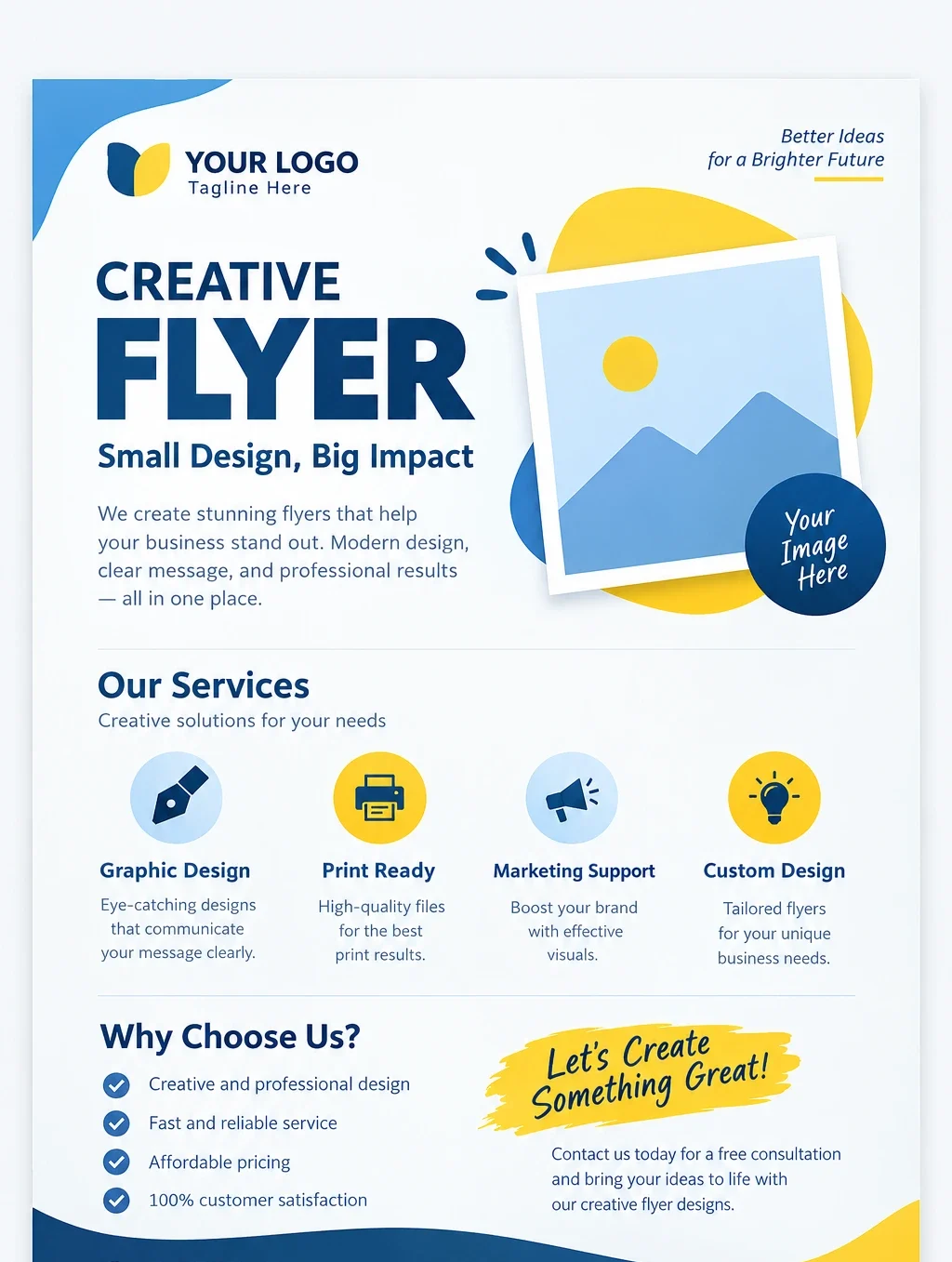
The following printable design demonstrates how these elements can work together in a clean and professional composition.
It combines a strong headline, an image area, service highlights, a promotional message, and contact information. Its blue and yellow color palette creates a modern appearance while keeping the content easy to follow.
Use this design as inspiration for creating your own promotional material. Replace the sample text, logo, images, and contact details with information relevant to your business.
How to Create a Creative Flyer Step by Step
Creating an attractive flyer does not have to be complicated. With a clear plan and the right design approach, you can produce professional-looking promotional materials.
Step 1: Define Your Purpose
Start by identifying what you want your flyer to achieve. Are you advertising a product, promoting an event, introducing a service, or announcing a discount?
A clear objective makes it easier to select the right images, colors, headlines, and supporting information.
Step 2: Understand Your Target Audience
Consider who will read your flyer. Different audiences respond to different visual styles and communication methods.
For example, a flyer targeting young customers may use energetic colors and modern typography. A corporate audience may prefer a cleaner and more formal presentation.
Step 3: Choose a Suitable Layout
Organize the content before adding decorative elements. Place the headline in a prominent position, followed by the main image and supporting information.
Use consistent spacing and alignment to create a natural reading flow. Avoid overcrowding the page with unnecessary text.
Step 4: Add Visual Elements
Include photographs, icons, illustrations, or geometric shapes that support your message. Keep the visual style consistent throughout the design.
Every element should have a purpose. Remove graphics that distract readers from the main message.
Step 5: Review and Export
Before publishing, check spelling, contact details, image quality, and text alignment. Make sure the most important information is immediately visible.
For physical printing, consider exporting your flyer as a high-quality PDF with appropriate print settings. For digital distribution, optimized PNG or JPG files are often suitable.
Best Tools for Designing Creative Flyers
You do not need expensive software to create professional promotional materials. Several design applications offer useful features for beginners and experienced designers.
Canva
Canva provides ready-made layouts, graphics, typography options, and customizable flyer templates. Its drag-and-drop interface makes it suitable for people who want to create designs quickly.
Adobe Express
Adobe Express offers design templates and creative tools for producing promotional graphics. It is useful for creating consistent marketing materials across different platforms.
Adobe Illustrator
Adobe Illustrator is a professional vector design application. It provides greater control over typography, shapes, illustrations, and custom layouts.
Microsoft PowerPoint
PowerPoint can also be used to create simple flyers. Its shapes, text boxes, images, and alignment tools provide enough flexibility for many basic promotional projects.
Practical Tips to Make Your Flyer More Effective
A visually attractive design is important, but an effective flyer must also communicate information clearly. Apply these practical suggestions to improve your results.
- Keep your message simple: Focus on the most important information instead of including every detail.
- Use visual hierarchy: Make headlines, promotional offers, and important information easy to identify.
- Maintain white space: Give text and images enough room to breathe.
- Choose relevant graphics: Use images that directly support your message.
- Include a call to action: Tell readers whether they should visit your website, contact your business, or register for an event.
- Check print dimensions: Select the correct paper size and margins before exporting.
- Stay consistent: Follow your brand colors, logo placement, and typography guidelines.
Another useful technique is to ask someone unfamiliar with your project to review the flyer. If they can understand the main message within a few seconds, your design is probably communicating effectively.
Common Creative Flyer Design Mistakes to Avoid
Even an attractive flyer can become ineffective when important design principles are overlooked. Recognizing common mistakes can save time and improve the final result.
Too Much Information
Including too much text makes a flyer difficult to scan. Prioritize the essential details and direct readers to your website for additional information.
Poor Color Combinations
Colors that clash or lack sufficient contrast can make text difficult to read. Choose a balanced palette and test the design before printing.
Low-Quality Images
Blurry photographs and stretched graphics can make promotional materials look unprofessional. Always use appropriate image dimensions and resolution.
Weak Call to Action
A flyer should guide readers toward a specific next step. Without a clear call to action, potential customers may notice your design but fail to respond.
Conclusion: Create a Creative Flyer That Makes an Impact
A Creative Flyer is more than a simple promotional document. It is a visual communication tool that helps businesses, organizations, and individuals present their messages in an attractive and memorable way.
By combining strong headlines, balanced colors, readable typography, relevant images, and organized content, you can create a flyer that captures attention and communicates effectively.
Start with a clear objective, choose a suitable layout, and focus on the needs of your audience. You can also use printable flyer templates to make the process faster and easier.
Most importantly, remember that effective design is not about adding as many decorative elements as possible. It is about making every element work together to deliver one clear message.
What kind of creative flyer would you like to design next? Share your ideas, explore different layouts, and keep experimenting with new styles to make your promotional materials stand out.