A well-designed flyer is one of the simplest and most effective ways to promote a business, advertise an event, share important information, or attract new customers. Even in today’s digital world, flyers remain a popular marketing tool because they are affordable, easy to distribute, and capable of delivering a message quickly.
Whether you need a flyer for a business, restaurant, school event, product launch, community gathering, or personal project, choosing the right design can make a significant difference. A professional flyer combines attractive visuals, clear messaging, readable typography, and a strong call to action.
In this guide, you will discover what makes an effective flyer, explore different flyer styles, learn how to create your own design, and find practical tips for producing professional results. You will also learn how to choose the right flyer template for your specific needs.
What Is a Flyer?
A flyer is a single-page promotional document designed to communicate information about a product, service, event, business, or announcement. It typically includes a headline, images or graphics, supporting text, and contact information.
Flyers can be printed and distributed physically or shared digitally through websites, email, and social media platforms. Their simple format makes them suitable for both personal and professional communication.
Unlike lengthy brochures, a flyer focuses on delivering essential information in a compact and visually appealing format. Readers should understand its main message within just a few seconds.
Common Uses of Flyers
Flyers can support many different promotional activities, including:
- Business promotion: Advertise products, services, special offers, and company announcements.
- Event marketing: Promote concerts, conferences, workshops, festivals, and community gatherings.
- Restaurant advertising: Showcase menus, discounts, new dishes, and seasonal promotions.
- Education: Share information about school activities, courses, seminars, and enrollment opportunities.
- Real estate: Advertise properties, open houses, rental opportunities, and property services.
- Personal announcements: Promote birthday parties, celebrations, charity events, and local activities.
Different Types of Flyer Designs
Choosing the right flyer style is important because different purposes require different visual approaches. A business advertisement may need a clean and professional appearance, while an entertainment flyer can use bold colors and expressive graphics.
1. Business Flyers
Business flyers help companies introduce their products and services to potential customers. They often include a company logo, a short description, important benefits, contact details, and a promotional offer.
For a professional appearance, use consistent brand colors, simple typography, and high-quality images. Avoid overcrowding the layout with unnecessary information.
2. Event Flyers
Event flyers are designed to attract attention and encourage people to attend an upcoming occasion. They are commonly used for concerts, parties, exhibitions, workshops, and community events.
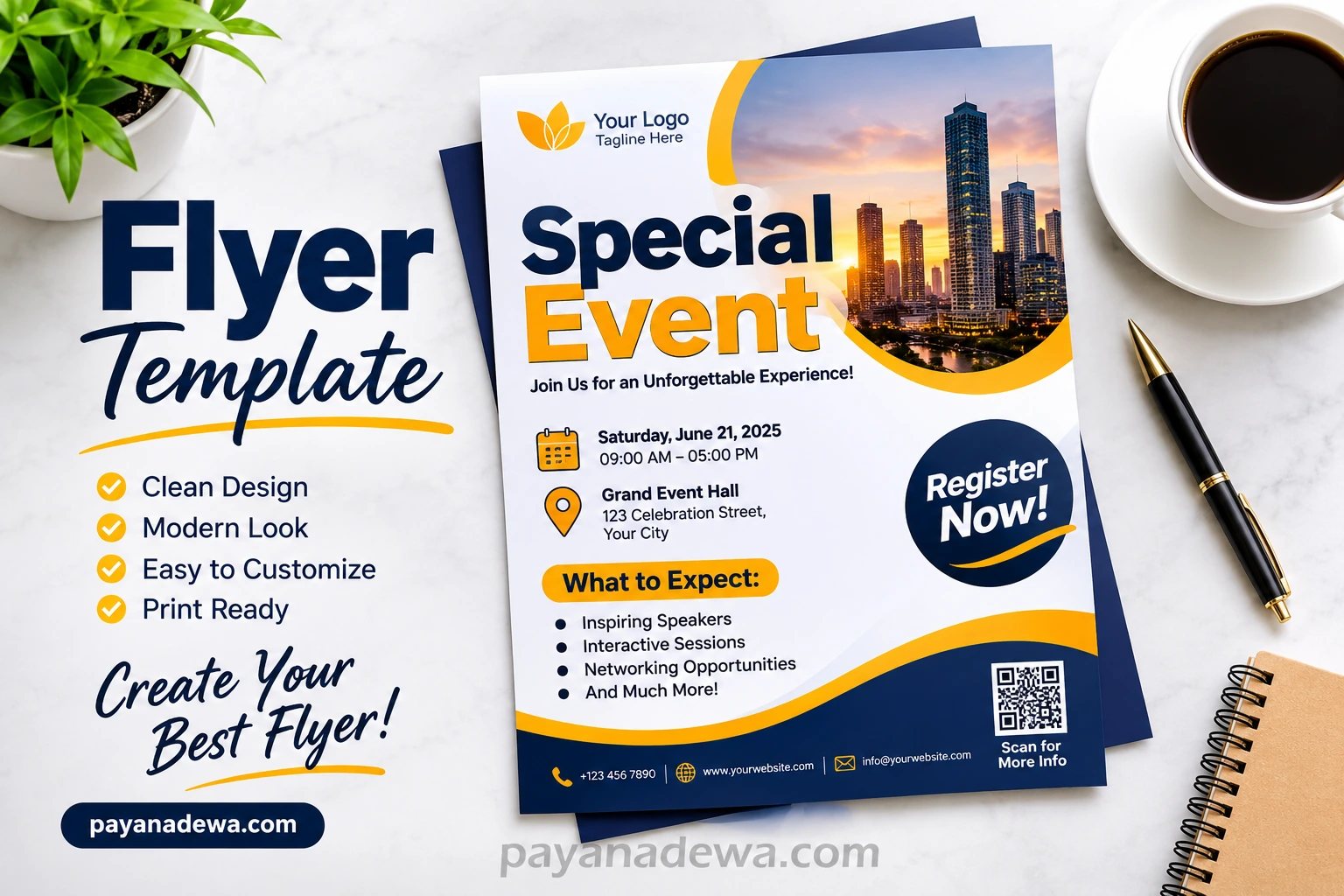
Important information should include the event name, date, time, venue, ticket details, and registration instructions. A strong headline and eye-catching visual can make the event easier to remember.
3. Promotional Flyers
Promotional flyers focus on special deals, discounts, product launches, and limited-time offers. Their primary purpose is to encourage customers to take immediate action.
Use clear promotional headlines such as special offer, seasonal sale, or limited-time discount. Make the benefits easy to understand and include a visible call to action.
4. Restaurant and Food Flyers
Restaurant flyers are useful for promoting menus, food delivery services, opening announcements, and special dining offers. Attractive food photography can help create interest and encourage customers to visit.
Include essential details such as menu highlights, pricing, location, opening hours, and ordering information.
5. Educational Flyers
Educational flyers provide information about schools, training programs, online courses, seminars, and educational events. Their layouts should be organized and easy to read.
Use informative headings, concise descriptions, relevant illustrations, and clear registration details to help readers understand the opportunity.
Essential Elements of an Effective Flyer
A successful flyer is more than an attractive design. Every element should work together to communicate the message clearly and guide readers toward a specific action.
1. An Attention-Grabbing Headline
Your headline is often the first thing people notice. It should communicate the main purpose of the flyer immediately.
Use short, meaningful phrases that highlight the most important benefit or announcement. Strong headlines are generally easier to remember than long descriptive sentences.
2. Clear and Concise Information
Keep your message focused. Include only the information readers need to understand the offer, event, or service.
Use short paragraphs, descriptive subheadings, and bullet points to make important details easier to scan.
3. High-Quality Images and Graphics
Images can make a flyer more engaging and help explain its message. Choose visuals that match your topic and support your overall design.
For example, a restaurant flyer may feature appealing food photography, while a business flyer may use product images or professional illustrations.
4. Readable Typography
Typography affects both the appearance and readability of your flyer. Choose fonts that are easy to read and use a consistent hierarchy for headlines, subheadings, and body text.
Limit the number of font styles to two or three. Make important information more noticeable through appropriate font sizes and weights.
5. Contact Information and Call to Action
Every promotional flyer should tell readers what to do next. Depending on your goal, this could be visiting a website, calling a business, scanning a QR code, registering for an event, or purchasing a product.
Make your call to action visible and include accurate contact information so interested readers can easily reach you.
How to Create a Professional Flyer Step by Step
Creating an attractive flyer does not require advanced graphic design skills. With a clear plan and the right tools, you can produce a professional-looking design for almost any purpose.
Step 1: Define Your Purpose
Before opening a design application, determine what you want your flyer to accomplish. Are you promoting a product, announcing an event, introducing a business, or advertising a special discount?
Understanding your objective will help you select the right layout, colors, images, and messaging.
Step 2: Identify Your Target Audience
Think about the people you want to reach. Consider their interests, age groups, preferences, and expectations.
A flyer targeting business professionals may benefit from a minimal and elegant design. In contrast, a flyer promoting a music festival may need energetic colors and bold typography.
Step 3: Choose the Right Layout
Select a layout that provides enough space for your headline, visuals, supporting information, and contact details.
Common flyer sizes include:
- US Letter: 8.5 × 11 inches, commonly used for general business and promotional flyers.
- A4: 210 × 297 mm, a popular international paper size.
- A5: 148 × 210 mm, suitable for compact promotional materials.
- Digital flyer: Custom dimensions designed for websites, email campaigns, and social media platforms.
Step 4: Select Colors and Fonts
Choose colors that complement your brand or promotional theme. Good color combinations improve visual consistency and make important elements stand out.
Ensure that text contrasts sufficiently with the background. This is especially important for small text and essential information.
Step 5: Add Your Content and Images
Place your headline in a prominent position, followed by the most important information. Add relevant photographs, illustrations, or icons to support the message.
Keep enough empty space around design elements. A balanced composition looks more professional and helps readers focus on the information that matters.
Step 6: Review and Export Your Design
Before publishing or printing, check spelling, dates, prices, contact details, and website addresses. Make sure that all images are clear and that no text is accidentally cut off.
For professional printing, PDF is commonly recommended. For digital sharing, PNG and JPG are practical choices. Always confirm the required specifications with your printing provider.
Why Use a Flyer Template?
A flyer template provides a ready-made layout that you can customize with your own text, images, colors, and branding. It saves time and makes the design process easier, especially for beginners.
Instead of creating every element from scratch, you can start with an existing structure and adjust it to match your promotional needs.
Here are some important advantages of using a flyer template:
- Saves time: Start with an existing design instead of building a layout from the beginning.
- Easy customization: Replace sample text, images, colors, and branding with your own content.
- Professional appearance: Use organized layouts and balanced design elements.
- Beginner-friendly: Create attractive promotional materials without extensive design experience.
- Consistent branding: Reuse a similar visual style across different marketing campaigns.
- Flexible applications: Adapt templates for print, websites, email, and social media.
Tips for Making Your Flyer More Effective
A visually appealing flyer should also be easy to understand and encourage readers to respond. Apply these practical tips to improve your design.
Keep the Message Simple
Focus on one main idea. Too much information can overwhelm readers and reduce the impact of your headline.
Use a Strong Visual Hierarchy
Arrange information according to its importance. The headline should receive the most attention, followed by supporting details and the call to action.
Choose Relevant Images
Use images that communicate your message rather than decorative graphics that serve no clear purpose. High-resolution visuals are especially important for printed materials.
Make Your Call to Action Noticeable
Tell readers exactly what they should do next. Phrases such as Visit Our Website, Book Today, Register Now, and Contact Us can help guide their decisions.
Optimize for Print and Digital Use
If you plan to use the same design across multiple platforms, create separate versions when necessary. Printed flyers require appropriate resolution, margins, and color settings. Digital versions should be optimized for screen viewing and fast loading.
Best Tools for Designing a Flyer
Several design applications make it easier to create professional promotional materials. Your choice depends on your experience, budget, and customization requirements.
- Canva: A beginner-friendly design platform with customizable flyer layouts and graphic elements.
- Adobe Express: A convenient option for creating branded promotional graphics and marketing materials.
- Adobe Illustrator: A professional vector design application offering detailed control over typography, shapes, and layouts.
- Adobe Photoshop: Useful for image-heavy flyer designs, photo editing, and creative visual compositions.
- Microsoft PowerPoint: A familiar tool that can also be used to create simple flyers with shapes, text, and images.
Choose a tool that matches your skill level. A simple application can be more than enough for everyday promotional projects.
Common Flyer Design Mistakes to Avoid
Even a good promotional idea can become less effective when the flyer is difficult to read or poorly organized. Avoid these common mistakes:
- Too much text: Long descriptions make flyers harder to scan quickly.
- Poor color contrast: Similar text and background colors reduce readability.
- Low-resolution images: Blurry visuals can make printed materials look unprofessional.
- Too many fonts: Excessive font styles create visual inconsistency.
- Missing contact details: Readers may lose interest if they cannot find a way to respond.
- No clear call to action: A flyer should guide readers toward a specific next step.
- Incorrect information: Spelling errors, outdated prices, and incorrect dates can damage credibility.
Conclusion
A professional flyer is a practical and affordable way to promote a business, advertise an event, introduce a product, or communicate important information. With the right combination of clear messaging, attractive visuals, readable typography, and a strong call to action, you can create promotional materials that capture attention and deliver results.
Using a customizable flyer template makes the process even easier. You can save time, maintain consistent branding, and create designs for different marketing needs without starting from scratch.
Whether you are a business owner, student, event organizer, or beginner designer, the key is to keep your design simple, relevant, and focused on your audience. Start with a suitable layout, customize it with meaningful content, and create a flyer that communicates your message effectively.
Explore more creative resources and design inspiration at payanadewa.com to help bring your next project to life.