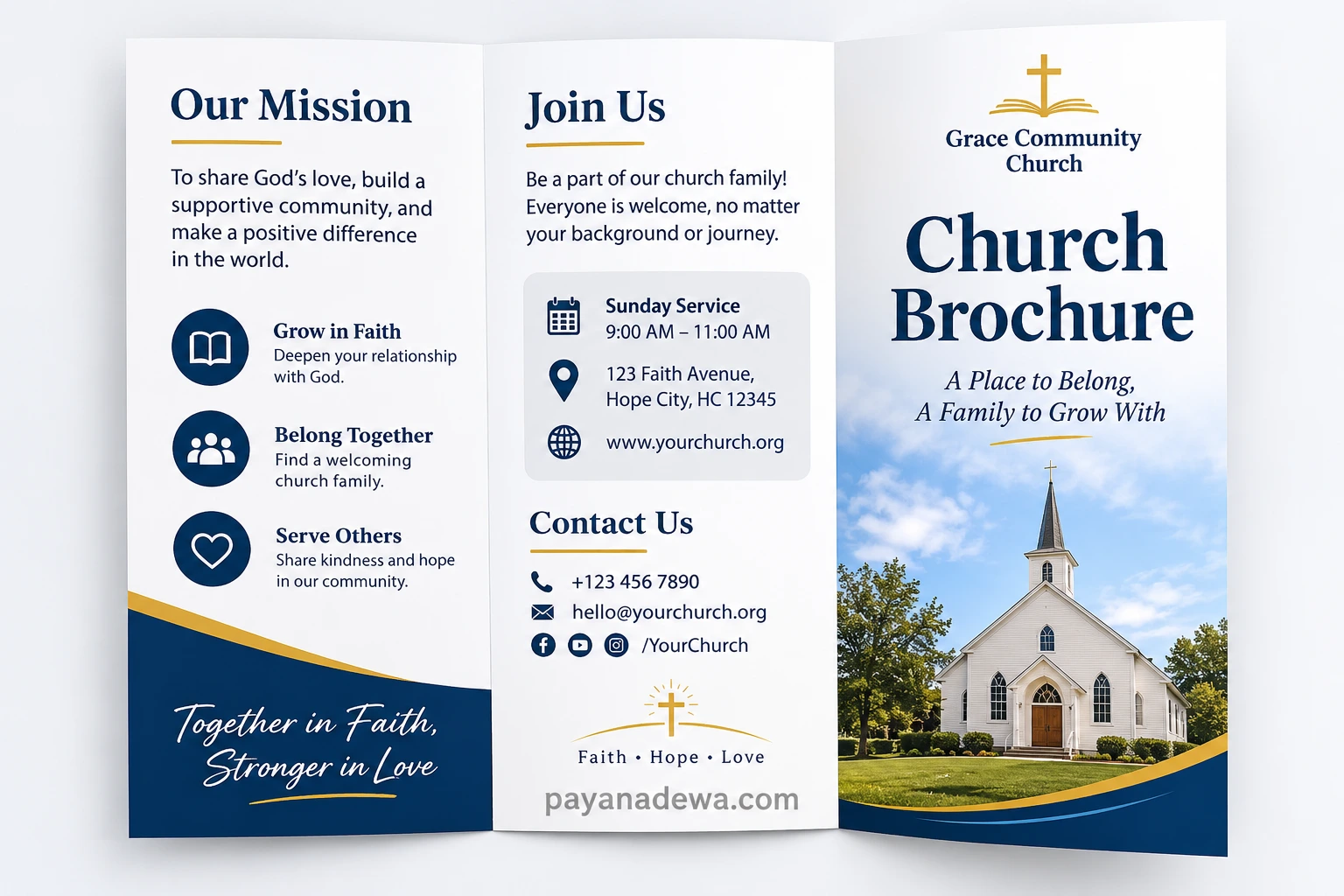
However, creating an effective brochure requires more than attractive colors and beautiful images. You also need meaningful content, organized information, and a design that reflects your church’s identity. Fortunately, with the right church brochure template and a few practical design tips, anyone can create an engaging and professional result.
In this guide, you will discover useful brochure ideas, essential content to include, popular layouts, and practical tips for creating a church brochure that connects with readers.
What Is a Church Brochure?
A church brochure is a printed or digital informational document that introduces a church, its beliefs, activities, services, and community. It helps visitors understand what the church offers and how they can become involved.
Churches use brochures for several purposes. For example, they can welcome first-time visitors, promote upcoming events, introduce ministry programs, and share important contact information.
Unlike a simple flyer, a brochure usually provides more detailed information. It also uses multiple sections or panels to organize content in an easy-to-read format.
A good church brochure should answer a few important questions:
- What is the church’s name and mission?
- Where is the church located?
- When are the worship services held?
- What activities and ministries are available?
- How can visitors contact the church?
- How can someone become part of the congregation?
By answering these questions, your brochure becomes a helpful introduction rather than just another promotional document.
Why Every Church Needs a Professional Brochure
A professional brochure can make a positive first impression. It also gives visitors something they can take home, share with family, or read later.
1. Welcome New Visitors
First-time visitors may feel unfamiliar with a church environment. Therefore, a welcoming brochure can help them feel more comfortable.
Include a friendly introduction, worship schedules, and a short message explaining what visitors can expect. Most importantly, let readers know that everyone is welcome.
2. Share Your Church’s Mission
Every church has a purpose and a set of values. A brochure provides an excellent opportunity to communicate those principles.
For example, you can highlight your commitment to faith, fellowship, community service, spiritual growth, and helping others. Keep the message simple so readers can understand your mission quickly.
3. Promote Church Events and Activities
Churches often organize Bible study groups, youth programs, prayer meetings, community outreach, and seasonal celebrations.
A brochure can introduce these activities and encourage people to participate. As a result, members and visitors can discover more opportunities to connect with the congregation.
4. Provide Important Contact Information
People need an easy way to contact your church. Include your address, phone number, email address, website, and social media accounts.
You can also add a QR code that directs readers to your website or online registration page. This makes it easier for interested visitors to take the next step.
Essential Elements to Include in a Church Brochure
Before choosing a design, decide what information your brochure needs. A clear content structure makes the finished document more useful and professional.
Church Name and Logo
Place your church name and logo in a visible position. These elements help readers recognize your organization and create a consistent visual identity.
Welcome Message
Write a short and friendly welcome message. Avoid complicated language or lengthy introductions.
For example: “Welcome to our church! We are a community of faith, hope, and love. Join us as we grow together, worship together, and serve our community.”
Mission and Vision
Explain what your church believes in and what it hopes to achieve. Focus on a few meaningful statements rather than lengthy paragraphs.
Worship Service Schedule
Clearly display your regular service times. Include the days, hours, and any special worship schedules.
For example:
- Sunday Worship: 9:00 AM – 11:00 AM
- Wednesday Bible Study: 6:30 PM – 7:30 PM
- Friday Prayer Meeting: 7:00 PM – 8:00 PM
Remember to replace these sample schedules with your church’s actual information.
Ministries and Community Programs
Introduce the different groups and activities available to members. These might include children’s ministry, youth fellowship, women’s ministry, men’s ministry, music ministry, and community outreach.
Location and Contact Details
Make your church easy to find. Add a complete address, contact number, email address, and website. A small location map or QR code can also improve convenience.
Popular Church Brochure Layout Ideas
The layout determines how readers experience your information. Fortunately, there are several brochure formats that work well for churches.
1. Tri-Fold Church Brochure
A tri-fold brochure is one of the most popular options. It features three panels on each side, creating six separate content sections.
This layout works well for introducing your church, presenting its mission, listing worship schedules, and sharing contact details.
It is also compact and easy to distribute during Sunday services, community gatherings, and special events.
2. Bi-Fold Church Brochure
A bi-fold brochure has one central fold that creates four panels. It offers a clean and spacious layout for churches that prefer a simple design.
This format is particularly useful for welcome brochures, church profiles, and ministry introductions. In addition, its larger panels provide more room for photographs and descriptive text.
3. Modern Minimalist Brochure
A minimalist design uses clean typography, generous white space, and a limited color palette. It creates a professional appearance without overwhelming readers.
For example, navy blue, white, and gold can create an elegant and timeless look. Meanwhile, soft beige and green can give the design a warm and welcoming atmosphere.
4. Photo-Based Church Brochure
Photography can make a brochure feel more personal. Consider using genuine pictures of your church building, worship services, community activities, and congregation.
Authentic photographs help readers understand the atmosphere of your church. However, always obtain permission before publishing identifiable photographs of individuals.
How to Design an Attractive Church Brochure
You do not need to be a professional graphic designer to create a beautiful brochure. With a few basic principles, you can produce a design that looks polished and communicates your message effectively.
Choose a Consistent Color Palette
Start by selecting two or three main colors. Use them consistently throughout the brochure to create a recognizable visual identity.
Consider these combinations:
- Navy blue and gold for an elegant and traditional appearance.
- White and light blue for a clean and peaceful atmosphere.
- Green and beige for a natural and welcoming style.
- Burgundy and cream for a warm and classic design.
Use Readable Fonts
Typography plays an important role in brochure design. Choose fonts that are easy to read, even when printed in smaller sizes.
Use one font for headings and another for body text. Avoid using too many decorative fonts because they can make the document look crowded.
Include High-Quality Images
Choose clear photographs that support your message. Images of the church building, worship activities, and community events can make the brochure more engaging.
Make sure images have sufficient resolution for printing. Blurry photographs can reduce the overall quality of your design.
Organize Information Clearly
Give each panel a specific purpose. For example, use one section for the welcome message, another for the church mission, and another for service information.
Use headings, short paragraphs, and bullet points to improve readability. Also, leave enough empty space between sections so the brochure does not feel overcrowded.
Include a Clear Call to Action
Every effective brochure should encourage readers to take action. Give visitors a simple next step.
Examples include:
- Join us this Sunday!
- Discover our church community.
- Connect with our ministry team.
- Visit our website to learn more.
- Join our upcoming community events.
Using a Church Brochure Template to Save Time
Starting from a blank page can be challenging, especially if you have limited design experience. That is why using a church brochure template can be a practical solution.
A ready-made template provides an organized structure that you can customize with your own content, colors, photographs, and church branding.
It also saves time because you do not need to create every section from scratch.
What to Look for in a Good Template
Before choosing a template, consider the following features:
- Easy customization: Choose a layout that allows you to edit text, images, and colors.
- Professional appearance: Look for balanced spacing and clean typography.
- Print-friendly layout: Make sure the dimensions and margins are suitable for printing.
- Organized sections: Select a design with clearly separated content areas.
- Flexible design: Choose a template that can accommodate different church activities and information.
You can customize the template using graphic design applications or document editing software. Depending on your preferred workflow, tools such as Canva, Microsoft Word, and Adobe Express can help you create a finished brochure.
Practical Tips Before Printing Your Church Brochure
Once your design is complete, review everything carefully before sending it to a printer.
Use this simple checklist to avoid common mistakes:
- Check the spelling and grammar of all text.
- Verify the church address and contact information.
- Confirm that worship schedules are accurate.
- Make sure all photographs are clear and properly licensed.
- Check that text is readable at the final print size.
- Use suitable print resolution, preferably 300 DPI for raster images.
- Allow enough space for printer margins and folding.
- Print one test copy before ordering a large quantity.
Additionally, consider choosing paper that matches your intended use. Matte paper offers a simple and elegant appearance, while glossy paper can make photographs look more vibrant.
If you are creating a tri-fold brochure, check the printer’s folding specifications. Some panels may need slightly different widths to fold neatly.
Common Church Brochure Design Mistakes to Avoid
Even a beautiful design can become ineffective when it contains too much information or lacks a clear structure.
Here are some common mistakes to avoid:
- Too much text: Long paragraphs make brochures difficult to scan. Keep information concise and relevant.
- Poor color contrast: Light text on a light background can be difficult to read.
- Too many fonts: Multiple font styles can make the design look inconsistent.
- Low-quality images: Blurry photographs reduce the professional appearance of your brochure.
- Missing contact details: Readers should always know how to reach your church.
- No clear invitation: Encourage visitors to attend a service or participate in an activity.
By avoiding these problems, you can create a brochure that looks attractive and provides genuinely useful information.
Conclusion
A well-designed church brochure is an effective way to introduce your congregation, communicate your mission, and welcome new visitors. It also helps promote worship services, ministry programs, and community activities.
Whether you choose a traditional bi-fold layout, a modern tri-fold design, or a minimalist style, focus on clear information, readable typography, and meaningful visuals.
Using a customizable church brochure template can make the process faster and easier. Most importantly, make sure the final design reflects your church’s personality and creates a welcoming impression.
Start planning your brochure today, share your church’s message, and create an invitation that encourages more people to discover your community of faith.