A patient chart is an essential tool for organizing medical information, documenting healthcare visits, and supporting effective patient care. Whether you work in a medical office, manage a small clinic, provide nursing services, or study healthcare administration, a well-organized patient chart helps keep important information accessible when it is needed.
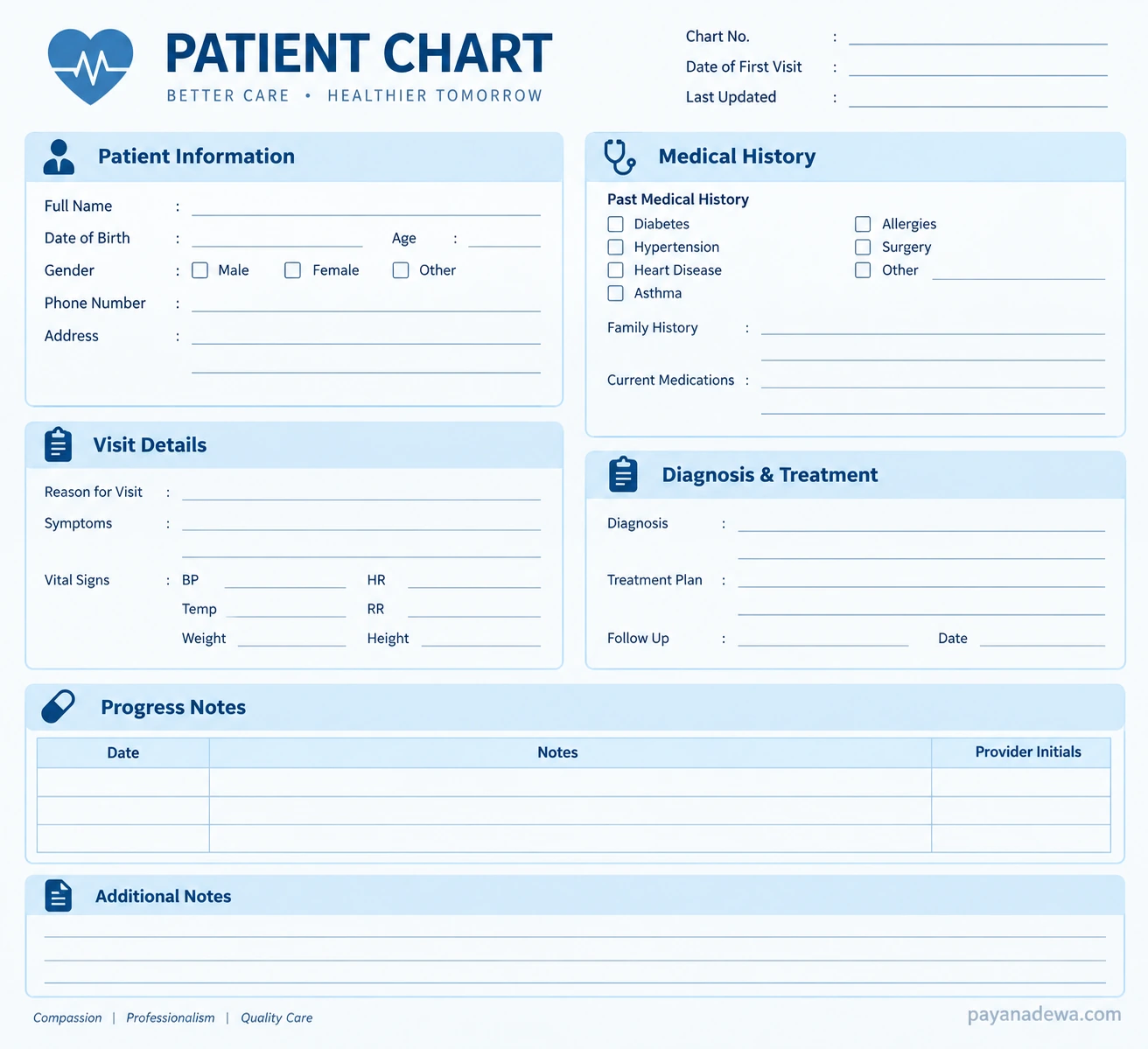
A patient chart template provides a structured way to record personal details, medical history, current medications, vital signs, diagnoses, treatment plans, and follow-up instructions. Using a consistent format can help healthcare professionals maintain accurate records, improve communication, and reduce the risk of missing important details during a patient visit.
In this guide, you will learn what a patient chart is, which sections it should include, how to use a printable patient chart template, and what to consider when choosing between paper-based and electronic records.
What Is a Patient Chart?
A patient chart is a collection of information documenting an individual’s health history, medical assessments, treatments, and healthcare encounters. It helps authorized healthcare professionals understand a patient’s medical background and track changes in their condition over time.
Depending on the healthcare setting, a patient chart may be maintained as a paper document, a digital file, or part of an electronic health record (EHR) system. Although the format may vary, its main purpose remains the same: to provide an organized and reliable record that supports continuity of care.
A patient chart may contain information such as:
- Patient identification and contact information.
- Medical, surgical, and family history.
- Allergies and current medications.
- Reason for the visit and reported symptoms.
- Vital signs and clinical observations.
- Diagnoses, treatment plans, and prescribed follow-up.
- Progress notes and relevant test results.
Patient charts should be completed and maintained by authorized individuals according to their professional responsibilities and the policies of the healthcare organization.
Why Is a Patient Chart Important?
Accurate patient documentation supports safe, coordinated, and consistent healthcare. When relevant information is recorded clearly, healthcare professionals can review previous encounters, identify important health concerns, and make better-informed clinical decisions.
Improves Continuity of Care
Patients may receive care from multiple healthcare professionals. A complete patient chart helps authorized team members understand previous assessments, medications, diagnoses, and treatment recommendations without relying entirely on memory or verbal explanations.
Supports Better Clinical Decisions
Medical history, allergies, vital signs, and previous treatment responses can provide important context during an assessment. Reviewing these details helps clinicians evaluate the patient’s condition and determine appropriate next steps.
Strengthens Documentation and Accountability
Clear records help document what was assessed, what treatment was provided, and what follow-up was recommended. Depending on the setting and applicable regulations, patient charts may also support billing, audits, quality improvement, and legal documentation requirements.
Helps Organize Daily Clinical Work
A standardized patient chart template gives healthcare staff a consistent place to record information. This can make routine documentation more efficient and help reduce omissions when the template is designed around the needs of the practice.
Essential Sections of a Patient Chart Template
A useful patient chart template should be easy to read, simple to complete, and appropriate for the intended healthcare setting. The sections below are common examples, although not every chart requires every field.
1. Patient Information
This section identifies the patient and provides basic administrative details. Depending on the practice, it may include:
- Full name and date of birth.
- Medical record or chart number.
- Contact information and address.
- Relevant demographic information.
- Emergency contact details, when appropriate.
Verify identifying information using the organization’s approved procedures. Avoid collecting unnecessary personal information, and keep confidential details accessible only to authorized personnel.
2. Medical and Family History
The medical history section records relevant previous and ongoing health conditions. It may include chronic illnesses, previous surgeries, known allergies, family medical history, and other information relevant to the patient’s care.
Current medications should be documented with sufficient detail for the healthcare setting, including medication names, doses, and schedules when appropriate. Medication information should be verified rather than assumed to be current.
3. Visit Details and Symptoms
This section explains why the patient is seeking care. Record the chief complaint, reported symptoms, relevant dates, and other details needed to understand the current concern.
Use clear, objective language. When documenting information reported by the patient, distinguish the patient’s description from observations made by the healthcare professional.
4. Vital Signs and Clinical Observations
Vital signs provide useful information about a patient’s current condition. Depending on the visit, the chart may include:
- Blood pressure.
- Heart rate.
- Respiratory rate.
- Body temperature.
- Oxygen saturation, when indicated.
- Weight and height, when relevant.
Record measurements with the correct units, the date and time, and any other contextual information required by the practice. Measurements should be obtained and interpreted by appropriately trained personnel using established procedures.
5. Diagnosis and Treatment Plan
The diagnosis and treatment section documents the clinician’s assessment and planned care. Depending on the service, it may include diagnostic findings, tests ordered, treatment recommendations, medications prescribed, patient education, and referrals.
Document only information supported by the clinical assessment and the responsible professional’s authorized decisions. A blank patient chart template is a documentation aid, not a substitute for clinical judgment.
6. Progress Notes and Follow-Up
Progress notes describe relevant developments during treatment or subsequent visits. They may document changes in symptoms, responses to treatment, new findings, and adjustments to the care plan.
Include follow-up recommendations, appointment dates when known, and the responsible healthcare professional’s identification according to workplace policy. Timely documentation makes it easier to track progress and communicate outstanding care needs.
How to Use a Printable Patient Chart Template
A printable patient chart can be useful for clinics, training exercises, administrative preparation, and settings where paper documentation is appropriate. Follow a consistent workflow to make the form more useful.
Step 1: Choose the Right Template
Select a template that matches the purpose of the visit and the type of healthcare service being provided. A general patient chart may work for basic visit documentation, while specialized services may require additional assessment fields or dedicated forms.
Step 2: Confirm Patient Identity
Before entering clinical information, verify the patient’s identity using the approved identification process. Use the correct chart number or other required identifiers to help prevent information from being recorded in the wrong record.
Step 3: Complete Relevant Sections
Enter information clearly and accurately. Review medical history, allergies, medications, symptoms, and measurements as appropriate. Leave fields blank or mark them according to the organization’s documentation policy when information is unavailable or not applicable.
Step 4: Record the Assessment and Plan
Document the relevant findings, clinical assessment, and treatment plan within your professional scope. Use approved abbreviations only, and ensure that other authorized team members can understand the notes.
Step 5: Review and Secure the Record
Check for missing information, incorrect dates, unclear entries, and inconsistencies before finalizing the chart. Store completed paper forms securely, or enter information into the approved electronic record system. Follow applicable retention, access, and confidentiality requirements.
Printable Patient Chart Template: What to Look For
A good printable patient chart should balance completeness with simplicity. Too many fields can make a form difficult to use, while too few can leave important documentation gaps.
Look for these practical features when selecting a patient chart template:
- Clear organization: Separate sections for identification, history, visit details, assessment, and follow-up.
- Readable typography: Use legible text, sufficient contrast, and appropriate spacing.
- Adequate writing space: Allow room for notes, measurements, and treatment details.
- Relevant fields: Include only the information needed for the intended workflow.
- Print-friendly formatting: Choose a layout that remains readable on standard paper without cutting off important content.
- Privacy-conscious design: Avoid unnecessary exposure of sensitive patient information.
Suggested image placement:
Paper Patient Charts vs. Electronic Health Records
Paper patient charts and electronic health records can both support medical documentation, but they have different practical considerations. The right option depends on the healthcare organization’s resources, workflow, legal obligations, and security requirements.
Advantages of Paper Patient Charts
- Can be used without a computer or internet connection.
- Are straightforward to print and complete by hand.
- May be useful for temporary workflows, approved downtime procedures, or educational demonstrations.
However, paper records can be misplaced, damaged, difficult to search, or challenging to share securely. Handwritten entries may also be difficult to read if the form is completed carelessly.
Advantages of Electronic Patient Records
- Can make authorized information easier to search and retrieve.
- May support standardized documentation and clinical workflows.
- Can facilitate authorized sharing between connected healthcare professionals.
- May include access controls, audit logs, and other security features.
Electronic systems also require appropriate configuration, staff training, secure access, maintenance, and contingency planning. Digital records are not automatically secure simply because they are electronic.
Some organizations use approved paper forms alongside electronic records. When doing so, establish a clear process for transferring information, reconciling duplicate records, and protecting confidential documents.
Best Practices for Accurate Patient Chart Documentation
Good documentation is more than filling in blank fields. It requires consistent habits, attention to detail, and respect for patient privacy.
- Document promptly: Record relevant information as soon as practical under the organization’s policies.
- Use objective language: Describe observed findings clearly and distinguish them from patient-reported symptoms.
- Check dates and measurements: Verify units, timestamps, and patient identifiers.
- Use approved terminology: Avoid ambiguous abbreviations and unexplained shorthand.
- Correct errors properly: Follow the organization’s amendment and correction procedures instead of concealing or improperly deleting an original entry.
- Protect confidentiality: Limit access, use secure storage, and avoid leaving charts visible to unauthorized individuals.
- Follow local requirements: Apply the relevant professional standards, privacy rules, retention policies, and organizational procedures.
Healthcare organizations should also periodically review their templates to ensure that fields remain relevant, instructions are clear, and documentation practices meet current operational and regulatory requirements.
Common Patient Chart Mistakes to Avoid
Several avoidable errors can reduce the quality and usefulness of a patient chart. Watch for incomplete medical histories, outdated medication lists, missing dates, unclear handwriting, inconsistent units, and notes that do not distinguish reported symptoms from observed findings.
Another common mistake is treating a template as a complete clinical record without considering the needs of the encounter. Some patients or services require additional consent documentation, assessment forms, test results, or specialized records. Use the patient chart as part of the approved documentation process rather than assuming that one form covers every requirement.
Finally, never leave sensitive information unsecured or share patient details through unapproved channels. Even a simple printable form can contain confidential information that requires appropriate protection.
Frequently Asked Questions About Patient Charts
What should a patient chart include?
A patient chart commonly includes identification details, medical history, allergies, medications, visit information, vital signs, clinical assessment, treatment plans, and progress notes. The exact contents depend on the healthcare setting and applicable requirements.
Can I use a printable patient chart template?
Yes. A printable template can help organize information when paper documentation is appropriate. Healthcare professionals should ensure that the form meets their organization’s requirements and that completed records are stored securely.
Is a patient chart the same as a medical record?
The terms are often used interchangeably in everyday healthcare settings. However, a medical record may refer to the broader collection of documentation about a patient’s care, while a patient chart may describe a particular record or the interface used to organize that information.
How often should a patient chart be updated?
Patient charts should be updated whenever relevant information needs to be documented, following the organization’s policies and applicable professional requirements. Medication changes, new diagnoses, clinical encounters, and follow-up assessments may require updates.
How can I keep patient charts confidential?
Use approved storage systems, restrict access to authorized personnel, protect paper documents from public view, and follow applicable privacy and security policies. Electronic records should use appropriate access controls and authentication measures.
Conclusion
A well-designed patient chart helps organize medical information, support continuity of care, and improve the consistency of healthcare documentation. By including relevant patient details, medical history, visit information, vital signs, diagnoses, treatment plans, and progress notes, a structured template can make routine recordkeeping easier.
Choose a patient chart template that fits your workflow, prioritize accuracy and readability, and follow the privacy and documentation requirements applicable to your setting. Whether you use a printable patient chart or an electronic health record, consistent and secure documentation remains essential to responsible patient care.