An organization chart, also called an organizational chart or org chart, is a visual guide to how a business, nonprofit, school, or other group is structured. It shows key roles, departments, reporting relationships, and lines of authority in one easy-to-understand layout. Whether you are building a new team or updating a growing company, a clear organization chart helps people understand who does what and where decisions should go.
A useful chart is more than a diagram of job titles. It can support onboarding, improve communication, clarify responsibilities, and reveal gaps or overlaps in a team. The best format depends on the size of your organization, how work gets done, and how often your structure changes. This guide explains common chart types, what to include, and how to create a practical org chart that stays useful over time.
What Is an Organization Chart?
An organization chart is a diagram that represents the internal structure of an organization. Boxes typically represent people, positions, or teams, while connecting lines show reporting relationships or other formal links. A traditional chart often starts with an executive at the top and branches into departments, managers, and individual roles.
Organizations use charts in many settings, from small businesses and startups to large enterprises, government offices, schools, and volunteer groups. Depending on the goal, a chart may show named employees, job titles only, department groupings, or a combination of these details.
Why Is an Organization Chart Important?
A well-maintained org chart makes the structure of a team easier to understand. It gives employees a shared reference point instead of leaving them to guess who owns a decision or where a request should go.
- Clarifies responsibilities: Employees can see role boundaries and understand how their work connects with other teams.
- Improves communication: Reporting lines help people identify the right contact for questions, approvals, and escalations.
- Supports onboarding: New hires can learn the company structure and recognize key colleagues more quickly.
- Helps with planning: Leaders can spot duplicated responsibilities, management bottlenecks, or teams that may need additional support.
- Documents change: A current chart helps communicate reorganizations, new departments, and changes in leadership.
An organization chart does not replace job descriptions, policies, or conversations with managers. Instead, it provides a simple overview that complements those resources.
Common Types of Organization Charts
Choose a chart style that reflects how your organization actually operates. A familiar format is usually easier to read than a complex diagram with too many connections.
Hierarchical Organization Chart
A hierarchical chart displays authority from top to bottom. The chief executive or owner appears at the top, followed by department heads, managers, and team members. This format works well for companies with clear reporting lines and is often the easiest structure for readers to follow.
Flat Organization Chart
A flat chart has fewer management layers and places teams or employees closer to the owner or leadership group. It can suit small businesses and startups where people take on broad responsibilities. Because reporting relationships may be less formal, labels should make ownership and decision-making responsibilities clear.
Matrix Organization Chart
A matrix chart shows people who work across both functional departments and projects. For example, a designer may report to a design manager while also contributing to a product team. Use clear lines or a legend to distinguish the different relationships and prevent confusion about accountability.
Divisional Organization Chart
A divisional chart groups teams by product, service, customer segment, or geographic region. It is useful for organizations with several business units that operate with some independence. Each division can have its own functional roles while still connecting to central leadership.
What Should an Organization Chart Include?
The chart should provide enough information to answer common questions without becoming crowded. For many organizations, the following elements are a practical starting point:
- Organization or company name: Identify the business, team, or institution represented.
- Chart title and date: Show that readers are viewing the correct document and indicate when it was last updated.
- Role or employee name: Use job titles for a role-based chart, names for a people directory, or both when appropriate.
- Department labels: Group related functions such as Finance, Operations, Human Resources, Sales, and Technology.
- Connecting lines: Use consistent lines to show reporting relationships. Avoid decorative lines that could be mistaken for authority.
- Legend or notes: Explain dotted lines, project relationships, abbreviations, or other symbols that may not be obvious.
- Document owner: State which team is responsible for keeping the chart accurate.
Only include personal contact details if there is a clear business need and the chart will be shared through an appropriate channel. For a public-facing chart, role titles are often sufficient.
How to Create an Organization Chart Step by Step
1. Define the Purpose
Decide what the chart needs to explain. An internal staff directory may need names and roles, while a leadership overview may focus on departments and reporting lines. A clear purpose helps you avoid adding details that do not serve the reader.
2. Collect and Verify the Information
Gather current job titles, department names, and reporting relationships from reliable internal sources. Ask department leads to confirm the details, especially after a promotion, team move, or restructuring. Do not assume that an old chart still reflects the way the organization works today.
3. Choose a Suitable Layout
Select a hierarchical, flat, matrix, or divisional format based on the organization’s structure. For a small team, a single-page chart may be enough. For a large business, create separate department charts and a high-level overview so the main diagram remains readable.
4. Arrange Roles and Connect the Lines
Place the highest-level role first if the chart is hierarchical, then add departments and their positions. Keep boxes aligned, use consistent spacing, and make each line connect clearly to the correct role. Avoid crossing lines wherever possible. If the organization has dual reporting relationships, explain them in a legend.
5. Improve Readability
Use a consistent font, legible text, and a restrained color palette. Color can distinguish departments, but do not rely on color alone to communicate meaning. Maintain sufficient contrast and ensure the chart remains understandable when printed in grayscale or viewed on a small screen.
6. Review, Publish, and Maintain
Ask relevant managers to review the draft before sharing it. Add a last-updated date and assign an owner who can make future changes. Store the approved version where employees can find it, and review it on a regular schedule or whenever a structural change occurs.
Organization Chart Template: A Simple Starting Point
Using an organization chart template can save time and create a consistent visual style. A template provides a ready-made structure for titles, department boxes, connectors, and document details, allowing you to focus on accurate information instead of formatting every element from scratch.
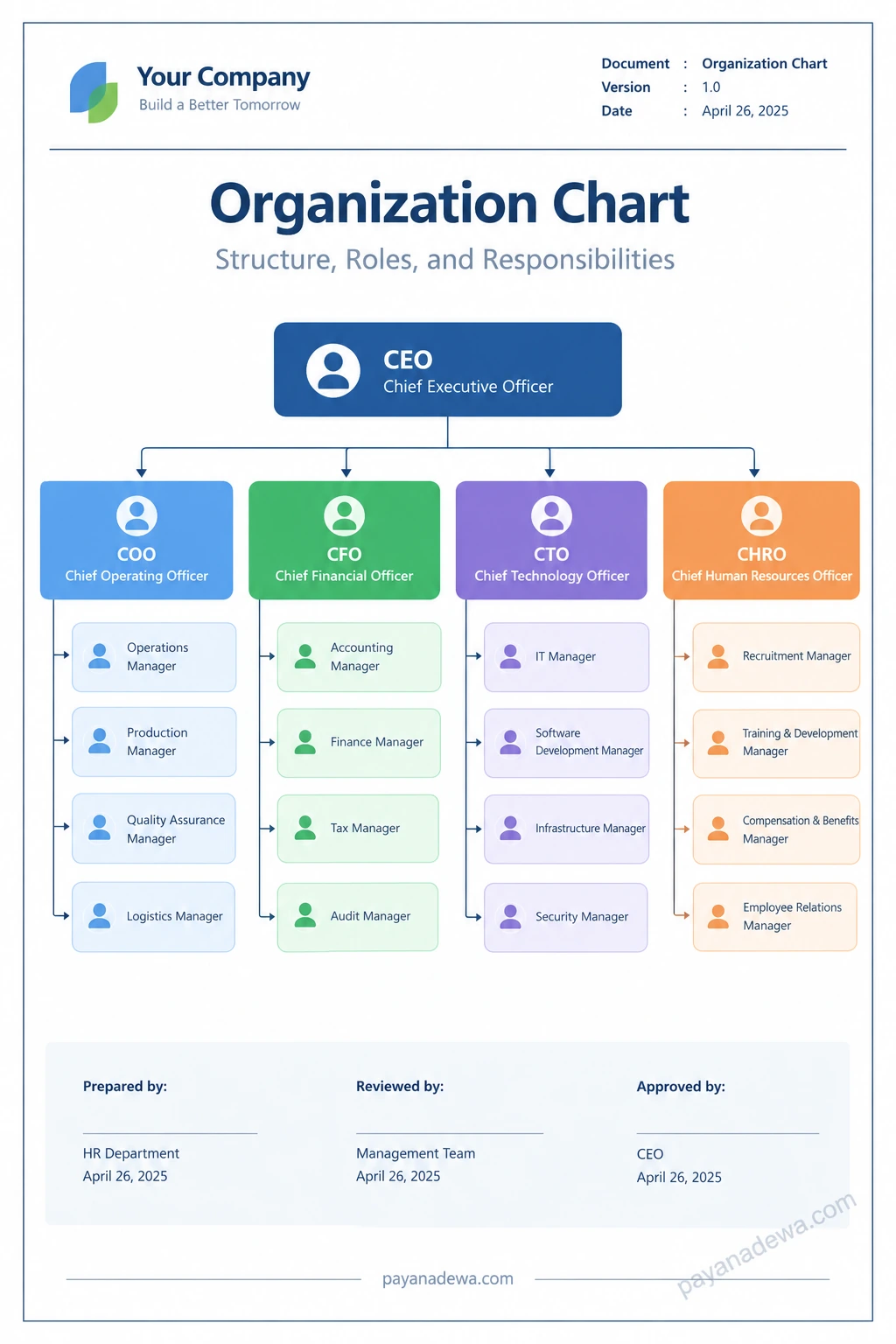
For example, the printable template below places the CEO at the top and groups four functional areas beneath that role: Operations, Finance, Technology, and Human Resources. Each department has space for manager roles, while the footer provides prepared, reviewed, and approved fields. Adapt the sample titles to match your own business; not every organization needs the same departments or management layers.
Best Practices for Keeping Your Org Chart Useful
- Keep it current: Update the chart when roles, reporting lines, or department structures change.
- Use clear language: Prefer familiar job titles and explain abbreviations that employees may not recognize.
- Keep the overview simple: Put detailed responsibilities in job descriptions or team documents rather than squeezing them into every box.
- Make ownership clear: Show who reports to whom, and document dotted-line or project relationships when needed.
- Consider accessibility: Use readable text, strong contrast, and labels that do not depend on color alone.
- Control distribution: Share the chart with the intended audience and avoid exposing unnecessary personal information.
Common Organization Chart Mistakes to Avoid
One common mistake is treating the chart as a complete description of how work happens. A formal reporting line may not show project collaboration, informal expertise, or decision-making processes. Add a short note or supporting resource if readers need that context.
Another issue is trying to fit every employee and every relationship onto one page. Dense diagrams are hard to read and quickly become outdated. Use a high-level chart for the whole organization and separate charts for larger departments. Finally, avoid unclear connectors, inconsistent job titles, and unverified information. A simple, accurate chart is more valuable than an elaborate but confusing one.
Conclusion
An organization chart is a practical way to show how a business or team is structured, who holds key roles, and how reporting relationships fit together. The right chart can improve communication, support onboarding, and help leaders plan for growth. Start by defining the chart’s purpose, verifying the information, choosing a suitable layout, and keeping the design easy to read. With a clear template and a reliable update process, your org chart can remain a useful reference as your organization evolves.