A great gaming session starts before you press Play. Whether you enjoy competitive matches, story-driven adventures, strategy games, or casual mobile titles, a clear plan can help you spend your time well and enjoy the experience. A Gaming FlowChart turns that plan into an easy visual path. It shows what to do first, which decisions to make, and how to respond when a session does not go as expected.
Use a gaming flowchart to choose a game mode, set a realistic goal, prepare your equipment, play with purpose, and review your results. You do not need design experience or complicated software. A simple printable template can be enough to build a repeatable routine that supports progress without taking the fun out of gaming.
What Is a Gaming FlowChart?
A Gaming FlowChart is a visual diagram that maps the steps and decisions involved in a gaming session. It uses shapes, labels, and arrows to show how one action leads to another. A rounded shape may mark the start or finish, a rectangle can represent an activity, and a diamond often signals a yes-or-no decision.
For example, a flowchart might ask, “Am I ready to play?” If the answer is yes, you begin the session. If not, the chart directs you to check your settings, learn the basics, or prepare your equipment. This simple structure makes a gaming plan easier to follow than a long list of instructions.
Why Use a Gaming Flowchart?
A visual plan helps you make intentional choices instead of drifting from one match or activity to the next. It is especially useful when you want to practice a skill, work toward a specific in-game objective, or manage limited free time.
- Set clear goals: Decide what success means before you start playing.
- Reduce wasted time: Prepare your controls, connection, and equipment in advance.
- Make better decisions: Use simple checkpoints to choose what to do next.
- Learn from each session: Review results and identify one improvement to try.
- Build a healthy routine: Include breaks and a planned stopping point.
A flowchart is a guide, not a strict rulebook. Adapt it to the game, your experience level, and the amount of time you have available.
How to Read the Gaming FlowChart Template
The template follows a practical loop: choose a game, set a goal, check your readiness, play, review your result, and celebrate progress. If you are not ready or have not reached your goal, the diagram sends you back to preparation or improvement rather than treating the session as a failure.
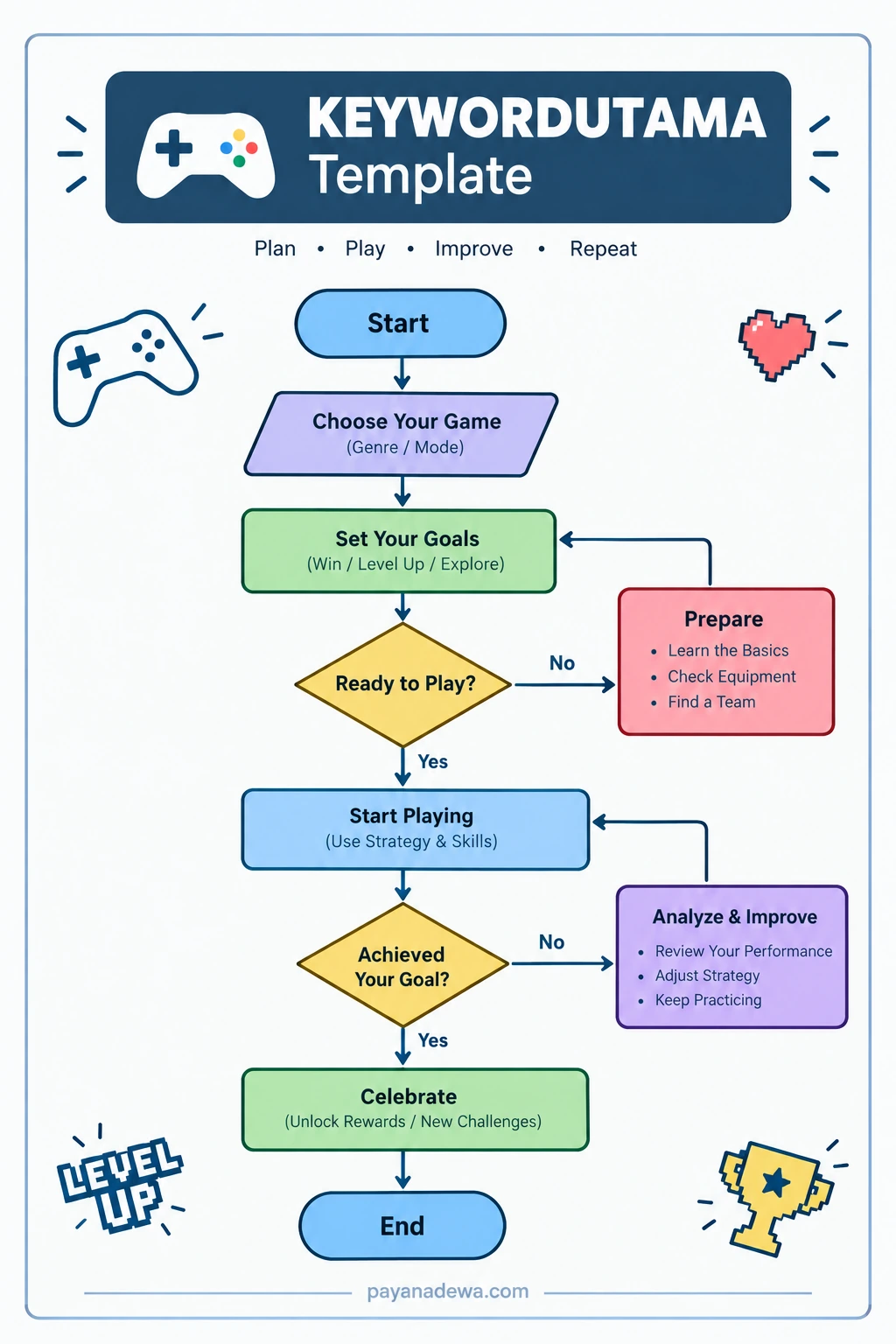
1. Choose Your Game and Mode
Start by selecting the game and mode that match your mood, schedule, and goal. You may want a ranked match, a cooperative mission, a creative building session, or relaxed exploration. Choosing in advance helps you avoid spending the first part of your free time deciding what to play.
2. Set a Specific Goal
Choose one achievable objective. Instead of saying, “I want to get better,” try “practice aiming for fifteen minutes,” “finish one quest,” or “communicate clearly with my team in three matches.” Specific goals make it easier to measure progress and decide what to practice next.
3. Check Whether You Are Ready
Before starting, check your controller or keyboard, headset, game updates, internet connection, and comfort. If you are learning a new game, review the controls or complete a tutorial. If something important is missing, prepare first. This small pause can prevent avoidable frustration later.
4. Play With Purpose
During gameplay, focus on the goal you chose. Pay attention to one or two useful habits rather than trying to fix everything at once. In a team game, that could mean communicating information clearly. In a racing game, it might mean improving braking points. In a role-playing game, it could mean completing a mission while managing resources carefully.
5. Review, Improve, and Repeat
When the session ends, ask whether you achieved your goal. If you did, note what worked and choose a new challenge for next time. If you did not, identify the main obstacle and make one adjustment. You might change a control setting, practice a difficult mechanic, review a replay, or ask a teammate for feedback.
How to Create Your Own Gaming FlowChart
You can make a useful game planning flowchart with paper, a whiteboard, presentation software, or a diagramming app. Keep the first version simple. Add detail only when it helps you make a decision.
- Write down the main stages: Start, choose a game, set a goal, prepare, play, review, and finish.
- Add decision points: Use questions such as “Am I ready?” and “Did I reach my goal?”
- Connect the steps: Draw arrows so the next action is obvious.
- Show alternate routes: Add a preparation route when you are not ready and an improvement route when you miss a goal.
- Use readable labels: Choose short phrases, consistent shapes, and enough spacing.
- Test the flow: Follow the chart from start to finish and check that every answer leads to a sensible next step.
For a printable version, use high contrast and avoid filling the page with tiny text. If you view the chart on a phone, keep the labels short and arrange the steps in a clear top-to-bottom order.
Tips for Different Types of Games
Competitive and Multiplayer Games
Focus the flowchart on warm-ups, team communication, match objectives, and post-match review. Keep the goal within your control. You cannot guarantee a win, but you can practice positioning, make timely callouts, or review one mistake after a match.
Single-Player and Story Games
Use checkpoints for quests, exploration, puzzles, or resource management. Your goal might be to complete a chapter, explore a new area, or solve one challenging puzzle. Include a note about where to resume next time so you can return without losing momentum.
Strategy and Simulation Games
Map decisions such as gathering resources, expanding, upgrading, and responding to risks. A decision tree can help you compare options before committing resources. Keep the chart flexible because complex games often have several valid approaches.
Casual and Mobile Games
Make the flowchart short. Choose a task, set a time limit, play, and stop or take a break when the limit is reached. A compact routine is often more practical than a detailed diagram for short sessions.
Common Gaming Flowchart Mistakes to Avoid
A chart should make gaming easier, not create extra work. Avoid these common problems:
- Too many steps: If the chart is hard to scan, remove decisions that do not change your next action.
- Unclear questions: Write decision points so the answers are easy to understand, such as yes or no.
- Goals that are too broad: Replace “play better” with a specific skill or task.
- No feedback loop: Include a review step so each session can inform the next one.
- Ignoring rest: Add a break or stopping point, especially during long sessions.
- Treating the chart as permanent: Update it when your game, skill level, or priorities change.
Make Gaming Progress Sustainable
Consistency matters more than making every session perfect. Use the flowchart to create a routine that fits your life, and remember that games are meant to be enjoyable. Take regular breaks, protect time for sleep and other responsibilities, and stop if gaming begins to feel stressful or interferes with your daily needs.
At the end of a session, write down one success and one lesson. Over time, these small notes can reveal patterns that are difficult to notice while playing. You may discover that a short warm-up improves your focus or that a different strategy works better on a particular challenge.
Conclusion
A Gaming FlowChart gives your gaming sessions a clear beginning, middle, and end. By choosing a game, setting a realistic goal, preparing your setup, playing with purpose, and reviewing the result, you can make better use of your time and build skills steadily. Start with the printable template, adjust it to your favorite games, and keep only the steps that help you. The best flowchart is simple enough to use regularly and flexible enough to grow with you.