A funnel chart is a simple, visual way to show how a group moves through a sequence of stages. Businesses often use it to understand the customer journey, measure sales performance, analyze website conversions, and identify where people drop out of a process. Because the shape narrows from one stage to the next, a funnel chart makes it easier to spot changes in volume and see which steps may need attention.
Whether you work in marketing, sales, product management, or operations, a well-designed funnel chart can turn complex numbers into a clear story. This guide explains what a funnel chart is, when to use it, how to create one, and which metrics help make it useful.
What Is a Funnel Chart?
A funnel chart is a data visualization that displays values across sequential stages, usually with the largest value at the top and smaller values below. Each section represents a step in a process, such as moving from website visitors to leads, qualified prospects, customers, and repeat buyers. The narrowing shape highlights how many records continue to the next stage.
Funnel charts are especially helpful when stages follow a meaningful order. They show both the amount remaining at each step and the loss between steps. A funnel chart can also be used outside marketing—for example, to track job applicants through recruitment, orders through fulfillment, or support requests through resolution.
Why Use a Funnel Chart?
Make drop-off points easier to see
When a process contains several steps, a table can make it difficult to notice where the largest losses occur. A funnel chart puts each stage in a single visual sequence. A sudden reduction between two stages can prompt a closer look at friction, unclear messaging, eligibility rules, or a technical problem.
Communicate the customer journey
Teams can use a funnel chart to explain how people progress from awareness to action. It gives stakeholders a shared overview without requiring them to interpret a large spreadsheet. Pairing the visual with short labels and conversion rates makes the journey easier to discuss.
Support practical decisions
A funnel chart is most valuable when it leads to a specific question or action. If many visitors reach a product page but few add an item to their cart, a team might test the page layout, clarify shipping costs, or improve product information. The chart does not explain the cause by itself, but it helps identify where investigation should begin.
Common Types of Funnel Charts
Sales funnel chart
A sales funnel chart tracks prospects through stages such as new lead, qualified lead, sales conversation, proposal, and closed deal. Sales teams can compare the number of opportunities at each stage and estimate where deals are being lost. Keep stage definitions consistent so the chart reflects actual progress rather than subjective judgments.
Marketing conversion funnel
A marketing funnel may begin with ad impressions or website visits and continue through clicks, sign-ups, trial starts, and purchases. It helps marketers compare campaigns and understand whether a weak result comes from attracting the wrong audience or from a later conversion step.
Website or product funnel
Product teams use funnels to follow a user flow, such as landing page, account creation, onboarding, and first key action. This view can reveal a step that confuses users or takes too much effort. For reliable analysis, define the event that qualifies a user for each stage and choose a consistent time window.
Recruitment and operations funnel
Recruiters can visualize applications, screening, interviews, offers, and hires. Operations teams can use a similar structure for order processing, claims, or service requests. In each case, the stages should represent a real sequence and use clearly defined counts.
How to Create a Funnel Chart Step by Step
1. Define the question and stages
Start with a decision you want the chart to support. For example: “At which point do trial users stop activating?” List the stages in order and make sure each one has a precise definition. Avoid mixing unrelated measures, such as page views at one stage and unique people at another, unless the difference is intentional and explained.
2. Collect consistent data
Gather the count for every stage from a reliable source, such as a CRM, analytics platform, spreadsheet, or internal reporting system. Use the same date range and population wherever possible. If the funnel tracks people, deduplicate records so one person is not counted several times at the same stage.
3. Calculate conversion and drop-off rates
Stage-to-stage conversion rate shows the share of one stage that reaches the next. Divide the next-stage count by the previous-stage count, then multiply by 100. Drop-off rate is the share that does not continue to the next stage.
Stage conversion rate = (Next-stage count ÷ Previous-stage count) × 100
Drop-off rate = 100% − Stage conversion rate
For example, if 1,000 visitors view a product page and 250 add an item to their cart, the stage conversion rate is 25%. The drop-off rate is 75%. These figures describe what happened; they do not, on their own, explain why it happened.
4. Choose a charting tool
You can build a funnel chart in spreadsheet software, a business intelligence dashboard, or a data visualization tool. Some tools offer a dedicated funnel chart, while others let you create a similar shape with stacked bars or formatted polygons. Choose a tool that allows you to label values, show conversion rates, and update the data without rebuilding the chart each time.
5. Design for quick understanding
Put stages in the correct sequence, use readable labels, and display counts directly on or beside each segment. Use color consistently and avoid decorative effects that distract from the data. If the chart will be viewed on a phone or included in a report, test whether labels remain legible at a smaller size.
6. Review the result with context
Compare stage counts and rates, then investigate the most important changes. Segmenting by traffic source, device, region, customer type, or campaign may reveal patterns hidden in the overall funnel. Always confirm that the segments are comparable and large enough to support a reasonable conclusion.
Example: A Simple Customer Funnel
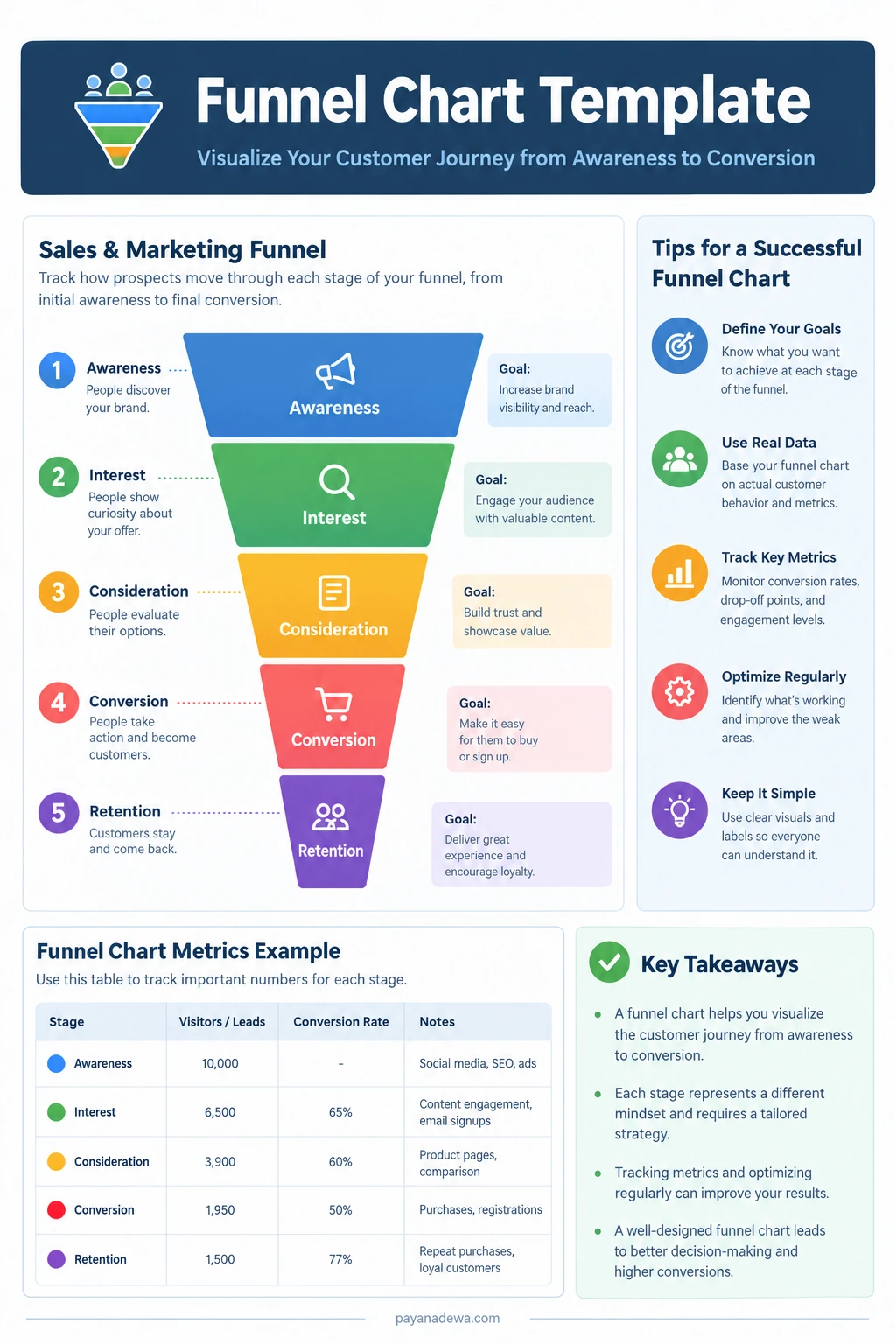
Imagine an online store tracking five stages in one month. The numbers below are illustrative and show how a funnel chart can summarize the customer journey.
- Awareness: 10,000 people visit the website.
- Interest: 6,500 people view a product or engage with content.
- Consideration: 3,900 people review product details or compare options.
- Conversion: 1,950 people complete a purchase.
- Retention: 1,500 customers return for another purchase during the chosen measurement window.
This example suggests that the largest absolute loss occurs early in the journey, while the retention count represents a separate follow-up behavior. Because returning customers may come from an earlier purchase cohort, retention should be interpreted carefully rather than treated as a simple continuation of the same group unless the data model supports that comparison.
Best Practices for an Effective Funnel Chart
- Keep stage definitions stable. Changing what qualifies someone for a stage can make comparisons misleading.
- Show counts as well as percentages. Rates provide context, while raw counts show the scale of the opportunity.
- Use a consistent reporting period. Avoid comparing a full month at one stage with only a few days at another.
- Make the next action clear. Add a short note identifying the stage that deserves further analysis.
- Use accessible design. Pair color with text labels, provide adequate contrast, and do not rely on color alone to communicate meaning.
- Validate unusual changes. Check tracking, data quality, campaign changes, and seasonality before drawing conclusions.
Funnel Chart vs Other Charts
A funnel chart works well when the data represents a sequence and the narrowing volume is central to the story. However, it is not always the best choice. A bar chart is often better for comparing unrelated categories, while a line chart is better for showing changes over time. A Sankey diagram can be more suitable when people or records split into multiple paths rather than following one linear process.
Consider using a table alongside the funnel when readers need exact values, or a line chart when you need to compare funnel performance across weeks or months. The clearest dashboard may combine a funnel chart with a trend view and a small set of supporting metrics.
Common Mistakes to Avoid
- Assuming the shape explains the cause. A narrow stage signals a change in volume, not the reason for it. Use qualitative feedback and additional analysis to understand causes.
- Mixing incompatible populations. Ensure each stage follows a consistent cohort or clearly explain where the populations differ.
- Overloading the visual. Too many stages, colors, icons, and notes can make the chart harder to read.
- Ignoring time lag. Some users need days or weeks to move from one stage to the next. Give cohorts enough time to mature before comparing results.
- Focusing only on the final conversion. Intermediate rates can show where targeted improvements may have the greatest impact.
Conclusion
A funnel chart helps teams understand how people or records move through a sequence, from the first stage to a desired outcome. It makes stage volume, conversion rates, and potential drop-off points easier to communicate. To create a useful funnel chart, define each stage carefully, use consistent data, display both counts and rates, and investigate changes before assuming their cause.
Start with a clear business question, keep the design simple, and review the funnel regularly. Used alongside supporting metrics and customer feedback, a funnel chart can help prioritize improvements and make decisions more evidence-based.