A well-designed Computer Repair Brochure can be one of the most effective marketing tools for a computer repair business. Whether you provide laptop repairs, desktop troubleshooting, virus removal, data recovery, or network support, a professional brochure gives potential customers a clear reason to choose your service.
Unlike a simple advertisement, a brochure allows you to present your services, benefits, contact information, and business strengths in one organized format. It can be printed and distributed locally, placed at a reception desk, handed to customers, or shared digitally as part of your online marketing strategy.
If you are looking for a practical way to promote a computer repair company, a professionally structured brochure template can save time while helping you create consistent and attractive marketing material.
Computer Repair Brochure Template
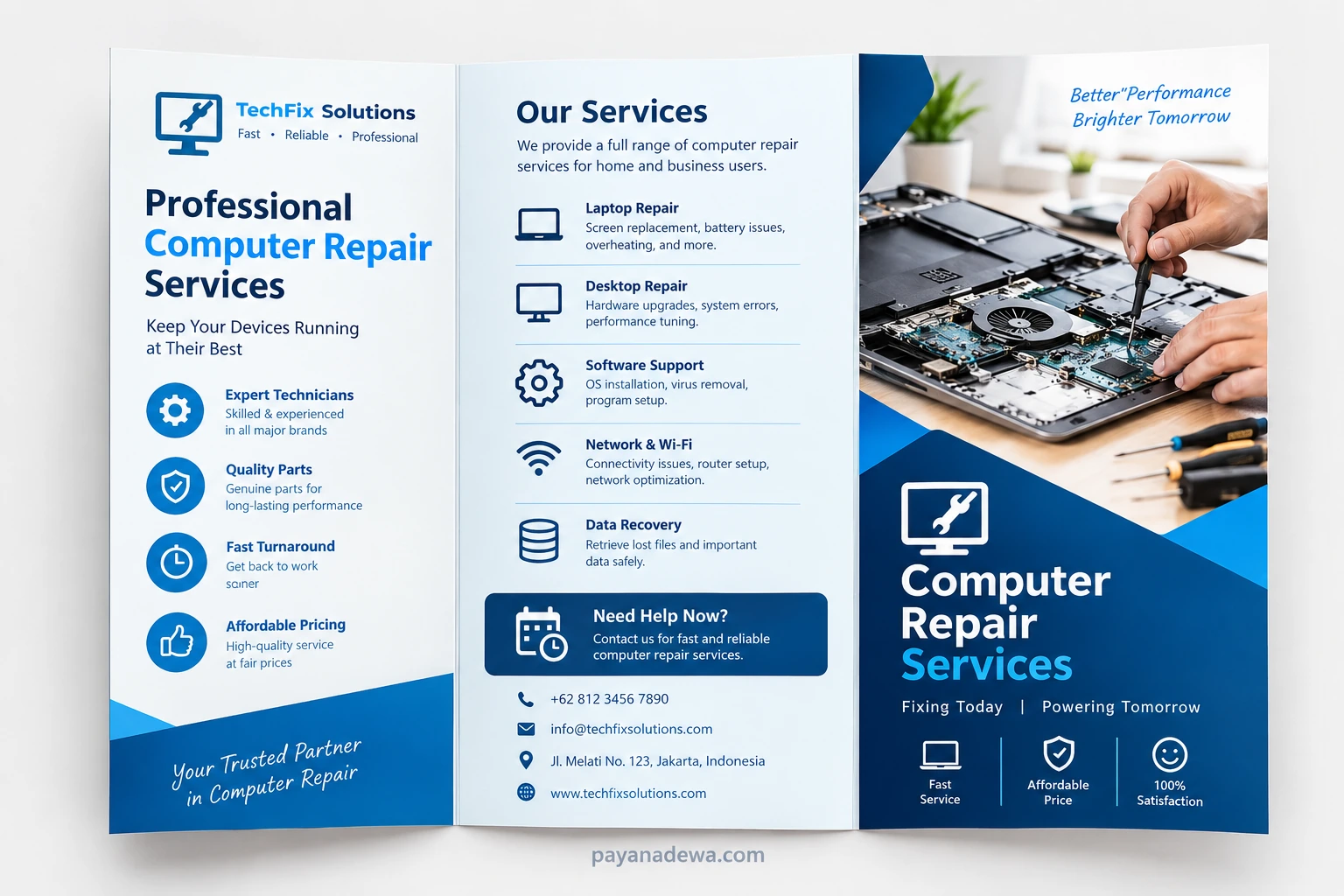
Why Use a Computer Repair Brochure?
Computer problems can happen at any time, and customers often want a repair provider they can trust. A brochure makes it easier to communicate what your business offers before a customer contacts you.
A good brochure can quickly answer important questions such as what devices you repair, which services you provide, why customers should trust your technicians, and how people can reach your business.
For local computer repair shops, printed brochures can also help increase brand awareness. You can distribute them to homes, offices, schools, small businesses, community centers, and other locations where potential customers may need technical assistance.
- Promotes your repair services: Clearly explain what customers can expect from your business.
- Builds credibility: Highlight experienced technicians, quality parts, warranties, or customer-focused service.
- Improves local visibility: Printed brochures can help introduce your business to nearby customers.
- Saves marketing time: A reusable brochure template makes future updates easier.
- Provides essential information: Include your phone number, email address, website, location, and business hours.
What to Include in a Computer Repair Brochure
The best computer repair brochures are informative without becoming difficult to read. Instead of filling every available space with text, organize your content into short sections that customers can scan quickly.
1. Business Name and Logo
Start with your business name and logo. These elements should be easy to recognize and visually consistent with your website, social media profiles, signage, and other marketing materials.
Your company name should immediately tell customers what type of service you provide. A short tagline can also communicate your main value, such as fast service, affordable repairs, or professional technical support.
2. List of Repair Services
Use a clear service list to show customers exactly what you can repair or troubleshoot. Depending on your business, common services may include:
- Laptop repair and troubleshooting
- Desktop computer repair
- Computer hardware upgrades
- Operating system installation
- Virus and malware removal
- Slow computer optimization
- Screen and battery replacement
- Data backup and data recovery
- Wi-Fi and network troubleshooting
- Printer and peripheral setup
- Software installation and configuration
- Business IT support
Only include services that your business actually provides. A focused list makes the brochure more credible and helps customers quickly identify the assistance they need.
3. Benefits of Choosing Your Service
Customers want more than a list of technical services. They also want to know why your company is a good choice. Use a dedicated section to explain your advantages.
- Experienced and skilled technicians
- Fast and reliable repair service
- Transparent pricing
- Quality replacement parts
- Friendly customer support
- Convenient local service
- Warranty or service guarantee when applicable
Keep these benefits specific and honest. Avoid making claims that you cannot support.
How to Design an Effective Computer Repair Brochure
Good brochure design should make information easier to understand. A professional appearance can also influence how customers perceive the quality of your repair service.
Use a Clean Visual Layout
Choose a simple layout with enough white space between sections. Avoid using too many fonts, colors, or decorative elements. A technology-focused color palette such as blue, white, gray, or dark navy can create a modern and trustworthy appearance.
Use headings, icons, and short paragraphs to make the brochure easy to scan. Important information such as your phone number and website should stand out visually.
Use High-Quality Images
Relevant images can make a computer repair brochure more engaging. Consider using photographs of technicians working on laptops, computer components, diagnostic equipment, or a professional repair workspace.
Images should support your message rather than distract from it. For example, a photograph of a technician repairing a laptop can immediately communicate your expertise and service category.
Make Contact Information Easy to Find
Your brochure should make contacting your business effortless. Place important contact details in a prominent location, especially on the front or final panel of a tri-fold brochure.
Consider including:
- Phone number
- Email address
- Website
- Physical address
- Business hours
- Social media profiles
- QR code linking to your website or booking page
Computer Repair Brochure Ideas for Different Customers
Your brochure can be customized depending on the audience you want to attract. Different customers may have different technical needs and concerns.
Home Computer Users
For residential customers, focus on common problems such as slow computers, malware, broken laptop screens, Wi-Fi problems, software errors, and data recovery. Use simple language and explain how your service can make technology easier to use.
Small Businesses
Business customers may be more interested in ongoing IT support, network troubleshooting, computer maintenance, cybersecurity assistance, backups, and hardware upgrades.
A business-focused brochure can emphasize reliability, minimal downtime, responsive support, and solutions designed to keep employees productive.
Students and Remote Workers
Students and remote workers often depend heavily on laptops and reliable internet connections. Highlight services such as laptop repair, battery replacement, screen repair, performance optimization, software setup, and Wi-Fi troubleshooting.
Tips for Writing Better Brochure Copy
The wording in your brochure should be direct and customer-focused. Avoid filling the design with complicated technical terminology unless your target audience understands it.
Instead of simply writing “hardware diagnostics,” explain what the customer receives. For example, you could say that your technicians identify hardware problems and recommend practical repair options.
Use short sentences and active language. Focus on customer benefits rather than describing every technical process behind the repair.
- Write for the customer, not just for technicians.
- Use clear and familiar language.
- Keep service descriptions short.
- Highlight your strongest benefits.
- Use action-oriented calls to action.
- Proofread phone numbers, URLs, and other contact details carefully.
How to Use Your Computer Repair Brochure for Marketing
A brochure becomes more valuable when you use it consistently across multiple marketing channels. Printed copies can be distributed in your local area, while a digital version can be uploaded to your website or sent to potential customers by email.
You can also create different versions for specific services. For example, one brochure could focus on laptop repair, while another could promote business IT support and network maintenance.
Consider placing brochures in appropriate local locations where potential customers may see them. Partnerships with complementary businesses can also help increase exposure, provided that the arrangement is appropriate for your market.
Benefits of Using a Brochure Template
Creating a brochure from scratch can take considerable time. A Computer Repair Brochure Template gives you a ready-made structure that you can customize with your own business information.
A template can help you maintain consistent spacing, typography, service sections, and visual hierarchy. You can then spend more time improving your marketing message instead of starting the entire design process from a blank page.
Before printing, carefully review every element. Check the spelling of your company name, contact information, service descriptions, pricing, website address, and business hours.
Practical Tips Before Printing
Before sending your brochure to a professional printer, check the document at its final size. Text that looks readable on a computer screen may be too small when printed.
- Use high-resolution images.
- Keep important text away from fold lines.
- Check margins and bleed requirements.
- Confirm that phone numbers and URLs are correct.
- Use consistent branding throughout the brochure.
- Print a test copy before ordering a large quantity.
- Ask another person to proofread the final version.
If you plan to distribute the brochure digitally, export it in a high-quality format that remains easy for customers to open and view on different devices.
Frequently Asked Questions About Computer Repair Brochures
What should a computer repair brochure include?
A computer repair brochure should normally include your business name, logo, repair services, customer benefits, contact information, location, business hours, and a clear call to action.
Can I use a computer repair brochure template for my business?
Yes. A template can provide a professional starting point. Replace the sample branding, service information, contact details, images, and other content with information that accurately represents your business.
Should a computer repair brochure include prices?
That depends on your pricing strategy. If your services have straightforward prices, displaying them can help customers understand what to expect. For repairs that require diagnosis, it may be better to explain that pricing depends on the specific problem.
Is a printed brochure still useful for a computer repair business?
Yes. Digital marketing is important, but printed brochures can still be useful for local businesses. They provide a physical way to introduce your services and can work especially well when combined with a website, social media presence, and local marketing.
Conclusion
A professional Computer Repair Brochure can help your business explain its services, build trust, and attract new customers. The most effective brochures combine a clean design with concise service descriptions, clear benefits, strong branding, and easy-to-find contact information.
Whether you operate a small local repair shop or provide professional IT support for businesses, a well-organized brochure gives customers a quick overview of what you offer. Start with a clean template, customize it with accurate business information, and make your strongest customer benefits easy to see.
With the right content and design, your computer repair brochure can become a practical marketing asset that supports both local promotion and your broader digital marketing strategy.