A bar graph chart is one of the simplest and most effective ways to present data visually. Whether you are comparing monthly sales, tracking school grades, analyzing survey responses, or organizing business information, a bar graph makes numbers easier to understand at a glance. By turning numerical values into rectangular bars, this chart helps readers identify differences, recognize patterns, and compare categories without studying a long list of figures.
In this guide, you will learn what a bar graph chart is, how it works, which types are available, and how to create one for school, work, or personal projects. You will also discover practical examples, design tips, and ways to use a printable bar graph chart template to organize your data more efficiently.
What Is a Bar Graph Chart?
A bar graph chart is a data visualization that uses rectangular bars to represent and compare values across different categories. Each bar corresponds to a category, and its length or height represents the value associated with that category. Depending on the design, bars can extend vertically or horizontally.
Bar graphs are especially useful when you want to compare separate groups of information. For example, a store owner can compare monthly sales, a teacher can display students’ test results, and a researcher can summarize survey answers. Instead of reading every number individually, viewers can quickly identify the highest and lowest values.
Most bar graphs include the following elements:
- Title: Explains the subject or purpose of the chart.
- Categories: Identifies the groups being compared.
- Axes: Provides a framework for displaying categories and numerical values.
- Scale: Shows the numerical intervals used to measure the bars.
- Bars: Represents the value for each category.
- Labels: Provides additional information about categories or values.
A well-designed bar graph chart combines these elements to communicate information clearly, accurately, and efficiently.
Types of Bar Graph Charts
Different bar graph styles serve different purposes. Choosing the right format helps readers understand your data without unnecessary complexity.
1. Vertical Bar Graph
A vertical bar graph, also called a column chart, displays bars that extend upward from a horizontal baseline. Categories appear along the horizontal axis, while numerical values appear on the vertical axis.
This format works well for comparing monthly revenue, annual production, student scores, or the number of products sold. It is particularly useful when categories follow a chronological sequence, such as days, months, or years.
2. Horizontal Bar Graph
A horizontal bar graph displays bars extending from left to right. Category names appear vertically along the left side, while values are measured along the horizontal axis.
Horizontal bars are helpful when category names are long or when a chart contains many categories. For example, a business might use this format to compare customer satisfaction across departments or rank its best-selling products.
3. Grouped Bar Graph
A grouped bar graph places multiple bars beside one another within each category. Each bar represents a different group or series, making it easy to compare related values.
For example, a school could compare mathematics and science scores across several classes. A company could use the same format to compare sales performance across two consecutive years.
4. Stacked Bar Graph
A stacked bar graph divides each bar into colored segments that represent different components of a total. The complete bar shows the combined value, while individual segments show how much each component contributes.
This chart is useful for comparing product sales by category, household expenses by type, or company revenue from different business divisions. However, comparing smaller segments can be difficult when they do not share a common baseline.
5. 100% Stacked Bar Graph
A 100% stacked bar graph shows every bar as the same total length or height, representing 100 percent. Each segment indicates the proportion contributed by a category.
This format is ideal for comparing percentages rather than absolute totals. Examples include survey response distributions, market share, and the proportion of expenses allocated to different budget categories.
Bar Graph Chart Examples
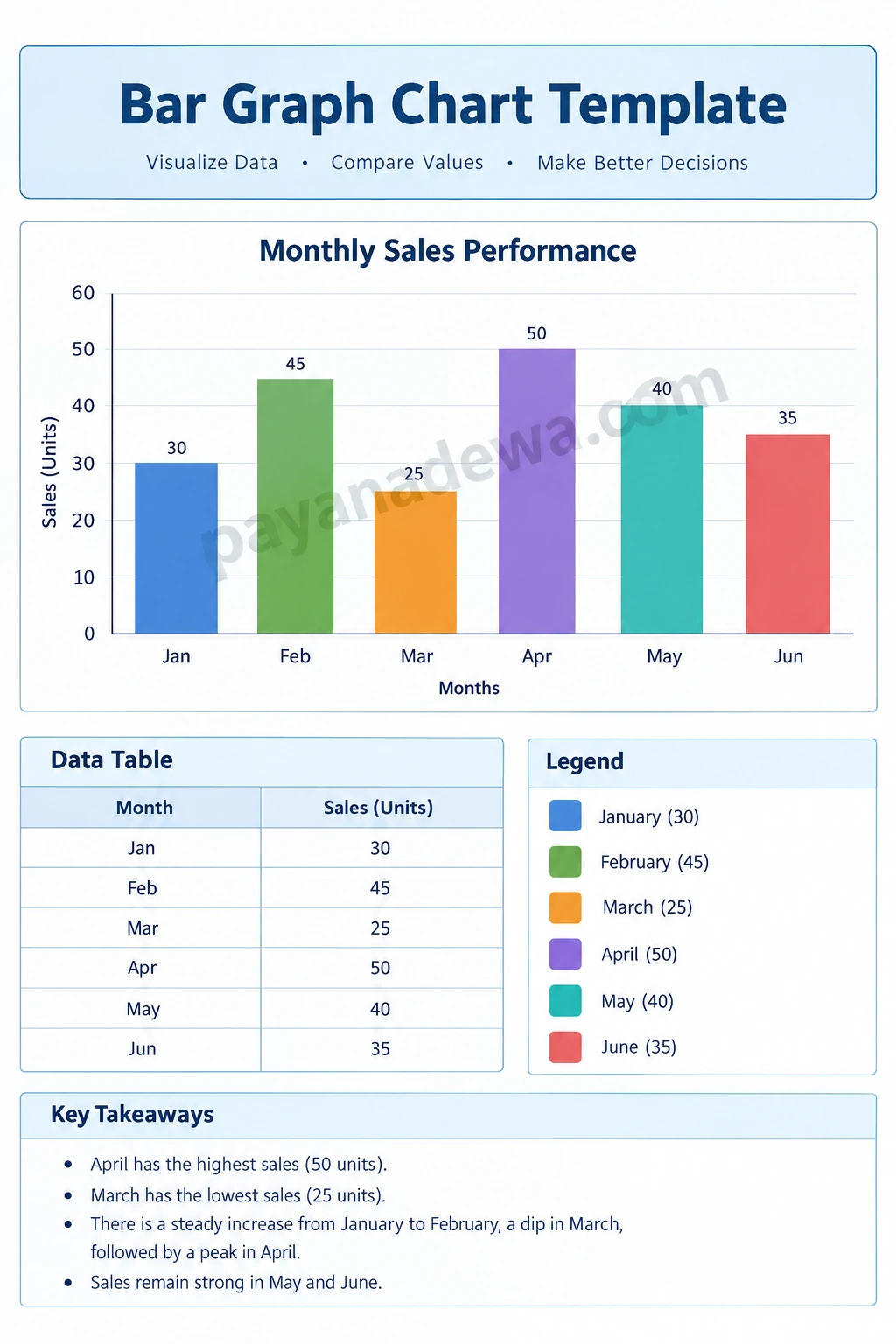
Practical examples make it easier to understand how a bar graph chart works. Consider the following monthly sales data for a small business.
- January: 30 units
- February: 45 units
- March: 25 units
- April: 50 units
- May: 40 units
- June: 35 units
In a vertical bar graph, each month appears along the horizontal axis, and the number of units sold determines the height of its bar. April has the highest sales at 50 units, while March has the lowest at 25 units.
The chart also reveals changes over time. Sales increase from January to February, decline in March, and reach their highest point in April before decreasing during May and June. These observations can help a business identify periods of stronger performance and investigate possible reasons for changes.
Beyond sales reporting, bar graph charts can be used in many everyday situations:
- Education: Compare test scores, attendance, reading progress, or classroom survey results.
- Business: Track revenue, compare product performance, or evaluate customer feedback.
- Personal budgeting: Compare spending across groceries, transportation, utilities, and entertainment.
- Research: Summarize survey responses and compare the frequency of different answers.
- Project management: Compare completed tasks, workloads, or performance across teams.
How to Create a Bar Graph Chart
Creating a useful bar graph does not require advanced mathematical skills. Follow these steps to turn a collection of numbers into a clear visual comparison.
Step 1: Collect and Organize Your Data
Start by gathering accurate information. Arrange your data into two columns: one for categories and another for their corresponding values. Check that each category has the correct value and that your data uses consistent units.
Step 2: Choose the Right Chart Type
Select a vertical or horizontal bar graph depending on the number of categories and the length of their labels. If you need to compare multiple groups, consider a grouped bar graph. If you want to show how individual components contribute to a total, a stacked bar graph may be more appropriate.
Step 3: Set Up the Axes and Scale
Place the categories on one axis and numerical values on the other. Choose a scale that covers the full range of your data and uses consistent intervals. For a conventional bar chart, begin the value axis at zero unless there is a clearly justified alternative, because truncated baselines can exaggerate differences between bars.
Step 4: Draw the Bars
Make each bar proportional to its value. Keep the bars equally wide and use consistent spacing between categories. In a standard bar graph, bars representing separate categories are generally separated by gaps to distinguish them from continuous data.
Step 5: Add Labels and a Clear Title
Give your chart a descriptive title, label the axes, and include units where appropriate. Value labels can help readers identify exact numbers without estimating them from the scale. Add a legend when colors represent multiple groups or data series.
Step 6: Review and Improve the Design
Check your calculations, spelling, labels, and bar heights before sharing the chart. Remove unnecessary decoration and ensure that the text is readable. If you use color to distinguish groups, select combinations that remain easy to interpret for people with color vision deficiencies.
Best Practices for Designing a Readable Bar Graph
A good bar graph chart should make the data easier to understand, not distract readers with unnecessary visual elements. Apply these practical tips when creating a chart for a report, presentation, classroom assignment, or printable worksheet.
- Keep the chart focused: Display only the categories and values that support your main message.
- Use descriptive titles: Tell readers what is being compared and, when relevant, the period covered.
- Maintain consistent spacing: Use uniform bar widths and gaps for a balanced appearance.
- Choose readable colors: Use a limited palette and maintain sufficient contrast between bars and the background.
- Avoid misleading scales: Use consistent intervals and an appropriate baseline.
- Label values when useful: Add numerical labels when exact comparisons matter.
- Consider accessibility: Do not rely on color alone to communicate important distinctions.
- Check the final size: Ensure labels, gridlines, and numbers remain legible when printed or viewed on a mobile screen.
For printable charts, leave enough white space around the graph and use a page layout that fits your intended paper size. A simple design often works better than a chart crowded with decorative elements.
Bar Graph vs Histogram: What Is the Difference?
Bar graphs and histograms may look similar, but they represent different kinds of data.
A bar graph compares values across distinct categories, such as products, countries, or school subjects. The categories are separate, and the bars typically have gaps between them.
A histogram displays the distribution of numerical data grouped into continuous intervals, such as age ranges, test score ranges, or measured temperatures. Its bars usually touch because the intervals represent neighboring portions of a numerical scale.
Choose a bar graph when your goal is to compare categories. Choose a histogram when you want to understand how numerical observations are distributed across intervals.
Tools for Making a Bar Graph Chart
You can create a bar graph chart using several common tools, depending on your needs and experience.
- Microsoft Excel: Useful for creating charts directly from spreadsheet data and updating them as values change.
- Google Sheets: A convenient browser-based option for creating and collaborating on charts.
- Canva: Helpful for designing visually appealing charts for presentations, posters, and educational materials.
- Printable templates: Useful for students, teachers, and anyone who prefers to enter values by hand or organize information on paper.
Before choosing a tool, consider whether you need automatic calculations, collaborative editing, custom styling, or a simple worksheet. For quick comparisons, a printable bar graph chart template can be an effective starting point.
Frequently Asked Questions About Bar Graph Charts
What is the main purpose of a bar graph chart?
The main purpose is to compare values across different categories. A bar graph makes it easier to identify the largest and smallest values, recognize differences, and communicate numerical information visually.
What are the essential parts of a bar graph?
The essential parts include a title, category labels, a numerical scale, bars, and axes. Additional elements, such as data labels, units, gridlines, and a legend, can improve clarity when needed.
Can I use a bar graph for percentages?
Yes. Bar graphs can compare percentages across categories, such as survey responses or market shares. A 100% stacked bar graph is particularly useful when you want to compare how different components contribute to a whole.
What is the best bar graph for comparing two groups?
A grouped bar graph is often a good choice when you need to compare two groups across the same categories. For example, you can compare sales in two years or test scores for two classes.
How do I make a bar graph chart printable?
Use a clean layout, readable labels, sufficient margins, and a suitable page size. Check the print preview before printing, and make sure the chart remains understandable in grayscale if you do not have access to color printing.
Conclusion
A bar graph chart is a practical tool for comparing data, identifying differences, and communicating information clearly. From simple classroom exercises to business performance reports, the right bar graph format can transform numerical values into insights that readers can understand quickly.
To create an effective chart, organize your data carefully, choose an appropriate graph type, use an accurate scale, and keep the design readable. Whether you build your chart in spreadsheet software or use a printable bar graph chart template, focus on making the information accurate, accessible, and easy to interpret.
Explore the Bar Graph Chart Template from payanadewa.com to help organize your data and create a clear visual comparison for your next project.