A well-designed Mobile App Advertising Rack Card can help businesses introduce their applications to potential users, communicate key benefits, and encourage more downloads. Although digital marketing continues to grow, printed promotional materials remain useful at events, retail locations, reception desks, trade shows, and other places where people discover new products and services.
By combining an attractive design, concise messaging, and a clear call to action, a mobile app rack card can connect offline marketing with digital engagement. Businesses can use this promotional tool to display app features, share a QR code, highlight special offers, and guide interested customers toward the appropriate download page.
Whether you are launching a new application or increasing awareness of an established product, understanding how to design and distribute an effective advertising rack card can help you build a consistent marketing strategy.
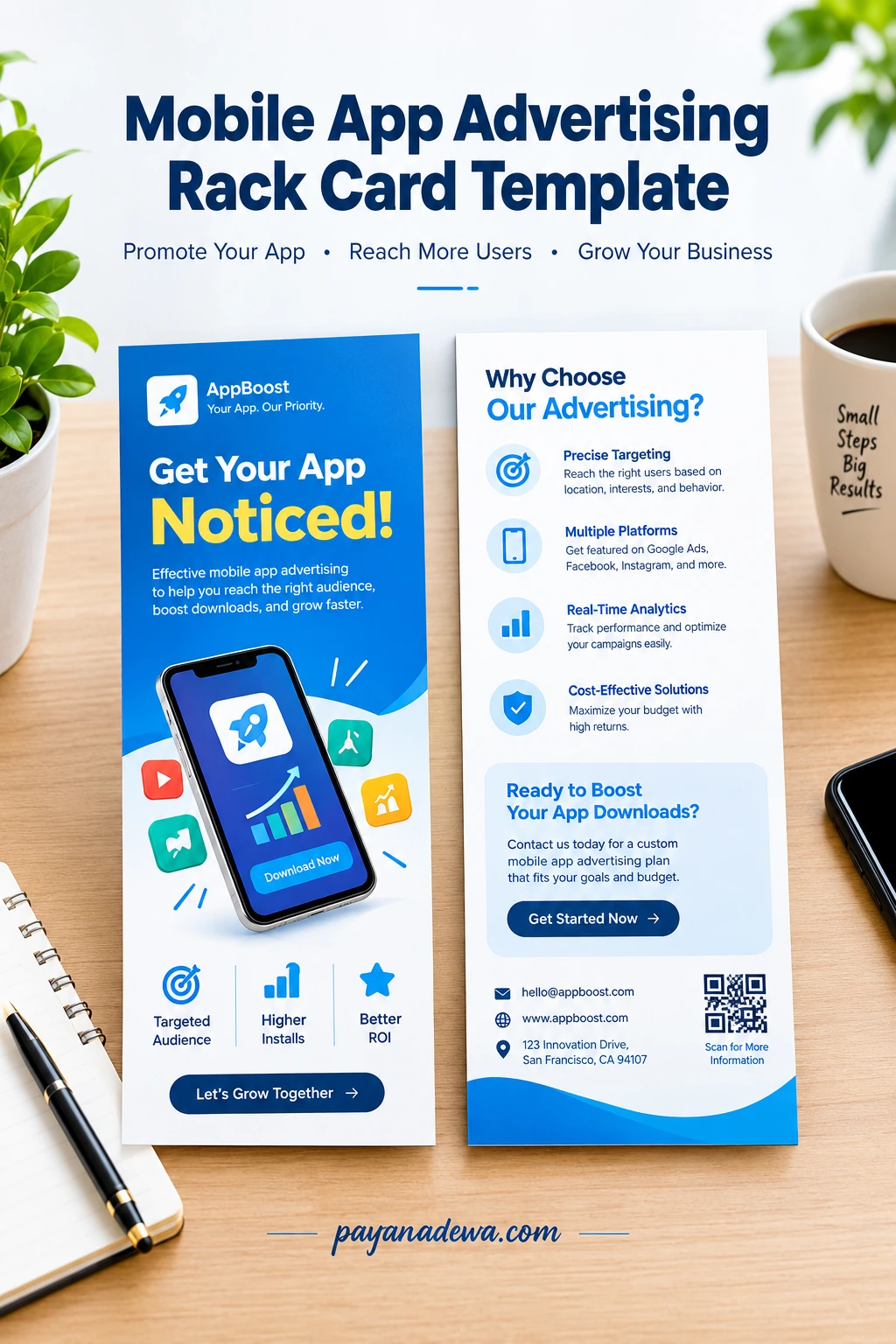
What Is a Mobile App Advertising Rack Card?
A Mobile App Advertising Rack Card is a printed marketing card designed to promote a mobile application. Businesses typically place these cards in display racks, on counters, at reception areas, or at promotional events. Their purpose is to capture attention quickly and provide enough information to encourage a potential user to take action.
Rack cards commonly use a tall, narrow layout with a front and back side. This format provides space for a headline, promotional message, app screenshots, benefits, contact information, and a QR code. A carefully organized design makes the information easy to scan without overwhelming the reader.
Mobile app rack cards can promote many types of applications, including:
- Shopping apps: Introduce product catalogs, exclusive offers, and convenient ordering.
- Fitness apps: Highlight workout plans, activity tracking, and wellness features.
- Travel apps: Promote booking tools, destination guides, and travel planning services.
- Business apps: Explain productivity tools, appointment scheduling, and customer services.
- Education apps: Showcase learning resources, interactive lessons, and study tools.
- Restaurant apps: Encourage customers to explore menus, order food, or join loyalty programs.
The most effective rack card focuses on the needs of a specific audience rather than trying to explain every feature in one small space.
Why Use a Mobile App Advertising Rack Card?
Printed promotional materials can complement digital advertising by introducing an app to people in physical locations. A rack card gives prospective users something tangible to read, keep, or scan later. It also creates an opportunity to communicate with customers who may not encounter your online advertisements.
Increase App Awareness
A strategically placed rack card can introduce your application to people who already have an interest in your business or service. For example, a hotel can promote its booking app near the front desk, while a fitness studio can display a workout app promotion beside its membership information.
Connect Print Marketing With Digital Downloads
A QR code can direct readers to a landing page containing download links, app information, or a promotional offer. This reduces the number of steps between discovering an application and learning how to access it. Test the QR code before printing to ensure that it opens the intended destination on supported devices.
Support Local and Event-Based Marketing
Rack cards are suitable for conferences, exhibitions, community events, partner locations, and local business promotions. They can also support sales representatives who need a compact handout explaining an app’s value during face-to-face conversations.
Essential Elements of an Effective App Advertising Rack Card
A strong rack card combines clear messaging with a recognizable visual identity. Every element should help readers understand what the app does and why they might want to use it.
1. A Compelling Headline
Start with a short headline that communicates the main benefit. Instead of using a vague phrase such as “Discover Our Application,” consider a message such as “Manage Your Daily Tasks in One Place” or “Find Your Next Favorite Product.” Make the headline specific to the problem your app solves.
2. A Clear Value Proposition
Explain what makes your application useful. Focus on two or three meaningful benefits rather than listing every available function. For example, a shopping app might emphasize convenient ordering, personalized recommendations, and order tracking.
3. Smartphone Images and App Screenshots
Visual previews help potential users understand the app before downloading it. Use clear smartphone mockups or genuine screenshots that represent the current interface. Keep text inside screenshots readable, and avoid decorative elements that distract from the primary message.
4. A Visible Call to Action
Tell readers exactly what to do next. Suitable calls to action include “Scan to Explore,” “Download the App,” and “Get Started Today.” Place the call to action near the QR code or download information so readers can easily identify the next step.
5. A Functional QR Code and Download Links
Use a QR code that directs users to a reliable destination, such as your official app landing page. From there, visitors can select the appropriate download option for their device. If you include app marketplace badges, follow the relevant brand guidelines and verify that every link works.
6. Consistent Branding and Contact Information
Include your logo, brand colors, website, and relevant contact details. Consistent branding makes the card recognizable and helps customers find your business after seeing the promotion. Avoid adding unnecessary information that makes the layout feel crowded.
How to Design a Mobile App Advertising Rack Card
Creating a professional rack card does not require a complicated design process. Follow these steps to develop a promotional layout that is attractive, informative, and easy to use.
Step 1: Define Your Marketing Goal
Decide what success means for your campaign. You might want to increase app awareness, generate downloads, encourage account registrations, or introduce a new feature. A clear objective will guide your headline, visual choices, and call to action.
Step 2: Understand Your Target Audience
Consider who will see the card and what information matters most to them. Busy professionals may respond to time-saving benefits, while travelers may be interested in convenience and destination information. Adapt the language and design to the audience’s needs.
Step 3: Organize the Layout
Use the front of the card to capture attention and communicate the primary benefit. The back can provide supporting details, additional features, contact information, and a secondary call to action.
For a balanced design, consider these principles:
- Use a readable headline with a clear visual hierarchy.
- Choose a consistent color palette that matches your brand.
- Leave enough white space between sections.
- Use short paragraphs and concise bullet points.
- Keep the QR code large enough to scan comfortably.
- Make important text readable at the final printed size.
Step 4: Write Benefit-Focused Copy
Describe outcomes rather than relying on technical jargon. For example, “Track your orders in real time” explains a practical benefit more clearly than a generic statement about advanced order management technology.
Step 5: Prepare the File for Printing
Choose a suitable rack card size based on your printer and display requirements. A common format is approximately 4 by 9 inches, although available sizes vary. Confirm the final dimensions, bleed, safe margins, color settings, image resolution, and paper specifications with your print provider before exporting the design.
Proofread the copy and check every URL, QR code, logo, and app screenshot. Request a physical proof when possible to review the colors, readability, and overall appearance before ordering a larger quantity.
Where to Distribute Mobile App Advertising Rack Cards
Placement can influence whether your promotional material reaches relevant customers. Choose locations that align with your application’s purpose and the habits of your intended audience.
- Retail stores: Promote shopping, loyalty, payment, or product discovery apps.
- Hotels and travel centers: Introduce booking, itinerary, and local discovery applications.
- Conferences and trade shows: Demonstrate business software and professional productivity tools.
- Gyms and wellness centers: Promote fitness tracking, class booking, and training apps.
- Restaurants and cafes: Advertise ordering, rewards, and reservation features.
- Educational institutions: Introduce learning platforms and student support applications.
- Partner businesses: Reach relevant audiences through mutually beneficial promotional arrangements.
Ask permission before placing materials at third-party locations. Keep displays tidy, replenish cards when necessary, and review whether each location generates meaningful engagement.
How to Measure Rack Card Marketing Performance
Printed advertising can be measured when the campaign includes trackable actions. Establish a baseline and choose metrics that correspond to your marketing objective.
Track QR Code Scans
Use a campaign-specific QR code that opens a dedicated landing page. Analytics can then help you understand how many people visit the page, when they visit, and which distribution locations generate interest, subject to applicable privacy requirements.
Monitor App Downloads and Registrations
Compare app downloads, registrations, or other relevant conversions during the campaign with your usual performance. Where possible, use campaign links and attribution tools to distinguish rack card traffic from other marketing channels. Remember that a scan does not necessarily result in a download.
Calculate Campaign Costs
Record printing, design, distribution, and promotional expenses. If you can attribute conversions to the campaign, calculate cost per acquisition by dividing the relevant campaign cost by the number of attributed acquisitions.
Review results by location, audience, and design variation. Use those findings to improve future campaigns rather than assuming that every placement will produce the same results.
Common Rack Card Design Mistakes to Avoid
Even an attractive promotional card can underperform if important information is difficult to find. Avoid these common mistakes when creating your mobile app advertising materials.
- Too much text: Focus on the most useful benefits and remove repetitive explanations.
- A weak call to action: Give readers a specific next step instead of leaving them to guess what to do.
- A difficult-to-scan QR code: Maintain sufficient size, contrast, and clear space around the code.
- Outdated screenshots: Make sure the visuals accurately represent the current application.
- Inconsistent branding: Use recognizable logos, fonts, and colors across your marketing materials.
- No performance tracking: Use campaign-specific links or QR codes when practical.
- Insufficient proofreading: Verify spelling, contact details, download destinations, and print specifications before production.
Addressing these issues helps create a rack card that looks professional and gives potential customers a straightforward path to learn more about your application.
Conclusion: Create a Mobile App Advertising Rack Card That Gets Noticed
A well-planned Mobile App Advertising Rack Card can support your marketing strategy by combining printed promotion with digital engagement. The right headline, benefit-focused copy, appealing visuals, and functional QR code help prospective users understand your app and discover the next step.
Start by defining your campaign objective and audience. Then create a clean layout, select relevant distribution locations, and track measurable results. Use those insights to refine your message and improve future campaigns.
Whether you are promoting a startup application, a retail platform, or a business productivity tool, a professional mobile app rack card template can provide a practical starting point for building consistent and recognizable marketing materials.
Frequently Asked Questions
What should a mobile app advertising rack card include?
Include a clear headline, your app’s main benefits, relevant screenshots, a call to action, a functional QR code, download information, and consistent branding. Add contact details when they help readers take the next step.
What size should an app advertising rack card be?
A common rack card size is approximately 4 by 9 inches, but the best dimensions depend on the display holder, printer requirements, and amount of information you need to present.
Can I use a rack card to increase app downloads?
Yes. A rack card can encourage downloads by explaining the app’s value and directing interested readers to a landing page or download destination. Results depend on the audience, placement, offer, and overall user experience.
How can I make my rack card easier to measure?
Use a unique QR code or campaign URL, monitor landing-page visits, and review attributed downloads or registrations. Compare performance across locations to identify opportunities for improvement.