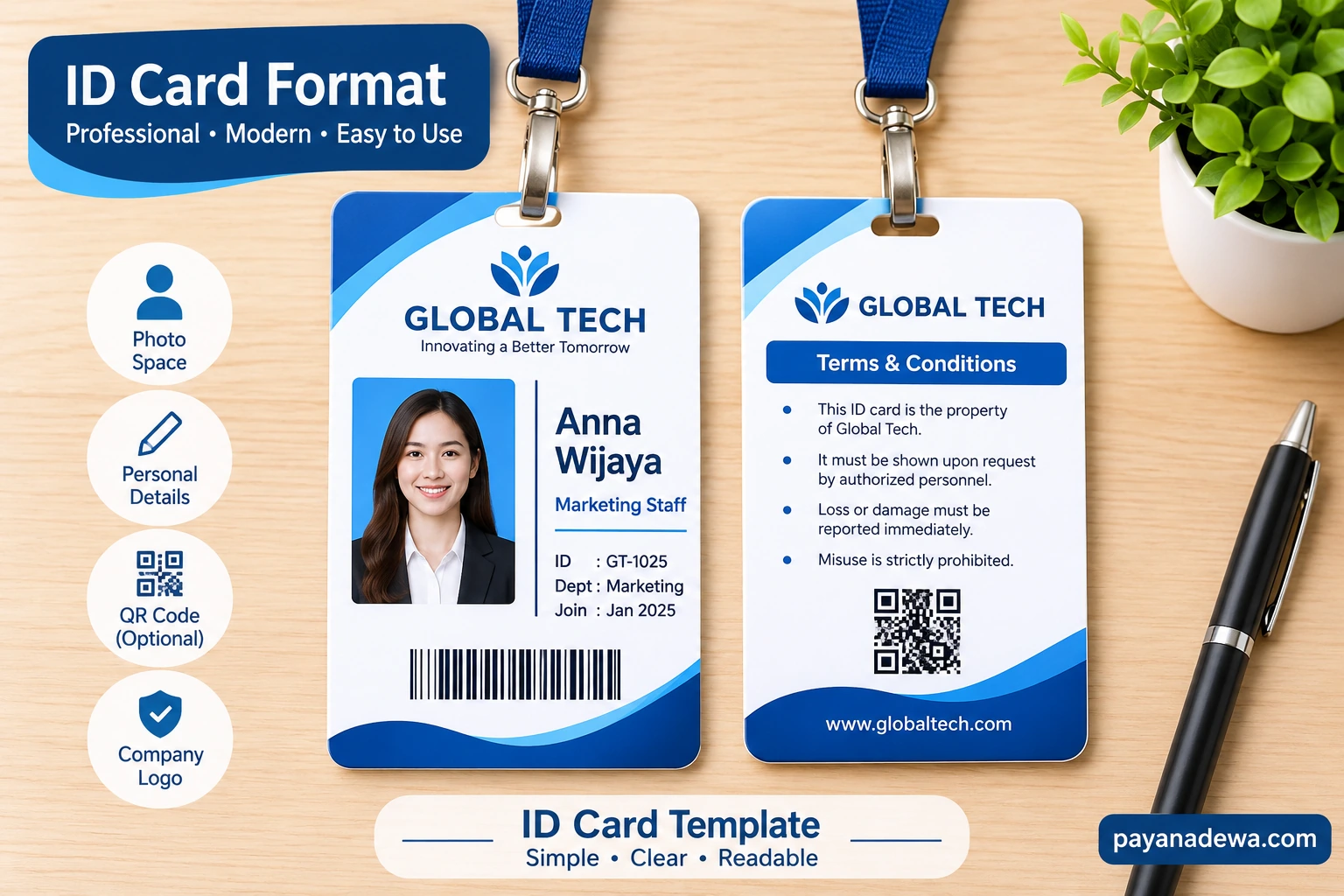
An ID card is an essential tool for identifying individuals, managing access, and maintaining security in workplaces, schools, universities, and organizations. A well-designed identification card provides important personal information in a clear, organized, and professional layout. Whether you need an employee badge, student identification card, visitor pass, or membership card, choosing the right ID Card Format makes a significant difference in its appearance and functionality.
A professional ID card should be easy to read, visually appealing, and practical for everyday use. It should include the necessary information without making the design look crowded. With the right layout, colors, typography, and card dimensions, anyone can create an identification card that represents an organization effectively.
In this guide, you will learn about different ID card formats, essential design elements, standard sizes, useful information to include, and practical tips for creating printable identification cards. You will also discover how to choose a suitable template for your personal or professional requirements.
What Is an ID Card Format?
An ID card format refers to the layout, structure, and visual arrangement of information printed on an identification card. It determines where personal details, photographs, identification numbers, logos, and other important elements appear.
A good identification card format balances appearance and functionality. It allows people to recognize the cardholder quickly while making essential information accessible to authorized individuals.
ID card designs can vary depending on their purpose. For example, an employee ID card may display a company logo, employee number, and department, while a student ID card may include a school name, class, and academic year.
Why Is a Proper ID Card Format Important?
Using a consistent card layout offers several advantages:
- Easy identification: Helps identify employees, students, visitors, and members quickly.
- Professional appearance: Creates a consistent visual identity for an organization.
- Improved organization: Keeps personal details arranged in a structured format.
- Access management: Supports identification procedures at authorized entrances and facilities.
- Brand recognition: Displays organizational colors, logos, and other visual elements.
- Convenience: Makes important information easy to find and read.
Different Types of ID Card Formats
Before choosing a template, consider the purpose of the identification card. Different organizations require different layouts and information. Here are some common types of ID card formats you can use.
1. Employee ID Card Format
An employee ID card is commonly used in offices, companies, factories, hospitals, and other workplaces. It helps identify staff members and supports workplace security procedures.
A typical employee identification card includes:
- Company name and logo.
- Employee photograph.
- Full name of the employee.
- Employee identification number.
- Job title or department.
- Joining date or employment details, when necessary.
- Company contact information or emergency instructions, if appropriate.
For a professional appearance, use corporate colors, readable fonts, and a clean layout. Avoid adding unnecessary information that makes the card difficult to read.
2. Student ID Card Format
Schools, colleges, universities, and educational institutions use student ID cards to identify their students. These cards may also support library services, campus access, and attendance systems.
Common information includes the student’s full name, photograph, student number, institution name, class or department, and academic year. Some institutions also include a barcode or QR code for identification purposes.
Choose a simple and colorful design that matches the institution’s branding. Make sure the student’s photograph and identification number are clearly visible.
3. Visitor ID Card Format
Visitor identification cards are designed for guests, contractors, temporary workers, and other people entering a facility for a limited period.
A visitor badge usually contains the visitor’s name, organization, visitor number, date of visit, host or department, and expiration time. Bright colors can help distinguish visitor badges from permanent employee identification cards.
For better security, visitor cards should be collected when guests leave the premises.
4. Membership ID Card Format
Membership ID cards are useful for clubs, associations, gyms, professional organizations, and community groups. They help verify membership and provide access to specific services or facilities.
Typical details include the member’s name, membership number, organization logo, membership category, issue date, and expiration date. A QR code or barcode can also be added when connected to an appropriate membership management system.
5. Personal ID Card Format
Personal identification card templates can be used for events, personal projects, creative activities, or internal organizational purposes. They can be customized with a photograph, name, identification number, and other relevant details.
However, a privately designed template should not be presented as an official government-issued identification document. Always follow applicable identification and privacy regulations.
Standard ID Card Size and Dimensions
Choosing the correct ID card size is important because it affects printing quality, readability, and compatibility with card holders. Most professional identification cards use a standard plastic card size similar to a bank card.
The commonly used CR80 card size measures approximately 85.60 mm × 53.98 mm (3.375 × 2.125 inches). It is widely used for employee badges, student cards, membership cards, and access cards.
Common ID Card Dimensions
- CR80 standard size: 85.60 × 53.98 mm.
- Landscape orientation: Horizontal layout, suitable for displaying names and organizational information.
- Portrait orientation: Vertical layout, useful when photographs and personal details need more vertical space.
- Custom sizes: Suitable for event passes, temporary badges, and specialized identification requirements.
Before printing, check your printer specifications and card holder dimensions. Use the correct document size and print settings to prevent unwanted cropping or scaling.
Essential Elements of a Professional ID Card
A successful ID card design should contain the right information in an organized and readable format. Although requirements vary between organizations, several elements are commonly included.
1. Organization Logo and Name
The organization logo helps establish identity and makes the card recognizable. Place it near the top of the card, where it can be seen easily. Use a high-quality logo file to maintain sharpness during printing.
2. Recent Photograph
A clear photograph helps authorized personnel identify the cardholder. Choose a well-lit, front-facing image with a simple background. Keep the photograph large enough to recognize the person easily.
3. Full Name and Identification Number
The cardholder’s full name should be one of the most visible elements. Include a unique identification number to distinguish individuals with similar names and support record management.
4. Department, Position, or Category
Additional information such as department, job title, class, or membership category provides useful context. Keep these details concise so they do not compete with the person’s name.
5. Barcode or QR Code
A barcode or QR code can make an ID card more functional when connected to an appropriate database or access management system. Before using one, ensure that the encoded information is accurate and that access to personal data is properly protected.
6. Expiration Date and Contact Details
Some identification cards need an expiration date to indicate when they are no longer valid. Contact information can also be useful for reporting lost cards or verifying organizational details.
How to Create an ID Card Format Step by Step
Creating an identification card does not require advanced graphic design skills. With a suitable template and basic design software, you can produce a professional result.
Step 1: Determine the Purpose
Start by deciding who will use the card and what it needs to accomplish. An employee badge, student card, and event pass have different information requirements. Defining the purpose first makes the design process easier.
Step 2: Choose the Right Template
Select an ID card template that matches your organization’s needs. Look for a layout with enough space for the photograph, name, identification number, and logo.
Step 3: Select Suitable Colors and Fonts
Choose two or three complementary colors that match your organization’s branding. Use simple fonts that remain readable at a small size. Avoid decorative typography for important identification details.
Step 4: Add Personal Information
Enter the cardholder’s information carefully. Double-check spelling, identification numbers, job titles, and dates before continuing. Accurate information is essential for reliable identification.
Step 5: Arrange the Front and Back Layouts
The front side should display the most important details, including the photograph, name, identification number, and organization logo. The back side can contain terms of use, contact details, emergency instructions, or a QR code.
Step 6: Review and Print
Preview the completed design before printing. Check alignment, image quality, font sizes, and margins. Export the final design using a print-friendly file format and confirm that the dimensions match your chosen card size.
Best Tips for Designing a Printable ID Card
A good ID card should look professional while remaining practical. The following tips can help you create a design that works well in real-world situations.
- Keep the layout simple: Use enough white space to make the information easy to understand.
- Use high-resolution images: Choose clear photographs and logos to avoid blurry printing results.
- Maintain consistent branding: Apply the same colors, logo placement, and typography across all organizational cards.
- Prioritize readability: Make names and identification numbers more prominent than secondary details.
- Choose durable materials: Consider PVC cards or protective laminating materials for frequently used identification cards.
- Check both sides: Ensure that the front and back designs are properly aligned.
- Protect personal information: Only display details that are genuinely necessary for identification.
- Test before bulk printing: Print one sample first to check the final appearance and dimensions.
Which Software Can You Use to Create an ID Card?
Several design tools can help you create an ID card without hiring a professional designer. The best option depends on your experience, available equipment, and desired output.
Microsoft Word
Microsoft Word is useful for creating basic identification cards with text boxes, shapes, images, and tables. It is a practical option for simple printable layouts.
Microsoft PowerPoint
PowerPoint offers flexible positioning and alignment tools. You can create a custom-sized slide, arrange design elements, and export the finished card as a PDF or image.
Canva
Canva provides ready-made design templates and easy-to-use editing tools. It is suitable for beginners who want to customize colors, photographs, fonts, and logos without learning complex graphic design software.
Adobe Photoshop and Illustrator
Adobe Photoshop and Illustrator provide more advanced design capabilities. They are useful for creating customized layouts, professional branding elements, and high-quality print-ready artwork.
Common ID Card Design Mistakes to Avoid
Even a visually attractive design can become ineffective if important details are difficult to read. Avoid these common mistakes when preparing your identification card.
- Using too many colors or decorative elements.
- Choosing fonts that are too small or difficult to read.
- Placing important information too close to the card edges.
- Using low-quality photographs or stretched logos.
- Including unnecessary personal information.
- Printing without checking the actual card dimensions.
- Using QR codes or barcodes without testing them first.
- Forgetting expiration dates when they are required.
Reviewing these details before printing can save time, reduce wasted materials, and improve the overall quality of your identification cards.
Frequently Asked Questions About ID Card Format
What is the standard size of an ID card?
The most common professional ID card size is CR80, measuring approximately 85.60 × 53.98 mm. This is similar to the dimensions of a standard bank card.
What information should be included on an ID card?
Most ID cards include the cardholder’s photograph, full name, identification number, organization name, and logo. Depending on the purpose, they may also include a department, expiration date, barcode, or QR code.
Can I create an ID card using Microsoft Word?
Yes. Microsoft Word can be used to create a basic ID card with text boxes, shapes, photographs, and logos. Set the page dimensions carefully before arranging the design elements.
Which format is best for printing an ID card?
PDF is a practical choice for preserving layout and dimensions during printing. High-resolution PNG files are also useful for image-based designs. Always confirm the printer’s requirements before exporting.
Should an ID card have information on both sides?
Not necessarily. A single-sided card may be sufficient for basic identification. However, a double-sided design provides additional space for contact information, usage instructions, QR codes, and other relevant details.
Can I customize an ID card template?
Yes. Most templates can be customized with different colors, logos, photographs, names, identification numbers, and organizational details. Make sure the finished design remains clear and consistent.
Conclusion
Choosing the right ID Card Format is an important step in creating professional, practical, and recognizable identification cards. Whether you need an employee badge, student ID, visitor pass, or membership card, a well-organized layout helps communicate essential information effectively.
Remember to select the appropriate card dimensions, use readable typography, include only necessary personal details, and maintain consistent branding. Always review the design and test a sample before printing multiple cards.
With a suitable template and the right design approach, creating a professional identification card can be simple and efficient. Start with a clean layout, customize it to your requirements, and create an ID card that combines clarity, functionality, and a polished appearance.