An Instagram grid is the visual arrangement of posts displayed on your profile. When planned carefully, it creates a consistent appearance, communicates your brand identity, and encourages visitors to explore more of your content.
Whether you are a content creator, business owner, influencer, or casual Instagram user, learning how to organize your Instagram feed can help you build a stronger online presence. In this guide, you will discover how Instagram grids work, how to plan your layout, and how to create a visually appealing profile without making the process complicated.
What Is an Instagram Grid?
An Instagram grid is the collection of photos, graphics, and video covers arranged on your Instagram profile. Traditionally, Instagram displays feed posts in three vertical columns, creating a grid-like appearance.
Each published post becomes part of your overall profile design. The colors, subjects, photography styles, and graphic elements work together to create a visual impression.
A well-designed Instagram grid can help you:
- Create a recognizable visual identity.
- Make your profile look professional and organized.
- Communicate your brand personality.
- Encourage visitors to explore additional posts.
- Present products, services, or creative work attractively.
- Build a consistent experience for your followers.
However, an attractive feed does not need to look perfectly symmetrical. The most effective layout is one that supports your content strategy while remaining visually comfortable and easy to maintain.
Why Is an Instagram Grid Important?
Your Instagram profile works like a visual introduction to your brand. Visitors may decide within seconds whether they want to follow your account or explore your content.
1. Creates a Strong First Impression
A coordinated feed immediately makes your profile feel more intentional. Consistent colors, photography, and graphic styles help visitors understand what your account offers.
2. Strengthens Brand Recognition
Using a recognizable color palette and visual style makes your content easier to identify. Over time, followers may recognize your posts even before checking your username.
3. Makes Content Easier to Explore
A thoughtfully organized feed helps visitors discover different topics. For example, a beauty business might arrange skincare tips, product highlights, customer reviews, and educational graphics throughout its content calendar.
4. Supports Your Marketing Strategy
Businesses can use an Instagram grid to present products, announce promotions, share testimonials, and communicate important information. A consistent visual approach helps these messages feel connected.
Popular Instagram Grid Layout Ideas
There are several ways to organize an Instagram feed. Your ideal layout depends on your content, audience, and personal preferences.
1. Checkerboard Instagram Grid
The checkerboard layout alternates between two types of content. For example, you can publish a photograph followed by a quote graphic, then repeat the pattern.
This approach creates a balanced appearance without requiring complicated graphic design skills.
2. Row-by-Row Instagram Grid
With this layout, each horizontal row follows a particular theme. One row might feature travel photographs, while the next contains educational graphics.
It works particularly well for creators who publish content in organized categories or campaigns.
3. Vertical Column Layout
A vertical Instagram grid uses recurring visual elements within each column. You might dedicate one column to photographs, another to quotes, and the final column to promotional content.
This style looks organized, although it requires careful planning because the order of published posts affects the arrangement.
4. Puzzle Instagram Grid
A puzzle grid combines several individual posts into one larger visual composition. When visitors view your profile, the separate images form a connected design.
This layout can create an impressive presentation for product launches, announcements, and special campaigns. However, individual posts should still make sense when viewed separately.
5. Minimalist Instagram Grid
A minimalist feed focuses on simplicity. It often uses neutral backgrounds, clean typography, natural lighting, and plenty of visual space.
This style is suitable for lifestyle creators, photographers, personal brands, and businesses that prefer an elegant appearance.
How to Plan an Instagram Grid Before Posting
Planning your content in advance makes it easier to maintain a consistent Instagram profile. You do not need expensive software or advanced design experience to get started.
Step 1: Choose Your Visual Theme
Start by deciding how you want your profile to look and feel. Consider whether your brand should appear modern, playful, luxurious, minimal, or creative.
Choose two or three main colors and a small selection of complementary shades. Repeating these colors throughout your posts will help establish a recognizable style.
Step 2: Select Consistent Fonts and Filters
If you regularly publish quote graphics or educational posts, choose fonts that are easy to read. Use similar image editing settings to maintain a consistent photographic appearance.
Avoid changing your visual style too frequently. Small variations are fine, but your overall feed should still feel connected.
Step 3: Create a Content Mix
A successful Instagram feed should offer variety. Instead of publishing the same type of content repeatedly, combine different formats and topics.
For example, your content mix could include:
- Educational posts that answer common audience questions.
- Personal photographs that introduce your personality.
- Product images that highlight important features.
- Inspirational quotes that encourage engagement.
- Customer testimonials that build credibility.
- Reels and video covers that introduce dynamic content.
Step 4: Arrange Your Posts in Advance
Use an Instagram grid planner to preview how upcoming posts will look together. This allows you to identify color conflicts, repeated images, and awkward visual combinations before publishing.
Move your planned images around until the overall arrangement feels balanced. Remember to consider how each post will appear individually as well as alongside neighboring content.
Step 5: Maintain a Realistic Posting Schedule
Consistency is more important than posting constantly. Create a schedule that matches your available time and content production capacity.
A manageable publishing routine makes it easier to maintain quality while avoiding unnecessary pressure.
Instagram Grid Template: A Simple Planning Tool
An Instagram grid template can make content planning much easier. Instead of imagining how your future posts will look, you can arrange sample images in a visual layout before uploading anything.
The template below provides a simple example of an organized Instagram profile. It combines a profile preview, a six-post photo arrangement, and practical suggestions for creating a consistent feed.
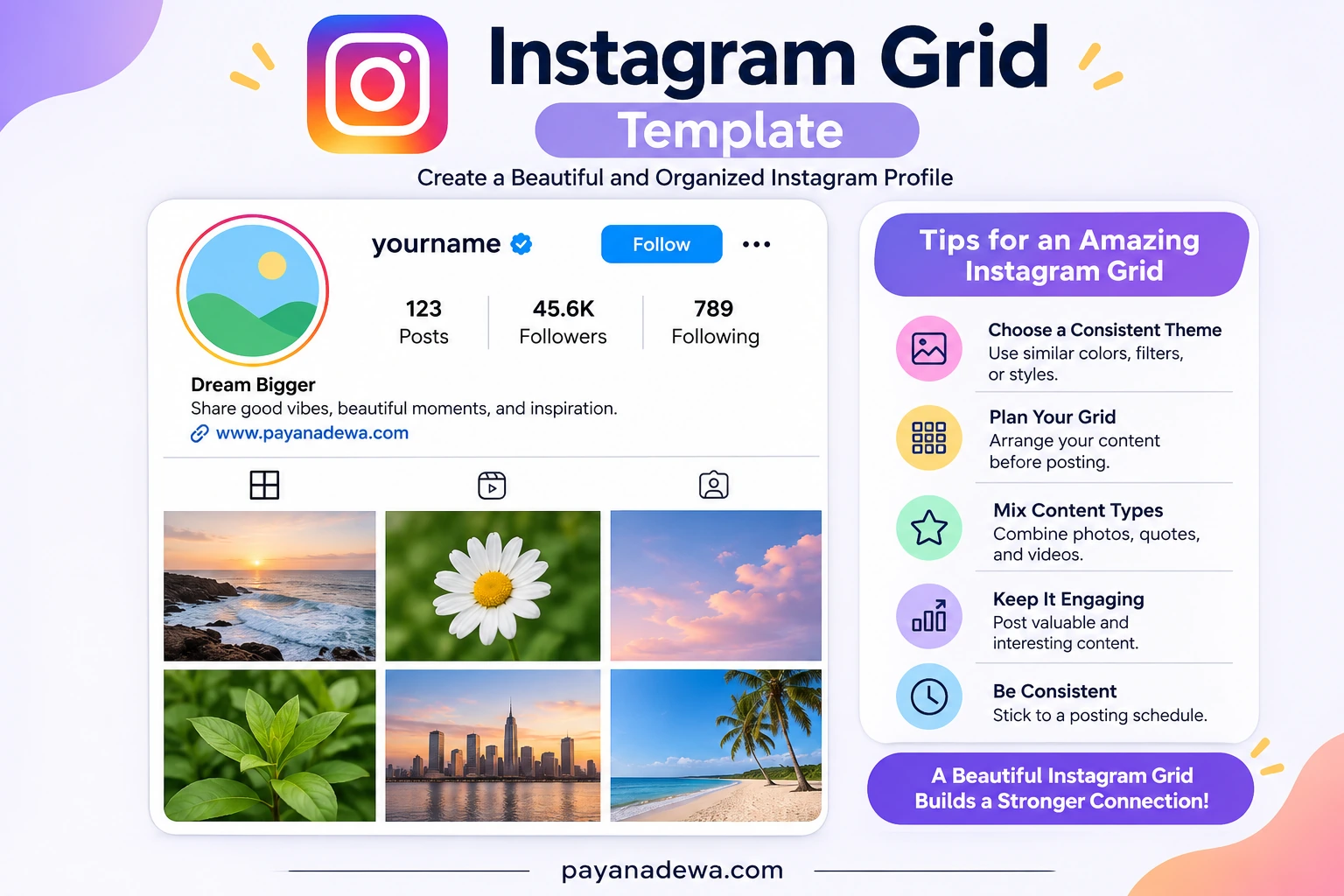
You can use a printable grid template to experiment with different image combinations, organize upcoming content, and develop a visual direction for your account.
Best Tools for Designing an Instagram Grid
Several design and planning tools can help you create an attractive Instagram feed. Choose one that matches your experience and workflow.
Canva
Canva is useful for creating Instagram posts, branded graphics, quote images, and promotional content. Its ready-made layouts make it accessible to beginners.
Adobe Express
Adobe Express provides graphic design features for creating social media content. It is useful for designing consistent templates and editing visual assets.
Preview and Grid Planning Apps
Instagram planning applications can help you arrange upcoming posts and preview your profile before publishing. Some tools also offer scheduling, analytics, and content organization features.
Before choosing a third-party application, review its pricing, privacy policy, and Instagram account permissions.
Practical Tips for a More Attractive Instagram Feed
Good design does not have to be complicated. A few simple habits can make a noticeable difference in the appearance of your profile.
- Use consistent lighting: Similar lighting conditions help photographs look connected.
- Limit your color palette: A few complementary colors create visual harmony.
- Balance different subjects: Avoid placing too many visually similar images together.
- Prioritize image quality: Use clear photographs and properly sized graphics.
- Keep text readable: Avoid overcrowding graphics with unnecessary information.
- Use meaningful captions: Give followers useful context and encourage genuine conversations.
- Review your profile regularly: Check whether your latest posts still support your overall visual direction.
Common Instagram Grid Mistakes to Avoid
Even a carefully planned feed can become difficult to maintain when visual consistency takes priority over useful content.
Focusing Too Much on Appearance
A beautiful grid is valuable, but it should not replace meaningful content. Your audience follows you for information, entertainment, inspiration, or products. Make sure your posts continue delivering value.
Using Too Many Different Styles
Frequently changing colors, fonts, and editing styles can make your profile feel disconnected. Establish a basic design system and use it consistently.
Ignoring Individual Post Quality
Some grid designs look impressive as a complete composition but contain individual posts that are difficult to understand. Every image should work independently because people may discover it through their home feed, Explore page, or shared links.
Following Trends Without a Clear Purpose
Not every popular Instagram layout is suitable for every account. Choose design trends that support your brand rather than copying every new visual style.
Frequently Asked Questions About Instagram Grid
What is the ideal Instagram grid layout?
There is no single ideal layout. Checkerboard, minimalist, row-based, and mixed-content designs can all work well. Choose an arrangement that supports your content and feels manageable over time.
How many posts should I plan for an Instagram grid?
Planning nine posts is a useful starting point because it provides a three-by-three preview of your profile. You can also plan six posts or an entire month of content depending on your publishing schedule.
Can I change my Instagram grid layout after publishing?
You can adjust your future content and, where Instagram provides the relevant features, rearrange eligible profile content. However, not every type of post or layout can be freely repositioned. Check the current Instagram app features before planning around a specific arrangement.
Do I need a special app to create an Instagram grid?
No. You can plan a basic Instagram grid using a printable template, a spreadsheet, or a graphic design application. Dedicated planning apps are optional.
Does an attractive Instagram grid increase followers?
A visually consistent profile can encourage visitors to explore your account and consider following you. However, follower growth also depends on content quality, audience relevance, discoverability, engagement, and publishing consistency.
Conclusion
An Instagram grid is more than a collection of photographs. It is an opportunity to communicate your identity, organize your content, and create a memorable profile experience.
By choosing a consistent visual theme, mixing different content types, planning posts in advance, and maintaining a realistic schedule, you can build a beautiful Instagram feed without making content creation unnecessarily complicated.
Start with a simple Instagram grid template, experiment with different arrangements, and develop a style that reflects your personality or brand. Focus on creating useful content first, and let your visual design bring everything together.