A well-organized classroom starts with an effective system for tracking student performance. Whether you teach in an elementary school, middle school, high school, or college, keeping accurate academic records is essential. A Gradebook provides a simple and reliable way to record grades, monitor assignments, evaluate academic progress, and identify areas where students may need additional support.
Teachers handle many responsibilities every day. From preparing lessons to grading homework and communicating with parents, managing student information can become overwhelming. Using a structured gradebook template makes this process easier. It keeps important information in one place and helps educators make informed decisions throughout the school year.
In this guide, you will discover what a gradebook is, how it works, which features to look for, and how to use a printable or digital gradebook effectively. You will also learn practical tips for maintaining accurate records and improving classroom organization.
What Is a Gradebook?
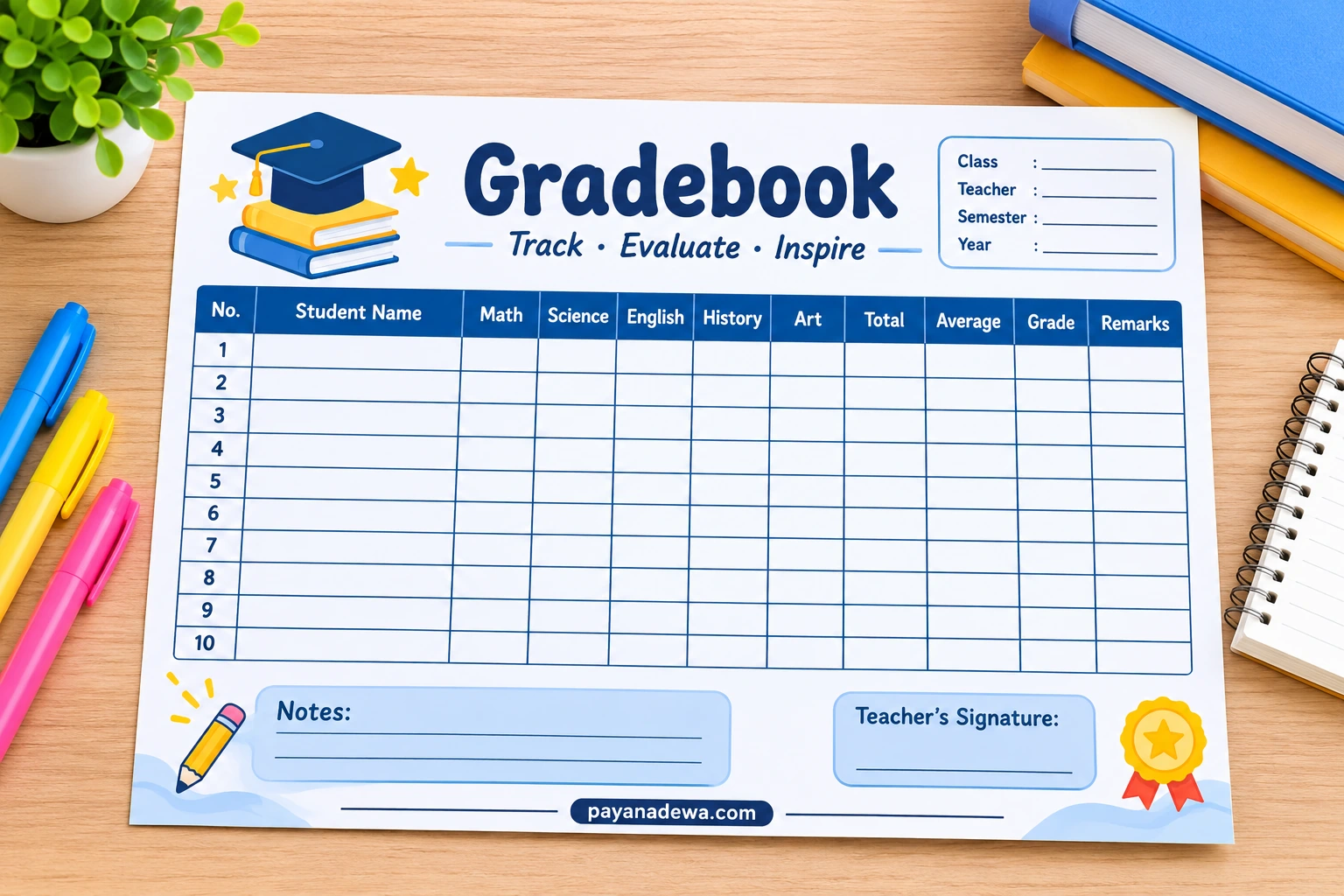
A gradebook is a record-keeping tool used by teachers and educators to organize, calculate, and track student grades. It typically includes student names, assignment scores, examination results, attendance information, and overall academic performance.
Traditionally, teachers used paper notebooks to record grades. Today, digital gradebooks are also widely available through spreadsheets, learning management systems, and dedicated educational software.
Regardless of the format, the main purpose remains the same: to provide a clear overview of student achievement and make academic assessment easier to manage.
What Information Does a Gradebook Contain?
A useful gradebook generally includes the following information:
- Student Information: Student names, identification numbers, and class details.
- Assignment Scores: Grades for homework, projects, quizzes, and classroom activities.
- Test Results: Examination scores and assessment performance.
- Subject Grades: Individual results for mathematics, science, English, history, and other subjects.
- Average Scores: Calculated averages based on recorded assessments.
- Final Grades: Overall academic results for a grading period.
- Teacher Remarks: Notes about student performance, improvement, and learning progress.
Why Is a Gradebook Important for Teachers?
Maintaining accurate student records is an important part of effective teaching. A gradebook helps educators organize assessment results while reducing the risk of missing or misplaced information.
1. Keeps Student Records Organized
Teachers often manage dozens of students across multiple subjects or classes. Without a consistent recording system, finding specific grades can take valuable time.
A structured gradebook keeps student names, assignment results, and assessment records together. This makes it easier to review information whenever necessary.
2. Makes Academic Progress Easier to Monitor
Grades provide useful information about how students perform over time. By recording results regularly, teachers can identify learning patterns and recognize students who are improving.
For example, a student who consistently struggles with mathematics quizzes may benefit from additional exercises or individual guidance.
3. Supports Better Teaching Decisions
Assessment records can help teachers determine whether their teaching strategies are working effectively. If several students receive low scores on the same topic, the teacher may need to review the lesson or introduce a different teaching approach.
This makes the gradebook more than a simple scoring tool. It becomes a valuable resource for improving classroom instruction.
4. Improves Communication With Parents
Parents and guardians want to understand how their children are progressing at school. Organized grade records make it easier for teachers to explain academic achievements and areas that need improvement.
Clear documentation also supports parent-teacher meetings and helps families understand where additional learning support may be beneficial.
Types of Gradebooks for Classroom Use
There are several types of gradebooks available. The best option depends on teaching preferences, classroom requirements, available technology, and the number of students being managed.
Printable Gradebook Templates
A printable gradebook is a paper-based document that teachers can download, print, and fill in manually. It is a practical option for educators who prefer writing grades by hand or need a simple record-keeping system.
Common advantages include:
- Easy to print and use immediately.
- No internet connection or software required.
- Simple layouts that are easy to understand.
- Convenient for classroom notes and quick observations.
- Easy to customize with additional columns or subjects.
Printable templates are especially useful for teachers who want a straightforward way to organize classroom information without learning complicated software.
Digital Gradebooks
A digital gradebook stores student assessment information electronically. Teachers can use spreadsheet applications, online platforms, or specialized school management systems.
Digital gradebooks offer several useful features, including automatic calculations, editable records, searchable information, and data backup options.
They can also make it easier to update grades and share authorized academic reports with students or parents.
Spreadsheet Gradebooks
Spreadsheet-based gradebooks offer a balance between flexibility and convenience. Teachers can create custom columns for assignments, examinations, attendance, and final grades.
Applications such as Microsoft Excel and Google Sheets can calculate averages automatically using formulas. This reduces repetitive calculations and helps teachers manage larger classes.
Essential Features of an Effective Gradebook
Not every gradebook needs complicated features. However, a well-designed template should include the basic elements required for accurate and convenient grade management.
Clear Student Identification
Each student should have a dedicated row or record. Including student names and identification numbers helps prevent mistakes when entering or reviewing grades.
Organized Subject and Assignment Columns
Separate columns make assessment records easier to read. Teachers can create individual sections for different subjects, homework assignments, quizzes, and examinations.
Automatic Grade Calculations
For digital templates, automatic calculations are particularly helpful. Formulas can calculate total points, average scores, and weighted final grades.
Teachers should always verify that formulas match their school’s grading policies before using the results for official reporting.
Remarks and Feedback Sections
Numbers alone do not always explain a student’s performance. A remarks section allows teachers to record observations, highlight improvements, and provide useful feedback.
Simple and Readable Layout
A good gradebook should be easy to navigate. Avoid unnecessary columns, confusing labels, and overly complicated formatting. Clear headings and consistent spacing make daily record-keeping more efficient.
How to Use a Gradebook Effectively
Having a gradebook is only the first step. Developing a consistent routine is what makes it genuinely useful.
Step 1: Enter Student Information
Begin by listing every student in the appropriate class. Check spelling carefully and use consistent identification details to avoid confusion.
Step 2: Create Assessment Categories
Organize your gradebook according to the types of assessments used in your classroom. Common categories include homework, class participation, quizzes, projects, and examinations.
Step 3: Record Grades Regularly
Update student results as soon as assignments have been evaluated. Recording grades consistently helps prevent forgotten scores and reduces the workload at the end of a grading period.
Step 4: Calculate Student Averages
Use the appropriate calculation method to determine student averages. If all assignments have equal value, add the scores and divide by the number of assessments.
For weighted grading systems, apply the correct percentage to each assessment category before calculating the final result.
Step 5: Review Academic Progress
Review student performance regularly instead of waiting until the end of the semester. Look for improvements, repeated difficulties, and unusual changes in assessment results.
Step 6: Provide Helpful Feedback
Use the remarks section to provide constructive comments. Specific feedback helps students understand what they are doing well and what they should work on next.
Practical Tips for Maintaining Accurate Grade Records
Good record-keeping habits can make a significant difference in classroom organization. Consider these practical recommendations:
- Update records promptly: Enter grades shortly after completing assessments.
- Use consistent grading rules: Apply the same assessment standards to all students.
- Double-check calculations: Review totals and averages before submitting official grades.
- Keep backup copies: Store digital records securely and maintain copies of important paper documents.
- Protect student privacy: Do not leave confidential grade records where unauthorized people can access them.
- Review entries regularly: Check for missing assignments, incorrect scores, and duplicate records.
- Choose a suitable format: Use printable sheets, spreadsheets, or educational software based on your classroom needs.
Printable vs. Digital Gradebook: Which Is Better?
Both printable and digital gradebooks can support effective classroom management. The right choice depends on how teachers prefer to work and what resources are available.
A printable gradebook is ideal for simple classroom tracking, handwritten notes, and teachers who prefer working with physical documents. It is also useful when internet access is limited.
A digital gradebook is generally more suitable for frequent updates, larger student records, automatic calculations, and convenient data management.
Some teachers choose to combine both formats. For example, they may maintain an electronic master record while printing selected student reports for meetings and classroom discussions.
The most important consideration is choosing a system that remains accurate, accessible, and easy to maintain.
Common Gradebook Mistakes to Avoid
Even an organized teacher can occasionally make mistakes when managing academic records. Recognizing common problems can help prevent inaccurate reporting.
- Entering grades in the wrong row: Always confirm the student name before recording a score.
- Forgetting missing assignments: Use a consistent notation for incomplete or unsubmitted work.
- Using incorrect formulas: Check spreadsheet calculations before relying on final averages.
- Changing grading rules unexpectedly: Keep assessment policies clear and consistent.
- Failing to back up records: Protect important information against accidental loss.
- Ignoring student feedback: Use assessment results to guide improvements, not just assign numerical grades.
Frequently Asked Questions About Gradebooks
What is the main purpose of a gradebook?
The main purpose of a gradebook is to record and organize student assessment results. It helps teachers monitor academic performance, calculate grades, and evaluate learning progress.
Can I use a printable gradebook for multiple subjects?
Yes. Many printable gradebook templates include separate columns for multiple subjects. You can also customize the layout to match your teaching requirements.
What is the difference between a gradebook and a report card?
A gradebook contains detailed assessment records collected throughout a grading period. A report card presents a summary of a student’s academic performance for a specific reporting period.
Can Excel be used as a gradebook?
Yes. Microsoft Excel can be used to create a customizable digital gradebook. Teachers can organize student records, calculate averages, and manage assessment results with spreadsheet formulas.
How often should teachers update their gradebooks?
Teachers should update their gradebooks regularly, preferably after each graded assignment or assessment. Consistent updates help maintain accurate records and make progress easier to monitor.
Conclusion
A reliable gradebook is an essential tool for organizing student assessment records and monitoring academic progress. Whether you choose a printable template, spreadsheet, or digital grading platform, maintaining accurate information can make classroom management more efficient.
By recording grades consistently, reviewing student performance, and providing meaningful feedback, teachers can create a more organized and supportive learning environment.
If you need a straightforward solution, start with a simple printable gradebook template and customize it to suit your classroom. Visit payanadewa.com for practical templates and helpful resources that make everyday organization easier.