An effective employee training checklist helps businesses prepare new hires, develop existing employees, and maintain consistent workplace standards. Without a clear training process, important tasks can be overlooked, employees may feel unprepared, and managers can struggle to measure progress.
Whether you are onboarding a new team member, introducing new software, or preparing employees for additional responsibilities, a structured employee training plan makes the process easier to manage. It provides a clear list of learning objectives, training activities, completion requirements, and follow-up actions.
In this guide, you will learn how to create and use an employee training checklist, what to include, and how to measure training effectiveness. You can also use the printable template provided below to organize training activities and track employee progress.
What Is an Employee Training Checklist?
An employee training checklist is a practical document that lists the tasks, topics, skills, and activities an employee must complete during a training program. It helps trainers, supervisors, and human resources teams ensure that every essential training requirement is covered.
Depending on the organization’s needs, the checklist may cover pre-training preparation, company orientation, job-specific skills, workplace safety, software training, performance assessments, and post-training follow-up.
Unlike an informal training plan, a checklist provides a straightforward way to record completed activities and identify outstanding requirements. It can be used for new employee onboarding, department transfers, professional development, and ongoing skills improvement.
Why Is an Employee Training Checklist Important?
A well-organized training checklist benefits both employees and employers. It creates a consistent learning experience while helping managers identify gaps before they affect workplace performance.
1. Creates a Consistent Training Process
When employees follow the same essential training steps, organizations can maintain consistent standards across teams and departments. A checklist reduces the risk of missing important information and helps trainers deliver the same core content to each employee.
2. Improves Employee Confidence
New employees may feel overwhelmed when they encounter unfamiliar responsibilities, systems, and procedures. A checklist breaks the learning process into manageable steps. Employees can see what they have completed, understand what comes next, and ask questions when they need support.
3. Helps Managers Monitor Progress
Managers can use the checklist to review completed tasks, identify outstanding activities, and determine whether additional coaching is necessary. This makes training progress easier to discuss during check-ins and performance reviews.
4. Supports Documentation and Accountability
Training records provide useful evidence that required learning activities have been completed. For regulated or safety-sensitive roles, organizations should maintain appropriate records and follow applicable legal requirements, internal policies, and industry standards.
Printable Employee Training Checklist Template
Use the employee training checklist template below as a starting point for organizing your training program. It includes employee information, preparation tasks, training activities, follow-up steps, and space for additional notes.
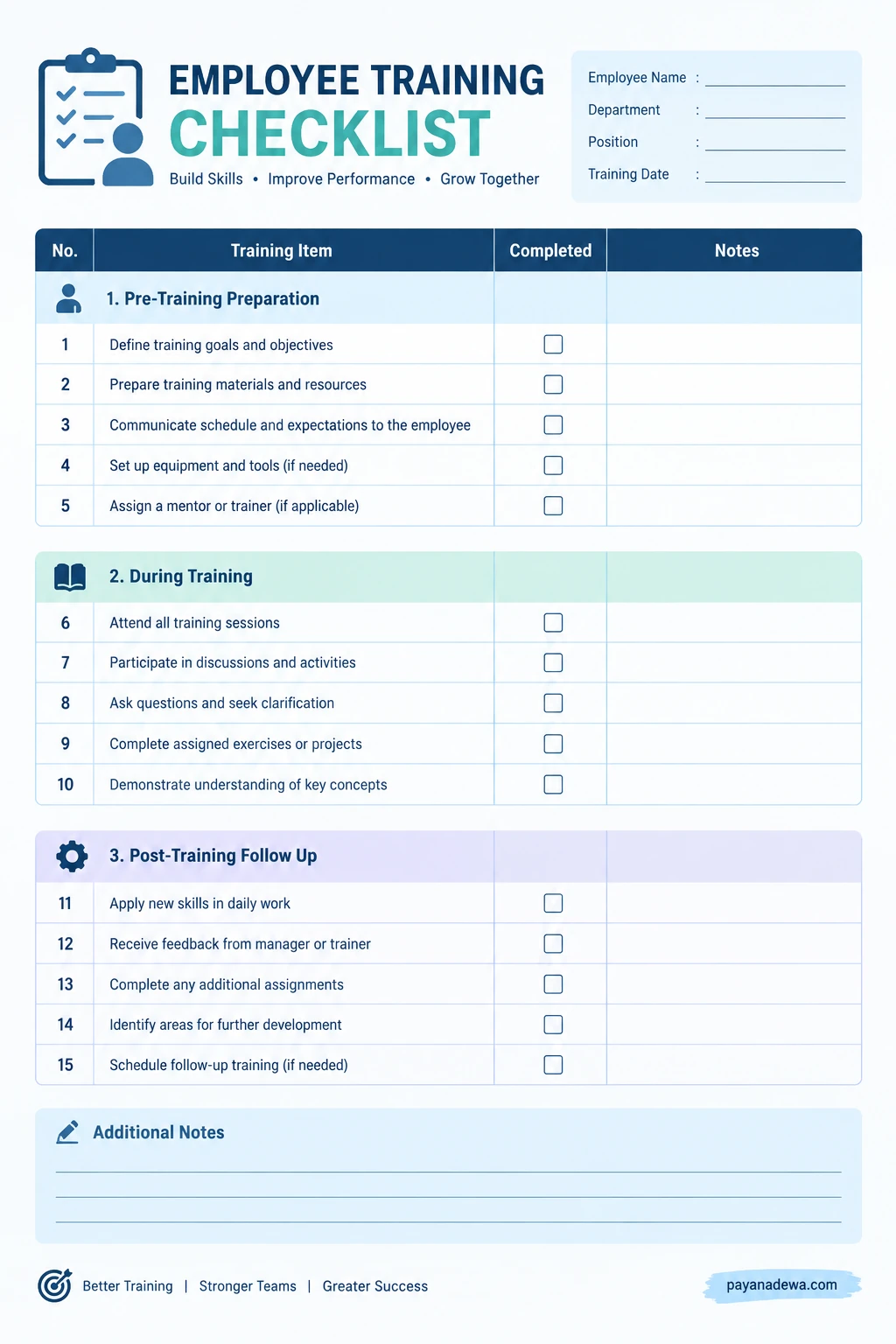
For best results, customize the template to match the employee’s position, department, training objectives, and required competencies. Add deadlines, trainer names, or approval fields when your organization needs more detailed documentation.
Essential Items to Include in an Employee Training Checklist
The most useful checklist covers the entire training process, from preparation to evaluation. The following sections provide a practical framework that you can adapt to different roles and industries.
1. Pre-Training Preparation
Preparation helps ensure that employees and trainers are ready before the first training session begins. Complete these tasks before training starts:
- Define training goals and expected learning outcomes.
- Identify the employee’s role, responsibilities, and skill requirements.
- Prepare training materials, manuals, and reference documents.
- Schedule training sessions and communicate expectations.
- Arrange access to equipment, software, and necessary work tools.
- Assign a trainer, supervisor, or workplace mentor.
- Prepare any required accounts, permissions, and workspace access.
Clear preparation saves time and helps prevent avoidable delays. For example, an employee who needs to learn a customer relationship management system should have the appropriate access before the practical training session begins.
2. Company Orientation and Workplace Policies
Employees need to understand how the organization operates and what is expected of them. Include relevant orientation topics such as:
- Company mission, values, and organizational structure.
- Department responsibilities and reporting relationships.
- Attendance, leave, and workplace conduct policies.
- Communication procedures and collaboration tools.
- Data protection, confidentiality, and information security.
- Emergency procedures and applicable workplace safety rules.
- Relevant anti-harassment, equal opportunity, and reporting policies.
Adapt these topics to the employee’s location, role, and workplace risks. Employees should know where to find official policies and whom to contact when they need clarification.
3. Job-Specific Skills Training
Job-specific training helps employees develop the knowledge and practical skills required to perform their duties. The exact requirements depend on the position.
- Explain the employee’s daily responsibilities and performance expectations.
- Demonstrate standard operating procedures.
- Provide hands-on practice with relevant equipment and software.
- Review quality standards and common mistakes.
- Explain escalation procedures and problem-solving methods.
- Allow supervised practice before independent work begins.
- Confirm that the employee can demonstrate essential competencies.
For example, a customer service representative may need training in handling customer inquiries, documenting cases, and escalating complaints. A warehouse employee may require instruction in inventory procedures, equipment safety, and product handling.
4. Training Assessment and Completion
Completing a training session does not automatically mean an employee has mastered the material. Include an assessment to determine whether the learning objectives have been achieved.
- Review the key concepts covered during training.
- Use a quiz, practical demonstration, or scenario-based exercise when appropriate.
- Observe the employee performing relevant tasks.
- Record completed requirements and outstanding skills.
- Provide constructive feedback and clarify misunderstandings.
- Document any required authorization before independent work.
Choose assessment methods that reflect the actual job. A short knowledge test may be suitable for policy awareness, while practical observation is often more useful for equipment operation or other hands-on responsibilities.
5. Post-Training Follow-Up
Follow-up helps employees apply their new knowledge and identify areas that need additional support. Add these activities to the checklist:
- Schedule a check-in with the manager or trainer.
- Review early work performance and task accuracy.
- Ask the employee about challenges and remaining questions.
- Provide additional coaching where necessary.
- Identify opportunities for continued professional development.
- Update the employee’s training record.
- Schedule refresher training when required.
Follow-up timing should reflect the complexity of the role. A brief check-in after the first few shifts may be appropriate for some positions, while specialized roles may require a longer supervised development period.
How to Create an Effective Employee Training Checklist
Creating a useful checklist does not require complicated software. Start with the skills and responsibilities employees need to perform their jobs successfully, then organize training into a sequence that is easy to follow.
Step 1: Identify Training Needs
Review job descriptions, performance expectations, existing skill gaps, and workplace requirements. Speak with supervisors and experienced employees to identify the knowledge and abilities that new or developing employees need.
Step 2: Set Clear Learning Objectives
Write objectives that describe observable outcomes. Instead of stating that an employee must understand the sales process, specify that the employee must demonstrate how to record a sales opportunity, update its status, and follow the required approval process.
Step 3: Organize Tasks by Priority
Place essential safety, access, and compliance requirements early in the training process. Follow with foundational knowledge, practical exercises, and more advanced responsibilities. Make sure employees do not perform restricted tasks independently before meeting the required competency standards.
Step 4: Assign Responsibilities and Deadlines
Identify who is responsible for each training activity and when it should be completed. Some tasks may belong to human resources, while others require a department manager, technical specialist, or external instructor.
Step 5: Track Completion and Review Results
Use checkboxes or status fields to record progress. Add notes when a task requires further practice, an assessment needs to be repeated, or a manager must approve completion. Review the checklist regularly and update it when procedures or job requirements change.
Best Practices for Using an Employee Training Checklist
A checklist is most effective when it supports learning rather than becoming a paperwork exercise. Apply these practices to make your training process more useful.
- Customize by role: Use a core checklist for company-wide requirements and separate sections for job-specific training.
- Keep tasks specific: Write clear, actionable items that employees and trainers can verify.
- Use plain language: Avoid unnecessary jargon and explain unfamiliar terms.
- Combine learning methods: Use demonstrations, written instructions, supervised practice, and discussions where appropriate.
- Encourage questions: Give employees a safe opportunity to raise concerns and request clarification.
- Record evidence of competency: Where appropriate, note assessment results or practical demonstrations rather than relying only on attendance.
- Review the checklist regularly: Update it when software, policies, equipment, or responsibilities change.
- Protect employee information: Store training records securely and limit access to authorized personnel.
Common Employee Training Checklist Mistakes to Avoid
Even a well-designed training checklist can become ineffective if it is poorly implemented. Watch for these common problems.
Using the Same Checklist for Every Position
A generic checklist may cover company orientation but overlook important role-specific skills. Maintain a shared foundation while adding tasks for each department and position.
Focusing on Completion Instead of Competency
Checking a box only confirms that a task was recorded as complete. It does not always prove that an employee can perform the task correctly. Use demonstrations, assessments, or supervised practice when appropriate.
Providing Too Much Information at Once
Overloading new employees can make information difficult to remember. Divide training into manageable sessions, prioritize essential knowledge, and provide reference materials employees can revisit later.
Skipping Follow-Up
Employees may encounter problems after formal training ends. Schedule check-ins, review actual work, and provide additional guidance before small knowledge gaps become recurring performance issues.
How to Measure Employee Training Effectiveness
Organizations can improve their training programs by measuring both learning outcomes and workplace performance. Select indicators that align with the purpose of the training rather than tracking numbers that offer little practical insight.
- Training completion rate: The proportion of assigned training activities completed within the required period.
- Assessment results: Scores or competency ratings that show whether employees achieved the learning objectives.
- Time to proficiency: The time employees need to perform essential duties to the expected standard.
- Error and rework rates: Changes in relevant mistakes, quality issues, or repeated work.
- Employee feedback: Responses about training clarity, relevance, confidence, and areas needing improvement.
- Manager observations: Evidence that employees can apply their new knowledge in everyday work.
Compare results with an appropriate baseline and consider other factors that may influence performance. For example, lower error rates may reflect improvements in training, equipment, supervision, or work processes. Use the findings to refine training content and identify additional support needs.
Frequently Asked Questions
What should an employee training checklist include?
An employee training checklist should generally include employee details, learning objectives, orientation topics, job-specific tasks, required policies, assessments, completion records, and follow-up activities. Adapt the list to the position and applicable workplace requirements.
Who is responsible for completing the training checklist?
Responsibility is usually shared between the employee, trainer, and manager. Trainers deliver instruction and assess skills, employees participate and demonstrate competency, and managers monitor progress and confirm completion where required.
How long should employee training take?
Training duration depends on the complexity of the job, the employee’s experience, and the required competency level. Some introductory tasks can be completed in a day, while technical or safety-sensitive roles may require weeks or longer of structured learning and supervised practice.
Can I use a digital employee training checklist?
Yes. A digital checklist can be managed using a spreadsheet, document, learning management system, or human resources platform. Digital tools can simplify updates, reminders, reporting, and record storage. Choose a solution that fits your organization’s size and security requirements.
How often should an employee training checklist be updated?
Review the checklist whenever job responsibilities, company policies, technology, equipment, or applicable requirements change. It is also useful to review it periodically with trainers and managers to identify missing steps and improve the employee learning experience.
Conclusion
An employee training checklist provides a clear and practical way to organize onboarding, develop job-specific skills, monitor learning progress, and support continuous improvement. By combining preparation, structured instruction, competency assessments, and follow-up, organizations can create a more consistent training experience.
Start with the printable employee training checklist template in this guide, then customize it to match your workplace and employees’ responsibilities. Keep each task specific, assign clear ownership, and measure whether employees can apply what they learn.
With a well-maintained training checklist, managers can identify learning gaps earlier, employees can approach new responsibilities with greater confidence, and organizations can build a stronger foundation for long-term performance.