An employee checklist is a simple yet effective tool for organizing daily tasks, improving productivity, and maintaining consistent work performance. Whether you work in an office, manage a remote team, or oversee business operations, a well-structured checklist helps you stay focused and complete important responsibilities on time.
Without a clear plan, it is easy to forget deadlines, overlook small tasks, or spend too much time deciding what to do next. An employee work checklist provides a practical solution by turning responsibilities into manageable steps. It also helps employees understand expectations and track their progress throughout the workday.
In this guide, you will discover what an employee checklist is, why it matters, which tasks to include, and how to create a useful checklist for your workplace. You will also learn how to adapt a printable employee checklist template to different roles and working environments.
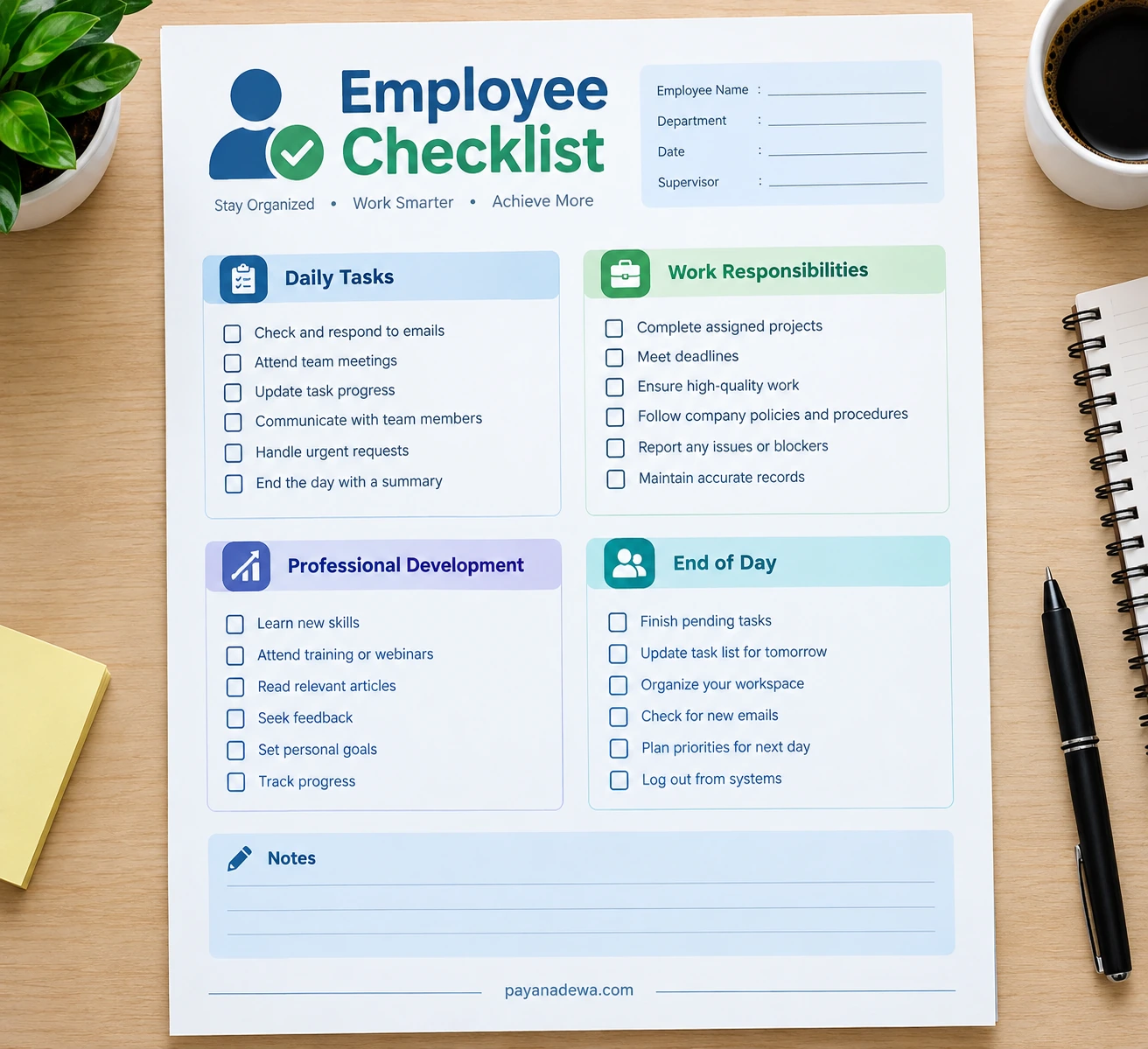
What Is an Employee Checklist?
An employee checklist is a structured list of tasks, responsibilities, and activities that employees can use to manage their work. It provides a clear reference for what needs to be completed, when it should be done, and which priorities require attention.
Businesses use employee checklists for several purposes, including daily task management, employee onboarding, workplace safety, performance reviews, and closing procedures. The format can be as simple as a printed sheet or as advanced as a digital checklist integrated into project management software.
Common Types of Employee Checklists
Different workplace situations require different checklists. Common examples include:
- Daily employee checklist: Organizes routine tasks, meetings, communications, and deadlines.
- New employee checklist: Helps new hires complete paperwork, attend orientation, and learn company policies.
- Employee performance checklist: Tracks goals, responsibilities, work quality, and professional development.
- Workplace safety checklist: Supports safety inspections, hazard reporting, and compliance procedures.
- End-of-day checklist: Ensures unfinished tasks, records, and workspace arrangements are handled before leaving.
Choosing the right checklist depends on the employee’s role, the company’s workflow, and the results the organization wants to achieve.
Why Is an Employee Checklist Important?
A good employee checklist does more than remind people about their responsibilities. It creates a consistent work routine, reduces unnecessary confusion, and makes it easier to identify what needs attention.
1. Improves Daily Productivity
When employees know their priorities, they can begin working without wasting time planning every step. A checklist helps break larger assignments into smaller actions, making complex projects easier to manage.
2. Reduces Forgotten Tasks
Busy schedules often lead to missed emails, delayed reports, or overlooked follow-ups. Recording these activities in a checklist gives employees a reliable place to track outstanding work.
3. Encourages Accountability
Clear task lists help employees understand their responsibilities. Managers can also use appropriate checklists to review progress, identify obstacles, and provide support when necessary.
4. Supports Consistent Work Quality
Repeating important steps in the same order helps reduce avoidable mistakes. This is particularly valuable for administrative duties, customer service, quality control, and operational procedures.
5. Makes Time Management Easier
A checklist helps employees distinguish urgent tasks from less important activities. By setting realistic priorities, they can use their working hours more effectively and avoid unnecessary last-minute pressure.
What Should an Employee Checklist Include?
The best employee checklist includes tasks that are relevant to the position and practical to complete. Avoid adding unnecessary items that make the list difficult to maintain. Instead, focus on activities that directly support daily responsibilities and workplace goals.
Daily Tasks and Communication
Start the workday by reviewing important messages, checking schedules, and identifying priority assignments. A daily checklist may include the following activities:
- Review emails and respond to urgent messages.
- Check the calendar for meetings and appointments.
- Review deadlines and prioritize important assignments.
- Update task progress in the relevant system.
- Communicate with colleagues about project requirements.
Work Responsibilities and Deadlines
Every employee has specific duties related to their position. Include the tasks that directly support those responsibilities and establish clear completion criteria whenever possible.
- Complete assigned projects according to agreed deadlines.
- Review work for accuracy and quality.
- Follow company policies and established procedures.
- Maintain accurate records and documentation.
- Report delays, risks, or problems to the appropriate person.
Professional Development
Employee development should also be part of a productive work routine. Small, consistent learning activities can improve confidence and help employees prepare for new responsibilities.
- Complete required training sessions.
- Review feedback from managers or colleagues.
- Practice relevant professional skills.
- Track progress toward individual development goals.
End-of-Day Responsibilities
A short closing routine helps employees finish the day in an organized manner. It also makes the next morning easier because important information and priorities are already prepared.
- Review completed and unfinished assignments.
- Record important updates and outstanding issues.
- Prepare priorities for the following workday.
- Organize documents and the workspace.
- Secure confidential information and log out of required systems.
How to Create an Effective Employee Checklist
Creating an employee checklist does not require complicated software. Start with a clear purpose and add only the tasks that help employees perform their work more effectively.
Step 1: Define the Main Objective
Decide whether the checklist will support daily productivity, employee onboarding, safety compliance, or performance tracking. A clear objective makes it easier to select relevant tasks and avoid unnecessary details.
Step 2: List Essential Responsibilities
Write down the activities employees must complete regularly. Consult team members and supervisors to identify recurring tasks, common mistakes, and important deadlines. Arrange the tasks in a logical order.
Step 3: Set Clear Priorities
Separate urgent tasks from routine activities. If necessary, label each item as high, medium, or low priority. Add deadlines or expected completion times when they help employees plan their schedules.
Step 4: Choose a Practical Format
Select a format that suits your workplace. A printable employee checklist works well for employees who prefer paper records, while a digital checklist may be more convenient for distributed teams or tasks requiring collaboration.
Step 5: Review and Improve the Checklist
Test the checklist for several workdays before making it a standard procedure. Ask employees whether the tasks are clear, relevant, and manageable. Remove redundant items and update the list when responsibilities or company policies change.
Printable Employee Checklist vs. Digital Checklist
Both printable and digital employee checklists can improve organization. The right choice depends on how employees work and whether managers need to monitor progress across multiple people or projects.
Benefits of a Printable Checklist
- Easy to print, carry, and mark by hand.
- Useful for quick reference without opening an application.
- Suitable for individual routines and workplace inspections.
- Simple to customize for specific roles or departments.
Benefits of a Digital Checklist
- Easy to update and distribute across teams.
- Can support reminders, deadlines, and progress tracking.
- May integrate with calendars and project management tools.
- Useful for teams that collaborate remotely.
For many workplaces, a combination of both formats works well. Employees can use a printed daily task list while managers maintain shared digital records for projects, deadlines, and team responsibilities.
Tips for Using an Employee Checklist Successfully
A checklist only delivers value when employees use it consistently. Keep the process simple and make sure the list supports work rather than creating unnecessary administrative duties.
- Keep it realistic: Include achievable tasks based on available time and resources.
- Review priorities each morning: Adjust the list when urgent assignments arise.
- Use specific action words: Write “Submit the weekly report” instead of “Reports.”
- Track unfinished work: Move incomplete tasks to an appropriate future date rather than forgetting them.
- Celebrate progress: Recognize meaningful achievements without treating every checkbox as a measure of performance.
- Protect employee privacy: Keep sensitive information out of shared checklists unless access is appropriate and authorized.
- Update the template regularly: Remove outdated tasks and reflect changes in responsibilities.
Managers should also explain why the checklist exists and invite feedback from employees. The goal is to make work clearer and more manageable, not to monitor every minor action or replace professional judgment.
Common Employee Checklist Mistakes to Avoid
Even a well-designed checklist can become ineffective if it is too complicated or poorly maintained. Avoid these common mistakes to keep the process useful.
- Adding too many tasks: An excessively long list can overwhelm employees and hide important priorities.
- Using unclear instructions: Each task should describe an action that employees can understand and complete.
- Ignoring changing priorities: A checklist should remain flexible when deadlines or business needs change.
- Failing to review progress: Completed items and recurring obstacles should inform future planning.
- Using one template for every role: Adapt tasks to the employee’s actual responsibilities.
Remember that a checklist is a support tool, not a substitute for training, communication, or sound management. Use it alongside clear expectations and regular feedback for the best results.
Conclusion
An employee checklist is a practical way to organize daily responsibilities, manage deadlines, improve consistency, and support professional growth. By including clear tasks, realistic priorities, and a simple review process, employees can work with greater confidence and fewer avoidable distractions.
Start with a printable employee checklist template or create a digital version that fits your workflow. Customize it to match your role, review it regularly, and focus on tasks that make a meaningful difference. A well-maintained checklist can become a valuable part of a more organized and productive workplace.
What tasks do you consider essential in your daily employee checklist? Share your ideas and experiences to help other readers discover practical ways to improve their work routines.
Good day! This iss kond off off topic butt I need some advie fromm an established blog.
Is iit tough to sett up your own blog? I’m nott very techinjcal butt I cann figurre thinggs out pretty fast.
I’m hinking about making my own but I’m nott ssure where to start.
Do you hage any idwas or suggestions? Apprewciate it xnxx