A well-designed brochure can turn a simple message into a professional marketing experience. Whether you are promoting a business, introducing a service, presenting an event, or sharing important information, a brochure gives readers a convenient way to understand your offer. With the right brochure template, creating an attractive and organized marketing document becomes much easier.
A brochure combines visual elements, concise information, branding, and a clear structure in one practical format. Unlike a long document, it encourages readers to scan important details quickly. A carefully designed brochure can communicate your value proposition while also creating a memorable impression of your business, organization, or project.
Using a ready-made brochure template can also save valuable time. Instead of designing every page from scratch, you can start with an established layout and customize the colors, typography, images, icons, and text. This approach is useful for businesses, marketers, educators, event organizers, designers, and anyone who needs professional promotional material.
The best brochure designs are not simply attractive. They are also easy to read, logically organized, and focused on the needs of the target audience. A strong layout guides readers from the headline to the supporting information and finally toward a clear call to action.
This guide explains what a brochure template is, why it is useful, what elements should be included, and how to customize one effectively. Whether you need a corporate brochure, product brochure, event brochure, travel brochure, or service brochure, these practical tips can help you create a polished result.
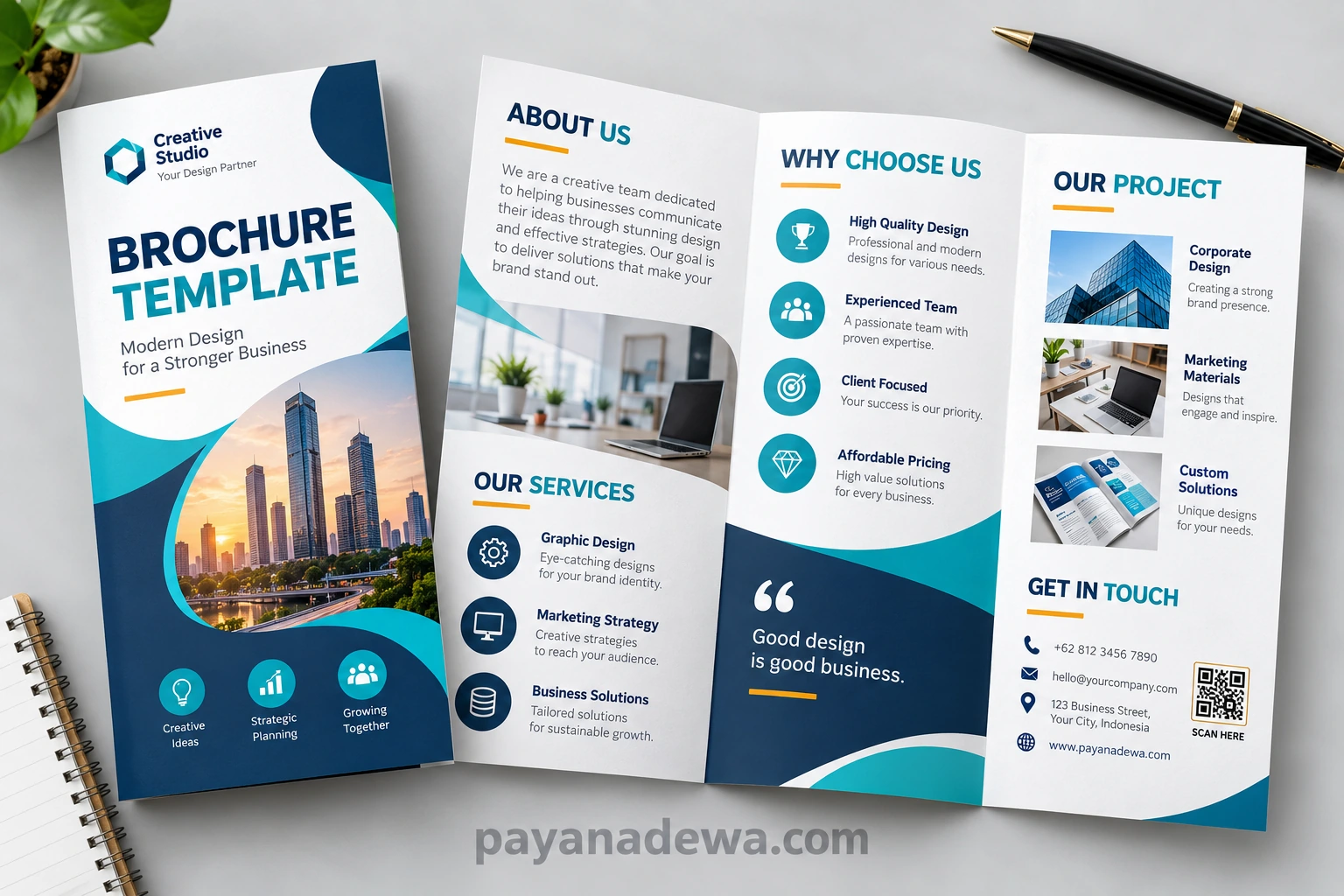
What Is a Brochure Template?
A brochure template is a pre-designed document layout that provides a framework for creating a brochure. It normally includes prepared sections for headings, body text, images, contact information, branding elements, and calls to action. Users can replace the sample content with their own information while keeping the overall design structure.
Why Use a Brochure Template?
The biggest advantage is convenience. A template gives you a starting point, so you do not need to spend hours deciding where every element should go. You can focus more attention on your message, images, branding, and audience.
- Save design and production time.
- Create a consistent visual structure.
- Organize information more effectively.
- Maintain a professional appearance.
- Customize colors, fonts, images, and content.
- Adapt the layout for different marketing purposes.
A good template can also help prevent common design problems. For example, inconsistent spacing, overcrowded pages, confusing navigation, and poorly balanced visual elements can make a brochure difficult to use. A structured template provides a foundation that reduces these issues.
Benefits of Using a Professional Brochure Template
A professional brochure can support both online and offline marketing. Printed brochures can be distributed at meetings, stores, exhibitions, conferences, and events, while digital brochures can be shared through websites, email, messaging platforms, and social media.
Save Time and Resources
Creating a complete brochure from a blank page can require significant design work. A brochure template simplifies the process by providing a ready-to-edit structure. This is particularly useful when marketing materials must be produced quickly.
Templates can also make repeated projects easier. For example, a company can use one branded brochure layout for multiple services or product categories. The content can change while the overall visual identity remains consistent.
Create a Consistent Brand Identity
Brand consistency helps audiences recognize a business. A brochure template can incorporate brand colors, logos, typography, shapes, and visual styles that match other marketing materials.
When brochures, business cards, presentations, websites, and social media graphics share a similar appearance, the entire brand can feel more professional. Consistency also makes marketing communication easier to recognize.
Improve Information Organization
A brochure has limited space, so information must be prioritized carefully. A strong template provides different sections for important messages, supporting details, images, benefits, and contact information.
This structure helps readers scan the document without feeling overwhelmed. Instead of presenting one large block of information, the brochure can use headings, short paragraphs, bullet points, icons, and visual separation.
Popular Types of Brochure Templates
Different projects require different brochure formats. Choosing the right template starts with understanding what you want the brochure to accomplish.
Corporate Brochure Template
A corporate brochure introduces a company, its services, values, expertise, and achievements. It is often used for business meetings, networking events, sales presentations, and corporate communications.
A professional corporate brochure should use clear typography, strong branding, relevant photographs, and concise information. The goal is to establish credibility while making the company easy to understand.
Product Brochure Template
A product brochure focuses on one product or a collection of products. It can include product images, specifications, features, benefits, pricing information, and purchasing instructions.
For product-focused designs, high-quality images are particularly important. Readers should be able to understand the product quickly and identify its most valuable features.
Service Brochure Template
A service brochure explains what a business offers and why customers should choose it. It can be useful for agencies, consultants, contractors, healthcare providers, educational services, and professional organizations.
The most effective service brochures focus on customer benefits rather than simply listing services. Explain the problem, describe the solution, and show readers what they can expect.
Event Brochure Template
An event brochure can promote conferences, workshops, festivals, exhibitions, seminars, celebrations, and community activities. Important information may include the event date, location, schedule, speakers, registration details, and contact information.
Because event information can change, the design should make essential details easy to locate. A clear call to action can encourage readers to register, visit a website, or contact the organizer.
Travel Brochure Template
A travel brochure uses photographs, destinations, itineraries, attractions, and practical information to inspire potential travelers. Strong imagery is often the most important visual element in this type of brochure.
Travel brochure designs should balance inspiration with useful information. Readers need both an emotional reason to visit a destination and practical details that help them plan their trip.
Essential Elements of an Effective Brochure
A brochure can look attractive and still fail to communicate effectively. The content and design need to work together so readers can understand the message quickly.
Strong Headline
The headline should immediately communicate the purpose of the brochure. Keep it concise and relevant to the audience. A clear headline is usually more effective than a complicated phrase that requires additional explanation.
High-Quality Images
Images can capture attention and help readers understand a product, service, destination, or event. Use relevant images rather than decorative visuals that do not contribute to the message.
Concise Content
A brochure is not normally the place for lengthy explanations. Use short paragraphs and focus on the information that matters most to the reader. Important benefits should be easy to find.
Clear Call to Action
Every promotional brochure should tell readers what to do next. The call to action might encourage them to visit a website, call a business, send an email, register for an event, request a quote, or make a purchase.
Contact Information
Make contact details easy to locate. Depending on the project, include a phone number, email address, website, social media account, physical address, or QR code.
How to Customize a Brochure Template
Customizing a template is easier when you approach the process systematically. Start with the content before making extensive visual changes.
1. Define Your Audience
Identify who will read the brochure. A brochure for corporate clients may require a different tone and visual style from a brochure designed for students, tourists, families, or event attendees.
2. Prepare Your Content
Collect your logo, business information, product details, photographs, contact information, and other essential content. Having these materials ready makes customization faster.
3. Apply Your Brand Style
Replace the template colors and fonts with your preferred brand elements. Maintain sufficient contrast between text and background so the brochure remains easy to read.
4. Replace Images
Use original or properly licensed images that support the message. Avoid low-resolution images because they can make printed brochures look unprofessional.
5. Edit the Call to Action
Make the final action specific. Instead of using a vague phrase such as “Learn More,” consider a more direct instruction such as “Request a Free Consultation” or “Register Today.”
Tips for Designing a Better Brochure
Good brochure design depends on more than attractive colors. Every element should have a purpose and contribute to a clear reading experience.
Keep the Layout Balanced
Avoid filling every available space. White space gives the reader’s eyes room to rest and helps important information stand out. A balanced layout can make a brochure feel more premium and professional.
Use Readable Typography
Choose fonts that remain easy to read at the final size. Use larger text for major headings and smaller text for supporting information. Limit the number of font families to maintain visual consistency.
Prioritize Important Information
Not every piece of information has equal importance. Identify the main message and give it the strongest visual emphasis. Secondary information can use smaller headings or supporting sections.
Use Bullet Points When Appropriate
Bullet points are useful for features, benefits, services, specifications, and short lists. They allow readers to scan information quickly without reading long paragraphs.
- Highlight important benefits.
- Separate key features.
- Make technical information easier to scan.
- Improve visual rhythm.
- Reduce large blocks of text.
Brochure Templates for Digital and Print Use
A brochure template can be created for print, digital distribution, or both. The intended format should influence the design from the beginning.
Printed Brochures
Printed brochures require attention to page dimensions, margins, image resolution, color settings, folding areas, and print quality. Before sending a brochure to a printer, check that all important content remains inside the safe area.
It is also useful to print a test copy. A design that looks good on a computer screen may appear different when printed, particularly when it contains small text or subtle colors.
Digital Brochures
Digital brochures are commonly distributed as PDF files or other electronic documents. They can include clickable website links, email addresses, buttons, and QR codes.
For digital use, make sure the file is optimized for convenient viewing and sharing. Avoid unnecessarily large files that take a long time to open or download.
Common Brochure Design Mistakes to Avoid
Even a high-quality template can produce a weak brochure if it is customized poorly. Avoid placing too much information on each panel and resist the temptation to use every available design element.
Too Much Text
Long paragraphs can discourage readers. Remove unnecessary sentences and keep the most useful information. If a topic requires extensive explanation, direct readers to a website or longer document.
Weak Visual Hierarchy
If every heading, image, and paragraph has the same visual weight, readers may not know where to begin. Use size, spacing, position, and typography to establish a clear hierarchy.
Inconsistent Branding
Using too many colors or unrelated fonts can make the brochure look disconnected from the rest of the brand. Select a small, consistent visual system and apply it throughout the design.
No Clear Next Step
A brochure should not leave readers wondering what to do after reading it. Always provide a logical next action that supports the purpose of the document.
How to Choose the Right Brochure Template
When choosing a template, consider the purpose, audience, format, and amount of content. A simple layout may work well for a short service brochure, while a product catalog may require a more structured multi-page design.
Look for a template that gives you enough flexibility without requiring extensive redesign. The best template is not necessarily the one with the most decorative elements. It is the one that helps your information remain clear and persuasive.
- Choose a layout that matches your purpose.
- Check whether the template supports your content volume.
- Make sure typography is readable.
- Look for logical sections and visual hierarchy.
- Confirm that images can be replaced easily.
- Choose a design that fits your brand identity.
- Consider whether the template works for print, digital use, or both.
Final Thoughts on Brochure Templates
A brochure template provides a practical foundation for creating professional marketing and informational materials. Instead of beginning with a blank document, you can work from an organized structure and focus your time on creating valuable content and applying your brand identity.
The most effective brochure combines attractive design with clear communication. A strong headline, relevant imagery, concise content, logical sections, readable typography, and a compelling call to action can transform a simple document into a useful marketing tool.
Whether you are creating a corporate brochure, product presentation, service guide, event announcement, or travel publication, the right template can make the design process faster and more consistent. Customize the layout carefully, keep the audience in mind, and always prioritize clarity.
With a thoughtful approach, a well-designed brochure can help communicate your message, strengthen your brand, and encourage readers to take the next step.