Managing human resources projects often involves many moving parts. From employee onboarding and recruitment campaigns to training programs, performance reviews, and workplace initiatives, HR teams need a clear system to keep everything organized. A Beige HR Project Planner can provide a practical and visually appealing way to bring those responsibilities together in one structured planning system.
Unlike a complicated project management system, a printable HR planner can make important information easy to see at a glance. Project objectives, deadlines, assigned tasks, stakeholders, priorities, and notes can all be arranged in a simple format. This makes it easier for HR professionals and team members to understand what needs to happen next.
The beige aesthetic also gives the planner a professional and calming appearance. Neutral colors can work well in corporate environments because they look clean without being distracting. Whether the planner is printed for a desk, stored in a project binder, or used as a digital planning reference, the format can support a more organized workflow.
For HR managers, coordinators, recruiters, team leaders, and business owners, having a dedicated project planning template can reduce the risk of forgotten tasks and unclear responsibilities. Instead of keeping information across scattered notes, emails, and documents, the key details can be brought into one central planning structure.
This guide explains how to use a Beige HR Project Planner, what sections to include, and how it can help improve organization, communication, and project visibility.
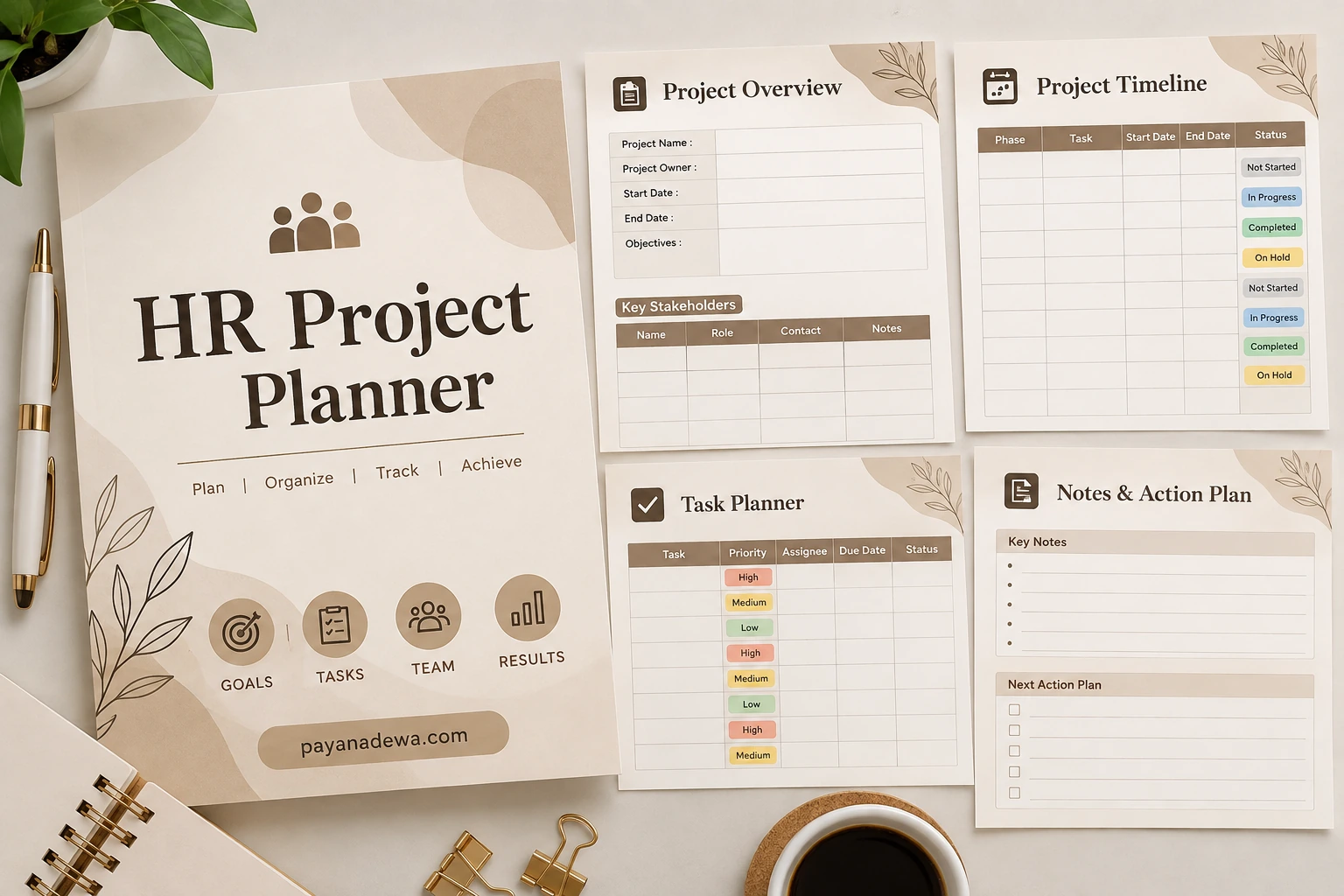
What Is a Beige HR Project Planner?
A Practical Planning Tool for Human Resources
A Beige HR Project Planner is a structured planning document designed to help HR professionals organize and manage human resources projects. It can be used for both small internal initiatives and larger projects involving multiple departments.
The planner typically brings several important project components together. These may include the project name, project owner, objectives, stakeholders, timeline, tasks, priorities, deadlines, status updates, and notes. Having these details in one place makes project information easier to review.
The beige design refers to the visual style of the template. Soft neutral colors create a professional appearance while keeping the document comfortable to read. This makes the format suitable for offices, HR departments, business meetings, and personal workspaces.
Why HR Teams Need Project Planning
HR work is often deadline-driven. Recruitment campaigns have application deadlines, employee onboarding follows specific schedules, training programs require preparation, and performance initiatives may involve several stages.
Without a clear planning process, important details can become difficult to track. A dedicated HR project planner provides a simple reference point where responsibilities and deadlines can be reviewed regularly.
The planner can also help teams communicate more effectively. When everyone can see the current status of a project, it becomes easier to identify completed work, pending tasks, and areas that require attention.
Key Sections to Include in an HR Project Planner
Project Overview
The project overview should provide the basic information needed to understand the purpose of the initiative. Useful fields include the project name, project owner, start date, expected completion date, objectives, and key stakeholders.
Writing clear objectives is especially important. Instead of using a vague goal such as “improve employee engagement,” an HR team could define a measurable objective such as increasing participation in an internal engagement program during a specific period.
- Project name: Identify the HR initiative.
- Project owner: Record the person responsible for coordinating the project.
- Start date: Establish when the project begins.
- End date: Set the expected completion date.
- Objectives: Explain the intended results.
- Stakeholders: List people or departments involved in the project.
Project Timeline
A project timeline helps HR teams understand how individual activities fit together. Each task can be assigned a start date, end date, project phase, and status.
For example, an employee training project might include needs assessment, training material development, participant registration, trainer preparation, training delivery, and post-training evaluation.
Breaking a large initiative into smaller phases makes the project easier to manage. It also allows the team to identify delays before they affect the final deadline.
Task Planner
The task planner is useful for assigning specific responsibilities. Each task can include an assignee, priority level, due date, and current status.
Simple status labels such as “Not Started,” “In Progress,” “Completed,” and “On Hold” can make project progress easier to understand. Priority categories such as high, medium, and low can help the team decide which tasks deserve immediate attention.
- Define each task clearly.
- Assign one responsible person whenever possible.
- Set realistic due dates.
- Mark task priorities.
- Update the status regularly.
- Record important follow-up actions.
How to Use a Beige HR Project Planner Effectively
Start With a Clear Project Objective
Before adding individual tasks, define what the project should accomplish. A clear objective gives the team a shared direction and makes it easier to determine whether proposed activities are relevant.
For example, an HR recruitment project could focus on filling several open positions within a defined recruitment period. The project planner can then connect that objective with job posting, candidate screening, interviews, reference checks, and onboarding preparation.
Clear objectives also make project reviews more productive. Instead of simply asking whether tasks were completed, HR leaders can evaluate whether those tasks contributed to the intended outcome.
Break Large Projects Into Manageable Tasks
Large HR projects can feel overwhelming when they are treated as one task. Dividing the project into smaller activities creates a more manageable workflow.
For example, an employee onboarding project can be divided into preparing documents, creating accounts, scheduling orientation, assigning equipment, introducing team members, and completing follow-up activities.
Each activity can then be assigned to the appropriate person. This reduces ambiguity and helps team members understand exactly what they are expected to complete.
Review the Planner Regularly
A planner is most useful when it stays current. Set aside time to review the document regularly and update task statuses, deadlines, notes, and priorities.
For active HR projects, a short review at the beginning or end of each workday may be useful. For longer-term projects, a weekly review can provide enough visibility without creating unnecessary administrative work.
Benefits of Using a Printable HR Project Planner
Improved Organization
One of the main benefits of an HR project planner is improved organization. Instead of relying on multiple notebooks, spreadsheets, emails, and loose notes, the team can use a consistent planning structure.
This can make project information easier to locate. A printed planner can also remain visible on a desk or inside a project folder, providing a quick reminder of important deadlines and responsibilities.
Better Team Communication
HR projects often require collaboration between HR professionals, managers, finance teams, department leaders, trainers, and employees. A shared planning structure can help clarify who is responsible for each part of the project.
When responsibilities are clearly documented, team members can spend less time asking who should complete a task and more time working on the task itself.
Greater Project Visibility
A visual project planner makes progress easier to monitor. Status fields can quickly show which activities are complete, which are currently underway, and which still need attention.
This visibility can be especially useful during project meetings. Rather than discussing every detail from memory, the team can use the planner as a reference point.
HR Projects That Can Use This Planner
Recruitment and Hiring Projects
A Beige HR Project Planner can support recruitment campaigns by organizing job openings, candidate screening activities, interview schedules, hiring decisions, and onboarding preparation.
Recruitment teams can also use the task section to assign responsibilities to recruiters, hiring managers, and administrative staff.
Employee Training Programs
Training projects often involve multiple preparation stages. HR teams need to identify training needs, select materials, coordinate trainers, communicate with participants, arrange facilities, and evaluate results.
A project planner can help place these activities into a logical sequence and establish deadlines for each stage.
Employee Onboarding
Onboarding requires coordination between HR, IT, managers, and new employees. A planner can help track paperwork, equipment preparation, account access, orientation sessions, introductions, and follow-up activities.
Performance Management Initiatives
Performance review projects can also benefit from structured planning. HR teams may need to prepare guidelines, communicate deadlines, train managers, collect documentation, and monitor completion rates.
Tips for Creating a More Effective HR Planning System
Keep Information Simple
A good planner should provide enough information without becoming difficult to maintain. Use short task descriptions and clear labels. Avoid filling every section with unnecessary details.
Use Consistent Status Labels
Choose a small set of status categories and use them consistently. This makes the planner easier to scan and reduces confusion when several people are working on the same project.
Prioritize Important Tasks
Not every task has the same level of urgency. Use priority labels to distinguish activities that require immediate attention from those that can be completed later.
Record Next Actions
A notes and action section can be particularly valuable after meetings. Write down decisions, follow-up tasks, questions, and important reminders while the information is still fresh.
Digital or Printable HR Project Planner?
Choosing the Right Format
A printable planner works well for people who prefer writing notes by hand and keeping project information physically visible. It can also be placed inside a binder for easy reference during meetings.
A digital version may be more suitable for distributed teams that need to update information from different locations. The same planning structure can often be adapted to a spreadsheet, document, or project management platform.
The most important factor is consistency. The format should make it easy for the team to update information and review project progress.
Conclusion
Build a More Organized HR Workflow
A Beige HR Project Planner offers a practical way to organize human resources projects from the initial objective through final completion. By combining project information, timelines, task assignments, priorities, status updates, and action notes, the planner creates a clear overview of ongoing work.
Its neutral beige design also makes it suitable for professional workplaces, personal desks, HR binders, and digital planning systems. More importantly, the value of the planner comes from the structure it provides rather than the appearance alone.
Whether you are managing recruitment, employee onboarding, training, performance initiatives, or another HR project, a consistent planning process can make responsibilities and deadlines easier to manage.
Start with a clear objective, divide the project into practical tasks, assign responsibilities, update progress regularly, and use the planner as a shared reference. With these simple habits, your HR team can create a more organized and transparent approach to project management.