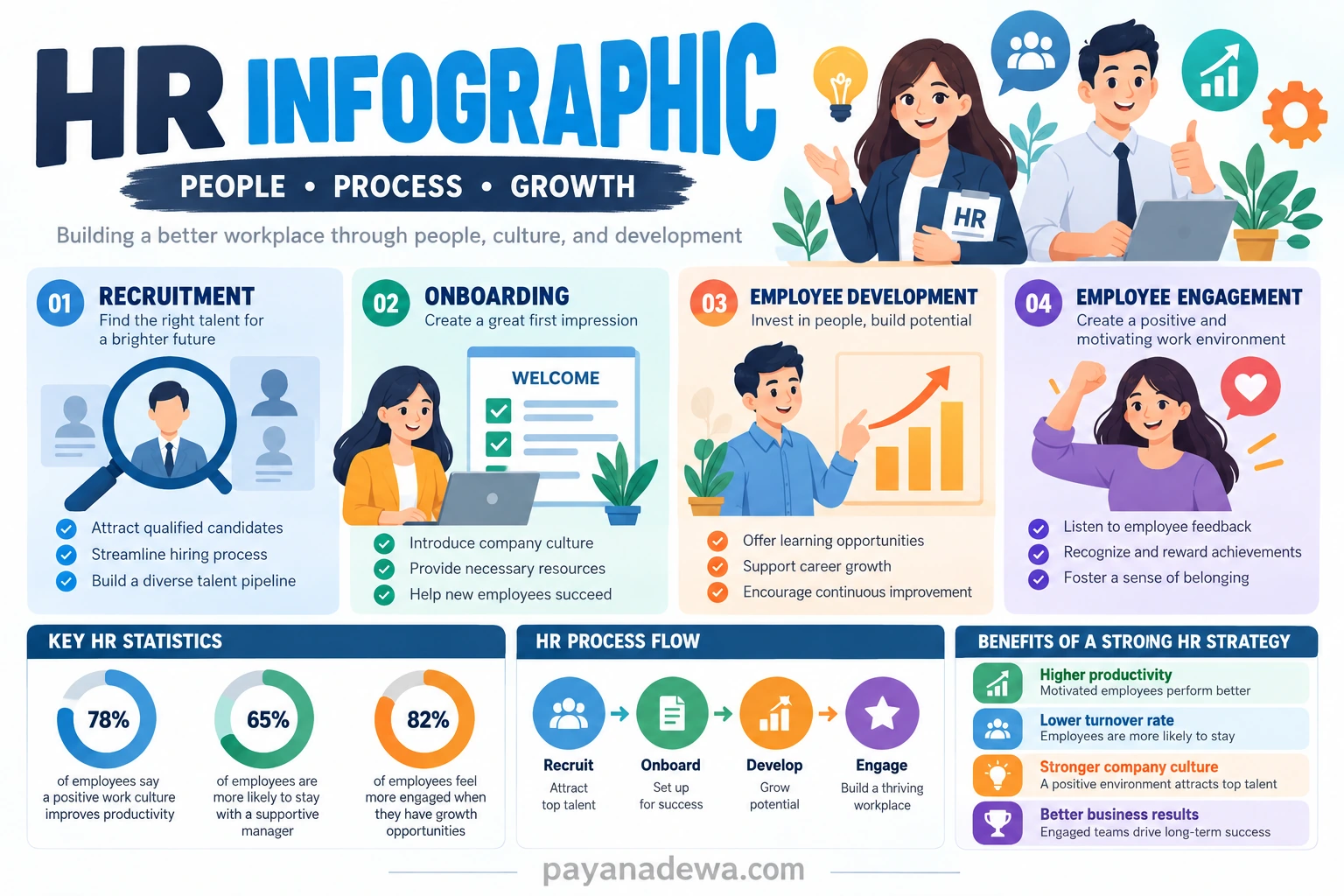
Human resources teams manage a wide range of information, from recruitment and onboarding to employee development, workplace culture, performance, and engagement. Because these topics can become complex quickly, presenting information in a clear visual format can make communication easier. An HR Infographic combines concise text, icons, charts, diagrams, and visual hierarchy to help employees, managers, and candidates understand important HR information at a glance.
A well-designed HR infographic can turn lengthy policies, statistics, procedures, or employee information into an easier-to-follow visual story. Instead of asking readers to work through several pages of dense content, HR teams can highlight the most important points in a structured format. This makes infographics useful for internal communication, training materials, recruitment campaigns, presentations, employee handbooks, and workplace announcements.
HR professionals can also use infographics to communicate recurring processes. Recruitment stages, onboarding steps, employee benefits, performance review cycles, workplace expectations, and professional development opportunities are all examples of information that can benefit from visual presentation. When the design is simple and the message is focused, employees are more likely to understand and remember the information.
This guide explains what an HR infographic is, why it is useful, which elements should be included, and how to create an effective visual for different human resources purposes. Whether you are an HR manager, recruiter, business owner, trainer, or content creator, these practical ideas can help you develop clearer HR communication materials.
The goal is not simply to make HR information look attractive. A successful infographic should solve a communication problem. It should help people find important information quickly, understand relationships between ideas, and know what action to take next.
What Is an HR Infographic?
An HR infographic is a visual communication resource designed to present human resources information in a concise and engaging format. It can combine headings, short paragraphs, statistics, icons, illustrations, timelines, process diagrams, charts, and other visual elements.
Unlike a traditional HR document, an infographic prioritizes visual hierarchy. The most important information is usually placed prominently, while supporting details are organized into smaller sections. This approach allows readers to scan the content without losing the overall message.
Common Uses of HR Infographics
There are many ways an HR department can use infographic content. The format can be adapted to different audiences and communication goals.
- Recruitment and hiring process explanations
- Employee onboarding guides
- Workplace policy summaries
- Employee benefits explanations
- Performance management processes
- Learning and development programs
- Employee engagement campaigns
- Workplace safety reminders
- Company culture communication
- HR statistics and annual reports
For example, a recruitment infographic can show candidates what happens after they submit an application. A separate onboarding infographic can explain the first-week process for new employees. These visuals reduce uncertainty and provide information in a format that is easier to scan.
Why Use an HR Infographic?
HR departments often need to communicate information that employees may consider complicated or time-consuming. An infographic provides an alternative way to organize that information. Instead of presenting every detail equally, the design can guide attention toward the most important points.
Visual communication can also make internal content more approachable. Employees may be more willing to review a clear process diagram or illustrated guide than a long block of policy text. This does not mean infographics should replace official documents. Rather, they can work alongside detailed policies by providing a quick summary.
Make Complex Information Easier to Understand
One of the biggest advantages of an HR infographic is its ability to simplify complex information. A multi-stage HR process can be converted into a sequence of numbered steps. A collection of statistics can become a chart. Several employee responsibilities can become a checklist.
This structure gives readers a visual path through the information. They can identify the beginning, middle, and end of a process without reading every sentence in detail.
Improve Internal Communication
HR communication becomes more effective when information is easy to find and understand. An infographic can be distributed through employee portals, email newsletters, presentations, digital signage, training sessions, or printed materials.
For recurring messages, an infographic can also provide consistency. Instead of different managers explaining the same process in different ways, HR can create a standardized visual reference that everyone can access.
Essential Elements of an Effective HR Infographic
A professional HR infographic should balance useful information with clear design. Adding too many visual elements can make a graphic difficult to understand, while using too little information may leave the audience without enough context.
Clear Title and Main Message
Start with a concise title that tells readers what the infographic is about. The title should be easy to understand without additional explanation. A subtitle can provide context when necessary.
For example, instead of using a vague title such as “Employee Information,” a more specific heading could be “5 Steps to a Successful Employee Onboarding Process.” The second version immediately communicates the purpose of the visual.
Organized Sections
Divide the infographic into logical sections. Each section should communicate one major idea. Consistent spacing, headings, icons, and visual patterns can help readers understand how the information is organized.
- Use numbered sections for processes.
- Use timelines for events and milestones.
- Use charts for numerical information.
- Use checklists for tasks and responsibilities.
- Use icons to support repeated concepts.
Readable Typography
Typography is particularly important because HR infographics may contain several pieces of information. Choose readable fonts and establish a clear difference between the title, headings, supporting text, and captions.
Avoid using too many font styles. A simple combination of one strong heading font and one readable body font can create a professional appearance while maintaining clarity.
HR Infographic Ideas for Different HR Functions
Different HR activities require different communication approaches. The infographic format can be adapted to match the purpose of the information and the needs of its audience.
Recruitment Infographic
A recruitment infographic can explain the hiring journey from application to offer. It might include stages such as application review, screening, interview, assessment, final decision, and onboarding.
Recruiters can also use visual content to highlight company culture, employee benefits, career opportunities, or important information about the hiring process. This can make recruitment communication more transparent and easier for candidates to follow.
Employee Onboarding Infographic
New employees often receive a large amount of information during their first few days. An onboarding infographic can organize that information into a simple checklist or timeline.
It might cover introductions, workspace setup, account access, company policies, team meetings, training sessions, and first-week objectives. By showing these steps visually, HR teams can give new employees a practical reference they can revisit whenever needed.
Employee Development Infographic
Professional development can also benefit from visual communication. An employee development infographic could illustrate available training programs, career pathways, mentoring opportunities, skills development, or performance review stages.
A career progression diagram can be especially useful because it allows employees to see how skills, experience, training, and performance may connect with professional growth opportunities within an organization.
Employee Engagement Infographic
Employee engagement campaigns can use infographics to communicate workplace initiatives, recognition programs, feedback opportunities, wellness activities, and team-building activities.
Engagement visuals should focus on clarity and action. Employees should be able to understand what the initiative is, why it matters, and how they can participate.
How to Create an HR Infographic
Creating an effective HR infographic does not begin with choosing colors or icons. Start with the communication objective. Determine what the audience needs to understand or do after viewing the graphic.
Step 1: Define the Audience
Identify who will see the infographic. Employees, managers, job candidates, executives, and HR professionals may need different information. Defining the audience helps determine the appropriate tone, level of detail, and visual style.
Step 2: Select One Main Topic
Avoid trying to communicate every HR topic in one graphic. Choose a specific subject and define the primary message. A focused infographic is generally easier to understand than a visual containing too many unrelated ideas.
Step 3: Collect and Verify Information
Gather the statistics, process steps, policy details, or other information that will appear in the design. Verify important numbers and statements before publication, especially when the infographic represents official company information.
Step 4: Build a Simple Structure
Arrange the content into a logical sequence. Sketch the sections before adding decorative elements. For a process infographic, a numbered flow may work well. For statistics, a collection of charts or data cards may be more appropriate.
Step 5: Add Visual Elements
Use icons, illustrations, charts, and simple shapes to support the message. Visual elements should reinforce the information rather than compete with it. Consistency is important, so use a unified icon style and visual language throughout the design.
Step 6: Review for Clarity
Before publishing the HR infographic, check spelling, numbers, spacing, hierarchy, and readability. Ask someone who was not involved in creating the graphic to review it. If they can understand the main message quickly, the design is more likely to work for the intended audience.
Best Practices for HR Infographic Design
A good HR infographic should be attractive, but visual appeal should support usability. Several simple design practices can improve the final result.
- Keep the message focused: One infographic should have one primary communication goal.
- Use short text: Replace long explanations with concise statements whenever possible.
- Create visual hierarchy: Make important information more prominent than supporting details.
- Maintain consistency: Use a consistent color palette, icon style, spacing, and typography.
- Use white space: Give each section enough room so the design does not feel crowded.
- Prioritize accessibility: Make text readable and avoid relying only on color to communicate meaning.
- Include useful calls to action: Tell readers what they should do when action is required.
Using HR Infographics for Digital and Print Communication
An HR infographic can be created for several formats. A digital version may be shared through an intranet, website, email, social media, or employee communication platform. A print version can be displayed in offices, training rooms, reception areas, or employee notice boards.
Consider the final viewing environment before designing the graphic. A detailed infographic intended for a desktop screen may not work well when printed at a small size. Similarly, a large workplace poster may need a different layout from an infographic designed for mobile devices.
Optimize the File for Its Intended Platform
Use appropriate dimensions and image quality for the final destination. Keep text large enough to remain readable, particularly for mobile users and printed materials. When an infographic is published online, descriptive alternative text can also help explain the visual to users who rely on assistive technologies.
How HR Infographics Support Better Workplace Communication
HR communication is ultimately about helping people understand information and take appropriate action. A well-planned infographic can support that goal by turning complex subjects into organized visual messages.
From recruitment to employee development, the same principle applies: identify the information employees or candidates need, remove unnecessary complexity, and present the remaining content in a logical visual structure.
An HR infographic can also become part of a larger HR communication system. A detailed policy can remain the official source, while an infographic provides a quick visual summary. Training materials can provide deeper explanations, while a process infographic acts as a convenient reference after training is complete.
Conclusion
An HR Infographic is a practical tool for communicating human resources information in a clear, visual, and engaging way. It can simplify recruitment processes, organize onboarding activities, explain employee development programs, communicate benefits, and support employee engagement.
The most effective infographic is not necessarily the one with the most graphics. It is the one that helps the intended audience understand the message quickly and accurately. Start with a clear purpose, organize the information logically, use readable typography, select supportive visuals, and remove anything that does not contribute to the main message.
Whether used online, in presentations, or as a printable workplace resource, a thoughtfully designed HR infographic can make important information easier to access and remember. By combining strong content with a clean visual structure, HR teams can create communication materials that are both professional and genuinely useful.
Image insertion: INSERT IMAGE HR Infographic Template HERE
Image Title: HR Infographic Template