Planning a special event is exciting, but making sure everyone remembers the date is just as important as organizing the celebration itself. Whether you are preparing for a wedding, birthday party, anniversary, graduation, engagement, or corporate gathering, a well-designed Save the Date Flyer is a simple and effective way to announce your upcoming event.
A save the date announcement gives your guests an early reminder so they can reserve the occasion on their calendars. It also creates excitement and gives everyone a preview of the celebration before the official invitation arrives. With the right design, colors, typography, and essential information, you can create an announcement that looks beautiful and communicates everything your guests need to know.
In this guide, you will discover what makes an effective save the date flyer, which details to include, popular design styles, and practical tips for creating a printable or digital announcement. You will also find inspiration for different occasions and ideas for customizing a template to match your event.
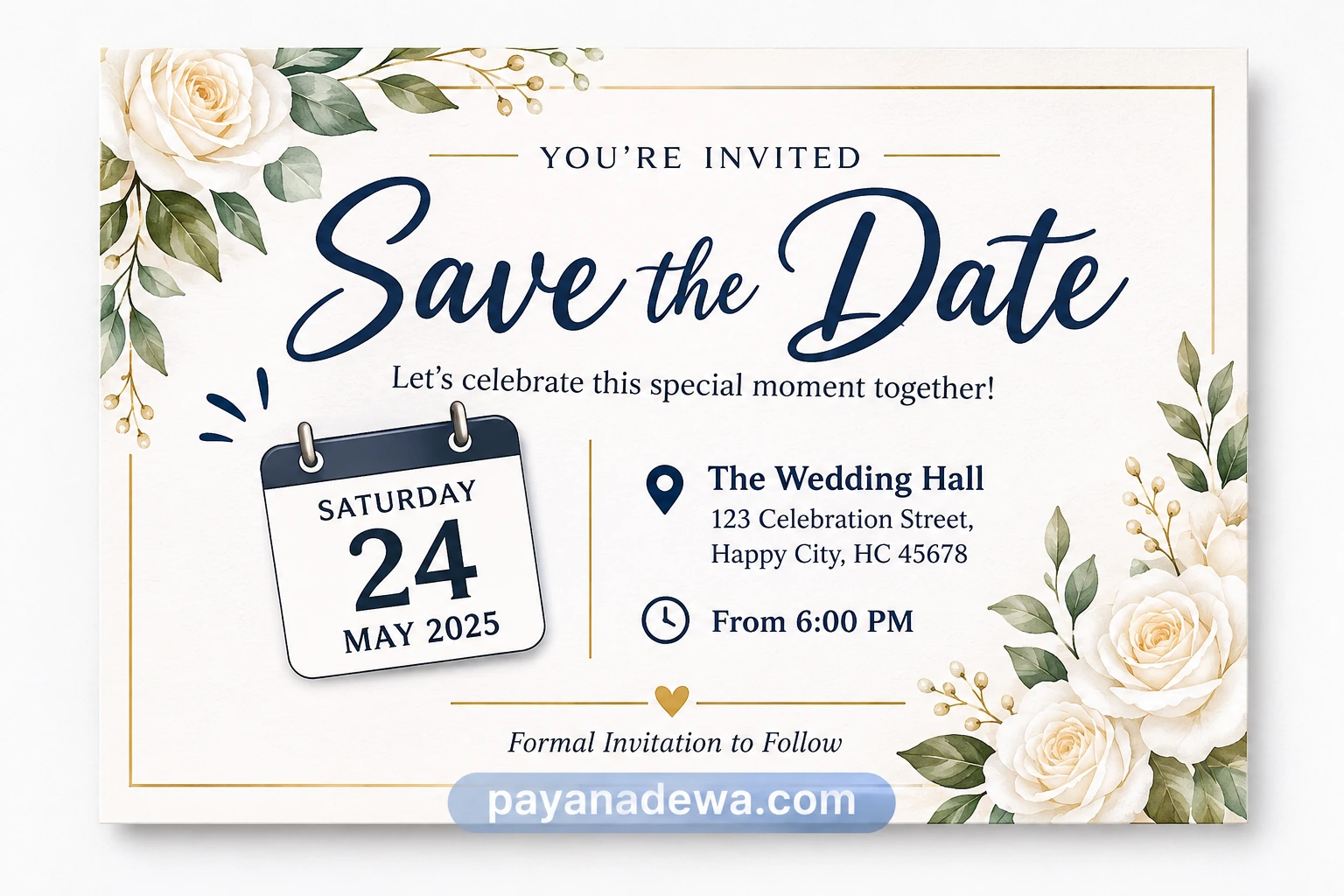
What Is a Save the Date Flyer?
A save the date flyer is an announcement that informs people about an upcoming event before the formal invitation is distributed. Its main purpose is to let guests know when an occasion will take place so they have enough time to plan their schedules.
Unlike a traditional invitation, a save the date announcement does not need to include every event detail. Instead, it focuses on the most important information, particularly the event date, occasion, and location when available.
These announcements are commonly used for:
- Weddings and engagement celebrations.
- Birthday parties and milestone celebrations.
- Anniversaries and family gatherings.
- Graduation parties and school reunions.
- Corporate events and business celebrations.
- Baby showers and other special occasions.
A flyer can be distributed as a printed card, a digital invitation, an email attachment, or an image shared through social media and messaging applications.
Why Use a Save the Date Flyer?
Sending an early announcement offers several advantages for both event organizers and guests. It makes communication easier while helping create anticipation for the upcoming celebration.
1. Give Guests More Time to Prepare
Guests often have busy schedules, family responsibilities, and other commitments. Providing an early announcement allows them to arrange their calendars, request time off, and organize transportation or accommodation when necessary.
2. Build Excitement Before the Event
A beautiful announcement creates curiosity and excitement. It gives guests their first impression of the occasion and helps establish the atmosphere of the celebration before the official invitation arrives.
3. Communicate Important Information Quickly
A well-organized flyer presents essential details in an easy-to-read format. Guests can quickly identify the event date and understand what they are being invited to celebrate.
4. Create a Consistent Event Theme
Your save the date design can introduce the visual identity of your celebration. Using similar colors, fonts, and decorative elements in your formal invitations, menus, and event decorations creates a coordinated appearance.
Essential Information to Include in Your Flyer
Before choosing a template, decide which information your guests need. A good design should be attractive without becoming crowded with unnecessary details.
Event Name or Occasion
Clearly identify the celebration. For example, you might use phrases such as Wedding Celebration, Sarah’s 30th Birthday, Our Anniversary, or Graduation Party. This immediately tells guests what the announcement is about.
Event Date
The date is the most important element of a save the date announcement. Display it prominently using a readable font and an easy-to-understand format. Including the day of the week can make the information even clearer.
Names of the Hosts
For weddings, include the names of the couple. For birthday celebrations, use the celebrant’s name. Corporate announcements may include the company or organization hosting the event.
Location or Venue
If the venue has already been confirmed, include its name and general location. If the details are not finalized, you can simply mention the city or write that the venue will be announced later.
Additional Details
Depending on the occasion, you may also include:
- Event start time.
- City or destination.
- Website or event information page.
- A short personal message.
- A note stating that the formal invitation will follow.
Popular Save the Date Flyer Design Ideas
The design should reflect the personality of your event. Fortunately, there are many creative styles to choose from, ranging from elegant and traditional to modern and playful.
1. Elegant Floral Design
Floral designs are especially popular for weddings, engagements, and anniversary celebrations. Soft flowers, delicate leaves, neutral backgrounds, and elegant typography create a romantic appearance.
Consider combining ivory, blush pink, sage green, and gold accents for a sophisticated look. Watercolor flowers can also add a gentle decorative touch without overwhelming the main information.
2. Minimalist Modern Design
If you prefer a clean appearance, a minimalist flyer may be the perfect option. Use generous white space, simple typography, and a limited color palette. Focus on the event name and date instead of adding too many decorative elements.
3. Rustic and Bohemian Style
Rustic announcements often feature natural textures, botanical illustrations, warm brown tones, and handwritten fonts. This style works particularly well for outdoor weddings, garden celebrations, and countryside events.
4. Modern Birthday Party Design
Birthday announcements can be more colorful and playful. Experiment with bold typography, balloons, confetti, geometric shapes, and vibrant backgrounds. Choose colors that reflect the celebrant’s personality or the party theme.
5. Professional Corporate Design
For business events, conferences, product launches, and networking gatherings, choose a polished layout. Use professional fonts, company branding, and clear information hierarchy to communicate the occasion effectively.
How to Create a Save the Date Flyer Using a Template
You do not need professional graphic design experience to create an attractive announcement. Starting with a ready-made template can save time and make the design process much easier.
Step 1: Choose a Suitable Template
Start by selecting a layout that matches your occasion. A floral wedding template may be suitable for a romantic celebration, while a colorful design may work better for a birthday party.
Step 2: Customize the Text
Replace the sample wording with your own event information. Add the names, date, location, and other essential details. Double-check spelling and make sure the date is correct.
Step 3: Select Your Colors and Fonts
Choose colors that complement your event theme. Use no more than two or three main font styles to maintain a consistent appearance. Make sure decorative fonts remain easy to read, particularly when displaying the event date.
Step 4: Add Decorative Elements
Include flowers, illustrations, borders, photographs, or other graphics that support your theme. Keep decorations balanced so the most important information remains the visual focus.
Step 5: Review and Export Your Design
Check the entire layout before saving your final file. For digital sharing, PNG or JPG formats are convenient. For printing, use a high-resolution PDF or another suitable print-ready format.
Tips for Designing an Attractive and Readable Flyer
Even a beautiful template needs thoughtful customization. The following tips can help you achieve a professional result.
- Make the date easy to find: Use a larger font size or a contrasting color to highlight the event date.
- Keep the layout organized: Arrange information in a logical order, beginning with the event name and date.
- Use readable typography: Avoid overly decorative fonts for important information.
- Choose complementary colors: Limit your palette to a few coordinated shades.
- Leave enough white space: Avoid filling every available area with text and decorations.
- Use high-quality graphics: Blurry images can make even a well-designed announcement look unprofessional.
- Check the final dimensions: Make sure the design fits your intended printing size or digital platform.
One additional consideration is accessibility. Use sufficient contrast between the text and background, and do not communicate important information through color alone. This helps more guests read and understand your announcement comfortably.
When Should You Send a Save the Date Announcement?
Timing depends on the type of event and how much preparation your guests may need.
- Weddings: Consider sending announcements around six to twelve months before the wedding, especially for destination celebrations.
- Birthday parties: Two to three months in advance is often sufficient for larger celebrations.
- Anniversaries: Sending the announcement two to six months beforehand gives guests time to prepare.
- Corporate events: Three to six months can be helpful for conferences and major business gatherings.
- Graduation parties: One to three months is often a practical timeframe, depending on the event.
These are general recommendations rather than strict rules. Consider your guests’ schedules, travel requirements, and the complexity of your event when choosing the best time to send your announcement.
Printable vs. Digital Save the Date Flyers
Both printed and digital announcements are effective. Your choice depends on your budget, audience, and preferred communication style.
Printable Flyers
Printed announcements provide a traditional and personal experience. They can be mailed, handed to guests, or displayed as keepsakes. Choose quality paper and check the print settings before producing multiple copies.
Digital Flyers
Digital announcements are convenient and easy to distribute. You can share them through email, WhatsApp, social media, or private messaging groups. They are particularly useful when guests live in different cities or countries.
Digital designs also make it easier to correct information and distribute updated versions if necessary.
Where to Find Inspiration for Your Next Flyer
If you are unsure which design to choose, explore different layouts and identify the elements you like. Pay attention to typography, color combinations, decorative details, and the arrangement of information.
You can also start with a free save the date flyer template and personalize it to suit your needs. Look for designs that offer enough editing flexibility so you can replace sample text, adjust colors, and add your own decorative elements.
Remember that the best design is not necessarily the most complicated one. A simple, well-organized announcement can communicate your message more effectively than a crowded layout.
Conclusion
A well-designed Save the Date Flyer is an excellent way to announce a special occasion, help guests prepare, and build excitement before the big day. By choosing an appropriate template, highlighting the event date, organizing essential information, and selecting complementary colors and fonts, you can create an announcement that is both attractive and practical.
Whether you are planning a wedding, birthday party, anniversary, graduation, or corporate gathering, take the time to personalize your design and make it reflect the occasion. Start with a suitable template, add your event details, review the final layout, and share it with your guests.
A thoughtful announcement is a wonderful first step toward a memorable celebration!
수원출장마사지 정보를 통해 이동 시간 없이 원하는 공간에서 편안하게 피로를 풀 수 있는 맞춤형 케어를 확인해 보세요.