An Event Showcase Brochure is a powerful marketing tool for presenting an event in a clear, attractive, and professional way. Whether you are promoting a corporate conference, business exhibition, product launch, networking event, workshop, festival, or industry gathering, a well-designed brochure can help potential attendees quickly understand what your event offers.
Unlike a simple flyer, an event brochure provides enough space to communicate important information while still maintaining a visually appealing layout. It can introduce the event, highlight speakers, display the schedule, explain attendee benefits, and provide registration details in one convenient format.
A carefully planned brochure also strengthens your event branding. With the right combination of typography, images, colors, information, and calls to action, your brochure can create a strong first impression and encourage readers to take the next step.
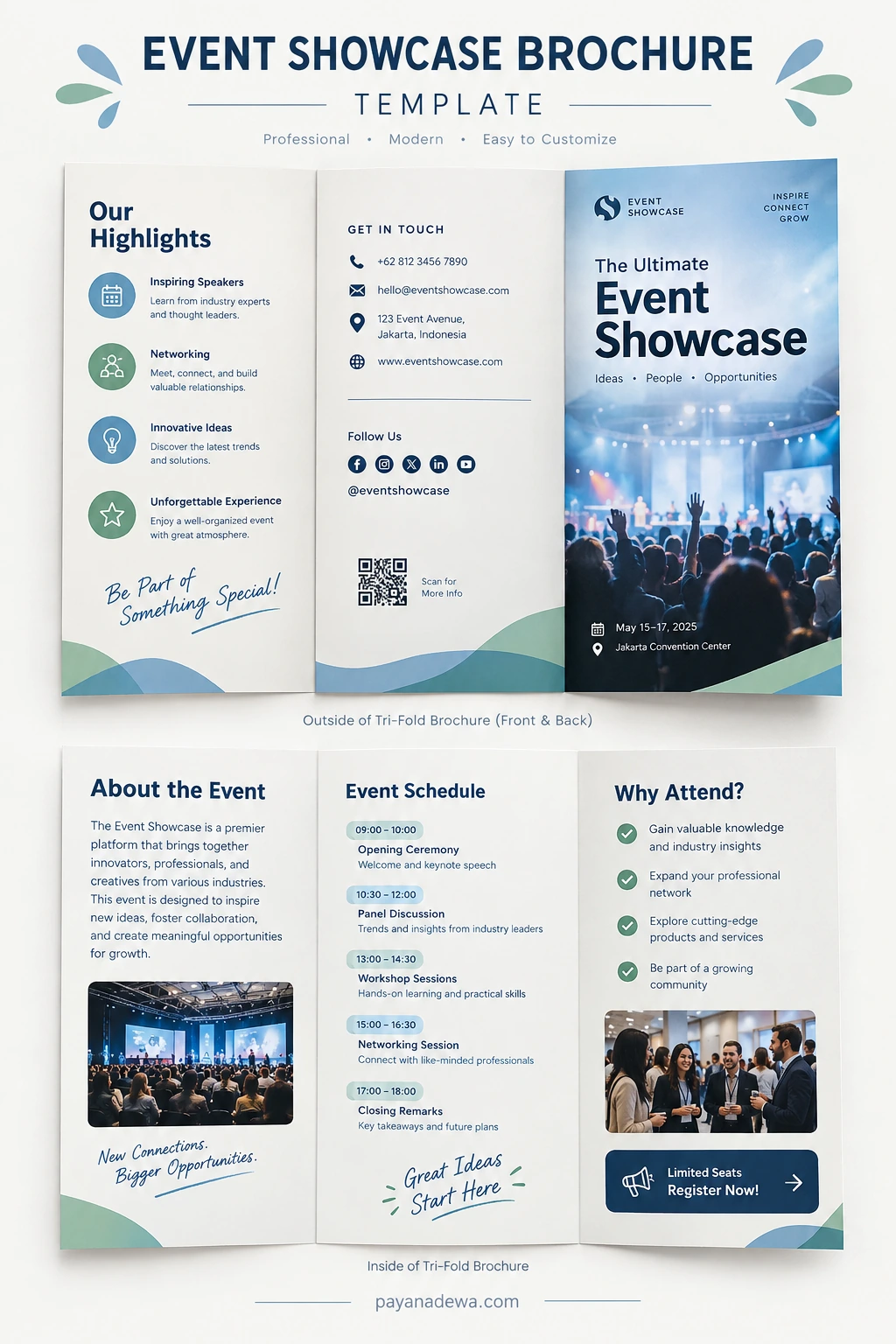
What Is an Event Showcase Brochure?
An Event Showcase Brochure is a printed or digital marketing document created to promote and explain an event. It usually combines compelling visuals with essential event information so readers can understand the experience before deciding to attend.
A brochure may be designed as a bi-fold, tri-fold, multi-page document, or digital PDF. The format depends on the amount of information, distribution method, and overall branding requirements.
A professional event brochure commonly includes:
- Event name and headline
- Event date and location
- Event overview or introduction
- Featured speakers or presenters
- Event schedule and activities
- Key benefits for attendees
- Registration or ticket information
- Contact details and social media accounts
- Website or QR code
- Strong call-to-action message
The goal is not simply to provide information. Instead, the brochure should help readers understand why the event is relevant and what they can expect when they attend.
Why Use an Event Showcase Brochure?
Events compete for attention across websites, social media platforms, email campaigns, and digital advertisements. Therefore, a well-structured brochure can give your event a professional identity and make important information easier to remember.
Build a Strong First Impression
The cover of a brochure is often the first thing people notice. A strong headline, attractive image, consistent branding, and balanced layout can immediately communicate the character of your event.
For example, a technology conference may use a modern and sophisticated visual style, while a creative festival could use brighter graphics and more expressive typography. The design should match the audience and purpose of the event.
Organize Important Information
Event information can quickly become overwhelming when presented as a long paragraph. A brochure solves this problem by separating information into logical sections.
Readers can scan headings, bullet points, schedules, and highlighted details without reading every sentence. As a result, they can find the information they need much faster.
Strengthen Event Branding
A consistent event brochure can reinforce your visual identity. Use the same logo, colors, fonts, imagery, and messaging across your brochure, website, social media, and other promotional materials.
This consistency makes the event easier to recognize and creates a more professional presentation.
Essential Elements of an Event Showcase Brochure
A successful brochure should provide useful information without making the design feel crowded. Each section should have a clear purpose.
1. Eye-Catching Cover
Start with a strong visual introduction. Include the event name, a concise headline, the date, and location. A high-quality photograph or original graphic can make the cover more memorable.
Keep the cover simple. Too many elements can compete for attention and make the primary message difficult to understand.
2. Event Overview
Use the introduction section to explain what the event is about. Describe the purpose, audience, and experience in a concise and engaging way.
Focus on the value of the event rather than simply listing facts. Tell readers what they can learn, discover, experience, or achieve by attending.
3. Event Schedule
A clear schedule is one of the most useful parts of an event brochure. Present sessions in chronological order and make the time, activity, and location easy to identify.
For longer events, consider dividing the schedule into days or categories. Use short descriptions so readers can quickly understand each session.
4. Speakers and Featured Participants
If your event includes speakers, performers, exhibitors, or industry experts, give them a dedicated section. Include names, roles, organizations, and brief descriptions when appropriate.
Professional photography can also make this section more engaging. However, images should be consistent in size and quality to maintain a polished appearance.
5. Benefits of Attending
Explain why someone should attend the event. Benefits may include professional networking, educational sessions, product demonstrations, exclusive experiences, workshops, or access to industry insights.
Use concise bullet points to make these benefits easy to scan.
6. Registration and Call to Action
Every promotional brochure should guide readers toward a specific action. Examples include registering for the event, purchasing a ticket, visiting a website, contacting the organizer, or scanning a QR code.
Use a visible call-to-action such as Register Now, Get Your Ticket, or Learn More. Make sure the action is clear and easy to complete.
How to Design an Effective Event Showcase Brochure
Use a Clear Visual Hierarchy
Visual hierarchy helps readers understand which information is most important. Use different font sizes, weights, spacing, and section headings to guide attention.
The event title should generally be more prominent than supporting information. Likewise, important details such as dates, registration instructions, and calls to action should be easy to locate.
Choose a Consistent Color Palette
Limit your design to a coordinated color palette. Two or three primary colors combined with neutral tones are often enough to create a professional appearance.
Make sure text has sufficient contrast against its background. Good contrast improves readability for both printed and digital brochures.
Select Readable Fonts
Creative typography can add personality, but readability should always come first. Use decorative fonts sparingly and choose a clean typeface for longer paragraphs.
Maintain consistent font styles throughout the brochure. A simple combination of one heading font and one body font can create a clean visual system.
Use High-Quality Images
Images can communicate the atmosphere of an event faster than text. Choose photographs or graphics that support your message and match your audience.
Avoid using too many unrelated images. Instead, select a small number of strong visuals and give them enough space within the layout.
Tips for Creating a Brochure That Converts
A beautiful design is useful, but the brochure should also support your marketing objectives. Consider these practical tips:
- Know your audience: Use language and visuals that appeal to the people you want to attract.
- Lead with value: Explain what attendees will gain from participating.
- Keep text concise: Short paragraphs and bullet points improve scanning.
- Highlight important dates: Make registration deadlines and event dates highly visible.
- Include contact information: Give readers an easy way to ask questions.
- Add a QR code: Link directly to registration, tickets, the event website, or additional information.
- Use consistent branding: Match the brochure with your other promotional materials.
- Proofread carefully: Check names, dates, times, URLs, contact details, and spelling before publishing.
Printed vs. Digital Event Brochure
An event brochure can work in both physical and digital formats. Each option has different advantages.
Printed brochures are useful at conferences, exhibitions, hotels, visitor centers, registration desks, and networking events. They provide a physical reference that attendees can keep during the event.
Digital brochures are convenient for websites, email marketing, social media, and online registration campaigns. A PDF version can also be shared quickly with sponsors, partners, speakers, and potential attendees.
For many events, using both formats provides broader reach. The same core design can be adapted for print and digital distribution while maintaining consistent branding.
Common Event Brochure Mistakes to Avoid
Even a well-intentioned brochure can become ineffective when the design focuses too heavily on decoration or includes unnecessary information.
- Using too much text without visual breaks
- Making the event date difficult to find
- Using low-resolution images
- Adding too many fonts or colors
- Creating weak or unclear calls to action
- Forgetting registration details
- Using inconsistent branding
- Failing to proofread important event information
Before publishing, review the brochure from the perspective of someone who knows nothing about the event. Ask whether they can quickly identify what the event is, who it is for, when and where it takes place, and how to register.
How an Event Showcase Brochure Template Can Save Time
Creating a brochure from a blank document can take considerable time. An Event Showcase Brochure Template provides a structured starting point with organized sections and a ready-made visual hierarchy.
A template can be especially useful for event organizers, marketing teams, businesses, designers, agencies, and organizations that regularly create promotional materials.
Instead of designing every element from scratch, you can focus on customizing the content. Replace the sample event name, photographs, schedule, colors, contact information, and registration details with your own information.
Templates also make it easier to maintain consistency when creating multiple event brochures throughout the year.
Final Checklist Before Publishing
Before sending your Event Showcase Brochure to print or uploading it online, complete a final review.
- Confirm the event name, date, time, and location.
- Check all speaker and participant names.
- Verify website addresses and contact information.
- Test every QR code.
- Review the registration instructions.
- Check image quality and resolution.
- Make sure headings and body text are easy to read.
- Confirm that the branding matches your event identity.
- Proofread the entire brochure for spelling and grammar.
- Review the final design on both desktop and mobile devices if it will be distributed digitally.
Conclusion
An Event Showcase Brochure combines information, visual storytelling, and marketing into one practical promotional asset. When designed carefully, it can introduce an event, communicate its value, organize essential details, and encourage potential attendees to register.
The most effective approach is to keep the design clean, make important information easy to find, use high-quality visuals, and provide a clear call to action. Whether you create a printed brochure, downloadable PDF, or digital promotional document, a well-structured layout can make your event look more professional and easier to understand.
With a customizable Event Showcase Brochure Template, you can start with an organized foundation and adapt the content to suit conferences, exhibitions, workshops, networking events, product launches, and many other occasions.